On this page
A SaaS customer with a question at renewal needs an answer in minutes, and a slow reply can cost a subscription the team worked months to win. The eight tools below mix AI-first chat platforms with shared inboxes built for software teams, with prices checked on each vendor site on November 27, 2026. They range from nineteen dollars per agent a month to twenty-nine dollars per seat a month. Intercom is our first pick — the AI-first platform that pairs chat with an agent that resolves tickets on its own.
How we researched this
We started with the support platforms SaaS teams actually buy, then added general help desks that handle product questions well, and read each price on the vendor pricing page on November 27, 2026. We judged them for a software team that needs AI chat, product data and churn signals beside the inbox. We left out quote-only enterprise suites that a small team cannot price without a sales call.
Compare the tools
| Name | Best for | Starting price | Free plan | |
|---|---|---|---|---|
 Intercom | SaaS teams that want AI chat with an agent that resolves tickets | $29/seat/month | No free plan; 14-day free trial | Visit |
 Zendesk | SaaS teams that want customer support across email, chat and voice in one queue | $19/agent/month | No free plan; 14-day free trial | Visit |
 Freshdesk | Small SaaS teams that want a free start for customer support mail | $19/agent/month | Free plan available | Visit |
 Help Scout | SaaS teams that want a polished shared inbox for customer mail | $25/user/month | Free plan for up to 5 users | Visit |
 Front | SaaS teams that want email and chat together in one shared inbox | $25/seat/month | No free plan; 14-day free trial | Visit |
 HubSpot Service Hub | SaaS teams already using HubSpot that want support beside CRM | $20/seat/month | Free tier for up to 2 users | Visit |
 Freshchat | SaaS teams that want fast messaging inside the product and on the website | $19/agent/month | Free plan for up to 10 agents | Visit |
 LiveChat | SaaS teams that want fast chat on pricing and product pages | $19/agent/month | No free plan; 14-day free trial | Visit |
The customer support software for SaaS, compared
1. Intercom
Best for: SaaS teams that want AI chat with an agent that resolves tickets
Paid tool Starting price: $29/seat/month · Twenty-nine dollars per seat a month billed annually for the Essential plan, or thirty-nine dollars per seat a month billed monthly; Advanced costs eighty-five dollars and Expert costs one hundred thirty-two dollars per seat a month billed annually, and the Fin AI agent costs ninety-nine cents per resolved outcome on top
Free plan: No free plan; 14-day free trial
Intercom is the AI-first platform SaaS teams use to answer customers inside the product, with chat and an agent that resolves tickets on its own. This Intercom Essential plan costs twenty-nine dollars per seat a month billed annually and adds shared inboxes and AI answers. A software team that wants instant replies gets chat that resolves common questions before a human sees them.

What we like
- AI agent resolves tickets without a human
- Chat that works inside your product
- Strong automation for onboarding and churn signals
Watch out for
- No free plan, so the trial is the only way to test it
- Fin AI costs ninety-nine cents per resolved outcome on top
How to try it
- Open the Intercom site and start the 14-day trial
- Add the chat widget to your product and set up the AI agent
- Turn on shared inboxes and test a question from a real user
2. Zendesk
Best for: SaaS teams that want customer support across email, chat and voice in one queue
Paid tool Starting price: $19/agent/month · Nineteen dollars per agent a month billed annually for the Support Team plan, or twenty-five dollars per agent a month billed monthly; Suite Team costs fifty-five dollars and Suite Professional costs one hundred fifteen dollars per agent a month billed annually
Free plan: No free plan; 14-day free trial
Zendesk is the help desk SaaS teams reach for when customers write by email, chat and voice and the team needs one queue to hold every message. This Zendesk Support Team plan costs nineteen dollars per agent a month billed annually and adds a shared inbox with ticket views. A team that answers customers on several channels gets one workspace instead of four open tabs.

What we like
- One queue for email, chat, voice and social messages
- Macros and views that scale as the team grows
- Huge integration library for SaaS and CRM tools
Watch out for
- AI features need the Suite plans
- Per-agent billing adds up fast on a large team
How to try it
- Open the Zendesk site and start the 14-day trial
- Connect email and chat channels to the shared inbox
- Build ticket views for onboarding, billing and bugs and turn on macros
3. Freshdesk
Best for: Small SaaS teams that want a free start for customer support mail
Paid tool Starting price: $19/agent/month · Nineteen dollars per agent a month billed annually for the Growth plan, or twenty-three dollars per agent a month billed monthly; Pro costs fifty-five dollars and Enterprise costs eighty-nine dollars per agent a month billed annually
Free plan: Free plan available
Freshdesk is the friendly help desk small SaaS teams use to turn customer email into tickets that the whole team can see and answer. This Freshdesk Growth plan costs nineteen dollars per agent a month billed annually and adds automations and collision detection. A new team gets a working customer inbox on day one and upgrades only when the ticket volume demands it.

What we like
- Free plan lets a new team start at no cost
- Collision detection stops two agents answering one customer
- Simple setup that a small team finishes in a day
Watch out for
- AI features need the higher plans
- SLA timers need the higher plans
How to try it
- Open the Freshdesk site and create the free plan
- Connect the support email and set up ticket fields
- Turn on automations and invite the first agents
4. Help Scout
Best for: SaaS teams that want a polished shared inbox for customer mail
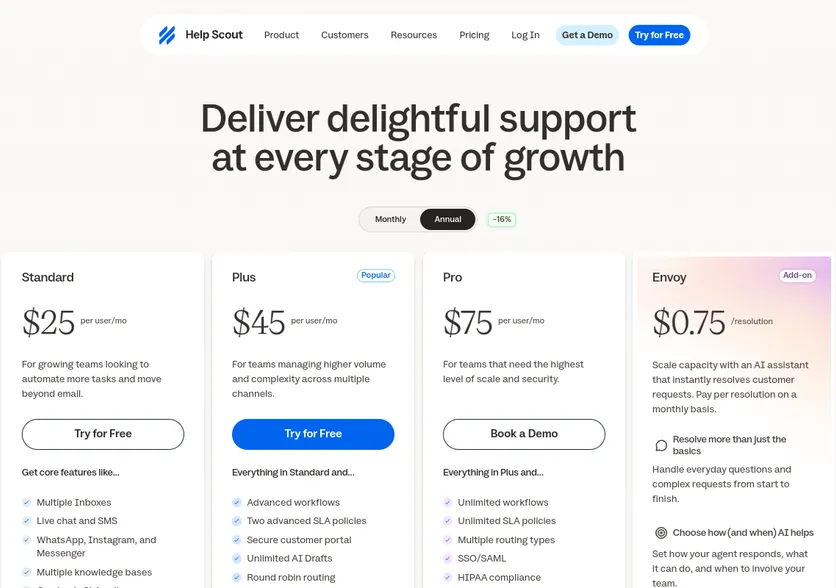
Paid tool Starting price: $25/user/month · Twenty-five dollars per user a month billed annually for the Standard plan, or thirty dollars per user a month billed monthly; Plus costs forty-five dollars and Pro costs seventy-five dollars per user a month billed annually
Free plan: Free plan for up to 5 users
Help Scout is the shared inbox SaaS teams use when customer mail needs a tidy queue and a knowledge base, without the weight of a full support suite. This Help Scout Standard plan costs twenty-five dollars per user a month billed annually and adds workflows and a customer-facing help center. A team that answers customers by email all day gets one inbox where nothing slips through.
What we like
- Free plan covers up to five users
- Workflows that route customer mail to the right person
- Help center answers common product questions
Watch out for
- No product data beside tickets, so agents look plans up elsewhere
- Advanced reporting needs the higher plans
How to try it
- Open the Help Scout site and create the free plan
- Connect the support email and set up mailboxes per topic
- Turn on workflows and publish the help center
5. Front
Best for: SaaS teams that want email and chat together in one shared inbox
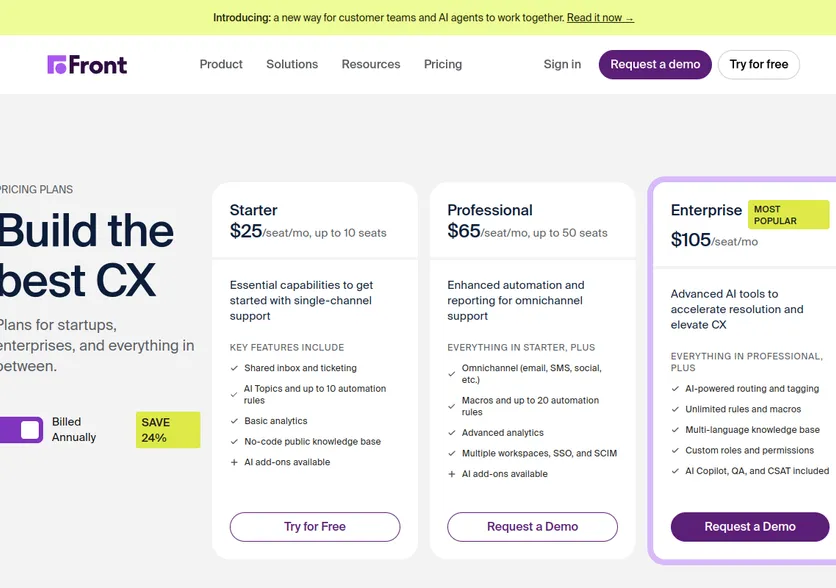
Paid tool Starting price: $25/seat/month · Twenty-five dollars per seat a month billed annually for the Starter plan, or thirty-five dollars per seat a month billed monthly; Professional costs sixty-five dollars and Enterprise costs one hundred five dollars per seat a month billed annually, and Starter caps at ten seats with one channel type
Free plan: No free plan; 14-day free trial
Front is the shared inbox SaaS teams use to manage email and chat together, with assignments and internal comments beside every message. This Front Starter plan costs twenty-five dollars per seat a month billed annually and covers ten seats with one channel type. A team that handles support and sales mail in one place gets a single inbox with clear ownership.
What we like
- Shared inbox with assignments and internal comments
- Works across email and chat in one view
- Strong rules and automations for busy teams
Watch out for
- Starter caps at ten seats with one channel type
- No free plan, so the trial is the only way to test it
How to try it
- Open the Front site and start the 14-day trial
- Connect email and chat channels to the shared inbox
- Set up assignments and test a message from a real customer
6. HubSpot Service Hub
Best for: SaaS teams already using HubSpot that want support beside CRM
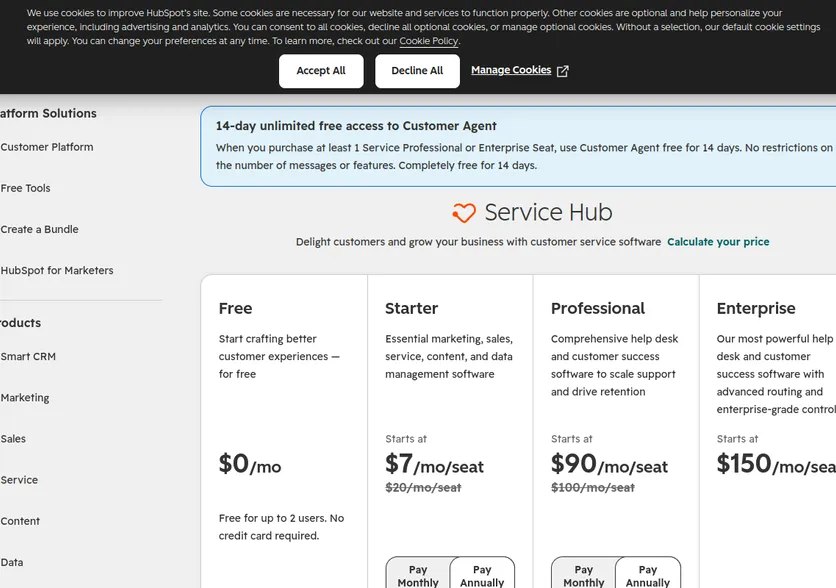
Paid tool Starting price: $20/seat/month · Twenty dollars per seat a month for the Starter plan at list price; new customers see a seven-dollar promotional rate, so confirm the list rate at checkout. Professional costs one hundred dollars and Enterprise costs one hundred fifty dollars per seat a month
Free plan: Free tier for up to 2 users
HubSpot Service Hub is the support tool for SaaS teams already running HubSpot, keeping tickets beside the CRM records for each customer. This HubSpot Service Hub Starter plan costs twenty dollars per seat a month at list price and adds ticketing and a knowledge base. A team that already pays for HubSpot gets support that shares customer data with sales instead of living apart.
What we like
- Free tier covers up to two users
- Shares customer data with HubSpot CRM
- Knowledge base and ticketing included on Starter
Watch out for
- Promotional pricing can confuse the list rate, so confirm at checkout
- Advanced automation needs the higher plans
How to try it
- Open the HubSpot Service Hub site and create the free tier
- Connect the support email and import customer records
- Turn on ticketing and publish the knowledge base
7. Freshchat
Best for: SaaS teams that want fast messaging inside the product and on the website
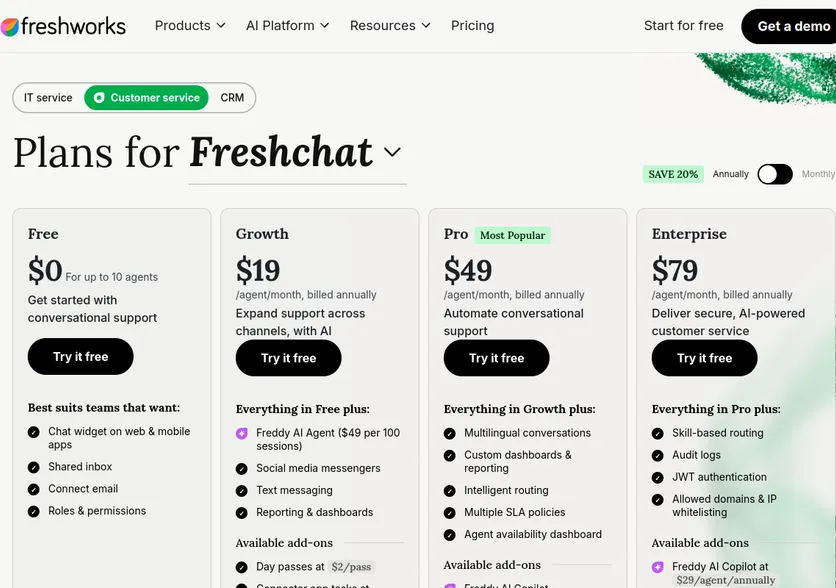
Paid tool Starting price: $19/agent/month · Nineteen dollars per agent a month billed annually for the Growth plan, or twenty-three dollars per agent a month billed monthly; Pro costs forty-nine dollars and Enterprise costs seventy-nine dollars per agent a month billed annually
Free plan: Free plan for up to 10 agents
Freshchat is the messaging tool SaaS teams use to talk to customers inside the product and on the website, with bots that answer the common questions. This Freshchat Growth plan costs nineteen dollars per agent a month billed annually and adds automations and team inboxes. A team that wants fast messaging gets chat that follows users from the website into the product.
What we like
- Free plan covers up to ten agents
- Messaging that works in-product and on the website
- Bots that answer common questions automatically
Watch out for
- AI features need the higher plans
- Reporting is thinner than full help desks
How to try it
- Open the Freshchat site and create the free plan
- Add the chat widget to your website and product
- Turn on bots and test a question from a real user
8. LiveChat
Best for: SaaS teams that want fast chat on pricing and product pages
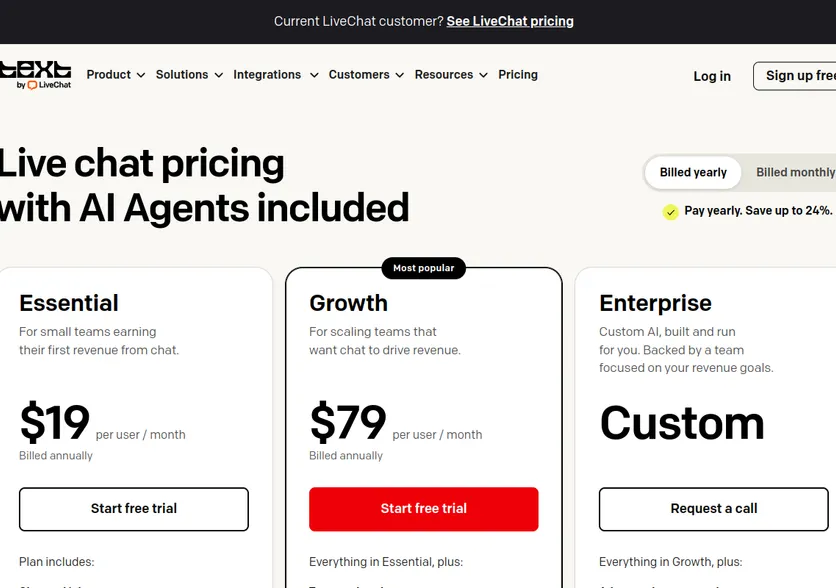
Paid tool Starting price: $19/agent/month · Nineteen dollars per agent a month billed annually for the Starter plan, or twenty-five dollars per agent a month billed monthly; Team costs forty-nine dollars and Business costs seventy-nine dollars per agent a month billed annually
Free plan: No free plan; 14-day free trial
LiveChat is the chat widget SaaS teams put on pricing and product pages so visitors get answers before they leave. This LiveChat Starter plan costs nineteen dollars per agent a month billed annually and covers one seat with chat and ticketing. A team that loses trials to unanswered questions gets a chat window that turns visitors into users.
What we like
- Fast chat widget that visitors actually use
- Canned responses speed up common answers
- Ticketing built in for questions that need follow-up
Watch out for
- Starter covers one seat, so teams pay per agent fast
- No free plan, so the trial is the only way to test it
How to try it
- Open the LiveChat site and start the 14-day trial
- Add the chat widget to your pricing page and set up greetings
- Turn on canned responses and test a chat from a product page
Prices above were checked on each vendor’s own website on Nov 27, 2026 and can change — the vendor’s page is the final word. Vendor links are editorial: nobody paid to be listed or ranked here. Vendors who want a featured listing can see how it works on our Get listed page.
What SaaS support software costs in 2026
A SaaS team pays for support software in two ways, the subscription and the renewals lost to customers who never get an answer inside the product. A nineteen-dollar help desk looks cheap until agents spend the day asking users which plan they run, so weigh product data and AI resolution against the sticker price. AI-first platforms cost more per seat because they carry chat, automation and product signals beside the inbox, while general help desks stay cheap by doing one job well.
Start with a trial on two tools and run real customer questions through each one. Check that product details show beside the ticket, that AI resolves the common questions without a human, and that the chat widget works inside your product. Pick the tool whose queue your team actually clears, because a polished system that the staff avoid is worse than a plain one they use every day.
Before you buy
- Match the tool to your ticket volume, because per-seat billing multiplies fast when the support team grows.
- Check that product data shows beside the ticket, because agents who hunt for plan details answer slower.
- Confirm AI resolution pricing is clear, because per-outcome fees can outgrow the subscription fast.
- Test the chat widget inside your product, because users ask where they work and a separate portal loses them.
- Ask what automation costs on each plan, because routing and macros are often gated behind higher tiers.
Official websites
Official websites of the products reviewed above. Features and prices were checked against these sites when this guide was written, and they can change, so confirm on the vendor site before you buy.
Frequently asked questions
Which customer support software is best for SaaS in 2026?
Intercom is the best overall pick at twenty-nine dollars per seat a month, with AI chat and an agent that resolves tickets on its own. Front is the best choice for teams that want a shared inbox across email and chat at twenty-five dollars per seat a month. Freshchat is the best budget pick at nineteen dollars per agent a month for teams that only need fast messaging.
How much does SaaS support software cost?
Prices in this list run from nineteen dollars per agent a month for Freshdesk, Freshchat and LiveChat to twenty-nine dollars per seat a month for Intercom, with most SaaS tools landing between nineteen and twenty-five dollars per seat a month. AI-first platforms cost more because they add chat automation and product signals, while general help desks stay cheap. Multiply the per-seat rate by the whole team before you compare totals.
Do SaaS teams need AI chat or is a help desk enough?
A team that only answers product questions by email can run on a general help desk, because the shared inbox and macros cover the daily work. A team that wants instant answers inside the product needs AI chat, because users ask where they work and will not wait for email. The deciding test is whether the team measures churn, since fast answers inside the product protect renewals.
Is there a free support tool for SaaS teams?
Freshdesk and Help Scout both offer free plans, and Freshchat is free for up to ten agents, so a small team can start without paying. Free plans limit seats, conversations or automation, so check the caps before you rely on them. Most teams move to a paid plan once ticket volume grows and AI matters.
What should a SaaS team check before switching support tools?
Check that ticket history, customer records and macros export cleanly, because a tool that locks data behind an export fee costs more later. Confirm the new tool connects to the CRM and product analytics the team already uses. Run both systems side by side for two weeks so no customer message falls between them.
Need everyday business help too? Try Toolsvine's free business tools right in your browser.
Browse Business Tools tools