On this page
An in-house maintenance team lives on work orders: the leak on the second floor, the lift inspection due Thursday, the boiler service that cannot slip. The software has to turn requests into jobs, schedule the maintenance that stops the next breakdown, and show the supervisor what the crew did this week. We compared seven facility maintenance tools on published price, work orders and ease of use for property teams. MaintainX is our first pick — a free Basic plan, a modern mobile app, and Essential at twenty dollars per user a month.
How we researched this
We started with facilities and maintenance tools that publish a US dollar price and cover the work an in-house maintenance team actually does: work orders, preventive maintenance, assets and parts. We read each price on the vendor site on November 27, 2026 and judged them for teams who fix things themselves and answer to a supervisor, not a client. We dropped quote-only platforms, including FMX, whose pricing page asks for a quote with no published figures, and eMaint, whose prices no longer appear on its own site.
Compare the tools
| Name | Best for | Starting price | Free plan | |
|---|---|---|---|---|
 UpKeep | Maintenance teams who need a mobile-first system on every job | $24/user/month | No free plan; free trial available | Visit |
 Limble | Teams who want a free starting plan with transparent pricing | $28/user/month | Free Basic plan | Visit |
 Fiix | Teams who want to start free and pay only when the workload grows | $45/user/month | Free plan for up to 25 active preventive maintenance schedules | Visit |
 MaintainX | Teams who want a free plan with a modern mobile app on site | $20/user/month | Free Basic plan | Visit |
 EZOfficeInventory | Teams who want unlimited users and pricing by equipment, not by headcount | $44.75/month | No free plan; 15-day free trial | Visit |
 Click Maint | Teams who want one simple plan with everything included | $35/user/month | No free plan; 30-day free trial | Visit |
 eWorkOrders | Large teams who want flat pricing with unlimited users | $380/month | No free plan; free trial available | Visit |
The facility maintenance software for property teams, compared
1. UpKeep
Best for: Maintenance teams who need a mobile-first system on every job
Paid tool Starting price: $24/user/month · Essential costs twenty-four dollars per user a month; Premium fifty-five dollars; Professional and Enterprise are quoted
Free plan: No free plan; free trial available
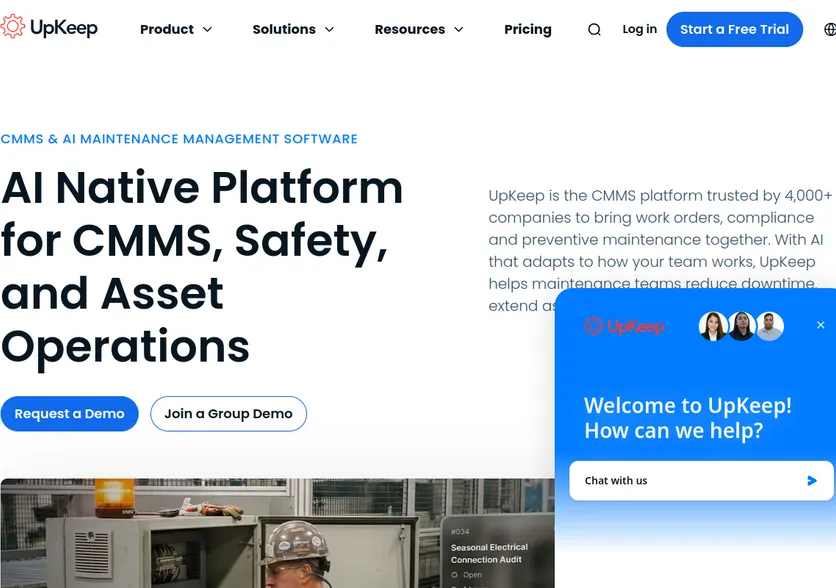
This UpKeep platform is built for crews who work from their phones: work orders, preventive maintenance and asset records share one mobile-first system, and each job carries a photo, a checklist and a deadline. A technician opens the job at the door, follows the checklist, and closes it with a photo before driving to the next site. Essential costs twenty-four dollars per user a month, with Premium at fifty-five dollars and higher tiers quoted.
What we like
- Mobile-first design that technicians use without training
- Work orders carry photos, checklists and deadlines in one place
- Supervisors see every open job across the team at a glance
Watch out for
- Inventory management waits for the Starter plan
- Advanced reporting needs the Professional tier
How to try it
- Open the UpKeep pricing page and start the free trial
- Add your sites and the equipment your team maintains
- Create the first work order with a photo checklist for the crew
2. Limble
Best for: Teams who want a free starting plan with transparent pricing
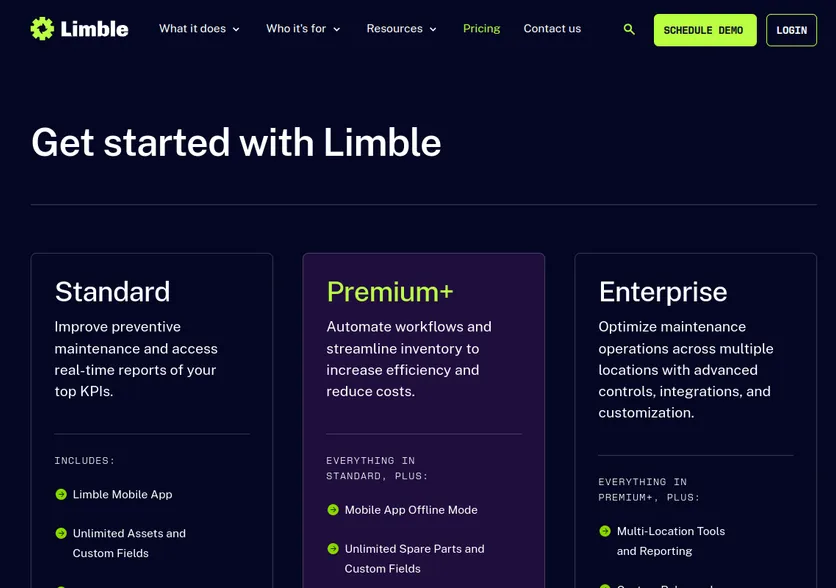
Paid tool Starting price: $28/user/month · Standard costs twenty-eight dollars per user a month; Premium+ sixty-nine dollars; Enterprise is custom; free Basic plan included. Prices are published on Limble's own cost guide, since the pricing page shows no figures
Free plan: Free Basic plan
This Limble platform gives maintenance teams a free Basic plan to start with, then two paid tiers with the price printed on the vendor site instead of hidden behind a quote. Work requests, dashboards and analytics arrive on Standard at twenty-eight dollars per user a month, and Premium+ at sixty-nine dollars adds inventory management and time tracking. The cost guide on the Limble site lists every tier plainly, which makes getting the budget approved straightforward.
What we like
- Free Basic plan genuinely works for a single site
- Prices are published plainly instead of hidden behind a quote
- Dashboards show the whole workload at a glance on Standard
Watch out for
- The pricing page itself shows no prices, only the cost guide does
- Inventory management waits for Premium+ at sixty-nine dollars
How to try it
- Open the Limble cost guide and compare Standard with Premium+
- Start on the free Basic plan with one site
- Move to Standard when the team needs dashboards and analytics
3. Fiix
Best for: Teams who want to start free and pay only when the workload grows
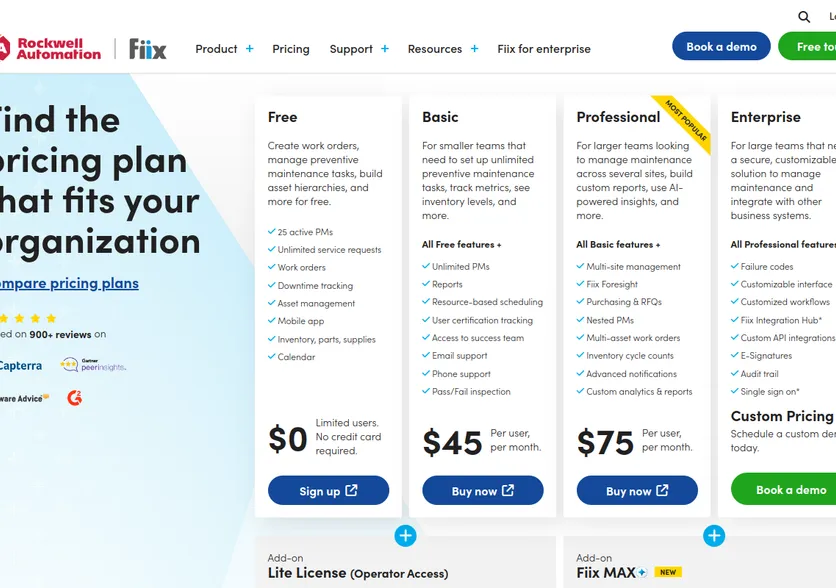
Paid tool Starting price: $45/user/month · Free plan at zero dollars for up to twenty-five active preventive maintenance schedules; Basic costs forty-five dollars per user a month; Professional seventy-five dollars; Enterprise is custom
Free plan: Free plan for up to 25 active preventive maintenance schedules
For an in-house crew that fixes things itself, this Fiix platform is the only one here with a free tier that covers real work: basic asset tracking, preventive maintenance planning and work order management at no cost. When the workload grows, Basic costs forty-five dollars per user a month and Professional seventy-five dollars, with predictive maintenance and custom reporting on the higher tier. Fiix has been part of Rockwell Automation since 2020, which suits teams who need a vendor that will still be around in ten years.
What we like
- Free tier covers real work, not just a demo
- Predictive maintenance arrives on Professional at seventy-five dollars
- Backed by Rockwell Automation since 2020
Watch out for
- The free tier caps at twenty-five active maintenance schedules
- Enterprise pricing is custom with no published figure
How to try it
- Open the Fiix pricing page and start on the free plan
- Add your sites and set the first preventive maintenance schedule
- Move to Basic when the team needs the mobile app on site
4. MaintainX
Best for: Teams who want a free plan with a modern mobile app on site
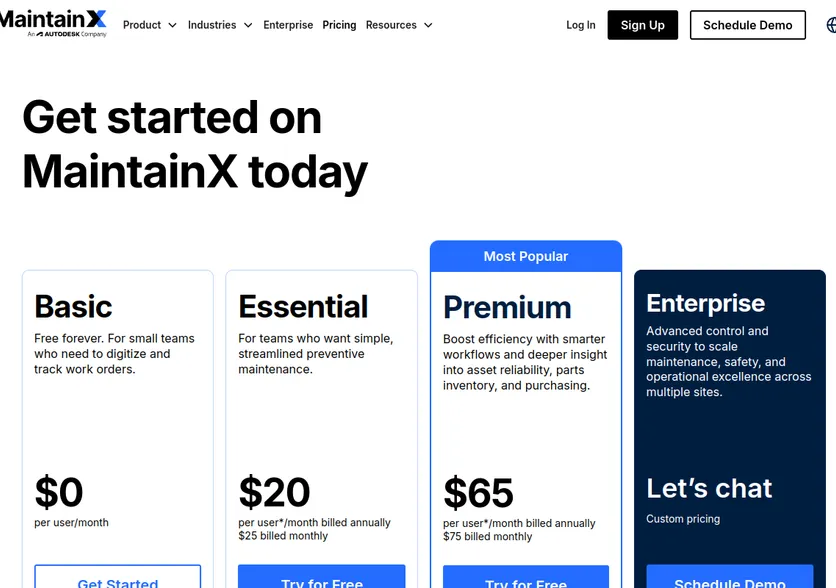
Paid tool Starting price: $20/user/month · Basic is free; Essential costs twenty dollars per user a month billed annually, or twenty-five dollars monthly; Premium sixty-five dollars billed annually, or seventy-five dollars monthly; Enterprise is custom
Free plan: Free Basic plan
This MaintainX platform gives maintenance teams a free Basic plan and a modern mobile app that technicians actually open on site. Work orders, preventive maintenance and asset records share one screen, and the Essential plan at twenty dollars per user a month on annual billing adds the reporting a supervisor needs to see the workload. Autodesk acquired MaintainX in August 2026, which puts the platform inside one of the largest building-software companies.
What we like
- Free Basic plan with a modern mobile app
- Essential costs twenty dollars a user on annual billing
- Reporting shows the team workload on the paid tiers
Watch out for
- Advanced analytics and integrations wait for Premium at sixty-five dollars
- Autodesk ownership may change the roadmap over time
How to try it
- Open the MaintainX pricing page and start on the free Basic plan
- Add your sites and invite the technicians on the crew
- Move to Essential when the supervisor needs workload reporting
5. EZOfficeInventory
Best for: Teams who want unlimited users and pricing by equipment, not by headcount
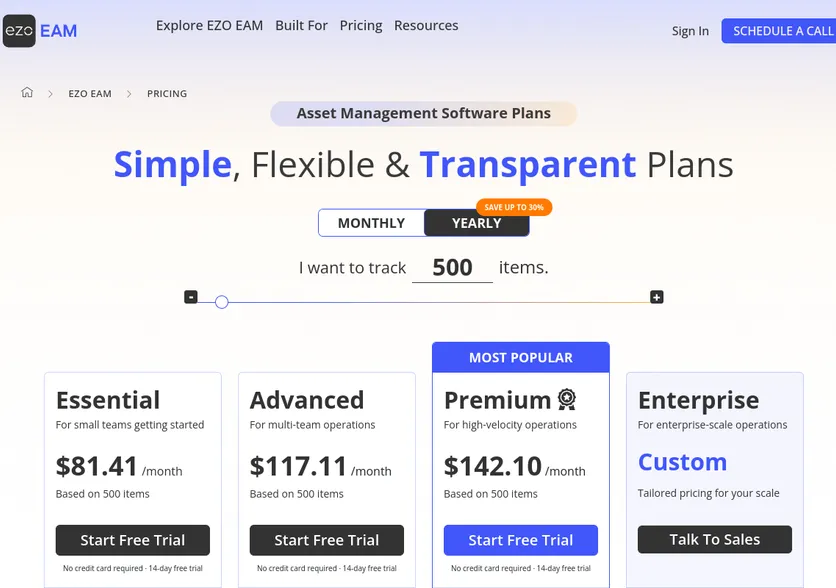
Paid tool Starting price: $44.75/month · Essential costs forty-four dollars and seventy-five cents a month billed annually at one hundred items; the price steps with item count, sixty-three dollars and fifty-five cents a month at three hundred items and eighty-one dollars and forty-one cents a month at five hundred items billed annually; Advanced and Premium are higher; priced by items, not by users, with unlimited users
Free plan: No free plan; 15-day free trial
This EZOfficeInventory platform prices by the number of items you track, not by the number of users, so every technician, supervisor and requester can log in without the bill growing. Assets, work orders and maintenance schedules share one system, and the price steps with the item count: Essential costs forty-four dollars and seventy-five cents a month billed annually at one hundred items. That model suits a team with many sites and many hands on the tools.
What we like
- Unlimited users, so the whole crew logs in without extra cost
- Pricing steps with item count, not headcount
- Asset, work order and maintenance records share one system
Watch out for
- The price depends on item count, so the bill rises as the asset list grows
- No free plan, only a fifteen-day trial
How to try it
- Open the EZOfficeInventory pricing page and count your items
- Start the fifteen-day trial with your largest site
- Check the price at your item count before you commit
6. Click Maint
Best for: Teams who want one simple plan with everything included
Paid tool Starting price: $35/user/month · Professional costs thirty-five dollars per user a month billed annually, or forty-two dollars month-to-month, and includes work orders, preventive maintenance, asset management, inventory, mobile access and reporting; unlimited maintenance requesters are included
Free plan: No free plan; 30-day free trial
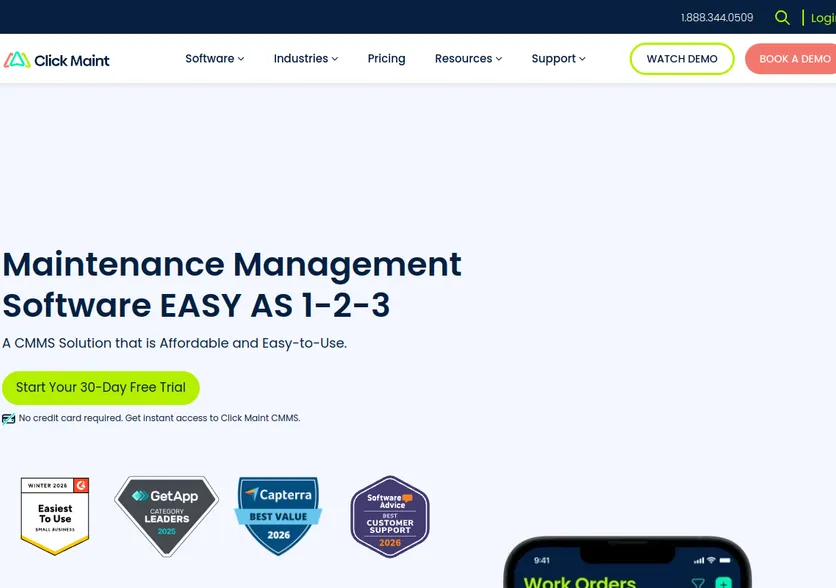
A crew that just wants to get on with the jobs will like how simple this Click Maint platform keeps the decision: one Professional plan at thirty-five dollars per user a month on annual billing, with work orders, preventive maintenance, asset management, inventory, mobile access and reporting all included. There is no tier maze to work through and no feature that waits for a higher plan. Unlimited maintenance requesters can submit jobs for free, which suits a team whose requesters outnumber its technicians.
What we like
- One plan with everything included, no tier maze
- Unlimited requesters submit jobs without a paid licence
- Thirty-day trial gives full access with no card required
Watch out for
- No free plan, so every licensed user costs thirty-five dollars
- No predictive or condition-based maintenance features yet
How to try it
- Open the Click Maint pricing page and start the thirty-day trial
- Add your sites and let requesters submit jobs for free
- Set the preventive maintenance schedules for the oldest equipment
7. eWorkOrders
Best for: Large teams who want flat pricing with unlimited users
Paid tool Starting price: $380/month · Starter costs three hundred and eighty dollars a month flat with unlimited users; Advanced four hundred and eighty dollars a month flat; Enterprise forty-five to one hundred and twenty dollars per user a month with a five-user minimum
Free plan: No free plan; free trial available
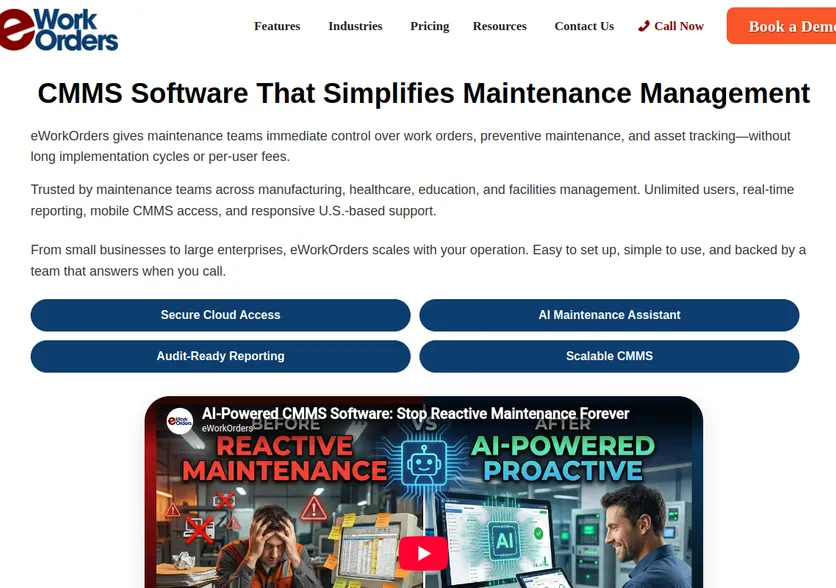
For a large in-house team where every hire would raise a per-user bill, this eWorkOrders platform charges a flat monthly fee with unlimited users, so the bill stays the same whether five people or fifty use it. Starter costs three hundred and eighty dollars a month flat, with core work orders, asset management, preventive maintenance and materials management included. That model suits a large in-house team where per-user pricing would climb fast with every hire.
What we like
- Flat monthly fee with unlimited users on Starter and Advanced
- Guided onboarding and data migration included on every plan
- Thirty-year track record in regulated and multi-site environments
Watch out for
- Three hundred and eighty dollars a month is steep for a small crew
- Mobile and barcode scanning wait for the Advanced plan
How to try it
- Open the eWorkOrders pricing page and compare Starter with Advanced
- Count your technicians and compare the flat fee with per-user pricing
- Start the trial with your largest site before go-live
Prices above were checked on each vendor’s own website on Nov 27, 2026 and can change — the vendor’s page is the final word. Vendor links are editorial: nobody paid to be listed or ranked here. Vendors who want a featured listing can see how it works on our Get listed page.
How a property team should run work orders without losing jobs
Give everyone one place to raise a job: a request portal that turns a leak report into a work order with a photo, a site and a deadline. A job that arrives by phone is a job that gets written down wrong, and a job written down wrong is a job that gets done twice or not at all. Set the priority when the job is created, so the crew knows what to fix first and what can wait until Friday.
Close every job with a photo and a note, because the record is what proves the work was done and what the next technician needs to see. Review the open jobs every morning and the completed jobs every Friday: the jobs that stay open longest are usually the ones waiting on a part, not on a person. Keep the preventive maintenance schedule in the same system as the work orders, because a schedule that lives in a spreadsheet will not get done.
Before you buy
- Check the plan covers preventive maintenance schedules, not just work orders
- Confirm technicians can work from the mobile app with photos and checklists
- Count every technician and supervisor when you check per-user minimums
- Make sure completed work syncs to your asset records automatically
- Check whether the renewal price is higher than the first-year price
Official websites
Official websites of the products reviewed above. Features and prices were checked against these sites when this guide was written, and they can change, so confirm on the vendor site before you buy.
Frequently asked questions
What is the cheapest facility maintenance software for a property team?
MaintainX Essential at twenty dollars per user a month on annual billing is the cheapest paid plan here, and UpKeep Essential costs twenty-four dollars per user a month. Fiix and Limble both offer free plans that cover real work for a single site, so a team can start free and pay only when the workload grows. Click Maint costs thirty-five dollars per user a month with everything included in one plan.
How do I start with maintenance software for one site?
Start with the site that generates the most emergency callouts, because that is where preventive maintenance pays back fastest. Add the equipment on that site, set the maintenance schedules, and run it for one month before adding the next site. The tools that fail this test usually fail on technician adoption, not on features, so pick the one your crew will actually open on their phones.
Does maintenance software include preventive maintenance?
Yes, and it is the first thing to check: the system should schedule maintenance by time, meter reading or season, and warn you before an asset fails. Fiix, UpKeep, Limble, MaintainX, Click Maint and eWorkOrders all include preventive maintenance scheduling. The free tiers cap the number of active schedules, so check the cap against the number of assets your team maintains before you commit.
How do I avoid paying per user for every technician?
Pick a tool that prices by items or by flat fee instead of per user. EZOfficeInventory prices by the number of items you track with unlimited users, and eWorkOrders charges a flat monthly fee with unlimited users on Starter and Advanced. Click Maint includes unlimited requesters for free, so anyone can raise a job without a paid licence.
Is a free plan enough for a small maintenance team?
Often yes for the first few months, especially with Fiix free for up to twenty-five maintenance schedules or Limble free Basic for a single site. The limits that push teams to a paid plan are usually the number of sites, the need for workload reporting, or the number of active maintenance schedules. Start free, track how many assets you maintain, and upgrade when the workload outgrows the free tier.
Compare the seven tools above, then trial the top two with your own maintenance crew for one month before you roll one out.
Browse Business Tools tools