On this page
A law firm is a project business, with every matter a project that has tasks, deadlines, owners and a budget. The software a firm picks decides whether that work is tracked on boards everyone can see or in private to-do lists. monday.com leads this list because it turns matters into visual boards with automations for nine dollars a seat a month, and the other seven tools are ranked on the same test: how clearly the whole firm can see what is due and who owns it.
How we researched this
We checked every price on the vendor pricing page on November 28, 2026, and only included tools with a published US dollar list price and a free plan or free trial. These are general project tools a law firm can shape around matters, not legal-specific platforms, so the firm should weigh flexibility against legal features. Prices change, so confirm the current figure on the vendor site before you buy.
Compare the tools
| Name | Best for | Starting price | Free plan | |
|---|---|---|---|---|
 monday.com | Law firms that want matters managed on visual boards with automations | $9/seat/month | Free plan for up to two seats | Visit |
 Asana | Law firms that want structured timelines and Gantt charts for matters | $10.99/user/month | Free Personal plan for up to two users | Visit |
 ClickUp | Law firms that want the most features for the lowest price | $9/user/month | Free Forever plan | Visit |
 Smartsheet | Law firms that like working in sheets and want project tracking there | $9/member/month | Free trial | Visit |
 Wrike | Law firms that want Gantt charts and dashboards for matter work | $10/user/month | Free plan for up to five users | Visit |
 Teamwork | Law firms that bill clients and want time tracking beside projects | $9.99/user/month | Free plan for up to five users | Visit |
 Zoho Projects | Law firms that want the cheapest project tool with Gantt and timesheets | $4/user/month | Free plan for up to five users and three projects | Visit |
 Basecamp | Law firms that want one flat bill with no per-user fees | $29/month | Free Personal plan for one project and up to three users | Visit |
The legal project management software for law firms, compared
1. monday.com
Best for: Law firms that want matters managed on visual boards with automations
Paid tool Starting price: $9/seat/month · Nine dollars per seat per month billed annually on the Basic plan (twelve dollars on monthly billing); Standard is twelve dollars and Pro is nineteen dollars per seat per month billed annually. Paid plans need at least three seats, so the floor is twenty-seven dollars a month
Free plan: Free plan for up to two seats
When a firm wants every matter visible at a glance, monday.com turns the caseload into boards where each matter is a row with its owner, deadline and status. Automations move matters forward, remind owners and notify partners when work stalls. The three-seat minimum sets a real floor of twenty-seven dollars a month, which suits a small team that works together on the same boards.

What we like
- Visual boards make the whole caseload easy to scan
- Automations chase deadlines without manual work
- Free plan covers two seats for trying it out
Watch out for
- Three-seat minimum means the floor is twenty-seven dollars a month
- No legal-specific features like trust accounting
How to try it
- Create a board with a row for each open matter
- Add columns for owner, deadline and status
- Set automations that remind owners before deadlines
2. Asana
Best for: Law firms that want structured timelines and Gantt charts for matters
Paid tool Starting price: $10.99/user/month · Ten dollars and ninety-nine cents per user per month billed annually on the Starter plan (thirteen dollars and forty-nine cents on monthly billing); Advanced is twenty-four dollars and ninety-nine cents billed annually and Enterprise is a custom quote
Free plan: Free Personal plan for up to two users
A firm that runs matters with many dependent steps needs to see the sequence, and Asana shows it with timelines and Gantt charts that map every task against its deadline. Custom fields track practice area and matter value, dashboards show workload across the team, and unlimited automations on the Starter plan keep routine steps moving. The free Personal plan covers two users getting started.

What we like
- Timelines and Gantt show task sequences clearly
- Unlimited automations on the Starter plan
- Dashboards show workload across the team
Watch out for
- Seats are sold in blocks, so the team size affects the bill
- No built-in time tracking without an add-on
How to try it
- Build a project template for each matter type
- Map the task sequence on the timeline view
- Review team workload on the dashboard weekly
3. ClickUp
Best for: Law firms that want the most features for the lowest price
Paid tool Starting price: $9/user/month · Nine dollars per user per month billed annually on the Core plan (twelve dollars on monthly billing); Business is seventeen dollars billed annually, and the Brain AI add-on is nine dollars per user per month on top
Free plan: Free Forever plan
Budget matters when the whole firm needs seats, and ClickUp packs unlimited storage, Gantt charts, time tracking and integrations into a nine-dollar plan. Spaces hold each practice area, tasks carry deadlines and owners, and goals track the firm toward its targets. The Brain AI add-on costs nine dollars more, so the firm should decide whether it needs the assistant before paying for it.

What we like
- Most features for the lowest price in this list
- Native time tracking included on the Core plan
- Free Forever plan for trying it out
Watch out for
- AI features cost extra on top of the subscription
- The wide feature set takes time to learn
How to try it
- Create a Space for each practice area
- Add tasks with owners and deadlines for each matter
- Track time natively and review it weekly
4. Smartsheet
Best for: Law firms that like working in sheets and want project tracking there
Paid tool Starting price: $9/member/month · Nine dollars per member per month billed annually on the Pro plan (twelve dollars on monthly billing); Business is nineteen dollars billed annually and Enterprise is a custom quote. Pro caps at ten members, and there is no free plan for new signups
Free plan: Free trial
Some firms think in spreadsheets, and Smartsheet meets them there with sheets that behave like projects, with Gantt views, forms and automations on top. Each matter is a row with its tasks, owners and deadlines, and reports roll the sheets up into a firm-wide view. The Pro plan caps at ten members, so a growing firm should plan the move to Business at nineteen dollars when the team passes ten.

What we like
- Familiar sheet interface with project views on top
- Forms collect matter updates from the team
- Unlimited free contributors can view and comment
Watch out for
- Pro caps at ten members, forcing a jump to Business
- No free plan for new signups, only a trial
How to try it
- Create a sheet for the caseload with a row per matter
- Add the Gantt view to see deadlines across matters
- Build a report that rolls up all sheets for partners
5. Wrike
Best for: Law firms that want Gantt charts and dashboards for matter work
Paid tool Starting price: $10/user/month · Ten dollars per user per month billed annually on the Team plan for two to fifteen users; Business is twenty-five dollars per user per month billed annually for five to two hundred users, and Pinnacle and Apex are custom-quoted. There is no monthly billing option on the published page
Free plan: Free plan for up to five users
A firm that manages complex matters with many moving parts needs to see the plan, and Wrike shows it with interactive Gantt charts and shareable dashboards. The Team plan at ten dollars covers two to fifteen users, which suits a small or mid-size firm, while Business at twenty-five dollars adds templates and resource management. There is no monthly billing option on the published page, so the firm commits annually.

What we like
- Interactive Gantt charts show complex matter plans
- Shareable dashboards keep partners informed
- Free plan covers up to five users
Watch out for
- Team plan caps at fifteen users
- No monthly billing option on the published page
How to try it
- Build a project for each matter with its task sequence
- View the plan on the Gantt chart and share the dashboard
- Review progress against deadlines weekly
6. Teamwork
Best for: Law firms that bill clients and want time tracking beside projects
Paid tool Starting price: $9.99/user/month · Nine dollars and ninety-nine cents per user per month billed annually on the Basics plan, with a three-seat minimum; Accelerate is twenty-four dollars and ninety-nine cents billed annually and Optimize and Enterprise are quoted. Older listings still show the retired Deliver plan at ten dollars and ninety-nine cents
Free plan: Free plan for up to five users
A firm that bills by the hour needs project tracking tied to time, and Teamwork puts billable time tracking on every project from the start. Projects hold tasks, milestones and budgets, while workload planning shows who is overloaded before deadlines slip. The Basics plan at nine dollars and ninety-nine cents covers a small team, and invoicing from logged time keeps the billing cycle short.

What we like
- Billable time tracking on every project
- Workload planning shows who is overloaded
- Invoicing from logged time keeps billing short
Watch out for
- Older listings still show the retired Deliver plan price
- Accelerate is needed for advanced capacity planning
How to try it
- Create a project for each matter with its budget set
- Log billable time against tasks as the team works
- Invoice from the logged time at month end
7. Zoho Projects
Best for: Law firms that want the cheapest project tool with Gantt and timesheets
Paid tool Starting price: $4/user/month · Four dollars per user per month billed annually on the Premium plan (five dollars on monthly billing); Enterprise is nine dollars and Ultimate is fourteen dollars per user per month billed annually
Free plan: Free plan for up to five users and three projects
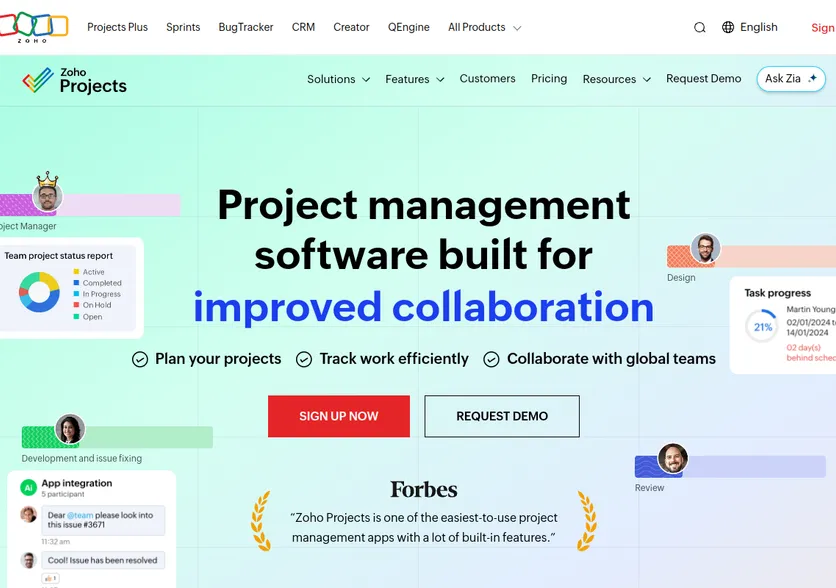
Budget is often the deciding factor, and Zoho Projects is the cheapest paid tool in this list at four dollars a user a month on the Premium plan. Gantt charts, timesheets, blueprints and automation come included, and the free plan covers five users and three projects for a firm starting out. The interface is denser than the visual board tools, so the firm should expect a day of setup before it feels natural.
What we like
- Cheapest paid plan in this list at four dollars
- Gantt, timesheets and automation included
- Free plan covers five users and three projects
Watch out for
- Denser interface that takes a day to learn
- Client users cost extra on top of the team price
How to try it
- Create a project for each matter with its Gantt chart
- Add timesheets so billable hours are tracked
- Use blueprints to repeat the same matter workflow
8. Basecamp
Best for: Law firms that want one flat bill with no per-user fees
Paid tool Starting price: $29/month · Twenty-nine dollars a month flat on the Freelancer package for three active projects and up to five users; Pro is seventy-nine dollars, Pro Plus is ninety-nine dollars, and Pro Unlimited is one hundred ninety-nine dollars a month billed annually for unlimited projects and users. No plan charges per user
Free plan: Free Personal plan for one project and up to three users
Per-user pricing punishes a growing firm, and Basecamp avoids it entirely with flat monthly packages and no per-seat fees. The Freelancer package at twenty-nine dollars a month covers three active projects and five users, while Pro Unlimited at one hundred ninety-nine dollars billed annually covers unlimited projects and users. Message boards, to-dos, chat and files live in each project, which suits a firm that wants one simple place per matter.

What we like
- Flat pricing with no per-user fees
- One simple place per matter with chat and files
- Free Personal plan for one project
Watch out for
- Smaller packages cap active projects at three, eight or twelve
- No Gantt chart or time tracking on the lower packages
How to try it
- Create a project for each matter with its tools inside
- Use the message board for client updates and the to-dos for tasks
- Move to Pro Unlimited when projects pass twelve
Prices above were checked on each vendor’s own website on Nov 28, 2026 and can change — the vendor’s page is the final word. Vendor links are editorial: nobody paid to be listed or ranked here. Vendors who want a featured listing can see how it works on our Get listed page.
How a law firm should run matters as projects
Treat every matter as a project with a template, an owner and a deadline. A firm that starts each matter from a template, assigns one owner and reviews the boards weekly will spot stalled work before clients do. Break big matters into tasks with real deadlines, not one vague due date, and track time against the project so profitability is visible. Close the project when the work ends, record what was learned, and reuse the template next time. Review the boards as a team every week, because a board nobody reviews is just a list of good intentions.
Before you buy
- Check that tasks, deadlines and owners live on one board per matter
- Confirm whether the price is per seat and how many seats you must buy
- Ask how time tracking and billing connect to each project
- Test the board with fifty open matters before you commit
- Run a trial with five real matters, from intake to close, before you commit
Official websites
Official websites of the products reviewed above. Features and prices were checked against these sites when this guide was written, and they can change, so confirm on the vendor site before you buy.
Frequently asked questions
What is legal project management software for law firms?
It is project software that treats each matter as a project, with tasks, deadlines, owners and budgets tracked on boards, timelines or sheets. The tools in this list are general project platforms a firm shapes around matters, rather than legal-specific systems. None of them handles trust accounting, but a visible project board means stalled matters are spotted in a weekly review instead of by an unhappy client.
How much does legal project management software cost for a law firm?
The tools in this list start at four to ten dollars and ninety-nine cents per user per month billed annually, with Basecamp charging flat monthly packages instead. Zoho Projects is cheapest at four dollars, while ClickUp is nine dollars, monday.com nine dollars and Asana ten dollars and ninety-nine cents. Basecamp starts at twenty-nine dollars a month flat for three projects.
Should a law firm use project software or practice management software?
Use practice management when the work is mostly matters, billing and trust accounting, and project software when the work is mostly coordinated tasks across a team. Many firms use both: the practice system holds the matter and the bill, while the project board tracks the work inside it. Start with the system that matches your biggest pain, and add the other only when the gap is clear.
How should a firm set up projects for its matters?
Build one template per matter type, with the standard tasks, deadlines and owners already set. Open each new matter from the template, assign one owner, and set real deadlines on every task rather than one vague due date. Review the boards weekly as a team, and close the project when the work ends so the board stays honest about what is still open.
Can these tools track billable time for matters?
Most of them can, though the depth varies. ClickUp, Zoho Projects and Teamwork include native time tracking, while Asana and monday.com need an add-on or integration for it. Basecamp adds time tracking on the Pro Plus package. Before you commit, test time entry with your real workflow, because a tracker nobody uses produces reports nobody trusts.
Compare the eight tools above, then start with a free plan or trial on the tool that matches how your firm already tracks work before you pay for a full year.
Browse Business Tools tools