On this page
A new hire who waits for a laptop, a login and a form will spend the first week chasing admin instead of learning the job, so the checklist decides whether the start is smooth or slow. The seven tools below were picked because each one publishes a price and runs onboarding checklists well. BambooHR leads the list because its Core plan costs ten dollars an employee a month and puts the checklist next to the employee record, and the rest are ranked on the same test: how much of the first week they cover for the price.
How we researched this
We checked every price on the vendor pricing page on November 28, 2026, and only included tools with a published US dollar list price. The HR platforms that sell by quote, including Workday, Greenhouse and Enboarder, publish no prices, so they are not in this list. Prices change, so confirm the current figure on the vendor site before you buy.
Compare the tools
| Name | Best for | Starting price | Free plan | |
|---|---|---|---|---|
 Trello | Small HR teams that want a visual onboarding checklist | $5/user/month | Free plan | Visit |
 Rippling | Growing companies that want onboarding automated end to end | $8/user/month | Free demo | Visit |
 ClickUp | HR teams that want checklists inside a work management tool | $9/user/month | Free plan | Visit |
| monday.com | HR teams that want onboarding as a visual status board | $9/seat/month | Free plan | Visit |
 Smartsheet | HR teams that want checklists in a spreadsheet format | $9/user/month | 30-day free trial | Visit |
 BambooHR | HR managers who want checklists inside a real HR system | $10/employee/month | Free demo | Visit |
 Asana | Teams that already run work in Asana and want onboarding there too | $10.99/user/month | Free Personal plan | Visit |
The onboarding checklist software for HR managers, compared
1. Trello
Best for: Small HR teams that want a visual onboarding checklist
Paid tool Starting price: $5/user/month · Five dollars per user per month billed annually on the Standard plan; Premium is ten dollars and Enterprise is quoted; the free plan covers up to ten boards per workspace
Free plan: Free plan
This Trello plan costs five dollars a user a month on annual billing, and it turns an onboarding checklist into a board anyone can follow. Each card is a task with a due date, an owner and attachments, so a new hire always knows what comes next. It suits a small HR team that wants a visual checklist without buying a full HR system.

What we like
- Cheapest paid plan in this list
- Boards and cards that any new hire can follow
- Free plan for simple checklists
Watch out for
- No HR records, payroll or compliance features
- Checklists need manual setup for each role
How to try it
- Create a board with one list per onboarding week
- Add a card for each task with an owner and due date
- Reuse the board as a template for the next hire
2. Rippling
Best for: Growing companies that want onboarding automated end to end
Paid tool Starting price: $8/user/month · Eight dollars per user per month for the Platform plan plus a forty dollar monthly base fee; some vendor pages list a thirty-five dollar base fee, so confirm the current figure; US payroll is eight dollars per employee per month billed annually and other modules are quoted
Free plan: Free demo
This Rippling plan costs eight dollars a user a month plus a monthly base fee, and it automates the whole first-week checklist. Accounts, devices, payroll and documents are set up from one onboarding flow, so HR stops chasing IT for access. It suits a growing company that wants onboarding to run itself once the hire signs.

What we like
- Onboarding, payroll, devices and documents in one flow
- Checklists that trigger account and payroll setup
- Strong automation for HR and IT together
Watch out for
- The monthly base fee sits on top of the per-user price
- Most HR modules beyond the core are quoted
How to try it
- Build an onboarding template for each role
- Assign tasks and due dates to HR, IT and the manager
- Track completion from the dashboard until day one
3. ClickUp
Best for: HR teams that want checklists inside a work management tool
Paid tool Starting price: $9/user/month · Nine dollars per user per month billed annually on the Core plan; Business is seventeen dollars per user per month billed annually and Enterprise is quoted
Free plan: Free plan
This ClickUp plan costs nine dollars a user a month on annual billing, and it gives HR a checklist system with docs, tasks and automation in one place. A template can cover forms, training, equipment and introductions, with each item assigned and dated. It suits an HR manager who wants onboarding checklists inside the same tool the team already uses for work.

What we like
- Checklists, docs and tasks in one workspace
- Templates that cover the full first month
- Free plan for small teams to start
Watch out for
- No built-in payroll or HR records
- Setup takes longer than on a dedicated HR tool
How to try it
- Create an onboarding template with tasks and due dates
- Assign each item to HR, the manager or the new hire
- Automate reminders for overdue checklist items
4. monday.com
Best for: HR teams that want onboarding as a visual status board
Paid tool Starting price: $9/seat/month · Nine dollars per seat per month billed annually on the Basic plan, or twelve dollars month to month, with a three seat minimum so the smallest Basic bill is twenty-seven dollars a month; Standard is twelve dollars and Pro is nineteen dollars
Free plan: Free plan
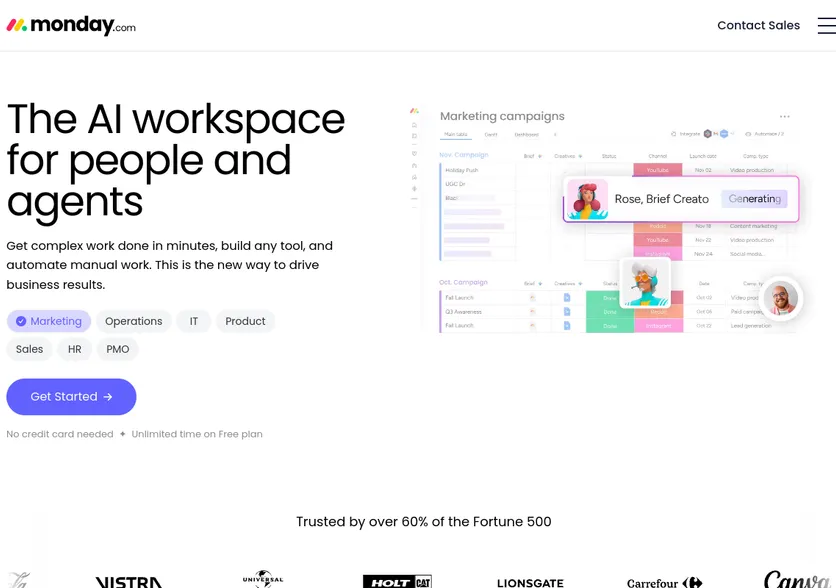
This monday.com plan costs nine dollars a seat a month on annual billing, and it runs onboarding as a board with status columns HR can read at a glance. Each hire gets a row, each task a status, and the manager sees exactly what is done and what is late. It suits an HR team that likes a visual board and wants the same tool for projects too.
What we like
- Status columns that show progress at a glance
- Templates for onboarding and HR workflows
- Free plan for small teams to start
Watch out for
- No built-in payroll or HR records
- Limited HR features compared with dedicated platforms
How to try it
- Build an onboarding board with one row per hire
- Add status columns for forms, training and equipment
- Share the board with managers for weekly review
5. Smartsheet
Best for: HR teams that want checklists in a spreadsheet format
Paid tool Starting price: $9/user/month · Nine dollars per user per month billed annually on the Pro plan, or twelve dollars month to month; Pro covers one to ten members with unlimited free contributors and Business is nineteen dollars; the free plan is closed to new signups and a thirty day trial is offered instead
Free plan: 30-day free trial
This Smartsheet plan costs nine dollars a user a month on annual billing, and it runs onboarding checklists as a familiar spreadsheet with automation behind it. HR can track forms, training and approvals in rows, with alerts when a task goes overdue. It suits a team that already thinks in sheets and wants checklist tracking without learning a new interface.

What we like
- Spreadsheet format that HR teams already know
- Automated alerts when checklist items go overdue
- Unlimited free contributors on the Pro plan
Watch out for
- Pro is capped at ten members
- No built-in payroll or HR records
How to try it
- Build a checklist sheet with tasks, owners and dates
- Set alerts for overdue items and missing forms
- Share the sheet with managers and the new hire
6. BambooHR
Best for: HR managers who want checklists inside a real HR system
Paid tool Starting price: $10/employee/month · Ten dollars per employee per month on the Core plan for teams over twenty-five staff, or a two hundred and fifty dollar flat monthly fee for twenty-five or fewer; Pro is seventeen dollars and Elite is twenty-five dollars; one vendor FAQ lists precise rates of ten dollars and twenty-five cents and seventeen dollars and fifty cents
Free plan: Free demo
This BambooHR plan costs ten dollars an employee a month, and it is the only dedicated HR platform in this list. Onboarding checklists sit next to employee records, time off and documents, so HR never re-enters the same hire twice. It leads this list for an HR manager who wants the checklist inside a real HR system.
What we like
- Onboarding checklists next to employee records
- E-signatures and documents built into the flow
- Clear pricing with a flat rate for small teams
Watch out for
- Costs more than the general work tools in this list
- Payroll is an add-on in some regions
How to try it
- Create an onboarding template for each role
- Send forms and documents for e-signature before day one
- Track checklist completion from the employee record
7. Asana
Best for: Teams that already run work in Asana and want onboarding there too
Paid tool Starting price: $10.99/user/month · Ten dollars and ninety-nine cents per user per month billed annually on the Starter plan, or thirteen dollars and forty-nine cents month to month; Advanced is twenty-four dollars and ninety-nine cents and Enterprise is quoted; the Personal plan is free for up to two users
Free plan: Free Personal plan
This Asana plan costs ten dollars and ninety-nine cents a user a month on annual billing, and it turns onboarding into a project with timelines, owners and dependencies. HR can see the whole first month on a timeline, with training and paperwork sequenced in the right order. It suits a team that already runs work in Asana and wants onboarding to follow the same pattern.

What we like
- Timelines that sequence the whole first month
- Custom fields for tracking forms and equipment
- Free Personal plan for up to two users
Watch out for
- No built-in payroll or HR records
- Seats are sold in blocks above five users
How to try it
- Create an onboarding project from the template
- Assign tasks with due dates to HR and the manager
- Track progress on the timeline each week
Prices above were checked on each vendor’s own website on Nov 28, 2026 and can change — the vendor’s page is the final word. Vendor links are editorial: nobody paid to be listed or ranked here. Vendors who want a featured listing can see how it works on our Get listed page.
How to build an onboarding checklist that new hires actually finish
Start the checklist before day one, because forms and equipment that wait until the first morning will eat the whole week. Give every item a named owner and a due date, and make the new hire the owner of their own tasks so nothing sits in a shared inbox. Keep the list to one page per week, since a fifty-item list gets ignored no matter how good the tool is. Finally, review completion rates monthly and cut any step that nobody misses, because a checklist that only grows is a checklist that stops working.
Before you buy
- Confirm the checklist assigns tasks to named people with due dates, not just a shared list
- Check whether new hires can complete forms and upload documents before their first day
- Ask if the tool tracks completion rates so HR can see who is stuck and where
- Make sure the checklist template can be reused for different roles without rebuilding it
- Test the new hire view on a phone, since most hires open it from a mobile device
Official websites
Official websites of the products reviewed above. Features and prices were checked against these sites when this guide was written, and they can change, so confirm on the vendor site before you buy.
Frequently asked questions
What is onboarding checklist software for HR managers?
It is software that gives every new hire a clear list of tasks, forms, training and introductions, with owners and due dates attached to each item. The tools in this list range from simple checklist boards to full HR platforms that also store employee records. The best fit depends on whether HR only needs the list or also needs the records behind it.
How much does BambooHR cost for onboarding checklists?
BambooHR charges ten dollars an employee a month on the Core plan for teams over twenty-five staff, or a two hundred and fifty dollar flat monthly fee for twenty-five or fewer. Pro costs seventeen dollars and Elite twenty-five dollars. It is the only dedicated HR platform in this list, so the checklist sits next to the employee record.
Which onboarding checklist tool is cheapest?
Trello is the cheapest paid option in this list at five dollars a user a month billed annually, and it has a free plan for simple checklists. Rippling follows at eight dollars a user a month plus a base fee, and ClickUp, monday.com and Smartsheet each start at nine dollars. The cheapest tool fits a team that only needs the list itself.
Can I run onboarding checklists for free?
Yes, Trello, ClickUp and monday.com all offer free plans that cover basic checklists, and Asana has a free Personal plan for up to two users. Smartsheet offers a thirty day trial instead of a free plan. The free plans are enough to run a checklist for a handful of hires before paying.
What matters most in onboarding checklist software?
The template is the part that matters most. A reusable checklist for each role means HR stops rebuilding the same list for every hire, and a new hire gets the same complete first week every time. Pick a tool where templates are easy to copy and edit, and where overdue items are visible to the manager without asking HR.
Compare the seven tools above, then start with a free trial on the one that matches how your HR team already onboards before you commit to a full year.
Browse Business Tools tools