On this page
A clinic proposal is not a sales pitch: it is a treatment plan, a care agreement or a quote for a course of treatment, and it needs a signature before work starts. The eight tools below cover that job for practices of every size, from a solo clinic sending a handful of estimates to a group practice with several locations. PandaDoc leads because it handles proposals, quotes and consent forms in one place for nineteen dollars per user a month, and the rest are ranked on how safely they collect a signature for the price.
How we researched this
We checked every price on the vendor pricing page on November 28, 2026, and only included tools with a published US dollar list price. The big RFP and enterprise platforms that sell by quote, including Loopio, Responsive, Conga and DealHub, publish no prices, so they are not in this list. Prices change, so confirm the current figure on the vendor site before you buy.
Compare the tools
| Name | Best for | Starting price | Free plan | |
|---|---|---|---|---|
 PandaDoc | Teams that want proposals, quotes and contracts in one place | $19/user/month | Free plan (5 documents a month) | Visit |
 DocuSign | Teams that need trusted e-signatures on every document | $25/user/month | No free plan; 30-day free trial | Visit |
 Proposify | Sales teams that want branded, trackable proposals | $39/user/month | 14-day free trial | Visit |
 Qwilr | Teams that want proposals as interactive web pages | $35/user/month | 14-day free trial | Visit |
 Better Proposals | Small teams that want designed proposals on a budget | $13/user/month | 14-day free trial | Visit |
 Nusii | Freelancers and small agencies that want simple proposals | $29/month | 14-day free trial | Visit |
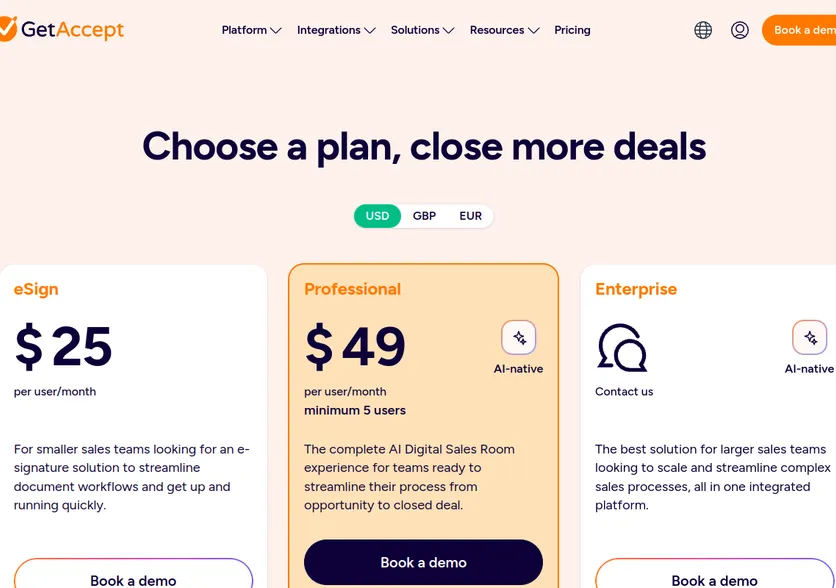
 GetAccept | Sales teams that want video and chat inside proposals | $25/user/month | Free trial | Visit |
| SignWell | Teams that only need signatures on proposal documents | $10/sender/month | Free plan (1 document a month) | Visit |
The proposal software for healthcare practices, compared
1. PandaDoc
Best for: Teams that want proposals, quotes and contracts in one place
Paid tool Starting price: $19/user/month · Nineteen dollars per user a month billed annually on Starter (thirty-five billed monthly); Business is forty-nine (sixty-five monthly); Enterprise is by quote; the free eSign plan covers five documents a month
Free plan: Free plan (5 documents a month)
When a clinic sends treatment plans that need a patient signature the same day, this PandaDoc plan costs nineteen dollars per user a month billed annually, and it covers proposals, quotes and consent forms in one place. It tracks every open and signature in real time, so a sender knows when a client has read the offer and when to follow up. The free eSign plan covers five documents a month, which suits an occasional sender who only needs signatures.

What we like
- Unlimited documents and e-signatures on paid plans
- Content library and templates keep branding consistent
- CRM integrations and approval workflows on Business
Watch out for
- Starter caps templates at five, so full branding needs Business
- Automated document creation uses paid usage credits
How to try it
- Pick a template from the library and add the client details
- Add pricing tables and payment options, then send for signature
- Track opens and follow up from the activity feed
2. DocuSign
Best for: Teams that need trusted e-signatures on every document
Paid tool Starting price: $25/user/month · Twenty-five dollars per user a month billed annually upfront on Standard (thirty billed monthly, forty-five month to month); Personal is ten; Business Pro is forty; envelope limits apply on the cheaper plans
Free plan: No free plan; 30-day free trial
When a clinic sends treatment plans that need a patient signature the same day, this DocuSign plan costs twenty-five dollars per user a month billed annually, and it puts a trusted signature on every agreement. Its audit trail records every view, signature and timestamp, which matters when a signed agreement is ever disputed. It is the safest pick when the signature itself matters more than the design of the document.

What we like
- Legally binding signatures recognised across the US
- Templates and bulk send speed up repeat paperwork
- Strong audit trail on every envelope
Watch out for
- Proposal design tools are thinner than dedicated proposal apps
- Envelope limits apply on the cheaper plans
How to try it
- Upload the document and place signature and date fields
- Add recipients in signing order and send the envelope
- Download the completed copy with its certificate
3. Proposify
Best for: Sales teams that want branded, trackable proposals
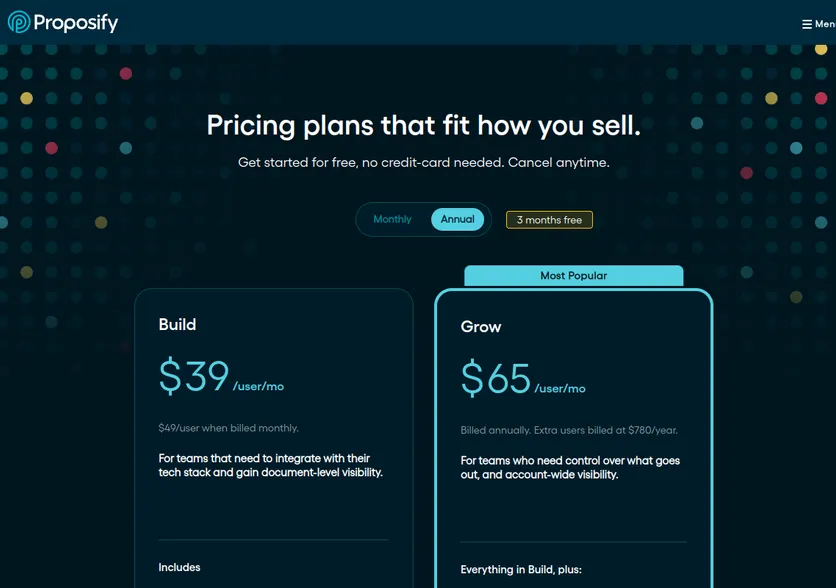
Paid tool Starting price: $39/user/month · Thirty-nine dollars per user a month billed annually on Build (forty-nine billed monthly); Grow is sixty-five; Scale is one hundred and seven; Proposify's own blog lists Build at thirty-five, so confirm the figure at checkout
Free plan: 14-day free trial
When a clinic sends treatment plans that need a patient signature the same day, this Proposify plan costs thirty-nine dollars per user a month billed annually, and it keeps every proposal on brand and tracks what the client reads. Its analytics show which pages a prospect lingered on, so follow-up calls can start with the section the client actually read. The content library keeps every proposal on brand without rebuilding pages from scratch.
What we like
- Drag-and-drop editor with a shared content library
- Document analytics show what each client read
- Stripe payments inside the proposal
Watch out for
- Build has no payment collection, which needs a higher tier
- Send allowances apply on monthly billing
How to try it
- Build the proposal from library sections and pricing tables
- Send the branded link and watch the analytics
- Collect the signature and payment in the same flow
4. Qwilr
Best for: Teams that want proposals as interactive web pages
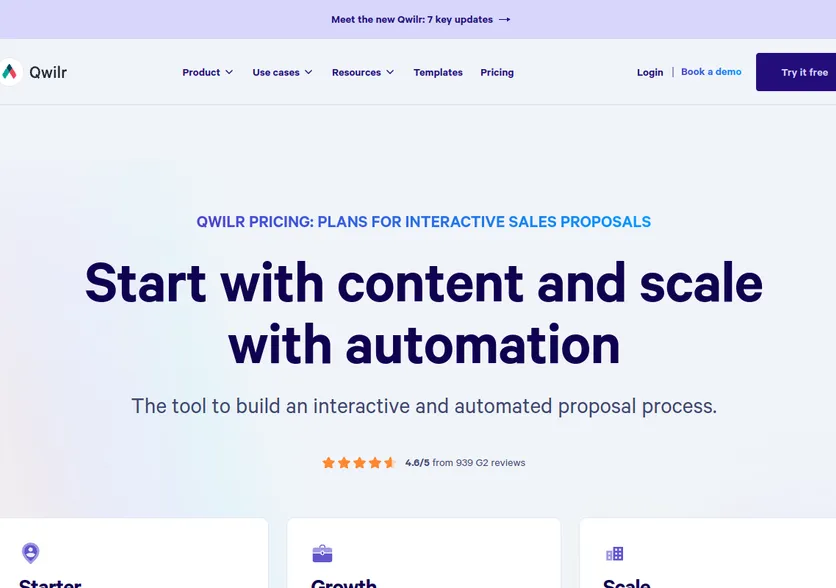
Paid tool Starting price: $35/user/month · Thirty-five dollars per user a month billed annually on Starter (forty-nine billed monthly); Growth is fifty-five with a five-user minimum; Scale is seventy-five with a ten-user minimum
Free plan: 14-day free trial
When a clinic sends treatment plans that need a patient signature the same day, this Qwilr plan costs thirty-five dollars per user a month billed annually, and it turns the proposal into a web page the client opens on a phone. Buyers open a web page rather than a file attachment, which reads better on a phone and updates live if the price changes. QwilrPay takes payment inside the proposal, so acceptance and payment happen in one step.
What we like
- Proposals render as polished web pages, not PDFs
- Built-in e-sign, analytics and payments
- CRM integrations with HubSpot, Zoho and Pipedrive
Watch out for
- Growth and Scale need five and ten users minimum
- No configuration logic for complex quotes
How to try it
- Choose a template and drop in the pricing table
- Send the web link and track opens and accepts
- Collect the signature and payment on the same page
5. Better Proposals
Best for: Small teams that want designed proposals on a budget
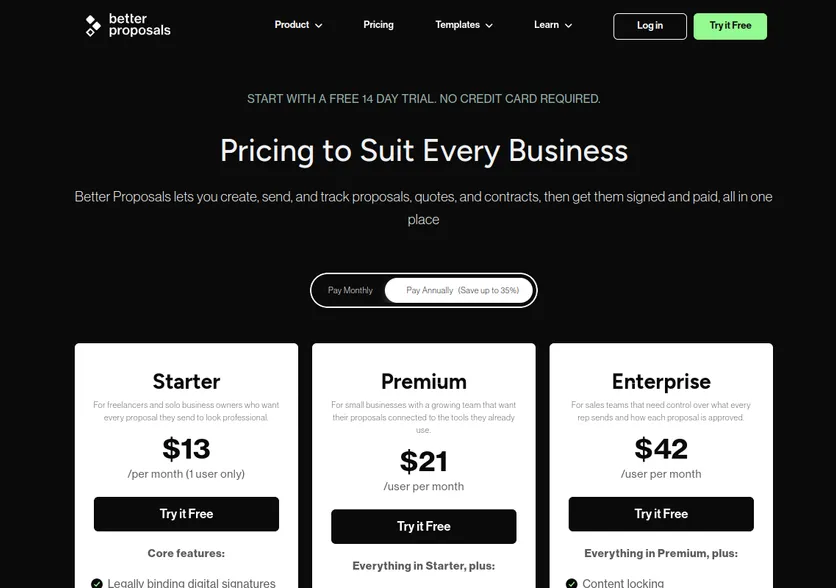
Paid tool Starting price: $13/user/month · Thirteen dollars per user a month billed annually on Starter (nineteen billed monthly); Premium is twenty-one (twenty-nine monthly); Enterprise is forty-two (forty-nine monthly); Starter is one seat and ten documents a month
Free plan: 14-day free trial
When a clinic sends treatment plans that need a patient signature the same day, this Better Proposals plan costs thirteen dollars per user a month billed annually, and it keeps the cost low while the documents still look designed. Its pricing tables let clients pick optional items and set quantities, which turns a flat quote into an upsell without extra calls. The low entry price makes it the cheapest serious proposal tool in this list for a solo sender.
What we like
- Interactive pricing tables with pick-one packages
- Payments by Stripe, PayPal and GoCardless on Starter
- Low entry price with a 14-day trial
Watch out for
- Starter sends only ten documents a month
- Follow-up nudges cost ten dollars per user extra
How to try it
- Pick a template and fill in the pricing table
- Send the proposal link and watch the open alerts
- Let the client sign and pay without leaving the page
6. Nusii
Best for: Freelancers and small agencies that want simple proposals
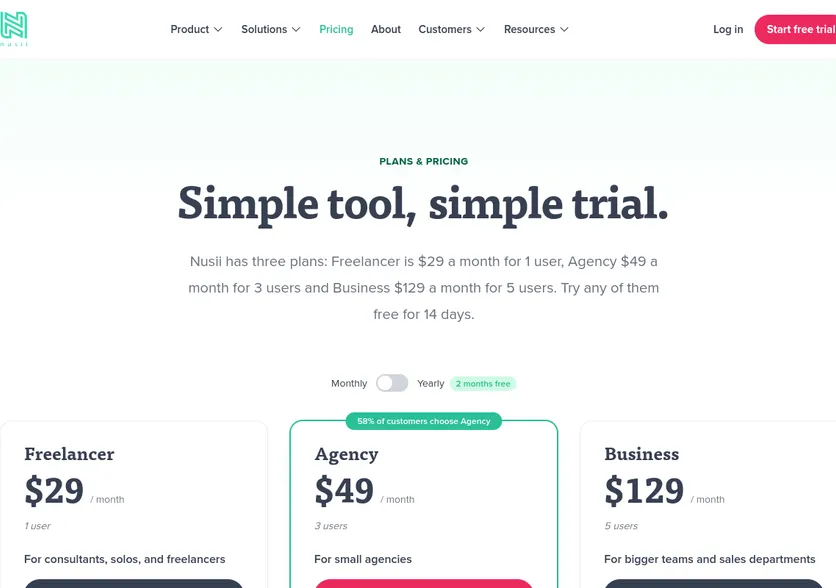
Paid tool Starting price: $29/month · Twenty-nine dollars a month on Freelancer for one user (two hundred and ninety a year); Agency is forty-nine for three users; Business is one hundred and twenty-nine for five users; extra seats are nineteen and twenty-nine a month
Free plan: 14-day free trial
When a clinic sends treatment plans that need a patient signature the same day, this Nusii plan costs twenty-nine dollars a month, and it keeps the workflow simple enough for a one-person team. It keeps the scope narrow on purpose, so a small team can send a polished proposal the same day it signs up. Agency pricing covers three users for one flat price, which beats per-seat billing for a tiny studio.
What we like
- Clean interface with unlimited templates and clients
- Pricing by account, not per seat, on Agency
- Automatic reminders chase unsigned proposals
Watch out for
- Caps on proposals awaiting an answer at once
- No signing for uploaded PDFs
How to try it
- Create the proposal from a reusable block template
- Send it for online signing and track the opens
- Set automatic reminders for proposals left unsigned
7. GetAccept
Best for: Sales teams that want video and chat inside proposals
Paid tool Starting price: $25/user/month · Twenty-five dollars per user a month on eSign, monthly or annual; Professional is forty-nine with a five-user minimum, billed annually; Enterprise is by quote; all plans run on twelve-month agreements
Free plan: Free trial
When a clinic sends treatment plans that need a patient signature the same day, this GetAccept plan costs twenty-five dollars per user a month, and it adds video and chat to the proposal itself. Its sales room gathers the proposal, chat, video and contract in one link, so a buyer never hunts through email threads. Engagement tracking shows which stakeholders opened the deal and which went quiet.
What we like
- Digital sales room with video, chat and e-signatures
- Mutual action plans keep deals on track
- AI features on the Professional plan
Watch out for
- Professional needs five users minimum and annual billing
- Every plan runs on a twelve-month agreement
How to try it
- Build the sales room with the proposal and contract
- Invite stakeholders and share video messages
- Track engagement and close with e-signatures
8. SignWell
Best for: Teams that only need signatures on proposal documents
Paid tool Starting price: $10/sender/month · Ten dollars per sender a month; a free plan covers one document a month; higher tiers add templates, API access and team controls, so confirm the current ladder on the vendor pricing page
Free plan: Free plan (1 document a month)
When a clinic sends treatment plans that need a patient signature the same day, this SignWell plan costs ten dollars per sender a month, and it adds signing without a heavy platform. It does one job well, turning a finished proposal into a signed agreement without a heavy platform. Teams that already design proposals elsewhere can bolt signing on for a small monthly fee.
What we like
- Simple signing flow with templates and reminders
- Free plan covers one document a month
- API access for sending from other apps
Watch out for
- No proposal design or pricing tables
- Per-sender pricing adds up on a big team
How to try it
- Upload the proposal document and add signature fields
- Send it to the client with an automatic reminder
- Download the signed copy with its audit trail
Prices above were checked on each vendor’s own website on Nov 28, 2026 and can change — the vendor’s page is the final word. Vendor links are editorial: nobody paid to be listed or ranked here. Vendors who want a featured listing can see how it works on our Get listed page.
How to send a treatment proposal a patient actually signs
Start with the treatment plan itself, written in plain language, because a patient who cannot understand the proposal will not sign it. Put the total cost, the payment options and the consent line on the same page, so nothing is agreed by email afterwards. Send it as a link the patient can open on a phone, and turn on read notifications so the front desk knows when to call. Keep the signed copy with the patient record, and store a template for the treatments the practice quotes every week.
Before you buy
- Confirm the tool collects a legally binding signature, not just a typed name on a PDF
- Check whether patient details stay in the US cloud and meet the practice privacy rules
- Ask if the proposal shows the full cost, including follow-up visits and aftercare
- Make sure the patient can open and sign the proposal on a phone without an app
- Test the tool on a real treatment estimate before paying, including the consent wording
Official websites
Official websites of the products reviewed above. Features and prices were checked against these sites when this guide was written, and they can change, so confirm on the vendor site before you buy.
Frequently asked questions
What is proposal software for healthcare practices?
It is software that turns a treatment plan, care agreement or quote into a branded document a patient can read, sign and pay for online. Good tools add pricing tables, e-signatures, payment collection and read tracking, so the front desk knows when a patient has seen the estimate and when to follow up.
How much does PandaDoc cost for a clinic?
PandaDoc Starter costs nineteen dollars per user a month billed annually, or thirty-five dollars billed monthly. That plan includes unlimited documents and e-signatures with five templates, while Business at forty-nine dollars a user a month adds unlimited templates, CRM integrations and approval workflows. A free plan covers five documents a month.
Can a clinic send proposals for free?
Yes, with PandaDoc, which offers a free eSign plan covering five documents a month, and SignWell, which offers a free plan covering one document a month. Both are genuine free tiers rather than trials, so a small clinic can send the occasional estimate without paying. Busy practices will outgrow either free tier quickly.
Which proposal tool is best for a small clinic?
Better Proposals is the best value for a small clinic, at thirteen dollars a user a month billed annually, with designed templates, pricing tables and payments included. PandaDoc is the better pick if the clinic also needs quotes and contracts in one place, since it covers the whole document workflow for nineteen dollars a user a month.
Do these tools collect legally binding e-signatures?
Yes, all eight tools in this list collect legally binding e-signatures in the US, with an audit trail that records when the document was viewed and signed. DocuSign is the strongest choice when the signature itself is the priority, while PandaDoc, Qwilr and GetAccept combine signing with the proposal, pricing and payment in one document.
Compare the eight tools above, then start with a free trial or the free PandaDoc plan on the tool that matches how the clinic already sends treatment estimates before paying for a full year.
Browse Business Tools tools