On this page
Building the rota by hand eats a manager's week, and a late schedule means missed shifts, overtime and unhappy staff. The seven tools below cover that job for teams of every size, from a free app for a ten-person shop to a platform that forecasts labour costs for a restaurant group. When I Work leads because drag-and-drop scheduling costs two dollars and fifty cents a user a month, and the rest are ranked on how much scheduling control you get for the price.
How we researched this
We checked every price on the vendor pricing page on November 28, 2026, and only included tools with a published US dollar list price. HotSchedules, now Fourth, and ADP Workforce Now publish no prices, so they are not in this list. Prices change, so confirm the current figure on the vendor site before you buy.
Compare the tools
| Name | Best for | Starting price | Free plan | |
|---|---|---|---|---|
 When I Work | Small teams that want fast, simple scheduling | $2.50/user/month | No free plan; 14-day free trial | Visit |
 Deputy | Teams that need scheduling plus HR basics | $5/user/month | No free plan; 30-day free trial | Visit |
 Homebase | Small businesses that want a free start | $24/location/month | Free plan (1 location, up to 10 employees) | Visit |
 Sling | Teams that want the cheapest paid start | $1.70/user/month | Free plan (up to 30 users) | Visit |
 Connecteam | Deskless teams that need scheduling plus HR | $29/month | Free plan (up to 10 users) | Visit |
 7shifts | Restaurants and cafes that schedule by the shift | $39.99/location/month | Free plan (1 location, up to 15 employees) | Visit |
 ZoomShift | Small teams that want pay-per-active-user pricing | $2/active user/month | Free plan (up to 20 users, 1 location) | Visit |
The software for managing employee shifts, compared
1. When I Work
Best for: Small teams that want fast, simple scheduling
Paid tool Starting price: $2.50/user/month · Two dollars and fifty cents per user a month on Essentials for a single location (five dollars for multiple locations); Pro is five dollars and Premium eight dollars; the vendor page does not state a billing period; time and attendance is a one-dollar-fifty to two-dollar add-on
Free plan: No free plan; 14-day free trial
A manager who builds the rota every week will save hours here, because this When I Work plan costs two dollars and fifty cents per user a month on Essentials for a single location. Drag-and-drop scheduling, shift swaps and time-off requests all work from the staff phone app, and the schedule publishes with one tap. It is the simplest scheduling tool in this list for a small team that just wants the rota done.

What we like
- Drag-and-drop scheduling that a manager learns in minutes
- Shift swaps and time-off requests in the staff app
- One-tap publishing with instant notifications
Watch out for
- No free plan, so every user costs from day one
- Time tracking costs extra as an add-on
How to try it
- Add staff and set their roles and availability
- Drag shifts onto the weekly schedule template
- Publish the schedule so staff see it in the app
2. Deputy
Best for: Teams that need scheduling plus HR basics
Paid tool Starting price: $5/user/month · Five dollars per user a month billed annually on Lite ($5.50 month to month); Core is six dollars and fifty cents and Pro nine dollars; a thirty-dollar monthly minimum spend applies per invoice
Free plan: No free plan; 30-day free trial
A business that wants scheduling and HR in one place finds it here, because this Deputy plan costs five dollars per user a month billed annually on Lite. Rotas, time tracking and leave requests share one record, and the app flags overtime before it happens. It is the strongest pick in this list for a team that outgrows a simple rota and needs proper workforce controls.

What we like
- Scheduling, time tracking and leave in one record
- Overtime alerts before the rota is published
- Demand forecasting builds the rota from sales data
Watch out for
- A thirty-dollar monthly minimum applies to small teams
- HR and payroll features cost extra as add-ons
How to try it
- Import staff and set pay rates and roles
- Build the rota from the demand forecast
- Turn on overtime alerts before publishing
3. Homebase
Best for: Small businesses that want a free start
Paid tool Starting price: $24/location/month · Twenty-four dollars per location a month billed annually on Essentials ($30 month to month); Plus is fifty-six dollars and All-in-One ninety-six dollars; Basic is free for one location with up to ten employees
Free plan: Free plan (1 location, up to 10 employees)
A small business that wants to start at no cost gets the best deal here, because this Homebase plan costs twenty-four dollars per location a month billed annually on Essentials, and the Basic plan is free for one location with up to ten employees. Scheduling, time clocks and team messaging sit in one app, and payroll is available when the business grows. It is the friendliest pick in this list for a single-location shop.

What we like
- Free Basic plan for one location and ten employees
- Scheduling, time clock and messaging in one app
- Payroll available in the same system as the team grows
Watch out for
- Priced per location, so multi-site teams pay more
- Some features need the dearer Plus or All-in-One plans
How to try it
- Create the business and add the first ten employees
- Set up the weekly schedule from a template
- Turn on the time clock for clock-in and clock-out
4. Sling
Best for: Teams that want the cheapest paid start
Paid tool Starting price: $1.70/user/month · One dollar and seventy cents per user a month billed annually on Premium ($2 month to month); Business is three dollars and forty cents ($4 month to month); the free plan covers up to thirty users
Free plan: Free plan (up to 30 users)
A team watching every dollar gets the lowest headline price here, because this Sling plan costs one dollar and seventy cents per user a month billed annually on Premium. Scheduling, time tracking and team chat share one app, and the free plan covers up to thirty users. It is the cheapest paid scheduling tool in this list for a small team that wants the basics done well.

What we like
- Cheapest paid plan in this list
- Free plan covers up to thirty users
- Scheduling, time tracking and chat in one app
Watch out for
- Advanced reporting needs the Business plan
- Fewer payroll integrations than the bigger rivals
How to try it
- Invite the team and set their availability
- Build the weekly rota with drag and drop
- Publish the schedule and open the team chat
5. Connecteam
Best for: Deskless teams that need scheduling plus HR
Paid tool Starting price: $29/month · Twenty-nine dollars a month billed annually on Basic for the first thirty users ($35 month to month); Advanced is forty-nine dollars and Expert ninety-nine dollars; each hub is priced separately, so twenty-nine dollars covers one hub
Free plan: Free plan (up to 10 users)
A business with deskless workers gets more than a rota here, because this Connecteam plan costs twenty-nine dollars a month billed annually on Basic for the first thirty users. Scheduling, time tracking, forms and training sit in one mobile-first app, and the free plan covers up to ten users. It is the best pick in this list for a team that works on its feet and needs operations in the same app.

What we like
- Mobile-first app built for deskless workers
- Scheduling, forms and training in one place
- Free plan covers up to ten users
Watch out for
- Each hub is priced separately, so the full suite costs more
- The per-hub model confuses teams that want one price
How to try it
- Pick the Operations hub and add the team
- Build the schedule and set shift reminders
- Add a form for checklists or incident reports
6. 7shifts
Best for: Restaurants and cafes that schedule by the shift
Paid tool Starting price: $39.99/location/month · Thirty-nine dollars and ninety-nine cents per location a month billed annually on Essentials ($44.99 month to month); Pro is seventy-nine dollars and ninety-nine cents and Premium one hundred and thirty-four dollars and ninety-nine cents; the vendor page renders prices dynamically, so figures rest on agreeing November 2026 reads
Free plan: Free plan (1 location, up to 15 employees)
A restaurant or cafe will feel at home here, because this 7shifts plan costs thirty-nine dollars and ninety-nine cents per location a month billed annually on Essentials. Scheduling, labour-cost forecasting and team messaging are built for food service, and the free Comp plan covers one location with up to fifteen employees. It is the best pick in this list for hospitality teams that schedule around covers and labour costs.

What we like
- Built for restaurants, cafes and hospitality
- Labour-cost forecasting on the rota itself
- Free Comp plan for one location and fifteen employees
Watch out for
- Priced per location, so multi-site groups pay more
- Outside hospitality it offers less than the general tools
How to try it
- Add the team and set roles and pay rates
- Build the rota from the sales forecast
- Publish the schedule and open team messaging
7. ZoomShift
Best for: Small teams that want pay-per-active-user pricing
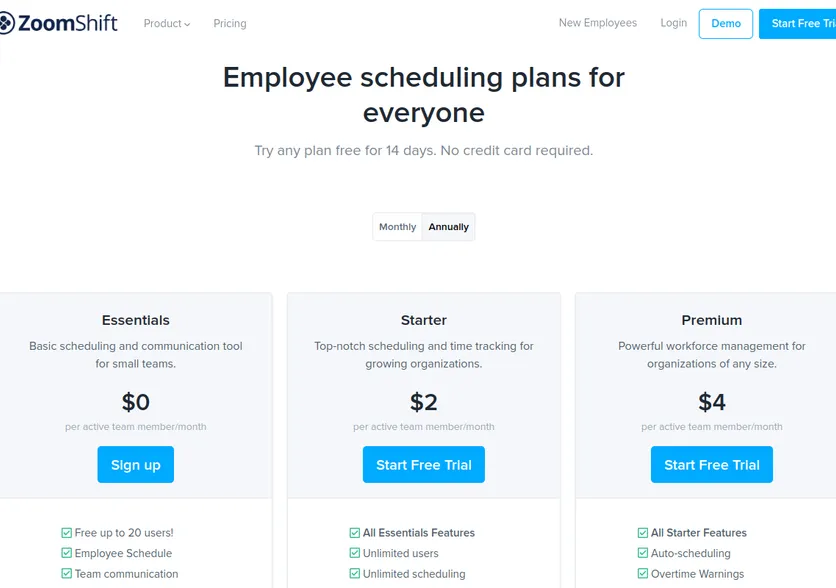
Paid tool Starting price: $2/active user/month · Two dollars per active user a month billed annually on Starter ($2.50 month to month); Premium is four dollars ($5 month to month); Essentials is free for up to twenty users at one location
Free plan: Free plan (up to 20 users, 1 location)
A small team that only pays for the people who actually work gets a fair deal here, because this ZoomShift plan costs two dollars per active user a month billed annually on Starter. Scheduling, time tracking and team messaging share one simple app, and the free Essentials plan covers up to twenty users at one location. It is the best pick in this list for a team with part-time staff who should not all count toward the bill.
What we like
- Only active users are billed, not the whole roster
- Free plan covers up to twenty users at one location
- Simple app that staff learn in minutes
Watch out for
- Fewer integrations than the bigger scheduling tools
- Payroll features are thinner than the rivals
How to try it
- Add staff and set their roles and availability
- Build the weekly schedule with drag and drop
- Publish the rota and let staff swap shifts in the app
Prices above were checked on each vendor’s own website on Nov 28, 2026 and can change — the vendor’s page is the final word. Vendor links are editorial: nobody paid to be listed or ranked here. Vendors who want a featured listing can see how it works on our Get listed page.
How to build a rota the team actually follows
Publish the schedule at the same time every week, because staff plan their lives around it and a late rota is the fastest way to lose trust. Collect availability and time-off requests in the app, not in a group chat, so nothing gets lost. Check the labour cost before publishing, since a rota that looks full can still blow the budget on overtime. Finally, let staff swap shifts with manager approval in the app, and keep one channel for schedule changes so nobody misses an update.
Before you buy
- Confirm the price per user or per location and whether a monthly minimum applies
- Check whether time tracking, payroll and messaging are included or paid add-ons
- Ask if shift swaps and time-off requests work from the employee phone app
- Make sure the schedule publishes cleanly and staff get notified of changes
- Test the tool with one location for two weeks before rolling it out everywhere
Official websites
Official websites of the products reviewed above. Features and prices were checked against these sites when this guide was written, and they can change, so confirm on the vendor site before you buy.
Frequently asked questions
What is the best software for managing employee shifts?
When I Work is the best overall pick for most small teams, because drag-and-drop scheduling, shift swaps and time-off requests all work from the staff phone app. It costs two dollars and fifty cents per user a month on Essentials for a single location. Sling is the cheapest paid start at one dollar and seventy cents a user a month, and Homebase suits single-location shops with a free plan for ten employees.
How much does employee scheduling software cost?
A small team can pay from one dollar and seventy cents per user a month for Sling Premium to five dollars for Deputy Lite, with most tools in this list between two and three dollars a user. Per-location tools cost more: Homebase Essentials is twenty-four dollars a location a month and 7shifts Essentials is thirty-nine dollars and ninety-nine cents. Free plans from Sling, Homebase, 7shifts and ZoomShift cover the smallest teams at no cost.
Is there free employee scheduling software?
Yes. Sling is free for up to thirty users, ZoomShift Essentials is free for up to twenty users at one location, Homebase Basic is free for one location with up to ten employees, and 7shifts Comp is free for one location with up to fifteen employees. Connecteam is free for up to ten users. Free plans cover scheduling and messaging, while time tracking and payroll usually need a paid tier.
Can staff see schedules and swap shifts on their phones?
Yes, most tools in this list publish schedules to a staff phone app and send a notification when a shift changes. When I Work, Deputy, Sling, Homebase and ZoomShift all let staff swap shifts and request time off from the app, with manager approval. Check the app reviews before buying, because the staff app is where the team lives every day.
Should I choose per-user or per-location pricing?
Pick the billing unit that matches the business: per-user pricing suits teams with few staff, while per-location pricing suits a busy site with many part-timers. Count the real monthly cost at the team's actual size, including any minimum spend or add-on for time tracking. Test with one location for two weeks, and check that payroll exports match the system the accountant already uses.
Compare the seven tools above, then start with a free plan or trial on the one that matches the team's size and locations before paying for a full year.
Browse Business Tools tools