On this page
Purchase orders turn a handshake into a paper trail, so a business knows what it ordered, what arrived and what it still owes. The eight tools below range from fifteen dollars a month to four hundred ninety-nine dollars, and they cover purchase orders, approvals, inventory and accounts payable. Every price was checked on the vendor site on November 27, 2026, and the list favours tools that keep ordering simple without losing control. BILL is our first pick — the best purchase order and payables tool for a growing business.
How we researched this
We started with the accounting and procurement tools small businesses actually buy, then read each price on the vendor pricing page on November 27, 2026 and noted the free plan or trial each one carries. We judged them for a small business that needs to raise purchase orders, track deliveries and pay suppliers without losing control. We dropped Procurify and Tipalti because neither publishes a list price, and we dropped Fishbowl because its pricing could not be verified.
Compare the tools
| Name | Best for | Starting price | Free plan | |
|---|---|---|---|---|
 BILL | Growing businesses that want purchase orders, approvals and payments in one payables tool | $49/user/month | Free Spend and Expense plan available | Visit |
 QuickBooks Online | Small businesses that want purchase orders tied to inventory and accounting | $140/month | No free plan; 30-day free trial | Visit |
 Xero | Small businesses that want simple purchase orders with strong accounting | $59/month | No free plan; 30-day free trial | Visit |
 Zoho Books | Small businesses that want purchase orders and inventory at the lowest price | $15/month | Free plan for businesses under $50,000 annual revenue | Visit |
 Sage Accounting | Small businesses that want purchase orders, inventory and multi-currency in one package | $50/month | No free plan; 30-day free trial | Visit |
 Katana | Makers and manufacturers that want purchase orders tied to production and stock | $299/month | Free plan, up to 30 SKUs | Visit |
 Odoo | Businesses that want purchase orders inside a full suite of business apps | $31.10/user/month | Free One App plan | Visit |
 Precoro | Growing businesses that want approval workflows and spend control on every purchase | $499/month | No free plan; free trial | Visit |
The accounting software for purchase orders, compared
1. BILL
Best for: Growing businesses that want purchase orders, approvals and payments in one payables tool
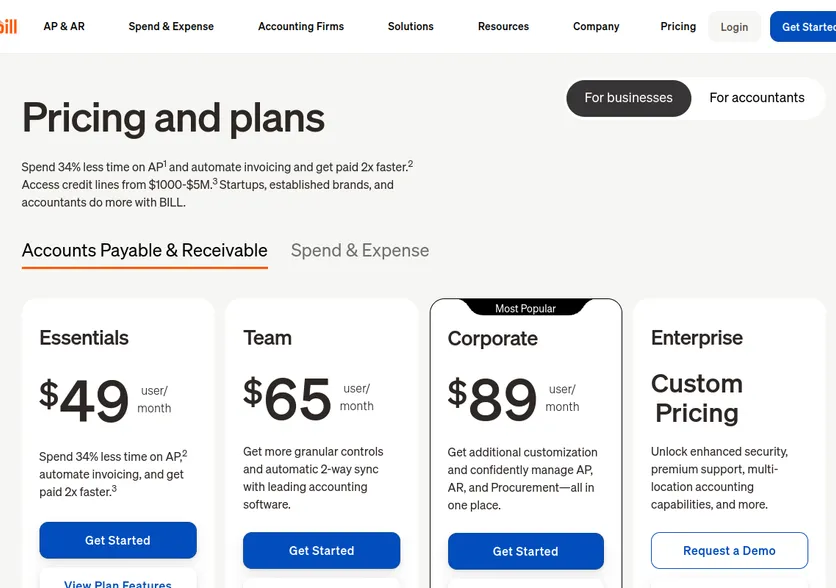
Paid tool Starting price: $49/user/month · Essentials plan, forty-nine dollars a user a month, with Team at sixty-five dollars and Corporate at eighty-nine dollars, plus a free Spend and Expense plan
Free plan: Free Spend and Expense plan available
BILL turns purchase orders into a controlled workflow, with approvals, vendor payments and accounting sync in one place. This BILL Essentials plan costs forty-nine dollars a user a month and covers purchase orders, bill pay and vendor management. A business can raise a purchase order, get it approved, receive the goods and pay the bill without retyping anything.
What we like
- Purchase orders, approvals and payments in one place
- Vendor management with payment tracking
- Free Spend and Expense plan for card spending
Watch out for
- Essentials syncs by CSV only, with two-way sync from Team
- Per-user pricing adds up fast for a big finance team
How to try it
- Open the BILL pricing page and compare the three paid plans
- Create a purchase order for your next supplier order
- Set an approval rule so nothing is paid without sign-off
2. QuickBooks Online
Best for: Small businesses that want purchase orders tied to inventory and accounting
Paid tool Starting price: $140/month · Plus plan, one hundred forty dollars a month, with Simple Start at thirty-eight dollars, Essentials at eighty-five dollars and Advanced at three hundred forty dollars
Free plan: No free plan; 30-day free trial
QuickBooks Online Plus handles purchase orders alongside inventory, so a business can order stock, receive it and pay the bill in one flow. This QuickBooks Online Plus plan costs one hundred forty dollars a month and adds inventory, class tracking and five users. A business can create a purchase order from a low-stock alert, receive the goods against it, and match the supplier bill before paying.
What we like
- Purchase orders tied to inventory levels
- Five users included on the Plus plan
- Supplier bills matched to orders before payment
Watch out for
- Plus costs one hundred forty dollars a month
- Prices rose in August 2026, so old guides quote less
How to try it
- Open the QuickBooks pricing page and start the thirty-day trial
- Turn on inventory and set a reorder point
- Create a purchase order from the low-stock alert
3. Xero
Best for: Small businesses that want simple purchase orders with strong accounting
Paid tool Starting price: $59/month · Growing plan, fifty-nine dollars a month, with Early at twenty-seven dollars and Established at ninety-seven dollars
Free plan: No free plan; 30-day free trial
Xero Growing adds purchase orders to its clean accounting core, which suits a small business that orders stock or services each week. This Xero Growing plan costs fifty-nine dollars a month and adds bill payments, expense claims and project tracking. A business can raise a purchase order, send it to the supplier, and copy it to a bill when the goods arrive, without retyping the lines.
What we like
- Purchase orders that copy straight to bills
- Unlimited users on every plan
- Clean reports that owners actually read
Watch out for
- No approval workflow on the Growing plan
- Inventory features are lighter than Katana or Odoo
How to try it
- Open the Xero pricing page and start the thirty-day trial
- Add your suppliers and their price lists
- Raise a purchase order and copy it to a bill on delivery
4. Zoho Books
Best for: Small businesses that want purchase orders and inventory at the lowest price
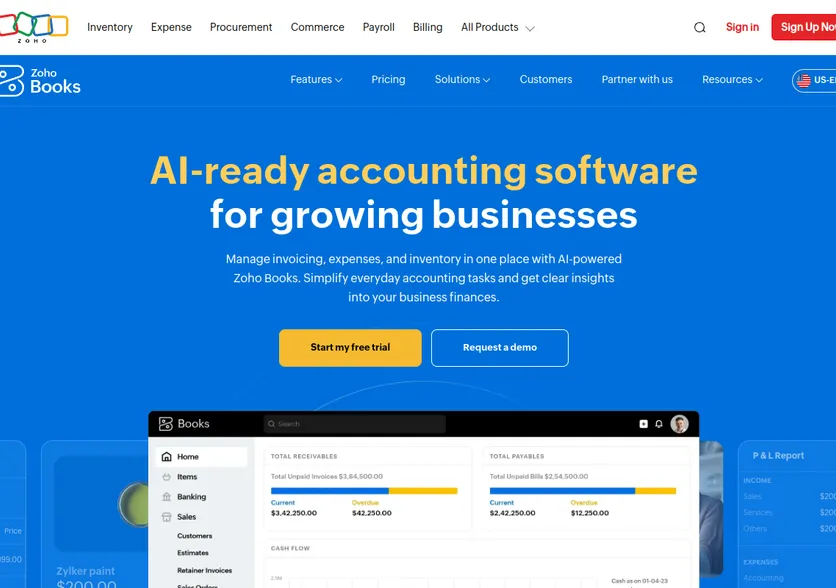
Paid tool Starting price: $15/month · Standard plan, fifteen dollars a month billed annually, or twenty dollars billed monthly, with Professional at forty dollars and Premium at sixty dollars
Free plan: Free plan for businesses under $50,000 annual revenue
Zoho Books Standard covers purchase orders, inventory and vendor credits for fifteen dollars a month, which is the cheapest way into this list. This Zoho Books Standard plan costs fifteen dollars a month billed annually and adds three users, invoicing and expense tracking. A small business can raise a purchase order, track the delivery and convert it to a bill, all inside the same accounting package.
What we like
- Lowest price in this comparison at fifteen dollars a month
- Purchase orders, inventory and vendor credits included
- Free plan for businesses under fifty thousand dollars revenue
Watch out for
- Standard plan covers only three users
- Approval workflows need the forty-dollar Professional plan
How to try it
- Open the Zoho Books pricing page and claim the free plan
- Add your suppliers and stock items
- Raise a purchase order and convert it to a bill on delivery
5. Sage Accounting
Best for: Small businesses that want purchase orders, inventory and multi-currency in one package
Paid tool Starting price: $50/month · Plus plan, fifty dollars a month, with Start at twenty dollars and Standard at forty dollars, and unlimited users on Plus
Free plan: No free plan; 30-day free trial
Sage Accounting Plus is the only Sage plan with purchase orders, and it adds inventory and multi-currency for fifty dollars a month. This Sage Accounting Plus plan costs fifty dollars a month and covers unlimited users with bank feeds and simple reports. A business can raise purchase orders, track stock and pay suppliers in several currencies, without paying per user.
What we like
- Unlimited users on the Plus plan
- Purchase orders with inventory and multi-currency
- Simple setup for a first accounting tool
Watch out for
- Purchase orders need the fifty-dollar Plus plan
- Reports are simpler than QuickBooks or Xero
How to try it
- Open the Sage Accounting page and start the thirty-day trial
- Add your suppliers and stock items
- Raise a purchase order and track the delivery
6. Katana
Best for: Makers and manufacturers that want purchase orders tied to production and stock
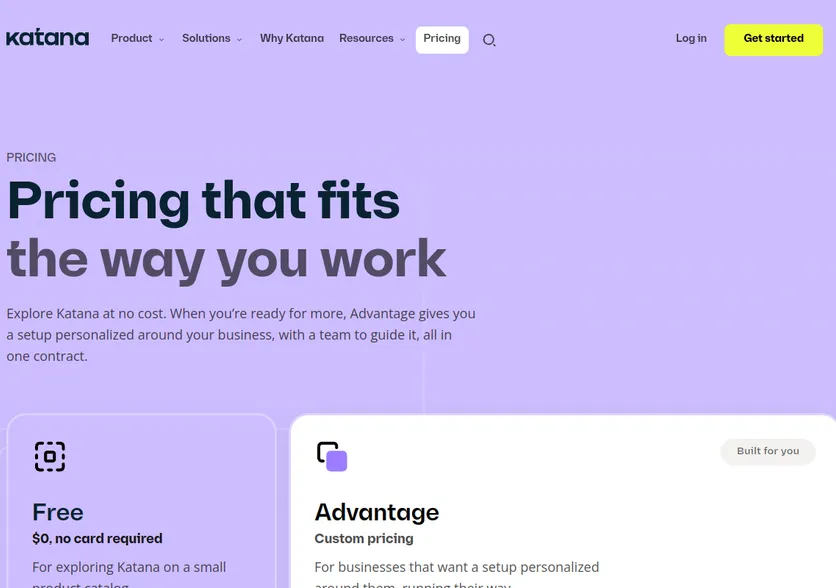
Paid tool Starting price: $299/month · Core plan, two hundred ninety-nine dollars a month, with paid add-ons for manufacturing, traceability and warehouse management, plus a free plan capped at thirty SKUs
Free plan: Free plan, up to 30 SKUs
Katana is built for makers and manufacturers, with purchase orders tied to production runs and stock levels in real time. This Katana Core plan costs two hundred ninety-nine dollars a month and covers purchase orders, inventory and sales orders. A manufacturer can raise a purchase order when raw materials run low, track the delivery against a production run, and see stock levels update as goods arrive.
What we like
- Purchase orders tied to production and stock
- Free plan for up to thirty SKUs
- Real-time stock levels as goods arrive
Watch out for
- Add-ons cost one hundred forty-nine to two hundred forty-nine dollars a month each
- Old guides quote one hundred seventy-nine dollars, which is stale
How to try it
- Open the Katana pricing page and claim the free plan
- Add your raw materials and finished products
- Raise a purchase order when a material runs low
7. Odoo
Best for: Businesses that want purchase orders inside a full suite of business apps
Paid tool Starting price: $31.10/user/month · Standard plan, thirty-one dollars and ten cents a user a month billed annually at list price, with a first-year discount of twenty-four dollars and ninety cents that should not be used as the headline
Free plan: Free One App plan
Odoo Standard puts purchase orders inside a full business suite, so ordering, inventory, sales and accounting share one database. This Odoo Standard plan costs thirty-one dollars and ten cents a user a month billed annually at list price, and the first-year discount is twenty-four dollars and ninety cents. A business can raise a purchase order, receive the stock, sell it and invoice it without leaving Odoo.
What we like
- Purchase orders inside a full business suite
- Free One App plan to start with
- Inventory, sales and accounting in one database
Watch out for
- List price is thirty-one dollars and ten cents, not the first-year discount
- Monthly billing costs thirty-eight dollars and ninety cents a user
How to try it
- Open the Odoo pricing page and claim the free One App plan
- Install the Purchase and Inventory apps
- Raise a purchase order and receive the stock against it
8. Precoro
Best for: Growing businesses that want approval workflows and spend control on every purchase
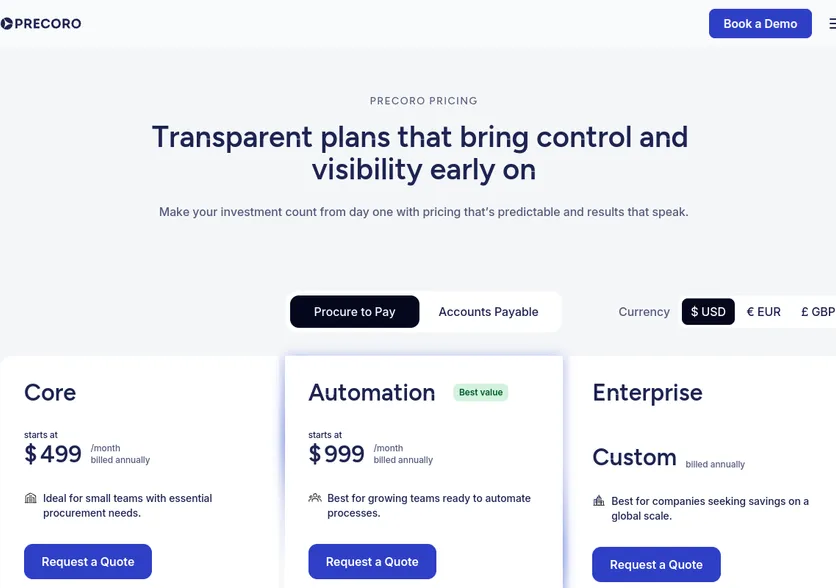
Paid tool Starting price: $499/month · Core plan, four hundred ninety-nine dollars a month flat billed annually, with Automation at nine hundred ninety-nine dollars and an AP Module at four hundred ninety-nine dollars
Free plan: No free plan; free trial
Precoro is a dedicated procurement tool, with purchase orders, approvals and budgets that stop rogue spending before it happens. This Precoro Core plan costs four hundred ninety-nine dollars a month flat billed annually and covers purchase orders, approvals and supplier management. A growing business can set a budget for each department, route every order through approval, and see exactly what was spent against it.
What we like
- Flat pricing with no per-user cost
- Approval workflows and budgets built in
- Spend control that stops rogue purchases
Watch out for
- Highest flat price in this comparison
- AP Module costs another four hundred ninety-nine dollars a month
How to try it
- Open the Precoro pricing page and start the free trial
- Set a budget for each department
- Raise a purchase order and route it through approval
Prices above were checked on each vendor’s own website on Nov 27, 2026 and can change — the vendor’s page is the final word. Vendor links are editorial: nobody paid to be listed or ranked here. Vendors who want a featured listing can see how it works on our Get listed page.
What purchase order software costs a small business in 2026
Purchase order software runs from fifteen dollars a month to four hundred ninety-nine dollars, and the price follows how much control you need. Zoho Books Standard at fifteen dollars a month and Xero Growing at fifty-nine dollars a month cover purchase orders inside accounting, while BILL Essentials at forty-nine dollars a user a month adds approvals and payments. Katana Core at two hundred ninety-nine dollars a month ties ordering to production, and Precoro Core at four hundred ninety-nine dollars a month flat adds budgets and approval workflows for a whole company.
Pick the tool that matches how much you order. If you order a few times a month, Zoho Books or Xero will cover it. If you order daily and need approvals, BILL or Precoro will pay for themselves. Run the free trial, raise a real purchase order, and check how fast it moves from request to approval to payment.
Before you buy
- Check whether purchase orders are included on the plan you pick, because Sage needs the fifty-dollar Plus plan and ZipBooks is not in this list.
- Count the users who need access, because BILL charges forty-nine dollars a user while Precoro charges a flat four hundred ninety-nine dollars a month.
- Use the list price, not the first-year discount, because Odoo Standard is thirty-one dollars and ten cents a user at list.
- Test the approval workflow during the trial, because approvals are the point of a procurement tool.
- Add the cost of add-ons, because Katana charges extra for manufacturing, traceability and warehouse management.
Official websites
Official websites of the products reviewed above. Features and prices were checked against these sites when this guide was written, and they can change, so confirm on the vendor site before you buy.
Frequently asked questions
What is the best accounting software for purchase orders in 2026?
BILL is the best overall pick, with purchase orders, approvals and payments at forty-nine dollars a user a month. QuickBooks Plus is the best option for tying orders to inventory at one hundred forty dollars a month. Precoro is the best dedicated procurement tool at four hundred ninety-nine dollars a month flat, with budgets and approval workflows.
How much does purchase order software cost?
Prices in this list run from fifteen dollars a month for Zoho Books Standard to four hundred ninety-nine dollars a month for Precoro Core, with most tools between forty-nine and one hundred forty dollars. BILL Essentials costs forty-nine dollars a user a month, Katana Core costs two hundred ninety-nine dollars, and Odoo Standard costs thirty-one dollars and ten cents a user a month.
What is a purchase order?
A purchase order is a formal request to a supplier, listing what you want to buy, how many, and at what price. The supplier confirms it, ships the goods, and bills against it, so the business can match the bill to the order before paying. The tools in this list create the order, track the delivery and link it to the bill.
Do I need approvals for purchase orders?
Approvals matter once more than one person can order, because they stop duplicate and unbudgeted spending before it happens. BILL and Precoro both offer approval workflows, while Zoho Books and Xero cover the order itself. A small business with one buyer can skip approvals, while a growing team should not.
Is there a free purchase order tool?
Yes, Zoho Books has a free plan for businesses under fifty thousand dollars of annual revenue, Katana has a free plan for up to thirty SKUs, and Odoo has a free One App plan. BILL has a free Spend and Expense plan for card spending. The other tools here offer a free trial, which is enough time to raise a real order.
Need everyday finance help too? Try Toolsvine's free finance tools right in your browser.
Browse Finance Calculators tools