
On this page
When a critical service goes down at 3 a.m., the tool that pages you matters more than the tool that monitors it. PagerDuty leads this list because it turned alerting into a reliable craft, but the best critical event platform for your team depends on price, AI triage, and how it handles the handoff. We checked seven paid platforms on their own pricing pages and compared free plans, response features, and the real cost per responder.
How we researched this
We read each vendor pricing page on November 26, 2026 and kept only tools with a published starting price. We then weighed alert routing, AI triage, on-call schedules, and how clearly each tool shows who owns the incident.
Compare the tools
| Name | Best for | Starting price | Free plan | |
|---|---|---|---|---|
 PagerDuty | Teams running serious on-call rotations | $21/user/month | Free plan with basic alerting | Visit |
 ilert | Small teams that want enterprise-grade alerting | $19/user/month | Free plan for up to 5 users | Visit |
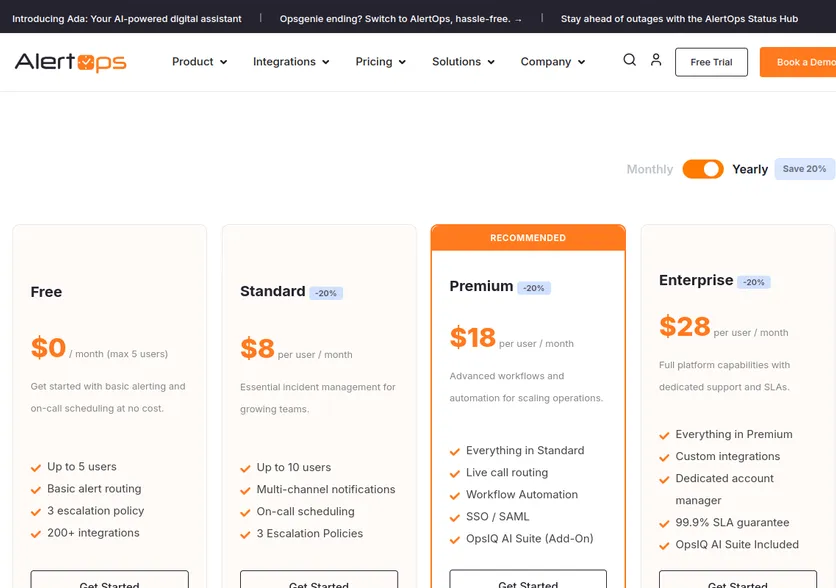
 AlertOps | Teams that want simple, cheap, reliable alerting | $10/user/month | Free plan with basic alerting | Visit |
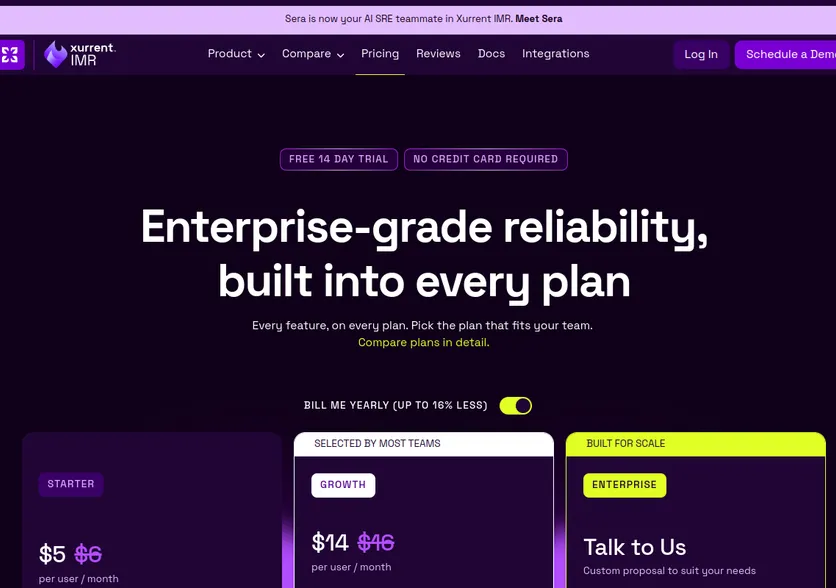
 Zenduty | Small teams on the tightest budget | $6/user/month | Free plan for up to 5 users | Visit |
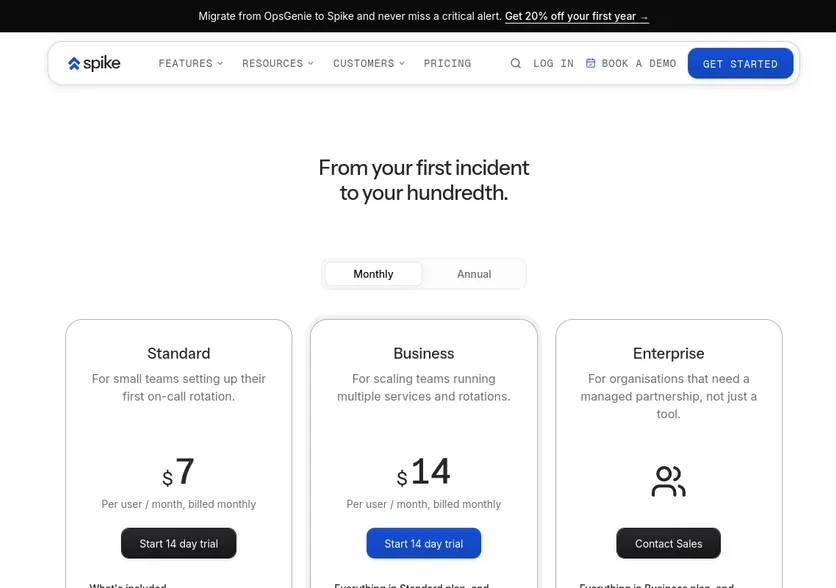
 Spike.sh | Teams that want incident tools with zero learning curve | $7/user/month | Free plan with basic alerting | Visit |
 SIGNL4 | Field teams and mobile-first responders | $9/user/month | Free trial, no free plan | Visit |
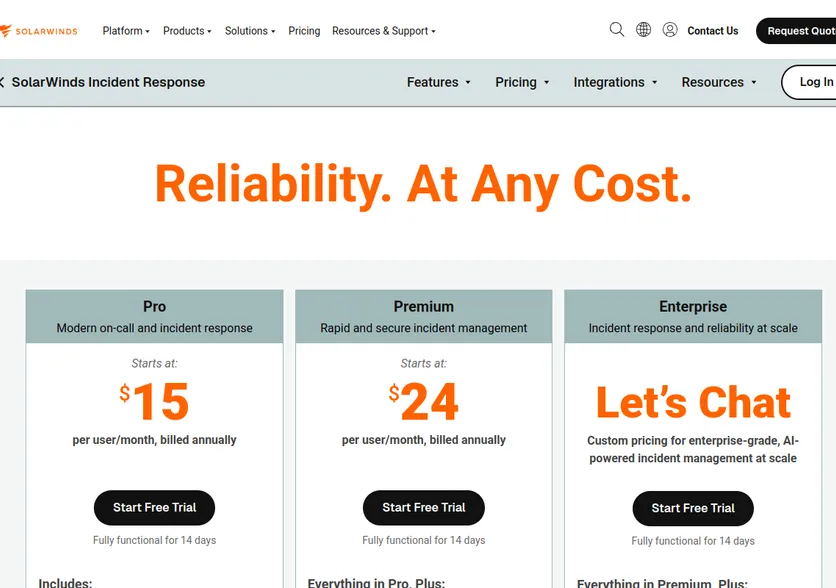
 Squadcast | Teams that want runbooks plus on-call schedules | $15/user/month | Free trial, no free plan | Visit |
The 7 best AI critical event management platforms
1. PagerDuty
Best for: Teams running serious on-call rotations
Paid tool Starting price: $21/user/month · Professional plan billed annually
Free plan: Free plan with basic alerting
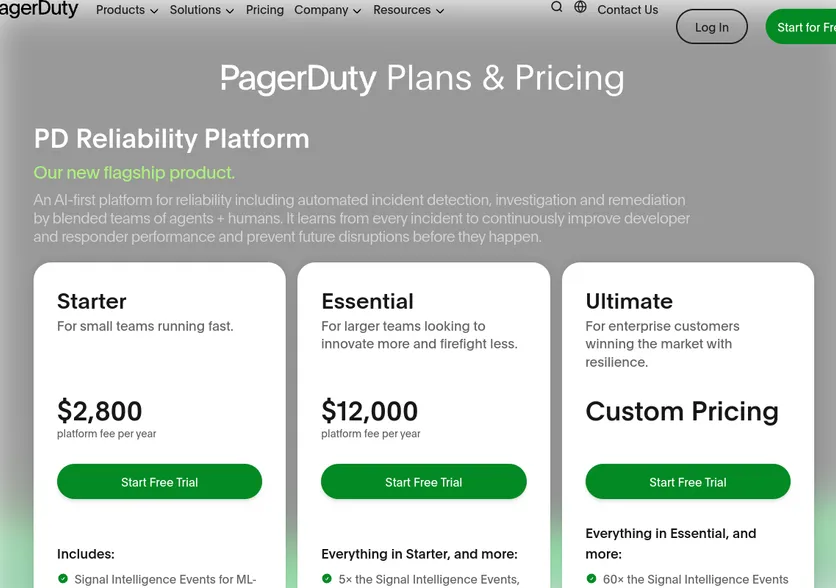
PagerDuty is the standard every other incident tool is measured against, and its routing still feels the most dependable. This PagerDuty Professional plan adds advanced escalation, event orchestration, and AI triage for twenty-one dollars a user each month. It costs more than the challengers here, but teams that run real on-call rotations rarely regret paying for it.
What we like
- Most dependable alert delivery here
- Strongest escalation and routing rules
- AI triage that actually cuts noise
Watch out for
- Pricier than the challengers here
- New platform tiers add complexity
How to try it
- Connect your monitoring tool and send a test alert
- Set up escalation policies for your on-call team
- Run a trial incident and check the response timeline
2. ilert
Best for: Small teams that want enterprise-grade alerting
Paid tool Starting price: $19/user/month · Pro plan; yearly billing saves 20 percent
Free plan: Free plan for up to 5 users
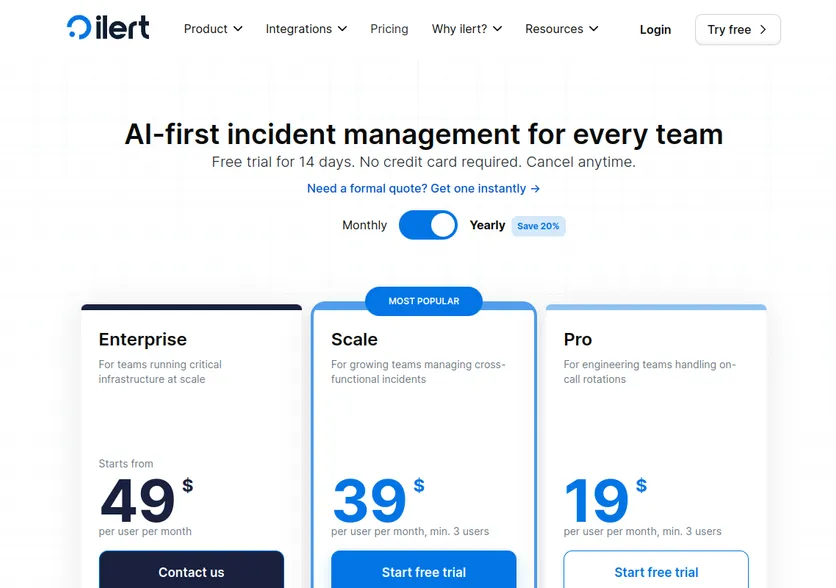
ilert brings enterprise-grade alerting to smaller teams at a price they can actually afford. This ilert Pro plan adds unlimited alerts, on-call schedules, and integrations for nineteen dollars a user each month. It is the best value here for teams that need serious alerting without a PagerDuty-sized bill.
What we like
- Best value for serious alerting
- Unlimited alerts on the Pro plan
- Fast setup with clear docs
Watch out for
- Three-user minimum on paid plans
- Smaller integration list than PagerDuty
How to try it
- Connect your monitoring tool with one click
- Build your on-call schedule and rotation
- Test an alert end to end before going live
3. AlertOps
Best for: Teams that want simple, cheap, reliable alerting
Paid tool Starting price: $10/user/month · Standard plan
Free plan: Free plan with basic alerting
AlertOps focuses on one job and does it well: getting the right alert to the right person without noise. This AlertOps Standard plan adds unlimited alerts, escalation policies, and integrations for ten dollars a user each month. It is the cheapest serious incident tool here, though it lacks the AI triage of the pricier options.
What we like
- Cheapest serious incident tool here
- Very simple to set up and run
- Unlimited alerts on Standard
Watch out for
- No AI triage on this tier
- Fewer analytics than pricier rivals
How to try it
- Add your first integration and send a test alert
- Set escalation rules for each service
- Review the alert log after your first week
4. Zenduty
Best for: Small teams on the tightest budget
Paid tool Starting price: $6/user/month · Starter plan billed yearly
Free plan: Free plan for up to 5 users
Zenduty, now part of Xurrent, turns alert noise into a clear incident queue with sensible routing rules. This Zenduty Starter plan adds unlimited alerts, on-call schedules, and basic integrations for six dollars a user each month. It is the lowest-priced option on this list, though the rebrand means its roadmap now runs through Xurrent.
What we like
- Lowest price on this list
- Clean incident queue and routing
- Good value for tiny teams
Watch out for
- Rebrand to Xurrent adds uncertainty
- Fewer integrations than PagerDuty
How to try it
- Connect your monitoring alerts in one place
- Build a rotation for your on-call team
- Check the incident queue after your first alert
5. Spike.sh
Best for: Teams that want incident tools with zero learning curve
Paid tool Starting price: $7/user/month · Standard plan billed monthly
Free plan: Free plan with basic alerting
Spike keeps incident management simple, with clean schedules and alerts that reach you on any channel. This Spike Standard plan adds unlimited alerts, escalation policies, and status pages for seven dollars a user each month. It is the easiest tool here to set up, though it has fewer AI features than PagerDuty or ilert.
What we like
- Easiest setup on this list
- Alerts reach any channel you use
- Built-in status pages included
Watch out for
- Fewer AI features than rivals
- Smaller team behind the product
How to try it
- Create your team and add an on-call schedule
- Connect Slack, email, or phone alerts
- Publish a status page for your customers
6. SIGNL4
Best for: Field teams and mobile-first responders
Paid tool Starting price: $9/user/month · Notify and Connect plan
Free plan: Free trial, no free plan
SIGNL4 is built for mobile-first teams, pushing alerts to phones with one-tap acknowledge and escalation. This SIGNL4 Notify and Connect plan adds unlimited alerts, on-call duty planning, and team messaging for nine dollars a user each month. It is the best pick here for field teams and factories, though desk-based teams may prefer a web-first tool.

What we like
- Best mobile alerting here
- One-tap acknowledge and escalation
- Strong fit for field and factory teams
Watch out for
- Mobile-first means weaker web tools
- No free plan, only a trial
How to try it
- Install the mobile app and join your team
- Set up duty planning for your responders
- Send a test alert and acknowledge it from your phone
7. Squadcast
Best for: Teams that want runbooks plus on-call schedules
Paid tool Starting price: $15/user/month · Pro plan billed annually
Free plan: Free trial, no free plan
Squadcast, now SolarWinds Incident Response, combines on-call schedules with incident timelines your team can actually read. This Squadcast Pro plan adds unlimited alerts, runbooks, and analytics for fifteen dollars a user each month. It sits in the middle on price and features, with the rebrand to SolarWinds as the one thing to watch.
What we like
- Readable incident timelines
- Runbooks built into the workflow
- Solid middle-ground price
Watch out for
- Rebrand to SolarWinds adds uncertainty
- No free plan, only a trial
How to try it
- Import your on-call schedule from a spreadsheet
- Write your first runbook for a common outage
- Review analytics after your first month
Prices above were checked on each vendor’s own website on Nov 26, 2026 and can change — the vendor’s page is the final word. Vendor links are editorial: nobody paid to be listed or ranked here. Vendors who want a featured listing can see how it works on our Get listed page.
How to run on-call without burning out your team
How to run on-call without burning out your team
Rotate fairly and keep the rotation short. Nobody should carry the pager for a whole month, and nobody should draw the holiday week twice in a row. Most of the tools here let you swap shifts in a tap, so use that feature instead of letting one person quietly absorb every bad week.
Then cut the noise before it reaches a human. Tune your monitoring so only real incidents page anyone, and let AI triage cluster the duplicates. A pager that cries wolf every night teaches your team to ignore it, and the night it matters is the night nobody answers.
Before you buy
- Does the tool page the right person first, or does every alert wake the whole team?
- Can it suppress duplicate alerts, or will one outage send fifty notifications?
- Does it offer AI triage that actually reduces noise, or just renames the dashboard?
- Are on-call schedules fair and easy to swap, or does one person always draw the short straw?
- Can it post a status page automatically, or does someone have to update customers by hand?
Official websites
Official websites of the products reviewed above. Features and prices were checked against these sites when this guide was written, and they can change, so confirm on the vendor site before you buy.
Frequently asked questions
What is critical event management software?
Critical event management software detects major incidents, alerts the right responders, and tracks the response until service is restored. It sits above monitoring tools, turning raw alerts into a coordinated incident with an owner, a timeline, and a status page. The tools on this list add AI triage to cut noise before a human ever sees it.
How is AI used in critical event management?
AI in these tools clusters duplicate alerts into one incident, suggests the likely cause, and routes the page to the person most likely to fix it. PagerDuty and ilert both add AI triage on paid plans, while cheaper tools like AlertOps and Spike.sh focus on clean routing instead. AI helps most in noisy environments where one outage triggers dozens of alerts.
Do I need PagerDuty or will a cheaper tool work?
PagerDuty is worth it when you run real on-call rotations with complex escalation rules and need the most dependable delivery. For teams under twenty people, ilert at nineteen dollars or AlertOps at ten dollars covers the same core job for far less. Start cheap and move to PagerDuty when your incident volume outgrows simple routing.
What does critical event management cost for a small team?
A team of five can start on Zenduty at six dollars a user, or about thirty dollars a month, with unlimited alerts included. ilert Pro for five costs ninety-five dollars a month with a three-user minimum, while PagerDuty Professional for five is one hundred and five dollars. Most small teams land between thirty and one hundred dollars a month.
Can critical event tools replace our monitoring?
No, these tools respond to incidents rather than detecting them. You still need monitoring to notice a service is down, and the event platform takes over from there with alerting, escalation, and status pages. Most teams pair a monitoring tool like Datadog or Prometheus with one of the platforms on this list.
Trial the tool that matches your team size this week, page yourself once on purpose, then pay for the one that woke the right person.
Browse Business Tools tools


