
On this page
A criminal defense call at midnight is a client you either sign or lose to the next firm, so intake has to answer fast, capture the facts and get a fee agreement signed. The eight tools below cover law firm intake from first call to signed retainer, with prices checked on the vendor sites on November 27, 2026. Some are built for law firms, while others are form and scheduling tools that slot into a defense practice. Clio Grow is our first pick — the intake front end that pairs with the case management most defense firms already run.
How we researched this
We started with the intake tools criminal defense firms actually buy, then read each price on the vendor pricing page on November 27, 2026 and noted the trial each plan carries. We judged them for a defense practice that fields urgent calls at odd hours and needs conflict checks, fee agreements and fast follow up before a prospect calls another lawyer. We dropped Filevine and Litify because both are quote-only, and Lead Docket because it publishes no price.
Compare the tools
| Name | Best for | Starting price | Free plan | |
|---|---|---|---|---|
 Clio Grow | Criminal defense firms that want intake and case management from one vendor | $59/user/month | No free plan; free trial available | Visit |
| Lawmatics | Defense firms that want intake automation with CRM and marketing follow up | $199/month | No free plan; demo available | Visit |
 MyCase | Small defense firms that want intake, billing and a client portal in one plan | $50/user/month | No free plan; free trial available | Visit |
 PracticePanther | Defense firms that want intake forms, payments and two-way texting in one system | $49/user/month | No free plan; free trial available | Visit |
 Lawcus | Budget-conscious defense firms that want visual intake pipelines | $39/user/month | No free plan; free trial available | Visit |
 Jotform | Defense firms that need flexible intake forms without a full practice system | $34/month | Free Starter plan with limited submissions | Visit |
 Typeform | Defense firms that want conversational intake forms prospects actually finish | $25/month | Free plan available with limited responses | Visit |
 Calendly | Defense firms that want prospects to book a consultation without phone tag | $10/user/month | Free Basic plan for one user | Visit |
The client intake software for criminal defense firms, compared
1. Clio Grow
Best for: Criminal defense firms that want intake and case management from one vendor
Paid tool Starting price: $59/user/month · Fifty-nine dollars per user per month billed annually, or sixty-nine dollars month to month; forty-nine dollars per user per month as an add-on for existing Clio Manage customers on Essentials or Advanced
Free plan: No free plan; free trial available
Clio Grow is the intake front end for the case management system most criminal defense firms already know, turning web forms, phone calls and referrals into matters with conflict checks and e-signature built in. This Clio Grow plan lists at fifty-nine dollars per user per month billed annually, with a lower add-on rate for firms already running Clio Manage. A defense firm that takes calls at all hours gets intake forms, automated follow up and a signed fee agreement without retyping client details into a second system.

What we like
- Intake and case management from one vendor
- Conflict checks and e-signature built in
- Automated follow up for prospects who go quiet
Watch out for
- Per-user pricing adds up fast for a large intake team
- The cheapest add-on rate needs an existing Clio Manage plan
How to try it
- Open the Clio Grow page and start the free trial
- Build an intake form with your practice areas and fee agreement
- Connect it to Clio Manage so signed clients flow into matters
2. Lawmatics
Best for: Defense firms that want intake automation with CRM and marketing follow up
Paid tool Starting price: $199/month · Last published prices: Lite one hundred ninety-nine dollars a month flat and Pro two hundred ninety-nine dollars a month flat, billed annually; the vendor no longer publishes prices on its pricing page
Free plan: No free plan; demo available
Lawmatics is the intake-focused CRM built for law firms, with pipelines, automated messages and e-signature that keep a prospect moving from first call to signed client. This Lawmatics Lite plan last listed at one hundred ninety-nine dollars a month flat, with Pro at two hundred ninety-nine dollars a month flat on annual billing. A criminal defense firm can track every call, text and form in one pipeline instead of losing prospects in a shared inbox.

What we like
- Intake CRM built only for law firms
- Flat monthly pricing with no per-user charge
- Automated follow up across calls, texts and email
Watch out for
- The vendor no longer publishes prices, so confirm the rate on a call
- Full intake automation needs the higher Pro plan
How to try it
- Book a Lawmatics demo and map your intake pipeline
- Set up automated texts for prospects who do not answer
- Connect e-signature so fee agreements go out the same day
3. MyCase
Best for: Small defense firms that want intake, billing and a client portal in one plan
Paid tool Starting price: $50/user/month · Fifty dollars per user per month billed annually, or sixty dollars month to month; Pro lists at one hundred dollars and Advanced at one hundred thirty dollars per user per month
Free plan: No free plan; free trial available
MyCase pairs intake forms and lead tracking with billing, documents and a client portal, so a small defense firm can run the whole matter from one login. This MyCase Basic plan lists at fifty dollars per user per month billed annually, with Pro and Advanced above it for firms that need more automation. A solo defender gets online payments, texting and document sharing without buying three separate tools.

What we like
- Intake, billing and portal in one plan
- Online payments and texting included
- Simple enough for a solo practice to run alone
Watch out for
- Per-user pricing grows with every hire
- Advanced intake automation needs the higher plans
How to try it
- Start the MyCase trial and add your intake form
- Set up online payments and texting for new clients
- Invite signed clients to the portal for documents and updates
4. PracticePanther
Best for: Defense firms that want intake forms, payments and two-way texting in one system
Paid tool Starting price: $49/user/month · Forty-nine dollars per user per month billed annually, or fifty-nine dollars month to month; Essential lists at sixty-nine dollars, Business at eighty-nine and Business Pro at one hundred fourteen dollars per user per month
Free plan: No free plan; free trial available
PracticePanther is a practice management system with intake forms, lead tracking and two-way texting, aimed at firms that want the front door and the back office in one place. This PracticePanther Solo plan lists at forty-nine dollars per user per month billed annually, with higher tiers adding automation and reporting. A defense firm can take a call, send a fee agreement and collect payment without switching tools.

What we like
- Intake forms, texting and payments in one system
- Lowest entry price among the full practice tools here
- Clean interface that new staff learn fast
Watch out for
- Solo plan is limited to one user
- Deeper automation waits for the Business tiers
How to try it
- Start the PracticePanther trial and build your intake form
- Turn on two-way texting for prospects and clients
- Send a fee agreement and collect the first payment online
5. Lawcus
Best for: Budget-conscious defense firms that want visual intake pipelines
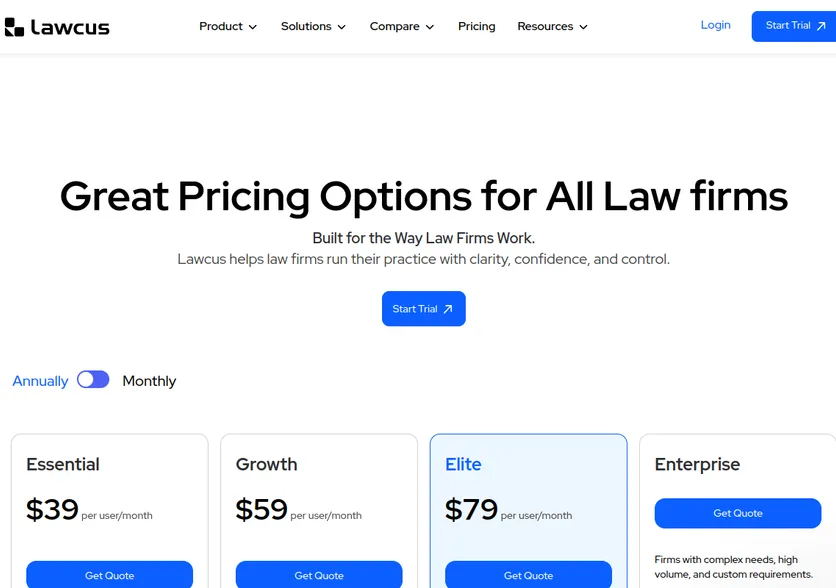
Paid tool Starting price: $39/user/month · Thirty-nine dollars per user per month billed annually, or forty-nine dollars month to month; Growth lists at fifty-nine dollars and Elite at seventy-nine dollars, and intake forms with lead pipelines need Elite
Free plan: No free plan; free trial available
Lawcus runs intake as a visual pipeline, so a defense firm can see every prospect at a glance and drag each one from first call to signed client. This Lawcus Essential plan lists at thirty-nine dollars per user per month billed annually, the cheapest law firm entry here. The catch is that intake forms and lead pipelines need the Elite plan, so budget for seventy-nine dollars per user per month if forms are the point.
What we like
- Cheapest law firm entry price in this comparison
- Visual pipeline shows every prospect at a glance
- Unlimited matters and documents on every plan
Watch out for
- Intake forms and lead pipelines need the Elite plan
- Smaller vendor with fewer integrations than Clio or MyCase
How to try it
- Start the Lawcus trial and set up your intake pipeline
- Add intake forms on the Elite plan and link them to stages
- Move prospects through the pipeline until the fee agreement is signed
6. Jotform
Best for: Defense firms that need flexible intake forms without a full practice system
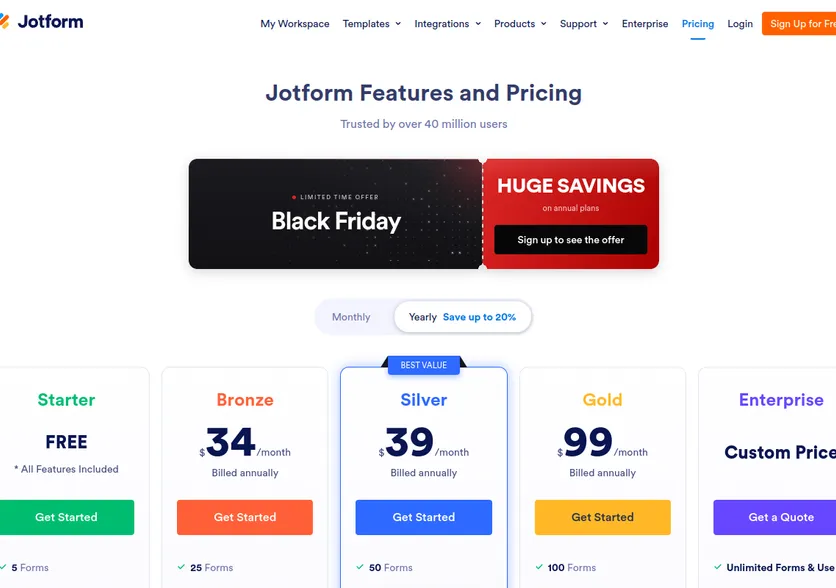
Paid tool Starting price: $34/month · Thirty-four dollars a month billed annually, or thirty-nine dollars month to month; a free Starter plan exists with limited submissions
Free plan: Free Starter plan with limited submissions
Jotform is a form builder that defense firms use for intake questionnaires, conflict check forms and fee agreement signing, without buying a full practice platform. This Jotform Bronze plan lists at thirty-four dollars a month billed annually, and a free Starter plan covers light use. A firm can publish a detailed intake form tonight and have answers land in an inbox or a spreadsheet by morning.
What we like
- Free Starter plan for light intake volume
- Thousands of templates, including legal intake forms
- E-signature and payments without a second tool
Watch out for
- No case management, so matters live elsewhere
- Submission caps on the cheaper plans
How to try it
- Open Jotform and pick an intake form template
- Add your questions, conflict check and e-signature field
- Share the link on your site and in text replies
7. Typeform
Best for: Defense firms that want conversational intake forms prospects actually finish
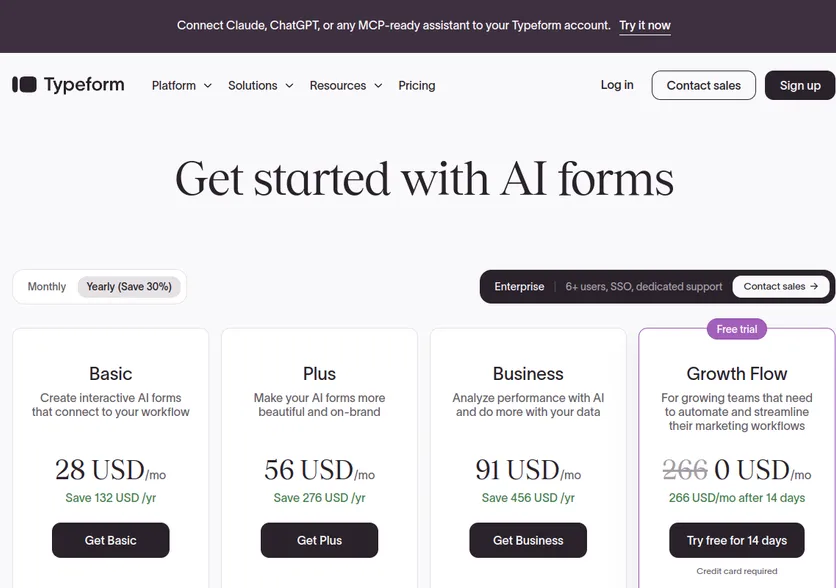
Paid tool Starting price: $25/month · Twenty-five dollars a month billed annually, or twenty-nine dollars month to month; Plus lists at fifty dollars and Business at eighty-three dollars a month
Free plan: Free plan available with limited responses
Typeform turns intake into a one-question-at-a-time conversation, which suits defense prospects who start a long form on a phone and abandon it halfway. This Typeform Basic plan lists at twenty-five dollars a month billed annually, with Plus and Business above it. A firm that loses prospects to long static forms can get more completed intakes with the same questions asked one at a time.
What we like
- Conversational forms that prospects finish more often
- Logic jumps that tailor questions to the case
- Clean mobile experience for phone-first clients
Watch out for
- No legal-specific features like conflict checks
- Response limits on the cheaper plans
How to try it
- Open Typeform and build a conversational intake form
- Add logic jumps so questions match the charge type
- Connect responses to your CRM or inbox
8. Calendly
Best for: Defense firms that want prospects to book a consultation without phone tag
Paid tool Starting price: $10/user/month · Ten dollars per user per month billed annually, or twelve dollars month to month; Teams lists at sixteen dollars per user per month billed annually
Free plan: Free Basic plan for one user
Calendly lets a prospect book a consultation straight from your site or a text message, cutting the phone tag that loses urgent defense calls. This Calendly Standard plan lists at ten dollars per user per month billed annually, with a free Basic plan for a single user. A defense firm can offer same-day slots, collect intake answers at booking and send reminders that cut no-shows.

What we like
- Cheapest paid start in this comparison
- Free Basic plan covers a solo lawyer
- Reminders that cut consultation no-shows
Watch out for
- Scheduling only, so intake answers live elsewhere
- Team routing and round robin need the Teams plan
How to try it
- Open Calendly and set your consultation event type
- Add intake questions to the booking form
- Share the link on your site, in texts and in email signatures
Prices above were checked on each vendor’s own website on Nov 27, 2026 and can change — the vendor’s page is the final word. Vendor links are editorial: nobody paid to be listed or ranked here. Vendors who want a featured listing can see how it works on our Get listed page.
How to pick intake software for a criminal defense firm
Start with the call, not the software. A defense prospect usually rings once, often late, and hires the first firm that answers with a clear next step, so speed matters more than features. Pick the tool that gets a form in front of the caller fastest, then sends a fee agreement the same night.
Count the real monthly cost before you buy. Per-user plans look cheap at one seat and double when the paralegal and the intake coordinator join, while flat-rate tools stay steady as the team grows. Add the plan that actually includes intake forms, because some vendors charge the top tier for the feature you bought the tool for. Run a real prospect through the form on a phone, time how long it takes, and check the fee agreement lands signed without a second login.
Before you buy
- Match the tool to your intake volume, because a per-user price that looks cheap doubles once the whole team is on it.
- Check whether intake forms are included, because some vendors gate forms and lead pipelines behind the top plan.
- Confirm e-signature is built in, because a fee agreement that needs a second tool slows every signing.
- Test the form on a phone, because most defense prospects start intake on a mobile and abandon long forms.
- Ask how fast a missed call gets a reply, because the first firm to text back usually signs the client.
Official websites
Official websites of the products reviewed above. Features and prices were checked against these sites when this guide was written, and they can change, so confirm on the vendor site before you buy.
Frequently asked questions
Which client intake software is best for criminal defense firms in 2026?
Clio Grow is the best overall pick at fifty-nine dollars per user per month billed annually, because it pairs intake with the case management most defense firms already run, with conflict checks and e-signature built in. Lawmatics is the best intake-only CRM for firms that want a dedicated pipeline. Calendly is the best budget pick at ten dollars per user per month for firms that mainly need prospects to book a consultation fast.
How much does client intake software cost for a criminal defense firm?
Law firm intake tools in this list run from ten dollars per user per month for Calendly to one hundred ninety-nine dollars a month flat for Lawmatics Lite, with most full practice tools between thirty-nine and fifty-nine dollars per user per month billed annually. Form tools are cheaper: Jotform lists at thirty-four dollars a month and Typeform at twenty-five dollars a month. Budget for the tier that includes intake forms, because some vendors gate them behind the top plan.
Do I need a law firm system, or will a form tool do?
A form tool is enough if you only need answers collected, because Jotform and Typeform both handle intake questionnaires and e-signature at a low monthly price. A law firm system earns its price when you need conflict checks, matter creation and fee agreements in the same place, so signed clients flow straight into a case file. Solo defenders often start with a form tool and move to Clio Grow or MyCase once volume grows.
Is there a free client intake tool for criminal defense firms?
Yes, with limits. Jotform has a free Starter plan, Typeform has a free plan and Calendly has a free Basic plan for one user, so a solo defender can collect intake answers and book consultations without paying. The free plans cap submissions or responses, so a busy firm outgrows them fast. None of the full law firm systems here has a permanent free plan, though most offer a free trial.
What should a criminal defense intake form ask?
Ask for the charge, the court and the next hearing date first, because those three answers decide urgency and conflict checks. Then collect contact details, a short account of what happened and whether the caller has a lawyer already. Keep it short enough to finish on a phone, and end with a booking link or a promise of a callback time, because a form with no next step loses the client.
Need everyday business help too? Try Toolsvine's free business tools right in your browser.
Browse Business Tools tools