
On this page
A workers comp client is hurt, worried about the job and calling from a phone, so intake has to be short, kind and fast. The eight tools below cover workers comp intake from the first call to a signed fee agreement, with prices checked on the vendor sites on November 27, 2026. One is built only for injury work, while the rest are law firm and form tools that adapt to it. CASEpeer is our first pick — the case tool whose intake captures the injury, the employer and the medical providers in one pass.
How we researched this
We started with the intake tools workers compensation firms actually buy, then read each price on the vendor pricing page on November 27, 2026 and noted the trial each plan carries. We judged them for a practice that hears from injured workers who usually complete intake on a phone, and needs medical records, incident reports and hearing dates captured fast. We dropped Filevine and Litify because both are quote-only, and Lead Docket because it publishes no price.
Compare the tools
| Name | Best for | Starting price | Free plan | |
|---|---|---|---|---|
 CASEpeer | Workers comp firms that want intake built around injury cases | $90/user/month | No free plan; demo available | Visit |
 Clio Grow | Workers comp firms that want intake and case management from one vendor | $59/user/month | No free plan; free trial available | Visit |
| Lawmatics | Workers comp firms that want a dedicated intake pipeline with automated follow up | $199/month | No free plan; demo available | Visit |
 MyCase | Small workers comp firms that want intake, billing and a client portal in one plan | $50/user/month | No free plan; free trial available | Visit |
 PracticePanther | Workers comp firms that want intake forms, payments and two-way texting in one system | $49/user/month | No free plan; free trial available | Visit |
 Smokeball | Workers comp firms that want intake with strong document handling | $49/user/month | No free plan; demo available | Visit |
 Jotform | Workers comp firms that need detailed intake questionnaires without a full practice system | $34/month | Free Starter plan with limited submissions | Visit |
 Calendly | Workers comp firms that want injured workers to book a consultation without phone tag | $10/user/month | Free Basic plan for one user | Visit |
The client intake software for workers compensation law firms, compared
1. CASEpeer
Best for: Workers comp firms that want intake built around injury cases
Paid tool Starting price: $90/user/month · Ninety dollars per user per month for Basic; Pro lists at one hundred thirty dollars and Advanced at one hundred sixty dollars per user per month
Free plan: No free plan; demo available
CASEpeer is the case tool built for personal injury and workers comp, with intake that captures the injury, the employer and the medical providers in one pass. This CASEpeer Basic plan lists at ninety dollars per user per month, with Pro and Advanced above it for larger teams. A workers comp firm gets intake answers that land in the matter file, instead of retyping the same facts from a generic form.
What we like
- Built for injury and workers comp cases
- Matter tracking from intake to settlement
- Case value reporting for partners
Watch out for
- Injury only, so it cannot run a general practice
- Higher entry price than the general practice tools
How to try it
- Book a CASEpeer demo and map your intake questions
- Set up intake forms for injury, employer and medical details
- Track hearings and settlement values in the matter file
2. Clio Grow
Best for: Workers comp firms that want intake and case management from one vendor
Paid tool Starting price: $59/user/month · Fifty-nine dollars per user per month billed annually, or sixty-nine dollars month to month; forty-nine dollars per user per month as an add-on for existing Clio Manage customers on Essentials or Advanced
Free plan: No free plan; free trial available
A workers comp call often comes from a hospital bed or a break room, and Clio Grow keeps the first form short so an injured worker can finish it on a phone. This Clio Grow plan lists at fifty-nine dollars per user per month billed annually, with a lower add-on rate for firms already running Clio Manage. Intake forms, conflict checks and e-signature sit beside the matter file, so a signed client moves from first call to case work without retyping.

What we like
- Intake and case management from one vendor
- Conflict checks and e-signature built in
- Automated follow up for prospects who go quiet
Watch out for
- Per-user pricing adds up fast for a large intake team
- The cheapest add-on rate needs an existing Clio Manage plan
How to try it
- Open the Clio Grow page and start the free trial
- Build intake forms for injury, employer and medical details
- Connect it to Clio Manage so signed clients flow into matters
3. Lawmatics
Best for: Workers comp firms that want a dedicated intake pipeline with automated follow up
Paid tool Starting price: $199/month · Last published prices: Lite one hundred ninety-nine dollars a month flat and Pro two hundred ninety-nine dollars a month flat, billed annually; the vendor no longer publishes prices on its pricing page
Free plan: No free plan; demo available
Injured workers often call once and then disappear into treatment, so Lawmatics keeps those leads warm with automated texts until the worker is ready to sign. This Lawmatics Lite plan last listed at one hundred ninety-nine dollars a month flat, with Pro at two hundred ninety-nine dollars a month flat on annual billing. Pipelines, automated messages and e-signature move each prospect forward, and every call and text is logged in one place.

What we like
- Intake CRM built only for law firms
- Flat monthly pricing with no per-user charge
- Automated follow up across calls, texts and email
Watch out for
- The vendor no longer publishes prices, so confirm the rate on a call
- Full intake automation needs the higher Pro plan
How to try it
- Book a Lawmatics demo and map your intake pipeline
- Set up automated texts for prospects who do not answer
- Connect e-signature so fee agreements go out the same day
4. MyCase
Best for: Small workers comp firms that want intake, billing and a client portal in one plan
Paid tool Starting price: $50/user/month · Fifty dollars per user per month billed annually, or sixty dollars month to month; Pro lists at one hundred dollars and Advanced at one hundred thirty dollars per user per month
Free plan: No free plan; free trial available
A workers comp client needs to send medical records, incident reports and pay stubs before the first meeting, and MyCase collects those files beside the intake form. This MyCase Basic plan lists at fifty dollars per user per month billed annually, with Pro and Advanced above it for firms that need more automation. Intake, billing, documents and a client portal share one login, so a small firm can run an injury claim from first call to settlement without extra tools.

What we like
- Intake, billing and portal in one plan
- Online payments and texting included
- Document upload beside the intake form
Watch out for
- Per-user pricing grows with every hire
- Advanced intake automation needs the higher plans
How to try it
- Start the MyCase trial and add your intake form
- Ask new clients to upload medical records through the portal
- Set up online payments for case advances
5. PracticePanther
Best for: Workers comp firms that want intake forms, payments and two-way texting in one system
Paid tool Starting price: $49/user/month · Forty-nine dollars per user per month billed annually, or fifty-nine dollars month to month; Essential lists at sixty-nine dollars, Business at eighty-nine and Business Pro at one hundred fourteen dollars per user per month
Free plan: No free plan; free trial available
Injured workers usually prefer texting to email, and PracticePanther pairs a short intake form with two-way texting that keeps the conversation going while the worker is in treatment. This PracticePanther Solo plan lists at forty-nine dollars per user per month billed annually, with higher tiers adding automation and reporting. A firm can take the call, text the form link and collect the fee agreement before the worker talks to another firm.

What we like
- Intake forms, texting and payments in one system
- Lowest entry price among the full practice tools here
- Clean interface that new staff learn fast
Watch out for
- Solo plan is limited to one user
- Deeper automation waits for the Business tiers
How to try it
- Start the PracticePanther trial and build your intake form
- Turn on two-way texting for prospects and clients
- Send a fee agreement and collect the first payment online
6. Smokeball
Best for: Workers comp firms that want intake with strong document handling
Paid tool Starting price: $49/user/month · Forty-nine dollars per user per month for Bill; Boost lists at eighty-nine dollars per user per month, and Grow and Prosper Plus are priced by quote
Free plan: No free plan; demo available
Smokeball pairs intake with document assembly and matter management, which suits workers comp work where every case starts with the same forms, letters and medical requests. This Smokeball Bill plan lists at forty-nine dollars per user per month, with Boost above it and Grow and Prosper Plus by quote. A firm can capture the injury details once, then generate the letters and the fee agreement from the same intake data.
What we like
- Document assembly from intake answers
- Matter management built for injury work
- Strong reporting on case value and intake sources
Watch out for
- Higher tiers are priced by quote, so confirm the total
- Per-user pricing grows with every hire
How to try it
- Book a Smokeball demo and map your intake questions
- Set up document templates for medical requests and letters
- Track time and billing from the first consultation
7. Jotform
Best for: Workers comp firms that need detailed intake questionnaires without a full practice system
Paid tool Starting price: $34/month · Thirty-four dollars a month billed annually, or thirty-nine dollars month to month; a free Starter plan exists with limited submissions
Free plan: Free Starter plan with limited submissions
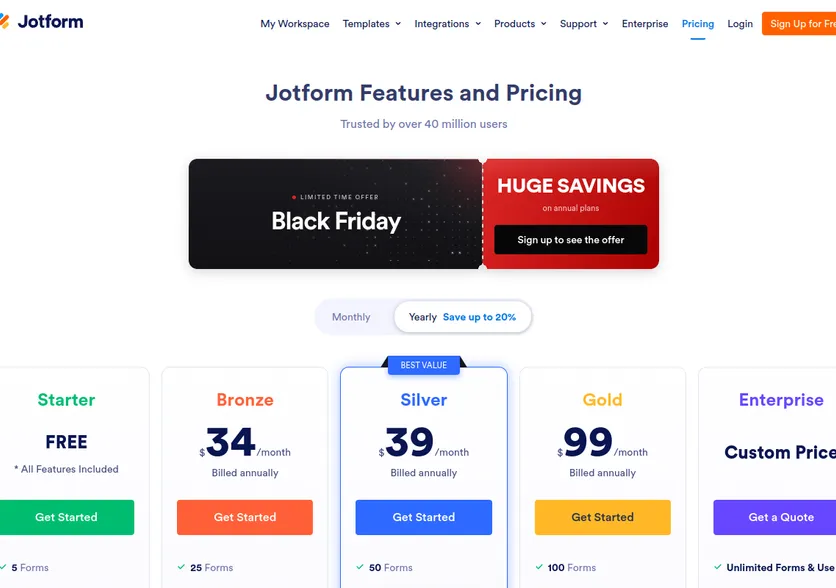
Workers comp intake means long questionnaires about the injury, the job and the medical treatment so far, and Jotform handles that depth with conditional questions that skip what does not apply. This Jotform Bronze plan lists at thirty-four dollars a month billed annually, and a free Starter plan covers light use. A firm can publish a thorough intake questionnaire, collect medical records with it and have the answers ready before the first consultation.
What we like
- Free Starter plan for light intake volume
- Thousands of templates, including legal intake forms
- E-signature and payments without a second tool
Watch out for
- No case management, so matters live elsewhere
- Submission caps on the cheaper plans
How to try it
- Open Jotform and pick an intake form template
- Add conditional questions for injury, employer and treatment
- Share the link on your site and in text replies
8. Calendly
Best for: Workers comp firms that want injured workers to book a consultation without phone tag
Paid tool Starting price: $10/user/month · Ten dollars per user per month billed annually, or twelve dollars month to month; Teams lists at sixteen dollars per user per month billed annually
Free plan: Free Basic plan for one user
An injured worker does not want to wait three days for a callback, and Calendly lets them book a consultation from a text link the same evening. This Calendly Standard plan lists at ten dollars per user per month billed annually, with a free Basic plan for a single user. The firm can offer same-day slots, collect intake answers at booking and send reminders that cut no-shows.

What we like
- Cheapest paid start in this comparison
- Free Basic plan covers a solo lawyer
- Reminders that cut consultation no-shows
Watch out for
- Scheduling only, so intake answers live elsewhere
- Team routing and round robin need the Teams plan
How to try it
- Open Calendly and set your consultation event type
- Add intake questions to the booking form
- Share the link on your site, in texts and in email signatures
Prices above were checked on each vendor’s own website on Nov 27, 2026 and can change — the vendor’s page is the final word. Vendor links are editorial: nobody paid to be listed or ranked here. Vendors who want a featured listing can see how it works on our Get listed page.
How to pick intake software for a workers compensation law firm
Start with the worker, not the software. An injured worker calls from a hospital bed or a break room, often on a phone, and needs a short form and a fast callback, not a twenty-page questionnaire. Pick the tool that gets the injury details, the employer facts and the medical providers first, then sends a consultation booking in the same message.
Count documents as well as dollars. Workers comp cases run on medical records and incident reports, so the intake tool must ask for files, chase them and show what is still outstanding. Test the form on a phone with a real worker, because long legal language makes people quit halfway. Check the answers and the documents land in the matter file without retyping.
Before you buy
- Match the tool to your case mix, because workers comp intake needs injury details, employer facts and medical providers.
- Check whether the plan includes document upload, because medical records and incident reports decide the case.
- Confirm the system handles mobile-first clients, because injured workers usually complete intake on a phone.
- Test the intake form with a real worker, because long legal language makes people quit halfway through.
- Count seats before you buy, because per-user pricing doubles once paralegals and intake staff join.
Official websites
Official websites of the products reviewed above. Features and prices were checked against these sites when this guide was written, and they can change, so confirm on the vendor site before you buy.
Frequently asked questions
Which client intake software is best for workers compensation law firms in 2026?
CASEpeer is the best overall pick at ninety dollars per user per month, because it is built for personal injury and workers comp, with intake that captures the injury, the employer and the medical providers in one pass. Clio Grow is the best choice for firms that also run other practice areas. Calendly is the best budget pick at ten dollars per user per month for firms that mainly need injured workers to book a consultation fast.
How much does client intake software cost for a workers compensation law firm?
Workers comp intake tools in this list run from ten dollars per user per month for Calendly to one hundred ninety-nine dollars a month flat for Lawmatics Lite, with most full practice tools between forty-nine and ninety dollars per user per month. CASEpeer lists at ninety dollars per user per month as the only injury-specific tool. Budget for the tier that includes document upload, because medical records decide the case.
What should a workers compensation intake form ask?
Ask for the date and place of the injury, the employer, the body part hurt and the medical treatment so far, because those answers decide urgency and the claim. Then collect contact details, the names of witnesses and any incident reports or letters the worker received. Keep the form short enough to finish on a phone, and end with a consultation booking link so the worker has a next step.
Is there a free client intake tool for workers compensation law firms?
Yes, with limits. Jotform has a free Starter plan and Calendly has a free Basic plan for one user, so a solo workers comp lawyer can collect intake answers and book consultations without paying. The free plans cap submissions or bookings, so a busy firm outgrows them fast. None of the full law firm systems here has a permanent free plan, though most offer a free trial or a demo.
Does intake software track hearings and settlement values?
Yes, and it is one of the main reasons to buy an injury-specific tool. CASEpeer tracks hearings and settlement values in the matter file, while Smokeball pairs intake with document assembly for medical requests and letters. General tools like Clio Grow and MyCase track deadlines too, but the firm has to build the injury workflow itself. A form-only tool like Jotform needs a separate calendar to track hearings.
Need everyday business help too? Try Toolsvine's free business tools right in your browser.
Browse Business Tools tools