On this page
Multi-office firms face the hardest conflict problem in law: a client in one city may already be opposed by a matter in another, and nobody in the new office knows. The check has to search every office, every practice group and every closed file — not just the open cases on one lawyer's desk. The good news is that cloud practice platforms now make that firm-wide search routine. We compared eight paid tools on price, conflict coverage and multi-office fit, checking every price on the vendor site on November 27, 2026. Our top pick for multi-office firms is CosmoLex.
How we researched this
We started with the practice platforms multi-office firms actually buy, then read each price on the vendor pricing page on November 27, 2026 and noted the trial each plan carries. We judged them for a firm with several offices that needs one conflict search across all of them. We dropped Filevine because it publishes no price, and we left out standalone compliance tools that carry no practice management features.
Compare the tools
| Name | Best for | Starting price | Free plan | |
|---|---|---|---|---|
 CosmoLex | Multi-office firms that want conflict checks with accounting in one system | $49/user/month | No free plan; 10-day free trial | Visit |
 Clio Manage | Multi-office firms that want conflict checks in a proven cloud platform | $49/user/month | No free plan; 7-day free trial | Visit |
 Actionstep | Multi-office firms that want flexible workflows per office | $49/user/month | No free plan; free trial available | Visit |
 MyCase | Multi-office firms that want conflict checks with a client portal | $50/user/month | No free plan; 10-day free trial | Visit |
 PracticePanther | Multi-office firms that want simple conflict checks with billing built in | $49/user/month | No free plan; 7-day free trial | Visit |
| LEAP | Multi-office firms that want deep matter management with conflict checks | $129/user/month | No free plan; free trial available | Visit |
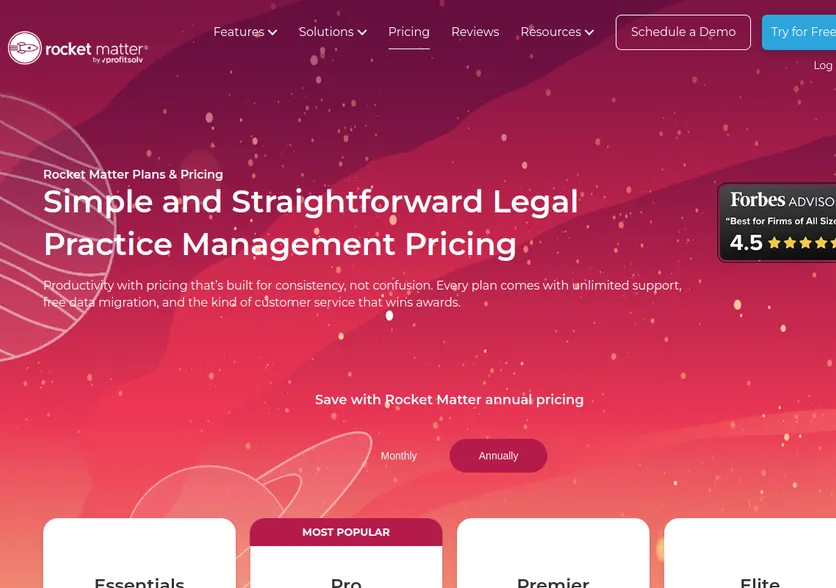
 Rocket Matter | Multi-office firms that want simple billing with conflict checks | $59/user/month | No free plan; 10-day free trial | Visit |
 Smokeball | Multi-office firms with a growing people-law practice | $49/user/month | No free plan; free trial available | Visit |
The conflict check software for multi-office law firms, compared
1. CosmoLex
Best for: Multi-office firms that want conflict checks with accounting in one system
Paid tool Starting price: $49/user/month · Forty-nine dollars per user a month for the Launch plan, billed annually; the monthly rate is fifty-nine dollars per user a month and the Pro plan costs one hundred twenty-nine dollars.
Free plan: No free plan; 10-day free trial
CosmoLex suits a multi-office firm because every office works from the same cloud system: one matter list, one contact list and one conflict search across all locations. CosmoLex costs forty-nine dollars per user a month on the Launch plan, and its built-in accounting removes the bookkeeping tool a multi-office firm would otherwise need. For a firm whose lawyers sit in different cities, that single shared system is what makes the conflict check trustworthy.

What we like
- One cloud system gives every office the same matters and contacts.
- Built-in accounting removes the need for a separate bookkeeping tool.
- Launch plan costs forty-nine dollars per user a month.
Watch out for
- The interface is dense for firms with many users across offices.
- Higher plans are needed for advanced reporting.
How to try it
- Enter the prospective client and related parties in CosmoLex.
- Run the conflict check across all matters and contacts in every office.
- Open the matter with billing and trust accounting already connected.
2. Clio Manage
Best for: Multi-office firms that want conflict checks in a proven cloud platform
Paid tool Starting price: $49/user/month · Forty-nine dollars per user a month for the EasyStart plan, billed annually; the monthly rate is fifty-nine dollars per user a month and higher plans reach one hundred forty-nine dollars.
Free plan: No free plan; 7-day free trial
Clio keeps every office on the same cloud platform, so a conflict check run in one city searches matters and contacts from all of them. Clio starts at forty-nine dollars per user a month on the EasyStart plan, rising to one hundred forty-nine dollars for the Complete plan with advanced reporting. Its integrations and app marketplace suit a firm that adds offices and tools as it grows.

What we like
- One cloud platform keeps every office on the same matters and contacts.
- Large integration marketplace for a growing firm.
- Conflict checks run inside the same system as matters and billing.
Watch out for
- The EasyStart plan lacks some advanced reporting features.
- Per-user pricing grows with every new hire in every office.
How to try it
- Add the new client and related parties to Clio as contacts.
- Run the conflict check from the matter screen and review any matches across offices.
- Save the cleared result with the matter file before opening the case.
3. Actionstep
Best for: Multi-office firms that want flexible workflows per office
Paid tool Starting price: $49/user/month · Forty-nine dollars per user a month; higher tiers reach eighty-nine dollars per user a month.
Free plan: No free plan; free trial available
Actionstep lets each office build workflows that match its practice, while the conflict check still searches the whole firm. Actionstep costs forty-nine dollars per user a month, and its matter templates carry the conflict check into every new case in every office. For a firm whose offices work differently, that flexibility beats a rigid system that forces every location into one process.

What we like
- Each office can build workflows that match its own practice.
- Matter templates carry the conflict check into every new case.
- Strong document tools for a multi-office team.
Watch out for
- Flexibility means setup takes longer than a ready-made system.
- Pricing details are sparse on the Actionstep site.
How to try it
- Set up matter templates for each office, including the conflict check step.
- Add the prospective client and run the check from the template.
- Open the matter and follow the workflow through documents and billing.
4. MyCase
Best for: Multi-office firms that want conflict checks with a client portal
Paid tool Starting price: $50/user/month · Fifty dollars per user a month for the Basic plan, billed annually; the monthly rate is sixty dollars per user a month and higher plans reach one hundred thirty dollars.
Free plan: No free plan; 10-day free trial
MyCase gives a multi-office firm one shared system for conflict checks, matters and billing, plus a client portal that looks the same whichever office the client visits. MyCase costs fifty dollars per user a month on the Basic plan, and its conflict search covers matters, contacts and opposing parties across all offices. As the firm adds locations, the portal and billing scale with it.

What we like
- One shared system keeps every office on the same matters.
- Client portal looks the same whichever office the client visits.
- Fifty dollars per user a month includes the portal and billing.
Watch out for
- Some features, such as advanced reporting, need the higher plans.
- Per-user pricing grows with every new hire in every office.
How to try it
- Add the prospective client and related parties to MyCase.
- Run the conflict check across matters and contacts in every office, then review any matches.
- Open the matter and invite the client to the portal to share documents and pay.
5. PracticePanther
Best for: Multi-office firms that want simple conflict checks with billing built in
Paid tool Starting price: $49/user/month · Forty-nine dollars per user a month for the Solo plan, billed annually; the monthly rate is fifty-nine dollars per user a month and higher plans reach one hundred fourteen dollars.
Free plan: No free plan; 7-day free trial
PracticePanther gives a multi-office firm a simple shared system: every office runs conflict checks against the same matters and contacts, with billing and intake beside them. PracticePanther costs forty-nine dollars per user a month on the Solo plan, with Business plans at eighty-nine dollars for larger teams. Its clean interface suits a firm that wants every lawyer in every office running checks without IT help.

What we like
- One shared system keeps every office on the same matters.
- Conflict checks are simple enough for every lawyer to run alone.
- Billing and intake sit beside the check in one login.
Watch out for
- Advanced reporting needs the higher-priced Business plans.
- The conflict search is basic compared with dedicated compliance tools.
How to try it
- Enter the prospective client and related parties as contacts in PracticePanther.
- Run the conflict check and review any matches across matters and contacts in every office.
- Clear the client for intake and open the matter with billing already set up.
6. LEAP
Best for: Multi-office firms that want deep matter management with conflict checks
Paid tool Starting price: $129/user/month · One hundred twenty-nine dollars per user a month as the starting price; exact pricing varies by firm size and region, so confirm it with sales.
Free plan: No free plan; free trial available
LEAP gives a multi-office firm the deepest practice platform on this list, combining conflict checks with document automation, accounting and matter management across all locations. LEAP costs one hundred twenty-nine dollars per user a month, and its conflict search covers every matter, client and related party in every office. For a firm that wants one system to run everything everywhere, that depth justifies the higher price.
What we like
- The most complete practice platform on this list.
- Document automation saves hours on standard forms.
- Conflict checks cover every matter and party in every office.
Watch out for
- One hundred twenty-nine dollars a month is the highest price on this list.
- The depth of features takes time to learn.
How to try it
- Add the prospective client and related parties to LEAP.
- Run the conflict check across all matters and contacts in every office.
- Open the matter with documents, accounting and billing already connected.
7. Rocket Matter
Best for: Multi-office firms that want simple billing with conflict checks
Paid tool Starting price: $59/user/month · Fifty-nine dollars per user a month for the Essentials plan, billed annually; the annual cost is seven hundred eight dollars per user.
Free plan: No free plan; 10-day free trial
Rocket Matter gives a multi-office firm clean, simple billing with the conflict check built in, so every office tracks time and invoices the same way. Rocket Matter costs fifty-nine dollars per user a month on the Essentials plan, and its conflict search covers matters and contacts before a new client is accepted. For a firm that bills by the hour in several cities, that consistency is the selling point.
What we like
- Clean, simple interface that every lawyer learns fast.
- Strong billing and trust accounting for hourly work.
- Every office bills the same way from one system.
Watch out for
- Fifty-nine dollars a month is the highest entry price on this list.
- Fewer workflow customisations than Actionstep or LEAP.
How to try it
- Add the prospective client and related parties to Rocket Matter.
- Run the conflict check and review any matches across offices.
- Open the matter and start tracking time and billing from day one.
8. Smokeball
Best for: Multi-office firms with a growing people-law practice
Paid tool Starting price: $49/user/month · Forty-nine dollars per user a month for the Bill plan; the Boost plan costs eighty-nine dollars per user a month.
Free plan: No free plan; free trial available
Smokeball suits a multi-office firm whose people-law practice spans cities, with conflict checks inside workflows built for personal injury, family and estate cases. Smokeball costs forty-nine dollars per user a month on the Bill plan, and its automatic time tracking and document automation suit teams that bill by the hour. The conflict search covers every matter and contact, so new clients are screened before the first consultation in any office.

What we like
- Workflows built for personal injury, family and estate cases.
- Automatic time tracking captures billable work other tools miss.
- Conflict checks sit inside the daily intake workflow.
Watch out for
- Pricing is not published on the Smokeball site, so confirm it with sales.
- It is built for people law, not corporate or transactional work.
How to try it
- Add the prospective client and related parties to Smokeball.
- Run the conflict check across matters and contacts in every office.
- Open the matter and let the workflow guide intake, documents and billing.
Prices above were checked on each vendor’s own website on Nov 27, 2026 and can change — the vendor’s page is the final word. Vendor links are editorial: nobody paid to be listed or ranked here. Vendors who want a featured listing can see how it works on our Get listed page.
What multi-office firms pay for conflict checks
Multi-office firms pay per user in every location, so the monthly bill tracks total headcount: fifty lawyers on a forty-nine dollar plan cost about two thousand five hundred dollars a month. The conflict check itself costs nothing extra, because it is bundled into the practice platform. The expensive option is a standalone compliance tool, which adds a second subscription for one feature while the platform already covers it.
Trial two platforms with a client known to another office and see which search finds the connection. Confirm the cleared result saves centrally and is auditable from any location, because a firm-wide check needs firm-wide proof. Pick the platform every office will actually use, because a check that only one location runs leaves the firm exposed.
Before you buy
- Check that conflict searches cover every office, because a multi-office firm misses conflicts across locations, not within them.
- Confirm the check searches closed matters in every office, because old files still create conflicts for new clients.
- Ask how the tool handles related companies and subsidiaries, because multi-office clients rarely come as a single name.
- Test the check with a client known to another office, because a search that misses cross-office matches is useless.
- Check that results are saved centrally and auditable, because a firm-wide check needs firm-wide proof.
Official websites
Official websites of the products reviewed above. Features and prices were checked against these sites when this guide was written, and they can change, so confirm on the vendor site before you buy.
Frequently asked questions
What is a conflict check in a multi-office law firm?
A conflict check searches the firm's matters and contacts for any relationship that would stop the firm representing a new client. It looks for the client, opposing parties, witnesses and related companies. In a multi-office firm the risk is cross-office: one location may already act for the other side.
How much does conflict check software cost a multi-office firm?
Most tools here cost between forty-nine and fifty-nine dollars per user a month, with LEAP at one hundred twenty-nine dollars. A firm with fifty users across three offices pays roughly two thousand five hundred dollars a month for the entry plans. Always count every user in every office.
Do these tools work across offices?
Yes, all eight tools are cloud platforms, so every office works from the same matters and contacts. A conflict check run in one city searches the whole firm. That shared system is the main reason multi-office firms pick a cloud platform over desktop software.
When should a multi-office firm run a conflict check?
Run the check before the first consultation, as soon as the prospective client gives a name, and repeat it when new parties join the matter. Multi-office matters gain parties as they grow, and a party added late can create a conflict the first check missed.
What happens if a firm misses a conflict?
A missed conflict can force the firm to withdraw from a case, lose the fee and face a professional complaint. In a multi-office firm the damage spreads further, because the conflict may involve another office or practice group. A five-minute check at intake is cheap insurance against all of that.
Need everyday business help too? Try Toolsvine's free business tools right in your browser.
Browse Business Tools tools