On this page
Design work is priced per user, so the nine tools below cover the full range from visual boards to full project managers with billing. Every price was checked on the vendor site on November 27, 2026, and the list runs from seven dollars per user a month to one hundred ninety-nine dollars a month for the whole team. Asana is our first pick — the work manager design teams use to track briefs, reviews and launches in one place.
How we researched this
We started with the project tools design teams actually buy, then read each price on the vendor pricing page on November 27, 2026 and noted the trial each plan carries. We judged them for a design team that tracks briefs, reviews and launches every week and needs approvals beside the work. We dropped the quote-only suites because a design team cannot price them without a sales call.
Compare the tools
| Name | Best for | Starting price | Free plan | |
|---|---|---|---|---|
 Asana | Design teams that track many briefs at once | $10.99/user/month | Free Personal plan for up to 2 users | Visit |
 Monday.com | Design teams that want every project visible at a glance | $9/seat/month | Free plan for up to 2 seats | Visit |
 Wrike | Design teams that review proofs every day | $10/user/month | Free plan with unlimited users | Visit |
 ClickUp | Design teams that want every tool in one place | $9/user/month | Free Forever plan | Visit |
 Notion | Design teams that document as they design | $10/user/month | Free plan | Visit |
 Milanote | Design teams that plan visually | $9.99/person/month | Free plan | Visit |
 Miro | Design teams that workshop ideas together | $8/member/month | Free plan with limited boards | Visit |
 Basecamp | Design teams that hate per-user billing | $199/month | No free plan | Visit |
 Teamwork.com | Design teams that bill clients by the hour | $9.99/seat/month | No free plan; 30-day free trial | Visit |
The creative project management software for design teams, compared
1. Asana
Best for: Design teams that track many briefs at once
Paid tool Starting price: $10.99/user/month · Ten dollars and ninety-nine cents per user a month billed annually for the Starter plan, or thirteen dollars and forty-nine cents per user a month billed monthly, with a two-seat minimum; Advanced costs twenty-four dollars and ninety-nine cents per user a month billed annually; free Personal plan for up to two users
Free plan: Free Personal plan for up to 2 users
Asana is the work manager design teams use to track briefs, reviews and launches in one place, with timelines and boards that fit creative work. This Asana Starter plan costs ten dollars and ninety-nine cents per user a month billed annually and includes a free Personal plan. A design team that juggles many briefs gets deadlines, approvals and files beside every task.

What we like
- Timelines and boards that fit creative work
- Approvals and files beside every task
- Free Personal plan for small teams
Watch out for
- Starter plan needs a two-seat minimum
- Advanced plan costs more than double Starter
How to try it
- Open the Asana site and start with the free plan
- Create a project and add the briefs as tasks
- Set deadlines and invite the team to review
2. Monday.com
Best for: Design teams that want every project visible at a glance
Paid tool Starting price: $9/seat/month · Nine dollars per seat a month billed annually for the Basic plan, or twelve dollars per seat a month billed monthly, with a three-seat minimum; Standard costs twelve dollars and Pro costs nineteen dollars per seat a month billed annually; free plan for two seats
Free plan: Free plan for up to 2 seats
Monday Work Management is the visual workspace design teams use to track projects on boards, timelines and calendars that everyone can read. This Monday Basic plan costs nine dollars per seat a month billed annually and includes a free plan for two seats. A design team that wants every project visible at a glance gets boards that need no training to read.

What we like
- Boards everyone can read at a glance
- Strong templates for design pipelines
- Free plan for two seats to start
Watch out for
- Three-seat minimum on paid plans
- Pro plan costs more than double Basic
How to try it
- Open the Monday site and start with the free plan
- Build a board for the design pipeline
- Add tasks, owners and deadlines to the board
3. Wrike
Best for: Design teams that review proofs every day
Paid tool Starting price: $10/user/month · Ten dollars per user a month billed annually for the Team plan, with a two-seat minimum and a cap of fifteen users; free plan with unlimited users and no automations
Free plan: Free plan with unlimited users
Wrike is the project manager built for teams that review creative work, pairing task tracking with proofing and approvals in one login. This Wrike Team plan costs ten dollars per user a month billed annually and includes a free plan with unlimited users. A design team that reviews proofs every day gets comments and approvals beside the work itself.

What we like
- Proofing and approvals beside the work
- Free plan with unlimited users
- Strong reporting for managers
Watch out for
- Team plan caps at fifteen users
- Free plan has no automations
How to try it
- Open the Wrike site and start with the free plan
- Create a project for the design sprint
- Add proofs and route them for approval
4. ClickUp
Best for: Design teams that want every tool in one place
Paid tool Starting price: $9/user/month · Core plan, $9 a user a month billed annually ($12 billed monthly); Business $17 a user a month billed annually
Free plan: Free Forever plan
ClickUp is the all-in-one workspace that pairs tasks, docs and goals in one subscription, with views that fit design work and reporting. This ClickUp Unlimited plan costs seven dollars per user a month billed annually and includes a free Forever plan. A design team that wants every tool in one place gets tasks, docs and time tracking without a second subscription.

What we like
- Tasks, docs and goals in one subscription
- Lowest per-user price here
- Free Forever plan to start with
Watch out for
- Newer Core plan at nine dollars is rolling out
- Interface can feel busy for new teams
How to try it
- Open the ClickUp site and start with the free plan
- Create a space for the design team
- Add tasks, docs and goals to the space
5. Notion
Best for: Design teams that document as they design
Paid tool Starting price: $10/user/month · Ten dollars per user a month billed annually for the Plus plan, or twelve dollars per user a month billed monthly; Business costs twenty dollars per user a month billed annually; free plan available
Free plan: Free plan
Notion is the workspace that pairs docs, wikis and tasks in one login, with databases that fit design systems and briefs. This Notion Plus plan costs ten dollars per user a month billed annually and includes a free plan. A design team that documents as it designs gets briefs, specs and tasks in the same place.

What we like
- Docs, wikis and tasks in one login
- Databases that fit design systems
- Free plan to start with
Watch out for
- Lighter task tracking than dedicated PM tools
- Plus plan is the one with full features
How to try it
- Open the Notion site and start with the free plan
- Build a brief database for the team
- Add tasks and link them to the briefs
6. Milanote
Best for: Design teams that plan visually
Paid tool Starting price: $9.99/person/month · Nine dollars and ninety-nine cents per person a month billed yearly; free plan available
Free plan: Free plan
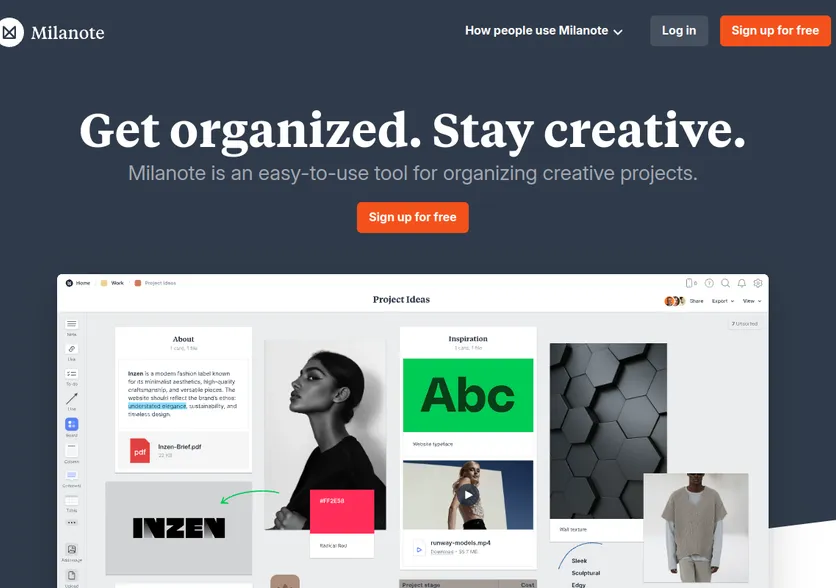
Milanote is the visual board tool for creative teams, pairing mood boards with tasks and notes in one canvas. This Milanote plan costs nine dollars and ninety-nine cents per person a month billed yearly and includes a free plan. A design team that plans visually gets boards that hold images, links and tasks together.
What we like
- Boards that hold images, links and tasks together
- Simple pricing with one plan
- Free plan to start with
Watch out for
- Lighter task tracking than the big PM tools
- No time tracking or billing built in
How to try it
- Open the Milanote site and start with the free plan
- Create a board for the project
- Add images, notes and tasks to the board
7. Miro
Best for: Design teams that workshop ideas together
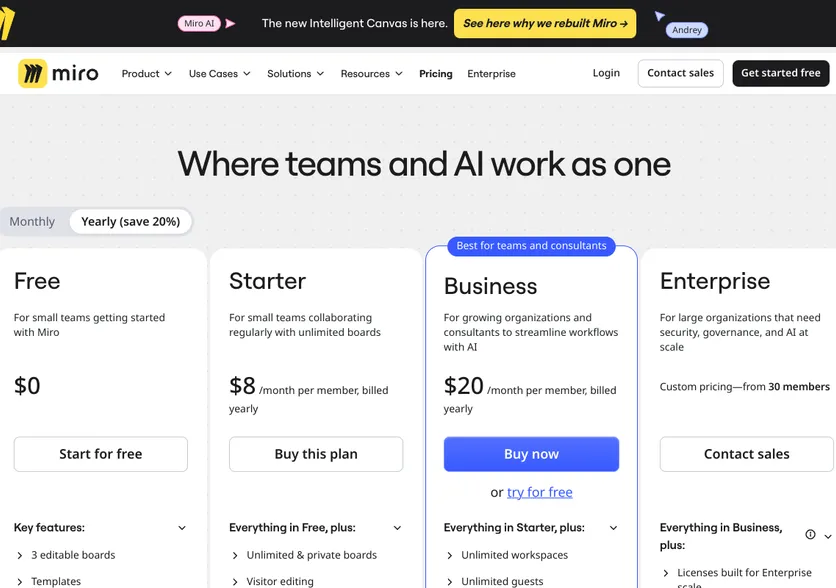
Paid tool Starting price: $8/member/month · Eight dollars per member a month billed yearly for the Starter plan, with a two-licence minimum, so one person pays sixteen dollars a month; free plan with limited boards
Free plan: Free plan with limited boards
Miro is the whiteboard where design teams sketch, plan and review together, with templates for workshops and sprints. This Miro Starter plan costs eight dollars per member a month billed yearly and includes a free plan with limited boards. A design team that workshops ideas together gets a board that holds every sketch and sticky note.
What we like
- Whiteboard that holds every sketch and note
- Strong templates for workshops and sprints
- Free plan with limited boards
Watch out for
- Two-licence minimum, so one person pays double
- Not a full project manager on its own
How to try it
- Open the Miro site and start with the free plan
- Create a board for the workshop
- Add sketches and sticky notes to the board
8. Basecamp
Best for: Design teams that hate per-user billing
Paid tool Starting price: $199/month · One hundred ninety-nine dollars a month for the whole company with unlimited users, cut from two hundred ninety-nine dollars in November 2026; no free plan and no per-user pricing
Free plan: No free plan
Basecamp is the flat-rate project tool that charges one price for the whole company, with to-dos, messages and files in one login. This Basecamp plan costs one hundred ninety-nine dollars a month for the whole company with unlimited users. A design team that hates per-user billing gets one price no matter how many people join.

What we like
- One flat price for the whole company
- Simple to-dos, messages and files
- No per-user maths at any team size
Watch out for
- No free plan at all
- Fewer views than the dedicated PM tools
How to try it
- Open the Basecamp site and start a trial
- Create a project for the design team
- Add to-dos, messages and files to the project
9. Teamwork.com
Best for: Design teams that bill clients by the hour
Paid tool Starting price: $9.99/seat/month · Nine dollars and ninety-nine cents per seat a month billed annually for the Basics plan, with a three-seat minimum; Accelerate costs twenty-four dollars and ninety-nine cents per seat a month billed annually
Free plan: No free plan; 30-day free trial
Teamwork is the project manager built for client work, pairing tasks and time tracking with billing in one login. This Teamwork Basics plan costs nine dollars and ninety-nine cents per seat a month billed annually and includes a free trial. A design team that bills clients by the hour gets tasks and time tracking in the same place.

What we like
- Tasks and time tracking in one login
- Built for client work and billing
- AI usage allowance on every plan
Watch out for
- Three-seat minimum on paid plans
- Accelerate costs more than double Basics
How to try it
- Open the Teamwork site and start the free trial
- Create a project and add the client work
- Track time against tasks and send the invoice
Prices above were checked on each vendor’s own website on Nov 27, 2026 and can change — the vendor’s page is the final word. Vendor links are editorial: nobody paid to be listed or ranked here. Vendors who want a featured listing can see how it works on our Get listed page.
What design project management costs in 2026
A design team pays for project tools in two ways, the per-user licence and the reviews that slip without one. A seven-dollar user looks cheap until a missed approval costs a deadline, so weigh proofing and timelines against the sticker price. Full project managers cost more because they track tasks, time and billing, while boards stay cheap by doing one job well.
Start with a trial on two tools and run a real brief through each one. Check that reviews route to the right person, that deadlines show on a timeline, and that files stay beside the task they belong to. Pick the tool whose board your team actually opens, because a powerful manager that designers avoid is worse than a plain one they use every day.
Before you buy
- Check the seat minimum, because a three-seat floor costs more than the headline rate.
- Match the tool to your workflow, because boards suit visual teams and lists suit writers.
- Confirm proofing is included, because approvals cost extra on some plans.
- Test the trial with a real brief, because a demo will not show review bottlenecks.
- Ask about the free plan limits, because user and board caps force an upgrade.
Official websites
Official websites of the products reviewed above. Features and prices were checked against these sites when this guide was written, and they can change, so confirm on the vendor site before you buy.
Frequently asked questions
Which creative project management software is best for design teams in 2026?
Asana is the best overall pick at ten dollars and ninety-nine cents per user a month, with timelines and boards that fit creative work. Monday is the best visual pick at nine dollars per seat a month for teams that want every project visible at a glance. ClickUp is the best budget pick at seven dollars per user a month for teams that want every tool in one place.
How much does project management software cost for design teams?
Prices in this list run from seven dollars per user a month for ClickUp Core to one hundred ninety-nine dollars a month for Basecamp, with most design tools landing between eight and eleven dollars per user a month. Basecamp is the exception, priced flat for the whole company with unlimited users. Seat minimums add to the bill, so check them before you compare totals.
Do design teams need a project manager or a whiteboard?
Yes, when the team tracks many briefs at once, because a project manager holds deadlines, approvals and files beside every task. A whiteboard suits teams that workshop ideas together and only need a shared canvas. A project manager suits teams that review proofs every day and need a record of every decision.
Is there a free project management tool for design teams?
Yes, Asana, Monday, Wrike, ClickUp, Notion, Milanote and Miro all carry free plans, so a small design team can start without paying. Free plans limit users, boards or automations, so check the caps before you rely on them. Basecamp and Teamwork have no free plan, so their first month is billed from day one.
What is the cheapest project management option for design teams?
ClickUp is the cheapest paid option here at seven dollars per user a month billed annually for the Unlimited plan, with a free Forever plan to start. Monday follows at nine dollars per seat a month, and Milanote costs nine dollars and ninety-nine cents per person a month. The cheapest licence is not always the cheapest deal if the seat minimum is higher or proofing costs extra.
Planning work too? Try Toolsvine's free productivity tools right in your browser.
Browse Productivity Tools tools