
On this page
Creative teams juggle briefs, assets, feedback rounds and deadlines, and the right project software keeps that chaos in one place where everyone sees the same plan. The eight tools below run from nine dollars a seat a month to twenty dollars, and every price was checked on the vendor site on November 26, 2026. Most include a free plan, so test the workflow with a real project before paying. Monday is our first pick — the most flexible board for a busy creative team.
How we researched this
We started with the project tools creative teams actually buy, then read each price on the vendor pricing page on November 26, 2026 and noted the free plan each one carries. We judged them for a team that runs client briefs, asset reviews and deadlines in one login, and we kept only tools with a published price.
Compare the tools
| Name | Best for | Starting price | Free plan | |
|---|---|---|---|---|
 Monday | Creative teams that want flexible visual boards for briefs, assets and approvals | $9/user/month | Free plan for up to 2 seats; 14-day free trial of the Pro plan | Visit |
 Asana | Creative teams that want timelines and proofing to keep feedback rounds on track | $10.99/user/month | Free Personal plan for up to 2 users | Visit |
 Wrike | Creative teams juggling many clients that need Gantt charts and workload views | $10/user/month | Free plan for unlimited users, capped at 200 active tasks | Visit |
 Smartsheet | Creative teams that plan in grids and want Gantt, board and calendar views together | $9/user/month | No free plan; 30-day free trial of the Business plan | Visit |
 Airtable | Creative ops teams that link briefs, assets, talent and deadlines in one database | $20/seat/month | Free plan for up to 5 editor seats with 1,000 records per base | Visit |
 Basecamp | Small studios that want clients inside the project with no learning curve | $29/month | Free plan for one project with up to 20 users; 30-day free trial of Plus | Visit |
 Teamwork | Creative agencies that bill by the hour and want margin visibility per job | $9.99/seat/month | Free plan for up to 5 users and 5 projects | Visit |
 Milanote | Designers and art directors who plan in moodboards, storyboards and visual boards | $9.99/person/month | Free plan with no time limit, capped at 100 notes, images or links and 10 file uploads | Visit |
The project management software for creative teams, compared
1. Monday
Best for: Creative teams that want flexible visual boards for briefs, assets and approvals
Paid tool Starting price: $9/user/month · Basic plan, $9 a user a month billed annually or $12 billed monthly; paid plans start at 3 seats; Standard $12 and Pro $19 a month
Free plan: Free plan for up to 2 seats; 14-day free trial of the Pro plan
Monday gives a creative team a visual board where briefs, assets and approvals move from idea to delivery without losing the thread. This Monday Basic plan starts at nine dollars a seat a month on annual billing and covers unlimited items with free viewers, so clients can follow progress without a paid seat. A design studio or content team can run every campaign, review round and deadline from the same board.

What we like
- Visual boards the whole team and clients read at a glance
- Free viewers keep clients out of the bill
- Templates cover campaigns, briefs and content calendars
Watch out for
- Paid plans start at three seats, so a solo creative pays for three
- Basic plan lists no automations, so routine moves stay manual
How to try it
- Open the Monday pricing page and start with the free plan
- Build one board for a live campaign with owners and due dates
- Invite clients as free viewers and buy seats for editors
2. Asana
Best for: Creative teams that want timelines and proofing to keep feedback rounds on track
Paid tool Starting price: $10.99/user/month · Starter plan, $10.99 a user a month billed annually or $13.49 billed monthly; Advanced $24.99 a user a month
Free plan: Free Personal plan for up to 2 users
Asana keeps creative work on rails with timelines, task owners and proofing, so feedback rounds stop living in scattered chat threads. This Asana Starter plan adds timeline and Gantt views plus reporting dashboards, so a creative lead can see which deliverable is slipping before the client does. A growing studio can start free and upgrade when the team passes two seats.

What we like
- Timeline and Gantt views show slipping deliverables early
- Proofing keeps feedback on the asset, not in chat
- Unlimited free guests keep clients in the loop
Watch out for
- Starter is the cheapest paid plan and still costs per user
- Proofing and approvals need the Advanced plan
How to try it
- Start with the free Personal plan and add one real project
- Turn the project into a timeline and assign every deliverable an owner
- Upgrade to Starter when the team passes two seats
3. Wrike
Best for: Creative teams juggling many clients that need Gantt charts and workload views
Paid tool Starting price: $10/user/month · Team plan, $10 a user a month billed annually for 2 to 15 users; Business $25 a user a month
Free plan: Free plan for unlimited users, capped at 200 active tasks
Wrike is built for structured creative operations, with Gantt charts, dashboards and workload views that suit teams juggling many clients at once. This Wrike Team plan costs ten dollars a user a month on annual billing and covers teams of two to fifteen people with interactive Gantt charts. A creative team that outgrows simple boards will find the structure here worth the step up.

What we like
- Interactive Gantt charts suit multi-client creative work
- Workload views show who is overloaded before burnout
- Free plan covers unlimited users for a first look
Watch out for
- Team plan stops at fifteen users, then the price jumps
- Setup takes longer than simpler board tools
How to try it
- Open the Wrike pricing page and start on the free plan
- Build one project with a Gantt chart and a shared dashboard
- Upgrade to Team when the task cap and automations matter
4. Smartsheet
Best for: Creative teams that plan in grids and want Gantt, board and calendar views together
Paid tool Starting price: $9/user/month · Pro plan, $9 a user a month billed annually or $12 billed monthly; Business $19 a user a month; Pro caps at 10 members
Free plan: No free plan; 30-day free trial of the Business plan
Smartsheet turns creative project plans into familiar grids with Gantt, board and calendar views, so spreadsheet lovers run projects without learning a new system. This Smartsheet Pro plan costs nine dollars a user a month on annual billing and covers one to ten members with unlimited sheets. A small creative team that plans in rows and columns will feel at home here.

What we like
- Grid, Gantt, board and calendar views in one plan
- Unlimited sheets on the Pro plan
- Formulas and reports suit data-heavy creative ops
Watch out for
- No free plan, so the trial is the only test
- Pro caps at ten members, so growing teams must upgrade
How to try it
- Start the thirty-day trial of the Business plan
- Build one project sheet with Gantt and calendar views
- Buy Pro when the trial proves the grid fits the team
5. Airtable
Best for: Creative ops teams that link briefs, assets, talent and deadlines in one database
Paid tool Starting price: $20/seat/month · Team plan, $20 a seat a month billed annually or $24 billed monthly; Business $45 a seat a month
Free plan: Free plan for up to 5 editor seats with 1,000 records per base
Airtable blends a database with project views, so a creative team can link briefs, assets, talent and deadlines in one connected base. This Airtable Team plan costs twenty dollars a seat a month on annual billing and adds Gantt views with fifty thousand records per base. A content or design ops team that lives in structured data will get more from this than from a plain board.

What we like
- Linked records connect briefs, assets and deadlines
- Gantt and timeline views come with the Team plan
- Only editors pay, so viewers stay free
Watch out for
- Team is the priciest entry plan in this list
- Building a good base takes setup time up front
How to try it
- Open the Airtable pricing page and start on the free plan
- Build one base linking briefs to assets and deadlines
- Upgrade to Team when the record cap or Gantt view matters
6. Basecamp
Best for: Small studios that want clients inside the project with no learning curve
Paid tool Starting price: $29/month · Freelancer plan, $29 a month flat with 3 projects and 10 GB of storage; Pro $79; Pro Plus $99; Pro Unlimited $199 a month billed annually
Free plan: Free plan for one project with up to 20 users; 30-day free trial of Plus
Basecamp keeps creative client work simple, with to-dos, message boards, schedules and files in one calm place that clients can actually use. This Basecamp Freelancer plan costs twenty-nine dollars a month flat and includes 3 projects with ten gigabytes of storage. A small studio that wants clients inside the project without a learning curve will like the flat simplicity here.

What we like
- Clients actually use it, with no learning curve
- Flat monthly price, no per-seat charges
- Flat Pro Unlimited plan caps costs for big teams
Watch out for
- Freelancer covers 3 projects for $29 a month flat
- Reporting and Gantt views stay basic next to rivals
How to try it
- Start the free plan with one client project
- Invite the client and run to-dos, messages and files together
- Upgrade to Plus when unlimited projects matter
7. Teamwork
Best for: Creative agencies that bill by the hour and want margin visibility per job
Paid tool Starting price: $9.99/seat/month · Basics plan, $9.99 a seat a month billed annually or $13.99 billed monthly, with a 3-seat minimum; Accelerate $24.99 a seat a month
Free plan: Free plan for up to 5 users and 5 projects
Teamwork is built for client work, pairing project delivery with time tracking and budgets so a creative agency can see the margin on every job. This Teamwork Basics plan costs just under ten dollars a seat a month on annual billing and covers billable time tracking with a three-seat minimum. A creative agency that bills by the hour can plan, track and invoice from the same login.

What we like
- Time tracking and budgets sit beside project delivery
- Burndown reports land on the cheapest paid plan
- Free client users keep the bill tied to staff only
Watch out for
- Basics has a three-seat minimum, so small teams pay for three
- Invoicing and resource planning need the Accelerate plan
How to try it
- Open the Teamwork pricing page and start on the free plan
- Log billable time on one client project for a week
- Upgrade to Basics when billable time tracking matters
8. Milanote
Best for: Designers and art directors who plan in moodboards, storyboards and visual boards
Paid tool Starting price: $9.99/person/month · Pro plan, $9.99 a person a month billed annually or $12.50 billed monthly; Team plan $49 a month billed annually for up to 10 people
Free plan: Free plan with no time limit, capped at 100 notes, images or links and 10 file uploads
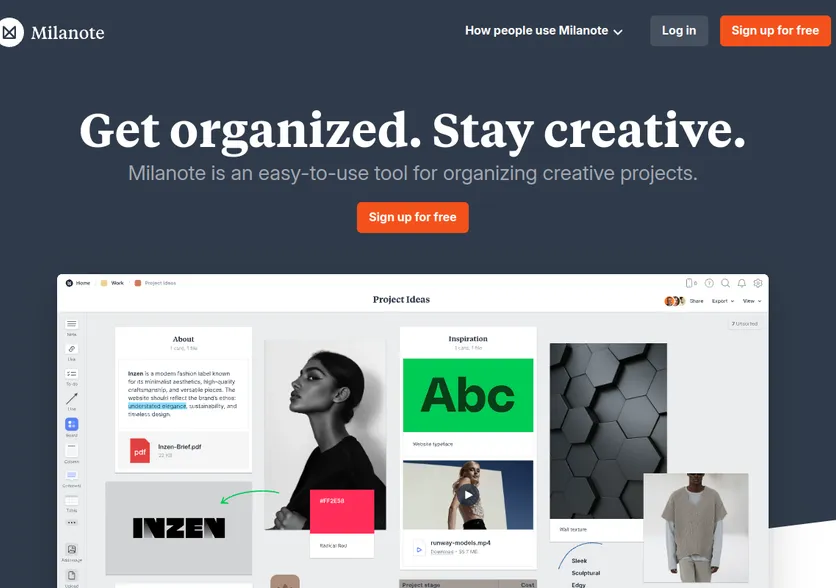
Milanote is a visual board for moodboards, storyboards and creative planning, where notes, images and links sit side by side instead of in rows. This Milanote Pro plan costs just under ten dollars a person a month on annual billing and lifts the free plan caps to unlimited notes and uploads. A designer or art director who thinks in images will plan faster here than in any list tool.
What we like
- Visual boards fit moodboards and storyboards perfectly
- Free plan has no time limit for trying it out
- Unlimited shared boards even before paying
Watch out for
- No task dependencies or Gantt views for scheduling
- Per-person pricing adds up fast for a big team
How to try it
- Open the Milanote plans page and start on the free plan
- Build one moodboard with notes, images and links
- Upgrade to Pro when the hundred-item cap bites
Prices above were checked on each vendor’s own website on Nov 26, 2026 and can change — the vendor’s page is the final word. Vendor links are editorial: nobody paid to be listed or ranked here. Vendors who want a featured listing can see how it works on our Get listed page.
What project software costs creative teams in 2026
Creative teams usually pay per seat, and this list runs from nine dollars a seat a month to twenty dollars, with free plans below most of them. A five-person studio on Monday Basic pays for three seats at minimum, while Smartsheet Pro caps at ten members and Airtable Team charges only for editors. The headline plan each vendor shows on its own pricing page is the number in the table above, checked on November 26, 2026.
Start with the free plan on two tools and run one real client project through each, from brief to final delivery. Compare how the team tracks feedback, how clearly deadlines show up, and whether clients can follow along without a paid seat. Pick the tool the team opens every morning, because the prettiest board is useless if nobody updates it.
Before you buy
- Count the seats first, because Monday and Teamwork charge from a three-seat minimum while Smartsheet caps Pro at ten members.
- Check who pays, because Airtable bills only editors while Monday bills every seat on the board.
- Compare annual and monthly billing, because most tools here cut the monthly rate by about a fifth on annual plans.
- Test client access before you buy, because free viewers on Monday and free guests on Asana keep clients out of the bill.
- Confirm Gantt and proofing are included, because Milanote has no Gantt view and Asana keeps proofing on its Advanced plan.
Official websites
Official websites of the products reviewed above. Features and prices were checked against these sites when this guide was written, and they can change, so confirm on the vendor site before you buy.
Frequently asked questions
Which project management software is best for creative teams in 2026?
Monday is the safest default at nine dollars a seat a month on annual billing, because its boards flex from simple task lists to full campaign tracking and free viewers keep clients out of the bill. Milanote wins for visual planning at just under ten dollars a person a month, with boards built for moodboards and storyboards. Wrike is the best fit for structured creative operations that need Gantt charts and workload views.
How much does project management software cost for creative teams?
Most tools in this list cost between nine and twenty dollars a seat a month on annual billing, with free plans below that for tiny teams. A five-person studio can pay about forty-five dollars a month on Monday Basic or about fifty dollars on Teamwork Basics, while Airtable Team costs a hundred dollars for the same five editors. Expect the bill to grow with headcount, since every tool here charges per seat.
Is there a free project management tool for creative teams?
Yes, most tools here have a free plan, though the caps differ. Monday Free covers two seats, Asana Personal covers two users, and Teamwork Free covers five users and five projects. Milanote Free has no time limit but stops at a hundred items, while Airtable Free covers five editors. Smartsheet is the exception, with no free plan and only a thirty-day trial.
Do creative teams need Gantt charts?
Not every creative team does. Milanote and Basecamp skip Gantt views entirely and still serve visual planning and client work well, while Monday Basic has no timeline view either. Asana Starter, Wrike Team, Smartsheet Pro and Airtable Team all include Gantt or timeline views for teams that plan by dates. If deadlines drive the work, pick a tool with Gantt on its cheapest paid plan.
What should a creative team look for in project software?
Look for a board or timeline the whole team reads at a glance, a way for clients to follow progress without a paid seat, and feedback tools that keep comments on the asset. Check the per-seat price against your headcount, the free plan caps, and whether Gantt or proofing sits behind a higher tier. The best tool is the one the team updates every day without being chased.
Need everyday productivity help too? Try Toolsvine's free productivity tools for creative teams right in your browser.
Browse Productivity Tools tools


