On this page
A nonprofit team does the work of a much larger organisation, so every hour lost to chasing tasks is an hour lost to the mission. The eight tools below were picked for small teams that run grants, volunteers and programmes on a tight budget, from a free list to a board a whole office can read. Asana leads because its free plan gets a small team started and its paid plan costs ten dollars and ninety-nine cents per user a month, and the rest are ranked on how much they give a nonprofit for the money.
How we researched this
We checked every price on the vendor pricing page on November 29, 2026, and only included tools with a published US dollar list price. Tools that sell only by quote were left out, and so were tools that need a large paid team to make sense for a small nonprofit. Prices change, so confirm the current figure on the vendor site before you buy.
Compare the tools
| Name | Best for | Starting price | Free plan | |
|---|---|---|---|---|
 Asana | Nonprofits that run grants, volunteers and programmes together | $10.99/user/month | Free plan (Personal) | Visit |
 ClickUp | Nonprofits that need one tool to replace several | $9/user/month | Free plan | Visit |
 monday.com | Nonprofits that want donors, volunteers and delivery on one board | $9/seat/month | Free plan (up to 2 seats) | Visit |
 Trello | Nonprofits with volunteers who need no training | $5/user/month | Free plan | Visit |
 Todoist | Small nonprofits that need a simple shared list | $4/user/month | Free plan (5 projects) | Visit |
 Notion | Nonprofits that keep proposals, donor notes and tasks together | $10/member/month | Free plan | Visit |
 Wrike | Nonprofits running several programmes with different funders | $9.80/user/month | Free plan (up to 5 users) | Visit |
 Smartsheet | Nonprofits that already run on spreadsheets | $9/member/month | No free plan; 30-day free trial | Visit |
The task management software for nonprofit organizations, compared
1. Asana
Best for: Nonprofits that run grants, volunteers and programmes together
Paid tool Starting price: $10.99/user/month · Ten dollars and ninety-nine cents per user a month on Starter billed annually (thirteen dollars and forty-nine cents billed monthly); Advanced is twenty-four dollars and ninety-nine cents billed annually (thirty dollars and forty-nine cents monthly)
Free plan: Free plan (Personal)
A nonprofit runs on grants, volunteers and a small paid team, and this Asana plan costs ten dollars and ninety-nine cents per user a month billed annually to keep all three moving together. Project templates turn a grant application or a fundraising event into a repeatable checklist, and the timeline shows when a report deadline collides with a donor visit.

What we like
- Project templates turn a grant or fundraiser into a repeatable checklist
- Timeline shows when a report deadline collides with a donor visit
- Free Personal plan covers a small team getting started
Watch out for
- Starter is the dearest entry plan in this list
- Guests and portfolios need paid seats, which adds up for volunteers
How to try it
- Create a project for each grant with sections for the application stages
- Add every task with an owner and a due date
- Review the timeline each week to spot clashing deadlines
2. ClickUp
Best for: Nonprofits that need one tool to replace several
Paid tool Starting price: $9/user/month · Nine dollars per user a month on Core billed annually; Business is seventeen dollars per user a month billed annually; Enterprise is quoted
Free plan: Free plan
When the budget is tight and the mission is wide, a nonprofit needs one tool that does the work of several, and this ClickUp plan costs nine dollars per user a month billed annually for that all-in-one workspace. Docs hold grant drafts beside the tasks that move them forward, custom fields track donor stages, and the free plan is generous enough for a small team to run on it for months.

What we like
- Docs hold grant drafts beside the tasks that move them forward
- Custom fields track donor stages without a separate CRM
- Free plan is generous enough for a small team to run on for months
Watch out for
- Setup takes a day to configure well
- The free plan limits storage for teams with many files
How to try it
- Build one space per programme with lists for grants, events and admin
- Add custom fields for donor stage and grant amount
- Use the free plan for a month before deciding on paid seats
3. monday.com
Best for: Nonprofits that want donors, volunteers and delivery on one board
Paid tool Starting price: $9/seat/month · Nine dollars per seat a month on Basic billed annually (twelve dollars billed monthly); Standard is twelve dollars a seat a month billed annually and Pro is nineteen dollars; a three-seat minimum applies to paid plans
Free plan: Free plan (up to 2 seats)
At nine dollars per seat a month billed annually, this monday.com plan brings donor pipelines, volunteer rotas and programme delivery onto one board. Status columns show which grants are submitted, which are waiting and which need a report, and automations can nudge the owner when a deadline approaches. The three-seat minimum is the catch for a tiny team, since the smallest paid plan still buys three seats.

What we like
- Status columns show grant progress at a glance
- Automations nudge the owner when a deadline approaches
- Forms collect volunteer sign-ups straight onto the board
Watch out for
- The three-seat minimum is steep for a tiny team
- The free plan covers only two seats
How to try it
- Create a board for grants with status columns for each stage
- Add a board for volunteers with a rota and contact details
- Set automations to remind owners a week before each deadline
4. Trello
Best for: Nonprofits with volunteers who need no training
Paid tool Starting price: $5/user/month · Five dollars per user a month on Standard billed annually (six dollars billed monthly); Premium is ten dollars per user a month billed annually (twelve dollars and fifty cents monthly); Enterprise is seventeen dollars and fifty cents
Free plan: Free plan
Volunteers come and go, so the tool a nonprofit picks must be learnable in minutes, and this Trello plan costs five dollars per user a month billed annually for boards anyone can use. A card holds the checklist, the due date and the files for one event or one grant, and a volunteer can pick up a task without a training session. The free plan covers a small team, though reporting across boards needs a paid tier or a Power-Up.

What we like
- Boards are learnable in minutes for new volunteers
- Cards hold the checklist, due date and files for one task
- Free plan covers a small team getting started
Watch out for
- Reporting across boards needs a paid tier or a Power-Up
- No timeline view on Standard for spotting clashes
How to try it
- Make a board for each programme with lists for each stage
- Add a card per event or grant with its checklist
- Invite volunteers to the board and let them pick up cards
5. Todoist
Best for: Small nonprofits that need a simple shared list
Paid tool Starting price: $4/user/month · Four dollars per user a month on Pro billed annually (five dollars billed monthly); Business is six dollars per user a month billed annually, while monthly Business billing is listed at eight dollars in one November 2026 read and six dollars in another, so confirm at checkout
Free plan: Free plan (5 projects)
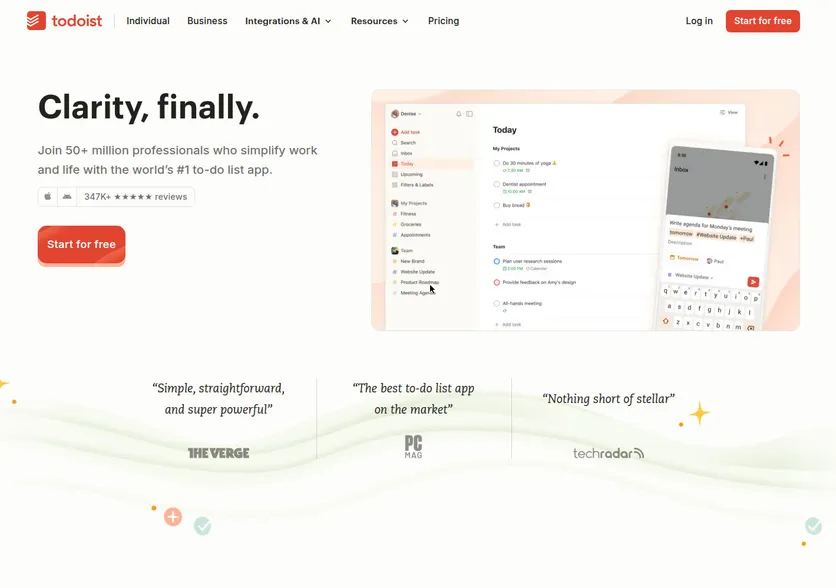
A small nonprofit team that mostly needs to stop things falling through the cracks will find a simple answer here, and this Todoist plan costs four dollars per user a month billed annually for shared lists that anyone can check. Projects separate fundraising, programmes and admin, shared tasks let staff and volunteers see the same list, and recurring tasks keep weekly reports and board papers on schedule. It is a personal list at heart, so it suits a small team rather than a large programme office.
What we like
- Shared lists let staff and volunteers see the same tasks
- Recurring tasks keep weekly reports on schedule
- Natural-language entry makes adding a task take seconds
Watch out for
- The free plan caps at five projects
- Built for personal lists, so a large programme office outgrows it
How to try it
- Create a project each for fundraising, programmes and admin
- Share the projects with staff and volunteers
- Set recurring tasks for weekly reports and board papers
6. Notion
Best for: Nonprofits that keep proposals, donor notes and tasks together
Paid tool Starting price: $10/member/month · Ten dollars per member a month on Plus billed annually (twelve dollars billed monthly); Business is twenty dollars per member a month billed annually (twenty-four dollars monthly)
Free plan: Free plan
A nonprofit that writes grant proposals, keeps donor notes and tracks tasks in different apps loses hours to searching, and this Notion plan costs ten dollars per member a month billed annually to hold them in one workspace. A donor database can link to the tasks and documents for each grant, and templates turn a recurring fundraiser into a checklist the team reuses each year. The free plan is workable for a small team, though the setup needs someone willing to build the system.

What we like
- A donor database links to the tasks for each grant
- Templates turn a recurring fundraiser into a reusable checklist
- One workspace replaces several separate apps
Watch out for
- Setup needs someone willing to build the system
- Offline access is weaker than the dedicated task apps
How to try it
- Create a database for grants with linked tasks and documents
- Build a template for the recurring fundraiser
- Share the workspace with staff and set view permissions
7. Wrike
Best for: Nonprofits running several programmes with different funders
Paid tool Starting price: $9.80/user/month · Nine dollars and eighty cents per user a month on Team billed annually; Business is twenty-four dollars and eighty cents per user a month billed annually; Enterprise is quoted
Free plan: Free plan (up to 5 users)
When a nonprofit runs several programmes at once, each with its own funder and deadline, the work needs a tool built for many projects, and this Wrike plan costs nine dollars and eighty cents per user a month billed annually for that multi-project view. Folders separate programmes, dashboards show every deadline in one place, and request forms collect new work without a chain of emails. The free plan covers up to five users, so a slightly larger team moves to paid quickly.

What we like
- Folders separate programmes with their own funders and deadlines
- Dashboards show every deadline in one place
- Request forms collect new work without email chains
Watch out for
- The free plan covers only five users
- The interface feels heavier than the simpler lists here
How to try it
- Create a folder per programme with projects inside
- Add dashboards that show every deadline across programmes
- Set up a request form for new work from the team
8. Smartsheet
Best for: Nonprofits that already run on spreadsheets
Paid tool Starting price: $9/member/month · Nine dollars per member a month on Pro billed annually (twelve dollars billed monthly); Business is nineteen dollars per member a month billed annually (twenty-four dollars monthly); the Pro plan caps at ten members
Free plan: No free plan; 30-day free trial
A nonprofit that already thinks in spreadsheets will feel at home here, and this Smartsheet plan costs nine dollars per member a month billed annually for grids that behave like project plans. Grant trackers, budgets and volunteer rotas can live as rows with owners and due dates, and automated reminders chase the person responsible without a staff member remembering. The Pro plan caps at ten members, so a growing organisation needs the Business tier sooner than expected.

What we like
- Grant trackers, budgets and rotas live as rows with owners
- Automated reminders chase the person responsible
- Familiar grid layout needs almost no training
Watch out for
- The Pro plan caps at ten members
- No free plan, only a thirty-day trial
How to try it
- Build a grid for grants with columns for funder, amount and deadline
- Add automated reminders a week before each report is due
- Share the sheet with the board so they see live progress
Prices above were checked on each vendor’s own website on Nov 29, 2026 and can change — the vendor’s page is the final word. Vendor links are editorial: nobody paid to be listed or ranked here. Vendors who want a featured listing can see how it works on our Get listed page.
How a small nonprofit team runs grants and programmes on one board
Put every grant on one board with its deadline, owner and next step visible, because a missed report can cost a nonprofit its funding. Give volunteers their own list with simple tasks and clear due dates, and keep the paid team's work on a separate board. Review the board together once a week, move anything that slipped, and close finished grants so the list only shows live work. When a new grant arrives, copy the template instead of starting from scratch.
Before you buy
- Check the free plan limits first, because a nonprofit team grows and paid seats add up fast
- Make sure volunteers can join a project without a paid licence or a long training session
- Ask whether the tool tracks grant deadlines and reports in the same place as daily tasks
- Confirm the tool works on the devices the team already owns, including older phones
- Test the tool with one real grant cycle before moving the whole team onto it
Official websites
Official websites of the products reviewed above. Features and prices were checked against these sites when this guide was written, and they can change, so confirm on the vendor site before you buy.
Frequently asked questions
What is the best task management software for nonprofit organizations?
Asana is the best overall pick for most nonprofits, because its free plan covers a small team and its paid plan costs ten dollars and ninety-nine cents per user a month with timelines and rules that suit grant work. ClickUp is the best value when the budget is tight, since its free plan is generous and its paid plan costs nine dollars a month. Smartsheet suits teams that already think in spreadsheets and track grants as rows.
Is there free task management software for nonprofits?
Yes. Asana, ClickUp, Trello, Todoist and Notion all have free plans that cover a small nonprofit team, and Wrike is free for up to five users. The free plans usually limit projects, guests or storage, so a team that grows past a handful of people will need a paid plan. Some vendors run discount programmes for registered nonprofits, so it is worth asking before paying full price.
How much does task management software cost a nonprofit?
Prices in this list run from four dollars per user a month for Todoist Pro to ten dollars and ninety-nine cents for Asana Starter, with most tools between five and ten dollars a month. The free plans cover small teams, so a nonprofit with five people may pay nothing at all. A team of ten on a paid plan should expect roughly fifty to one hundred dollars a month, depending on the tool.
Which tool is best for tracking grants at a nonprofit?
Smartsheet is the strongest pick for grant tracking, because grants fit naturally into rows with owners, due dates and amounts. Asana is a close second, with project templates that turn each grant into a repeatable checklist and a timeline that shows clashing deadlines. Monday.com also works well, since its status columns show at a glance which grants are submitted and which need a report.
Can volunteers use the same task tool as paid staff?
Yes, on most tools in this list, though the details matter. Trello and Todoist are easy for a volunteer to learn in minutes, and Asana and ClickUp let guests view specific projects without a full seat on some plans. Check the guest and seat rules before choosing, because a tool that charges for every volunteer quickly becomes expensive for a nonprofit.
Compare the eight tools above, then start with a free plan on the tool that matches how the team already works before paying for a full year.
Browse Productivity Tools tools