On this page
A startup team does the work of a larger company with a handful of people, so the task tool has to be cheap, fast and flexible enough to change with the plan. The eight tools below were picked for founding teams that juggle product, hiring and fundraising on a tight budget, from a free list to a workspace a whole team can read. ClickUp leads because its free plan carries a founding team and its paid plan costs nine dollars per user a month, and the rest are ranked on how much they give a startup for the money.
How we researched this
We checked every price on the vendor pricing page on November 29, 2026, and only included tools with a published US dollar list price. Tools that sell only by quote were left out, as were tools built for large enterprises with per-seat prices a startup cannot justify. Prices change, so confirm the current figure on the vendor site before you buy.
Compare the tools
| Name | Best for | Starting price | Free plan | |
|---|---|---|---|---|
 ClickUp | Startups that need docs, tracker and wiki in one tool | $9/user/month | Free plan | Visit |
 Asana | Startups growing from five people to twenty | $10.99/user/month | Free plan (Personal) | Visit |
 monday.com | Startups that pitch, hire and ship in the same week | $9/seat/month | Free plan (up to 2 seats) | Visit |
 Trello | Founding teams that need to start today | $5/user/month | Free plan | Visit |
 Todoist | Tiny founding teams that just need a shared list | $4/user/month | Free plan (5 projects) | Visit |
 Notion | Startups that write the pitch, hiring plan and roadmap together | $10/member/month | Free plan | Visit |
 Wrike | Startups running several projects with different deadlines | $9.80/user/month | Free plan (up to 5 users) | Visit |
 Smartsheet | Startups that plan and report to investors in spreadsheets | $9/member/month | No free plan; 30-day free trial | Visit |
The task management software for startups, compared
1. ClickUp
Best for: Startups that need docs, tracker and wiki in one tool
Paid tool Starting price: $9/user/month · Nine dollars per user a month on Core billed annually; Business is seventeen dollars per user a month billed annually; Enterprise is quoted
Free plan: Free plan
A startup needs one tool that can be the docs, the tracker and the wiki before it can afford three, and this ClickUp plan costs nine dollars per user a month billed annually for that all-in-one workspace. Custom statuses can follow a feature from idea to launch, docs hold the pitch and the spec beside the work, and the free plan is generous enough for a founding team to run on it for months.

What we like
- Custom statuses follow a feature from idea to launch
- Docs hold the pitch and the spec beside the work
- Free plan is generous enough for a founding team to run on for months
Watch out for
- Spending a week configuring it instead of shipping
- The free plan limits storage for teams with many files
How to try it
- Build one space with lists for product, hiring and fundraising
- Add custom statuses that match how the team really works
- Start with the free plan and add structure only when needed
2. Asana
Best for: Startups growing from five people to twenty
Paid tool Starting price: $10.99/user/month · Ten dollars and ninety-nine cents per user a month on Starter billed annually (thirteen dollars and forty-nine cents billed monthly); Advanced is twenty-four dollars and ninety-nine cents billed annually (thirty dollars and forty-nine cents monthly)
Free plan: Free plan (Personal)
When a startup grows from five people to twenty, the work that lived in one person's head needs a system everyone can see, and this Asana plan costs ten dollars and ninety-nine cents per user a month billed annually for that shared view. Timelines show what launches when, goals link the quarter's target to the week's tasks, and rules can assign new work without a founder doing it by hand.

What we like
- Timelines show what launches when
- Goals link the quarter's target to the week's tasks
- Rules assign new work without a founder doing it by hand
Watch out for
- The highest entry price in this list
- Guests are limited on the free plan
How to try it
- Create a project per launch with sections for each workstream
- Add goals for the quarter and link tasks to them
- Set rules that assign new requests to the right person
3. monday.com
Best for: Startups that pitch, hire and ship in the same week
Paid tool Starting price: $9/seat/month · Nine dollars per seat a month on Basic billed annually (twelve dollars billed monthly); Standard is twelve dollars a seat a month billed annually and Pro is nineteen dollars; a three-seat minimum applies to paid plans
Free plan: Free plan (up to 2 seats)
At nine dollars per seat a month billed annually, this monday.com plan gives a startup a board that shows pitches, hires and shipping in one place. Status columns track a hire, a deal and a feature on the same board, and automations can move work forward while the team is busy elsewhere. The three-seat minimum is small for a startup, though the tool is stronger on tracking than on docs.

What we like
- Status columns track a hire, a deal and a feature on one board
- Automations move work forward while the team is busy elsewhere
- Dashboards show investors a live view of progress
Watch out for
- Stronger on tracking than on docs
- The free plan covers only two seats
How to try it
- Create a board with groups for product, hiring and fundraising
- Add status columns for each stage of the work
- Set automations to move tasks when they are approved
4. Trello
Best for: Founding teams that need to start today
Paid tool Starting price: $5/user/month · Five dollars per user a month on Standard billed annually (six dollars billed monthly); Premium is ten dollars per user a month billed annually (twelve dollars and fifty cents monthly); Enterprise is seventeen dollars and fifty cents
Free plan: Free plan
A founding team that needs to start today, not after a week of setup, will like the speed here, and this Trello plan costs five dollars per user a month billed annually for boards that take minutes to build. A card holds the task, the owner and the due date for one feature or one hire, and Butler rules can move cards to done the moment the work is finished. The free plan covers a small team, though a growing startup will want timelines and reporting that need a paid tier.

What we like
- Boards take minutes to build, not a week of setup
- Butler rules move cards to done when the work is finished
- Free plan covers a small team getting started
Watch out for
- Timelines and reporting need a paid tier
- No built-in docs for specs and pitches
How to try it
- Make a board for the launch with lists for each stage
- Add a card per feature or hire with its owner
- Turn on Butler rules to move finished cards automatically
5. Todoist
Best for: Tiny founding teams that just need a shared list
Paid tool Starting price: $4/user/month · Four dollars per user a month on Pro billed annually (five dollars billed monthly); Business is six dollars per user a month billed annually, while monthly Business billing is listed at eight dollars in one November 2026 read and six dollars in another, so confirm at checkout
Free plan: Free plan (5 projects)
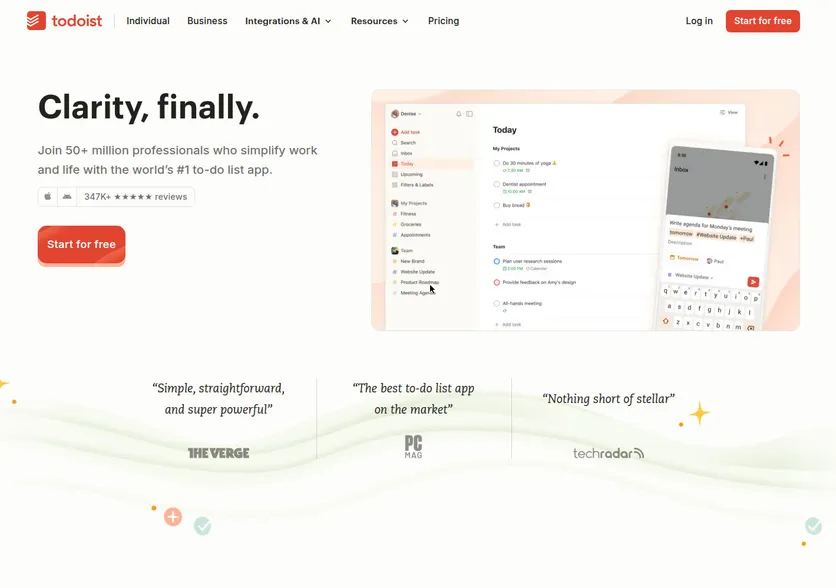
In the earliest days a startup mostly needs to stop dropping balls, and this Todoist plan costs four dollars per user a month billed annually for a shared list that does exactly that. Projects separate product, hiring and fundraising, shared tasks let the founders see the same list, and the free plan covers a tiny team getting started. It is the cheapest paid plan in this list, and the right size until the team needs real project views.
What we like
- Cheapest paid plan in this list
- Shared tasks let the founders see the same list
- Natural-language entry adds a task in seconds
Watch out for
- Too light once the team needs real project views
- The free plan caps at five projects
How to try it
- Create a project each for product, hiring and fundraising
- Share the projects with the whole founding team
- Set recurring tasks for weekly investor updates
6. Notion
Best for: Startups that write the pitch, hiring plan and roadmap together
Paid tool Starting price: $10/member/month · Ten dollars per member a month on Plus billed annually (twelve dollars billed monthly); Business is twenty dollars per member a month billed annually (twenty-four dollars monthly)
Free plan: Free plan
A startup that writes its pitch, its hiring plan and its product roadmap in the same place saves the chaos of five apps, and this Notion plan costs ten dollars per member a month billed annually for that combined workspace. Databases link the roadmap to the spec for each feature, templates turn a new hire into a repeatable checklist, and the free plan is workable for a founding team. The blank page is the challenge, since someone has to design the system before the team can use it.

What we like
- Databases link the roadmap to the spec for each feature
- Templates turn a new hire into a repeatable checklist
- One workspace replaces five separate apps
Watch out for
- A blank page needs someone to design the system first
- Offline access is weaker than the dedicated task apps
How to try it
- Create a roadmap database with linked specs for each feature
- Build a template for new hires
- Share the workspace with the team and set permissions
7. Wrike
Best for: Startups running several projects with different deadlines
Paid tool Starting price: $9.80/user/month · Nine dollars and eighty cents per user a month on Team billed annually; Business is twenty-four dollars and eighty cents per user a month billed annually; Enterprise is quoted
Free plan: Free plan (up to 5 users)
When a startup starts running several projects at once, each with its own deadline, the work needs a tool built for many projects, and this Wrike plan costs nine dollars and eighty cents per user a month billed annually for that multi-project view. Folders separate product, hiring and fundraising, dashboards show every deadline in one place, and request forms collect new work without a founder triaging email. The free plan covers up to five users, so a growing team moves to paid quickly.

What we like
- Folders separate product, hiring and fundraising
- Dashboards show every deadline in one place
- Request forms collect new work without a founder triaging email
Watch out for
- The free plan covers only five users
- The interface feels heavier than the simpler lists here
How to try it
- Create a folder per workstream with projects inside
- Add a dashboard that shows every deadline
- Set up a request form for new work from the team
8. Smartsheet
Best for: Startups that plan and report to investors in spreadsheets
Paid tool Starting price: $9/member/month · Nine dollars per member a month on Pro billed annually (twelve dollars billed monthly); Business is nineteen dollars per member a month billed annually (twenty-four dollars monthly); the Pro plan caps at ten members
Free plan: No free plan; 30-day free trial
A startup that plans in spreadsheets and reports to investors in spreadsheets will feel at home here, and this Smartsheet plan costs nine dollars per member a month billed annually for grids that behave like project plans. Launch plans, hiring trackers and budgets can live as rows with owners and due dates, and automated reminders chase the person responsible without a founder remembering. The Pro plan caps at ten members, so a fast-growing team needs the Business tier sooner than expected.

What we like
- Launch plans, hiring trackers and budgets live as rows
- Automated reminders chase the person responsible
- Familiar grid layout needs almost no training
Watch out for
- The Pro plan caps at ten members
- No free plan, only a thirty-day trial
How to try it
- Build a grid for the launch with owners and due dates
- Add automated reminders before each investor deadline
- Share the sheet with the team so they see live progress
Prices above were checked on each vendor’s own website on Nov 29, 2026 and can change — the vendor’s page is the final word. Vendor links are editorial: nobody paid to be listed or ranked here. Vendors who want a featured listing can see how it works on our Get listed page.
How a startup team picks one tool and sticks with it
Start on the free plan and use it for a real month before paying, because a startup that buys too early pays for seats it does not need. Keep one list for product, one for hiring and one for fundraising, and never let the three mix. Review the lists together once a week, close what shipped, and move anything that slipped to next week with a new owner. When the team doubles, add structure only where the pain is.
Before you buy
- Check the free plan limits first, because a startup grows fast and paid seats add up
- Make sure the tool handles docs as well as tasks, since a startup cannot afford five apps
- Ask whether the tool shows a roadmap the whole team and investors can read
- Confirm the mobile app is fast enough to add a task between meetings and pitches
- Test the tool with a real month of work before paying, including a week when plans change
Official websites
Official websites of the products reviewed above. Features and prices were checked against these sites when this guide was written, and they can change, so confirm on the vendor site before you buy.
Frequently asked questions
What is the best task management software for startups?
ClickUp is the best overall pick for most startups, because its free plan carries a founding team and its paid plan costs nine dollars per user a month for docs, tasks and tracking. Notion is the better choice when the team writes as much as it builds, and Todoist is the best value for a tiny team that just needs a shared list. The right pick depends on whether the startup needs depth, docs or a low price.
How much does task management software cost a startup?
Prices in this list run from four dollars per user a month for Todoist Pro to ten dollars and ninety-nine cents for Asana Starter, with most tools between five and ten dollars a month. A founding team of five on a paid plan should expect roughly twenty-five to fifty dollars a month, and the free plans cover a tiny team entirely. Start free, and pay only when the team outgrows the free limits.
Can a startup use free task management software?
Yes, and most startups should start there. ClickUp, Trello, Todoist, Notion and Asana all have free plans that cover a founding team, and Wrike is free for up to five users. The free plans usually limit projects, guests or storage, so a team that hires quickly will need a paid plan within a few months.
Which tool is best for a startup that also needs docs?
Notion is the strongest pick when docs matter as much as tasks, because it holds the pitch, the hiring plan and the roadmap beside the work. ClickUp is a close second, with docs built into the same workspace as the tasks. Asana and monday.com handle docs lightly, so a team that writes a lot should pick Notion or ClickUp and keep everything in one place.
When should a startup move from a free plan to a paid plan?
Move up when the free limits start costing time, usually when the team passes five people, needs more than a handful of projects, or wants guests and reporting. A paid plan also makes sense when the startup needs automations, timelines or a roadmap view that the free plan hides. Until then, the free plan is the right price, and the money is better spent elsewhere.
Compare the eight tools above, then start with the free ClickUp plan on the workspace that matches how the team already works before paying for a full year.
Browse Productivity Tools tools