On this page
Small teams do not need the biggest task tool — they need the one everyone actually opens. A shared list that half the team ignores is worse than no list at all, because work hides in chat threads and inboxes instead. Trello is our first pick — the simplest board a small team can adopt in an afternoon. Below are nine paid task tools that small teams run, compared on price, ease of use and features, with prices checked on November 25, 2026. Pick the one your least technical teammate enjoys using.
How we researched this
We started from the task tools small teams pay for, then checked each price on the vendor pricing page on November 25, 2026. We judged them for a team of five to fifteen people that needs shared lists and clear owners.
Compare the tools
| Name | Best for | Starting price | Free plan | |
|---|---|---|---|---|
 Asana | Small teams that want tidy timelines and dashboards without setup pain | $10.99/month | Free plan | Visit |
 Trello | Small teams that want the simplest board that still gets work done | $5/month | Free plan | Visit |
 ClickUp | Small teams that want tasks, docs and time tracking in one place | $9/month | Free plan | Visit |
 Monday.com | Small teams that want a visual board clients can follow | $12/month | Free plan | Visit |
 Todoist | Small teams that live in daily checklists and fast capture | $8/month | Free plan | Visit |
 Notion | Small teams that want tasks, docs and a wiki in one workspace | $10/month | Free plan | Visit |
 Wrike | Small teams that need Gantt charts and dependencies from day one | $10/month | Free plan | Visit |
 Teamwork | Agencies and client teams that bill hours against projects | $9.99/month | Free plan | Visit |
 Basecamp | Small teams that want one flat bill no matter how many people join | $79/month | Free plan | Visit |
The task management tools, compared
1. Asana
Best for: Small teams that want tidy timelines and dashboards without setup pain
Paid tool Starting price: $10.99/month · Starter plan, billed annually; $13.49 per user per month billed monthly; Personal plan free for up to 2 users
Free plan: Free plan
Asana is the tidy desk of task tools, and small teams feel the difference in week one. This Asana plan turns a shared to-do list into timelines, dashboards and forms, so five people can see who owns what without a meeting. The free Personal plan covers two people, and Starter adds automations and custom fields.

What we like
- Clean timelines and dashboards anyone can read
- Unlimited automations from Starter up
- Free guests keep clients in the loop
Watch out for
- Personal plan caps at two people
- Portfolio and goals need Advanced
How to try it
- Start a Starter trial on the Asana pricing page
- Create a project from a template and add your tasks
- Invite the team and set a weekly status update
2. Trello
Best for: Small teams that want the simplest board that still gets work done
Paid tool Starting price: $5/month · Standard plan, billed annually; $6 per user per month billed monthly; Premium $10 billed annually; free for up to 10 collaborators
Free plan: Free plan
Trello is the simplest board a team can adopt, and sometimes simple is the whole point. This Trello plan organizes work as cards on lists, so anyone can move a task from doing to done without training. Standard adds unlimited boards and custom fields, while Premium brings calendar, timeline and dashboard views.

What we like
- Easiest board to learn here
- Unlimited cards and Power-Ups on the free plan
- Mobile apps that work for quick updates
Watch out for
- No timeline or dashboard views until Premium
- Automation runs are capped on the free plan
How to try it
- Create a free workspace on the Trello pricing page
- Make a board with three lists and add your cards
- Try a Standard trial to unlock unlimited boards
3. ClickUp
Best for: Small teams that want tasks, docs and time tracking in one place
Paid tool Starting price: $9/month · Core plan, billed annually; regular price $12 per user per month; Business $17 billed annually; Free Forever plan
Free plan: Free plan
ClickUp is the all-you-can-eat option for teams that hate paying for five apps. This ClickUp plan packs tasks, docs, goals, chat and time tracking into one workspace, so a small team can plan a week and track it in one place. Core is the cheapest paid seat here, while Business adds dashboards and workload views.

What we like
- One app for tasks, docs, goals and chat
- Generous free plan with unlimited tasks
- Core is the cheapest paid seat here
Watch out for
- Feature overload can slow a small team down
- Paid upgrades apply to the whole workspace
How to try it
- Create a free workspace on the ClickUp pricing page
- Set up a Space for the team with tasks and docs
- Run one week of work, then try a Core trial
4. Monday.com
Best for: Small teams that want a visual board clients can follow
Paid tool Starting price: $12/month · Standard plan, billed annually; $14 per user per month billed monthly; Basic $9 and Pro $19 billed annually; 3-seat minimum
Free plan: Free plan
Monday is the most visual task board here, and that matters when everyone is part-time on planning. This Monday plan lays work out in color-coded boards with timelines and automations, so a small team can see the week at a glance. Standard adds the Gantt view and guest access client-facing teams need, and the three-seat minimum keeps the starting bill honest.

What we like
- Colorful boards anyone can read without training
- Guest access brings clients into the loop
- Strong templates for small-team workflows
Watch out for
- Three-seat minimum means a two-person team overpays
- Seats sell in bundles, so odd sizes cost extra
How to try it
- Start a Pro trial on the Monday pricing page
- Pick a template that matches your work
- Set one automation to move done items automatically
5. Todoist
Best for: Small teams that live in daily checklists and fast capture
Paid tool Starting price: $8/month · Business plan per user per month, billed annually; $10 per user per month billed monthly; Pro $5 billed annually; Beginner free
Free plan: Free plan
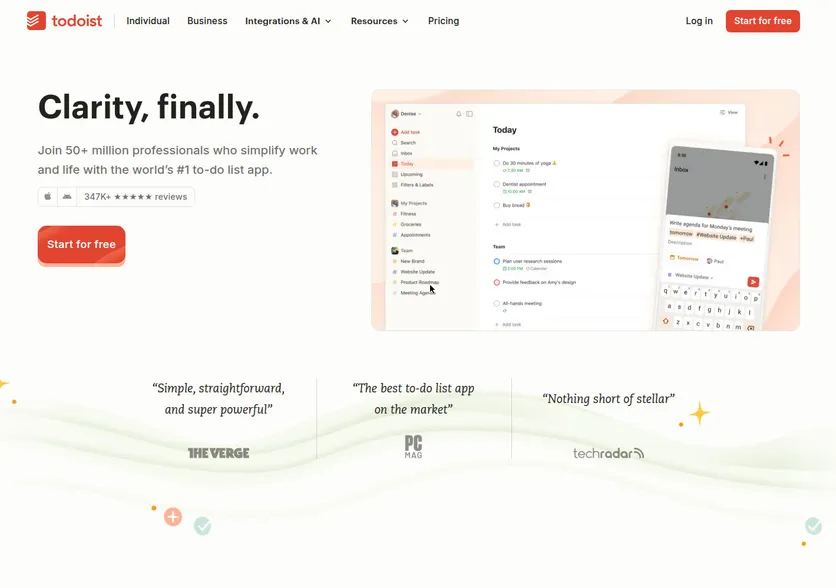
Todoist is the fastest way to capture a task before it slips away. This Todoist plan gives every team member a clean personal list plus a shared workspace, with natural-language dates and reminders that keep small jobs from going stale. Business adds team projects and roles, and the tool stays light enough to check fifty times a day.
What we like
- Fastest task capture here
- Natural-language dates make scheduling effortless
- Light enough to check dozens of times a day
Watch out for
- No built-in timeline or Gantt view
- Business is the only plan with team roles
How to try it
- Create a free account on the Todoist pricing page
- Create a team workspace and add your projects
- Set recurring tasks and try the Business trial
6. Notion
Best for: Small teams that want tasks, docs and a wiki in one workspace
Paid tool Starting price: $10/month · Plus plan per member per month, billed annually; $12 per member per month billed monthly; Business $20 billed annually; free plan
Free plan: Free plan
Notion is the notebook that grew up into a task manager. This Notion plan lets a small team keep tasks, docs and databases in one workspace, so a project page can hold its own checklist instead of linking elsewhere. Plus adds history, uploads and custom forms, while Business brings AI features and permissions.

What we like
- Tasks, docs and databases in one place
- Flexible templates fit almost any workflow
- Guests can view pages without a paid seat
Watch out for
- Task views are weaker than a dedicated tracker
- Business doubles the price for AI and single sign-on
How to try it
- Create a free workspace on the Notion pricing page
- Build a task database from a template
- Invite the team and try a Plus trial
7. Wrike
Best for: Small teams that need Gantt charts and dependencies from day one
Paid tool Starting price: $10/month · Team plan per user per month, billed annually, for 2 to 15 users; Business $25 billed annually; free plan
Free plan: Free plan
Wrike is the structured choice for teams that outgrow a simple board. This Wrike plan adds Gantt charts, dashboards and custom workflows to everyday task lists, so a small team can plan dates and dependencies without a separate scheduling tool. Team covers groups of two to fifteen, and Business adds resource management and time tracking.

What we like
- Real Gantt charts with dependencies on the entry plan
- Shared dashboards keep everyone aligned
- Strong request forms for intake work
Watch out for
- Team stops at fifteen users, then the bill jumps
- Seats sell in groups of five
How to try it
- Start a 14-day trial on the Wrike pricing page
- Create a project with a Gantt chart and dependencies
- Invite the team and set up a shared dashboard
8. Teamwork
Best for: Agencies and client teams that bill hours against projects
Paid tool Starting price: $9.99/month · Basics plan per user per month, billed annually; Accelerate $24.99 billed annually; free plan for up to 5 users and 5 projects
Free plan: Free plan
Teamwork is built for teams that bill clients by the hour. This Teamwork plan pairs tasks and Gantt charts with time tracking, invoicing and profitability views, so agency work stays tied to the budget that pays for it. The Basics tier covers up to three hundred projects, and Accelerate adds workload planning.

What we like
- Time tracking and invoicing built in
- Profitability views show which clients pay
- Clean Gantt and board views for client work
Watch out for
- Accelerate costs more than double the Basics seat
- Built for agencies, so solo teams overpay
How to try it
- Create a free account on the Teamwork pricing page
- Set up a client project with tasks and time tracking
- Try a Basics trial and create your first invoice
9. Basecamp
Best for: Small teams that want one flat bill no matter how many people join
Paid tool Starting price: $79/month · Pro package, flat monthly price for up to 10 users and 8 active projects; Pro Plus $99; Pro Unlimited $199 billed annually; free Personal plan for 1 project
Free plan: Free plan
Basecamp charges one flat price no matter how many people join. This Basecamp plan bundles message boards, to-dos, chat, scheduling and files into one calm workspace, so a small team stops paying per seat for every contractor and client. Pro covers ten people and eight projects for one monthly fee, and Pro Unlimited removes every cap.

What we like
- One flat price, so adding people never raises the bill
- Calm all-in-one workspace with no per-seat math
- Clients join without per-seat fees
Watch out for
- Project caps mean growing teams must jump a tier
- No built-in Gantt chart for date-driven planning
How to try it
- Start a free trial on the Basecamp pricing page
- Create a project with to-dos and a message board
- Invite the team and clients, then pick a package
Prices above were checked on each vendor’s own website on Nov 25, 2026 and can change — the vendor’s page is the final word. Vendor links are editorial: nobody paid to be listed or ranked here. Vendors who want a featured listing can see how it works on our Get listed page.
What the task tools cost in 2026
Price is the first filter, and the spread here is wide. The cheapest paid seat costs about five dollars a month, the priciest flat package about seventy-nine, and every tool offers a free plan. The table below uses the headline price from each vendor pricing page, checked on November 25, 2026.
Two things to watch. First, seat minimums and bundles can double a small bill — a two-person team still pays for three seats on some tools. Second, compare on the free plan: run the same week through two trials.
Before you buy
- Price the whole team, not one seat: Trello Standard is $5 a month per user, while Basecamp charges a flat $79 a month no matter how many people join.
- Mind the minimums: Monday.com has a three-seat minimum, so a two-person team overpays, and Wrike sells seats in groups of five.
- Check the free-plan caps: Asana's free Personal plan covers only two people, while Trello's free plan covers up to ten collaborators.
- Compare annual and monthly billing, because Asana Starter rises from $10.99 a month annual to $13.49 month-to-month, and Todoist Business from $8 to $10.
- Trial with real work: run the same week through two trials on the free plans, and pick the tool your least technical teammate enjoys opening.
Official websites
Official websites of the products reviewed above. Features and prices were checked against these sites when this guide was written, and they can change, so confirm on the vendor site before you buy.
Frequently asked questions
Which task management tool is best for a small team in 2026?
Asana is the best all-rounder for most small teams, pairing clean timelines with dashboards and automations anyone can read. Trello wins when the team wants the simplest board, and ClickUp wins when one app must cover tasks, docs and time tracking. Pick the tool your least technical teammate enjoys opening.
What is the cheapest task manager for a small team?
Trello Standard is the cheapest paid seat here at about five dollars per user each month on annual billing, and its free plan covers up to ten collaborators. Todoist Business and ClickUp Core are close behind, and Basecamp can be cheaper per head past ten people. Price the whole team, not one seat.
Do I need a paid plan, or is the free plan enough?
A free plan is enough while the team is tiny and the work is simple, especially on Trello or Todoist. Pay when you hit a real limit, such as running out of boards or needing timelines and reports. The honest test is whether the free plan slows the team down.
Which task tool is easiest for non-technical teammates?
Trello is the easiest to learn because a board of cards needs no explanation, and Basecamp is close behind with plain message boards and to-do lists. Asana and Todoist take about a day to feel natural, while ClickUp and Wrike need a setup session. If half the team never opens the tool, the tool is wrong.
Can these tools handle client work and billing?
Teamwork is built for exactly that, with time tracking, invoicing and profitability views on every paid plan. Basecamp handles client projects well on Pro Unlimited, where guests join without per-seat fees, and Monday covers client work with guest access on Standard. For hourly billing, Teamwork is the strongest pick.
Only need the everyday jobs? Browse the free productivity tools on Toolsvine — quick utilities that run in your browser.
Browse Productivity Tools tools