On this page
A small team does not need more meetings, it needs a shared list with an owner and a date on every task. The best productivity apps for small teams keep that list visible, so nothing slips. Asana Starter is our first pick — the best-known project tracker, with timelines and dashboards that keep projects visible. The seven apps below range from a $5 task list to a full project suite, with every price checked on the vendor site on November 25, 2026. Most offer a free plan, so test each one on a real project before you pay.
How we researched this
We started with the productivity apps small teams actually buy for daily task work, then read each price on the vendor pricing page on November 25, 2026 and noted the seat minimums and free plans each tier carries. We judged them for a working team that assigns tasks every day, tracks deadlines and needs everyone to see the same plan. We kept the list to tools with a published price, and we dropped any tool whose price we could not verify on its own site.
Compare the tools
| Name | Best for | Starting price | Free plan | |
|---|---|---|---|---|
 Asana Starter | Small teams that want clear owners and dates on every task | $10.99/month | Free plan | Visit |
 Trello Standard | Small teams that think in cards and columns | $5/month | Free plan | Visit |
 ClickUp Core | Small teams that want docs, tasks and chat in one app | $9/month | Free plan | Visit |
 Monday.com Basic | Teams that manage work in visual boards and tables | $9/month | Free plan | Visit |
 Notion Plus | Teams that live in docs and want tasks next to notes | $10/month | Free plan | Visit |
 Todoist Pro | Teams that want a fast, simple task list | $5/month | Free plan | Visit |
 Basecamp Plus | Teams that want calm project work without chat noise | $29/month | Free trial | Visit |
The productivity apps, compared
1. Asana Starter
Best for: Small teams that want clear owners and dates on every task
Paid tool Starting price: $10.99/month · Starter plan, per user per month on annual billing; $13.49 a month month-to-month
Free plan: Free plan
Asana Starter is the project tracker most small teams reach for first, because it turns a messy to-do list into work with owners and dates. This Asana Starter plan adds timelines, dashboards and workflow rules to the free core. It is the safest default for a small team that needs everyone to see who is doing what, and by when.

What we like
- Timelines show the whole project at a glance
- Workflow rules automate the repetitive steps
- Dashboards report progress without a meeting
Watch out for
- Advanced features need the higher plan
- Per-user pricing grows fast as the team grows
How to try it
- Open the Asana pricing page and start the Starter trial
- Create a project and assign an owner and due date to each task
- Open the timeline view to spot the work that will slip
2. Trello Standard
Best for: Small teams that think in cards and columns
Paid tool Starting price: $5/month · Standard plan, per user per month on annual billing; Premium is $10
Free plan: Free plan
Trello Standard is the simplest board on this list, and that simplicity is why small teams stick with it. This Trello Standard plan adds unlimited boards, custom fields and advanced checklists to the free boards. It is the best fit for a team that thinks in cards and columns rather than in timelines and reports.

What we like
- The simplest board here, learned in minutes
- Unlimited boards on the Standard plan
- Custom fields fit the board to your workflow
Watch out for
- No timeline view on the Standard plan
- Reporting is thinner than Asana or Monday
How to try it
- Open the Trello pricing page and start the Standard trial
- Make a board with To do, Doing and Done columns
- Add custom fields to track the details your team cares about
3. ClickUp Core
Best for: Small teams that want docs, tasks and chat in one app
Paid tool Starting price: $9/month · Core plan, $9 per user a month billed annually; $12 a month month-to-month; Business is $17
Free plan: Free plan
ClickUp Core is the value pick that tries to replace your docs, chat and task list in one app. This ClickUp Core plan adds unlimited storage, integrations and dashboards to the free core. It is the best choice for a small team that wants one login for almost everything.

What we like
- Docs, tasks and chat in one login
- Unlimited storage on the paid plan
- Best value per dollar on this list
Watch out for
- So many features it can overwhelm a new team
- Setup takes longer than Trello or Todoist
How to try it
- Open the ClickUp pricing page and start the Core trial
- Import your tasks and set up one space per project
- Turn on the dashboards to see every project at once
4. Monday.com Basic
Best for: Teams that manage work in visual boards and tables
Paid tool Starting price: $9/month · Basic plan, per seat per month on annual billing; 3-seat minimum; Standard is $12 and Pro is $19
Free plan: Free plan
Monday Basic is the visual work tracker that turns a project into a colorful board anyone can read at a glance. This Monday Basic plan adds unlimited viewers, a bigger file allowance and a shared board view. It is the best pick for a team that manages work in tables and wants status visible without opening a task.

What we like
- Boards are readable at a glance
- Unlimited viewers on the Basic plan
- Templates cover most common projects
Watch out for
- Three-seat minimum raises the smallest bill
- Automations need the higher plans
How to try it
- Open the Monday.com pricing page and start the Basic trial
- Build a board with a status column for every task
- Invite viewers, since the Basic plan includes unlimited viewers
5. Notion Plus
Best for: Teams that live in docs and want tasks next to notes
Paid tool Starting price: $10/month · Plus plan, per member per month on annual billing; $12 a month month-to-month; Business is $20
Free plan: Free plan
Notion Plus is the workspace that mixes notes, docs and tasks so a small team stops hunting across apps. This Notion Plus plan adds unlimited file uploads, longer page history and more guests to the free workspace. It is the best fit for a team that lives in documents and wants tasks sitting next to the notes.

What we like
- Notes, docs and tasks in one workspace
- Flexible pages fit almost any workflow
- Guests can view pages without a paid seat
Watch out for
- Setup takes time, since pages start blank
- Offline access is limited
How to try it
- Open the Notion pricing page and start the Plus trial
- Turn a meeting notes page into a task list
- Share the page with guests who only need to read
6. Todoist Pro
Best for: Teams that want a fast, simple task list
Paid tool Starting price: $5/month · Pro plan, $5 a month billed annually ($60 a year); $7 a month month-to-month
Free plan: Free plan
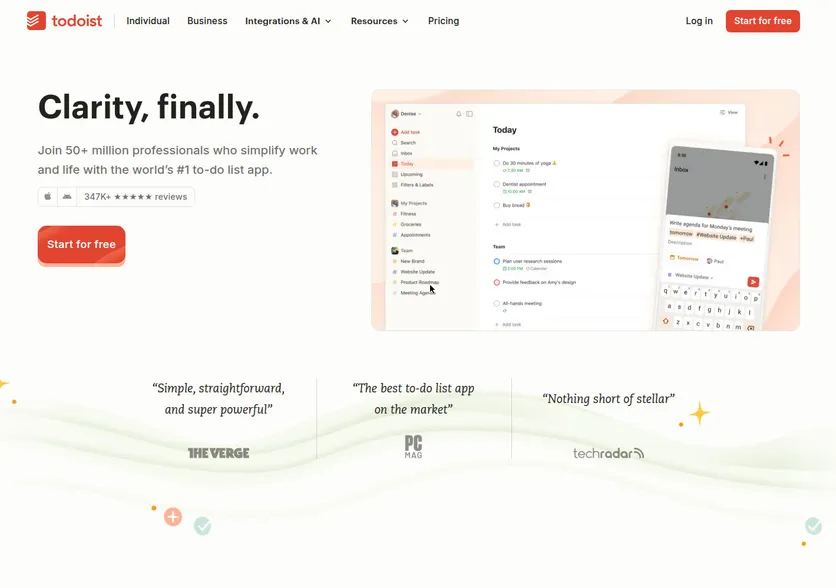
Todoist Pro is the personal task list that scales to a small team without adding weight. This Todoist Pro plan adds reminders, labels, filters and a bigger project allowance to the free list. It is the best choice for a team that wants a fast, simple task list rather than a full project suite.
What we like
- The fastest task list here, learned in minutes
- Reminders and filters keep the day on track
- Cheapest paid plan on this list
Watch out for
- No timeline or board views on Pro
- Reporting is thinner than Asana or Monday
How to try it
- Open the Todoist pricing page and start the Pro trial
- Create a project per workstream and add due dates
- Set up reminders for the tasks that cannot slip
7. Basecamp Plus
Best for: Teams that want calm project work without chat noise
Paid tool Starting price: $29/month · Freelancer plan, $29 a month flat; Pro $79 a month flat; Pro Plus $99; Pro Unlimited $199 a month billed annually
Free plan: Free trial
Basecamp Freelancer is the calm project hub for teams that hate chat noise and want work in one quiet place. This Basecamp Freelancer plan adds message boards, to-dos, schedules and file storage for a flat monthly price. It is the best pick for a small team that wants fewer notifications and more finished work.

What we like
- One quiet place for messages, tasks and files
- No chat noise, so focus survives the day
- Flat monthly pricing with no surprises
Watch out for
- No free plan, only a trial
- Fewer integrations than Asana or ClickUp
How to try it
- Open the Basecamp pricing page and start the Plus trial
- Create a project and post the first message on the board
- Add to-dos with owners and dates, then check the schedule
Prices above were checked on each vendor’s own website on Nov 14, 2026 and can change — the vendor’s page is the final word. Vendor links are editorial: nobody paid to be listed or ranked here. Vendors who want a featured listing can see how it works on our Get listed page.
What productivity apps cost in 2026
Price is the first filter, and the range on this list runs from about $5 a month to about $15 a month per user. The cheapest plans are not always the cheapest deal, because seat minimums and per-user billing change what a team really pays. The table below uses the headline plan each vendor shows on its own pricing page, checked on November 25, 2026.
Before you buy
- Count your team first, then multiply the per-user price: Asana, Trello, ClickUp, Monday.com, Notion and Todoist all charge per user, so the bill grows with every seat.
- Check the seat minimum: Monday.com Basic has a three-seat minimum, so a two-person team still pays for three seats.
- Compare annual and monthly billing, because Asana Starter rises from $10.99 a month annual to $13.49 month-to-month, and ClickUp Core from $9 to $12.
- Test the app on a real project before you pay, because a tool your team ignores costs more than any monthly fee.
- Check the free plan limits first: Basecamp offers no free plan, only a trial, while the other six tools all have free plans.
Official websites
Official websites of the products reviewed above. Features and prices were checked against these sites when this guide was written, and they can change, so confirm on the vendor site before you buy.
Frequently asked questions
Which productivity app is best for small teams in 2026?
Asana Starter, at about $10.99 a month per user on annual billing, is the safest default because timelines and dashboards keep every project visible. ClickUp Core is the best value at about $9 a month, and Trello Standard is the simplest pick at about $5 a month. Pick the one your team will actually open every day.
What is the cheapest productivity app for small teams?
Todoist Pro, at about $5 a month on annual billing, is the cheapest paid plan here. Trello Standard is next at about $5 a month per user, and ClickUp Core is about $9 a month. All three have free plans, so start free and pay only when the limits start to bite.
Can I try productivity apps before paying?
Yes, every tool here offers a free plan or a free trial. Asana, Trello, ClickUp, Monday.com, Notion and Todoist all have free plans with limits, while Basecamp offers a free trial. Test each one with a real project, not a test file, to see whether your team will actually use it.
Which productivity app is best for remote teams?
Notion Plus, at about $10 a month per member, is the best pick for remote teams because docs, notes and tasks live in one workspace that anyone can open. Basecamp Plus is the calmer choice at about $15 a month, since it keeps messages, tasks and files in one quiet place without chat noise.
Do productivity apps charge per user?
Most of them do. Asana, Trello, ClickUp, Monday.com, Notion and Todoist all charge per user or per seat, so the bill grows with the team. Basecamp Pro Unlimited is the exception at a flat $299 a month, which suits a larger team that wants one predictable bill.
See the full productivity collection and build your private system.
Browse Productivity Tools tools