On this page
A team that cannot see its work cannot manage it, so the board, timeline and map you choose shapes how fast work moves. The eight tools below turn scattered tasks into a picture the whole team can read, from a simple kanban board to a full project system with workload views. monday.com leads because it combines boards, timelines and dashboards at twelve dollars a seat a month, and the rest are ranked on how clearly they show who is doing what.
How we researched this
We checked every price on the vendor pricing page on November 29, 2026, and only included tools with a published US dollar list price. Tools that sell only by quote are not in this list. Prices change, so confirm the current figure on the vendor site before you buy.
Compare the tools
| Name | Best for | Starting price | Free plan | |
|---|---|---|---|---|
 monday.com | Teams that want boards, timelines and dashboards | $12/seat/month | Free plan (up to 2 seats) | Visit |
 Asana | Structured teams with clear owners and dates | $10.99/user/month | Free plan (up to 10 users) | Visit |
 Trello | Small teams that want a simple kanban board | $5/user/month | Free plan (up to 10 boards) | Visit |
 ClickUp | Teams that want tasks, docs and goals in one app | $9/user/month | Free plan | Visit |
 Miro | Teams that plan visually on a shared canvas | $8/member/month | Free plan (3 boards) | Visit |
 Lucidchart | Teams that map processes as diagrams | $9/month | Free plan (3 documents) | Visit |
 Smartsheet | Operations teams that think in spreadsheets | $9/user/month | No free plan; 30-day free trial | Visit |
 Wrike | Marketing and operations teams with approvals | $9.80/user/month | Free plan | Visit |
The team workflow software, compared
1. monday.com
Best for: Teams that want boards, timelines and dashboards
Paid tool Starting price: $12/seat/month · Twelve dollars per seat a month on Standard billed annually, or fourteen dollars billed monthly, with a three-seat minimum; Basic is nine dollars and Pro is nineteen dollars billed annually; one November 2026 read lists Standard at fourteen dollars and Pro at twenty-two dollars, which conflicts with the majority of reads
Free plan: Free plan (up to 2 seats)
A team that wants its work visible in boards, timelines and dashboards will find it here, since this monday.com plan costs twelve dollars per seat a month billed annually on Standard. Colour-coded status columns show progress at a glance, automations move cards without manual work, and dashboards roll every project into one view. It is the best all-rounder in this list for teams that want a picture of the whole workload.

What we like
- Boards, timelines, calendars and workload views in one place
- Automations move work forward without manual updates
- Dashboards roll every project into a single picture
Watch out for
- The three-seat minimum makes it dear for solo users
- Costs climb fast as the team and the feature list grow
How to try it
- Create a board and add the columns that match your process
- Invite the team and assign owners to each item
- Build a dashboard that shows progress across projects
2. Asana
Best for: Structured teams with clear owners and dates
Paid tool Starting price: $10.99/user/month · Ten dollars and ninety-nine cents per user a month on Starter billed annually, or thirteen dollars and forty-nine cents billed monthly; Advanced is twenty-four dollars and ninety-nine cents a user a month billed annually
Free plan: Free plan (up to 10 users)
A team that runs structured projects with clear owners and dates will work well here, because this Asana plan costs ten dollars and ninety-nine cents per user a month billed annually on Starter. List, board, timeline and calendar views show the same work four ways, and goals link daily tasks to the bigger picture. It is the best pick for teams that plan in detail and want every deadline visible.

What we like
- List, board, timeline and calendar views of the same work
- Goals link daily tasks to company objectives
- Rules automate handoffs between teammates
Watch out for
- The free plan caps at ten users
- Reporting depth needs the Advanced tier
How to try it
- Set up a project and choose the board or timeline view
- Add tasks with owners, dates and dependencies
- Check the workload view before assigning more work
3. Trello
Best for: Small teams that want a simple kanban board
Paid tool Starting price: $5/user/month · Five dollars per user a month on Standard billed annually, or six dollars billed monthly; Premium is ten dollars per user a month billed annually
Free plan: Free plan (up to 10 boards)
A small team that wants a board up in minutes will love the simplicity here, since this Trello plan costs five dollars per user a month billed annually on Standard. Cards drag between columns, checklists break work into steps, and power-ups add calendars and automation when needed. It is the cheapest and simplest pick in this list for teams that just need to see work move.

What we like
- Anyone learns the board in minutes with no training
- Checklists, labels and due dates keep cards organised
- Power-ups add calendars, automation and integrations
Watch out for
- No built-in workload or time tracking on the base plan
- Large projects outgrow the simple board fast
How to try it
- Create a board with columns for each stage of work
- Add cards for tasks and drag them as they progress
- Set due dates and checklists on the cards that matter
4. ClickUp
Best for: Teams that want tasks, docs and goals in one app
Paid tool Starting price: $9/user/month · Nine dollars per user a month on Core billed annually, or twelve dollars billed monthly; Business is seventeen dollars a user a month billed annually
Free plan: Free plan
A team that wants one app for tasks, docs, goals and time will get it here, because this ClickUp plan costs nine dollars per user a month billed annually on Core. Fifteen-plus views cover lists, boards, timelines and Gantt charts, and docs and whiteboards sit beside the tasks. It is the best value in this list for a team that wants to replace several tools with one.

What we like
- Fifteen-plus views including Gantt, mind maps and whiteboards
- Docs, goals and time tracking built into the same app
- Generous free plan for small teams to start on
Watch out for
- The depth of features can overwhelm new users
- Performance can lag in very large workspaces
How to try it
- Create a space and pick the views your team needs
- Add tasks with custom fields for your workflow
- Turn on the docs and goals views when ready
5. Miro
Best for: Teams that plan visually on a shared canvas
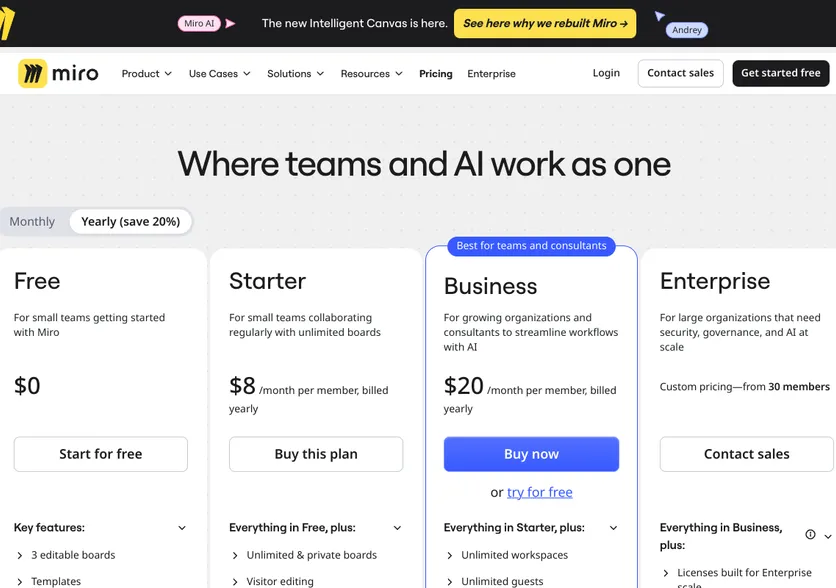
Paid tool Starting price: $8/member/month · Eight dollars per member a month on Starter billed annually, or ten dollars billed monthly; Business is twenty dollars per member a month billed annually
Free plan: Free plan (3 boards)
A team that plans on a whiteboard will find its digital twin here, since this Miro plan costs eight dollars per member a month billed annually on Starter. An endless canvas holds sticky notes, diagrams, flowcharts and timelines, and everyone can draw on it at once. It is the best pick for workshops, mapping and early-stage planning that needs room to spread out.
What we like
- Endless canvas for diagrams, maps and sticky notes
- Live collaboration with cursors and comments
- Hundreds of templates for workshops and planning
Watch out for
- Not a task tracker, so work needs a second tool
- The free plan caps at three boards
How to try it
- Open a board and pick a template for the session
- Invite the team and map the workflow with sticky notes
- Export the finished board as an image or PDF
6. Lucidchart
Best for: Teams that map processes as diagrams
Paid tool Starting price: $9/month · Nine dollars a month on Individual billed yearly; Team is ten dollars per user a month; Professional and Enterprise tiers add admin controls and integrations
Free plan: Free plan (3 documents)
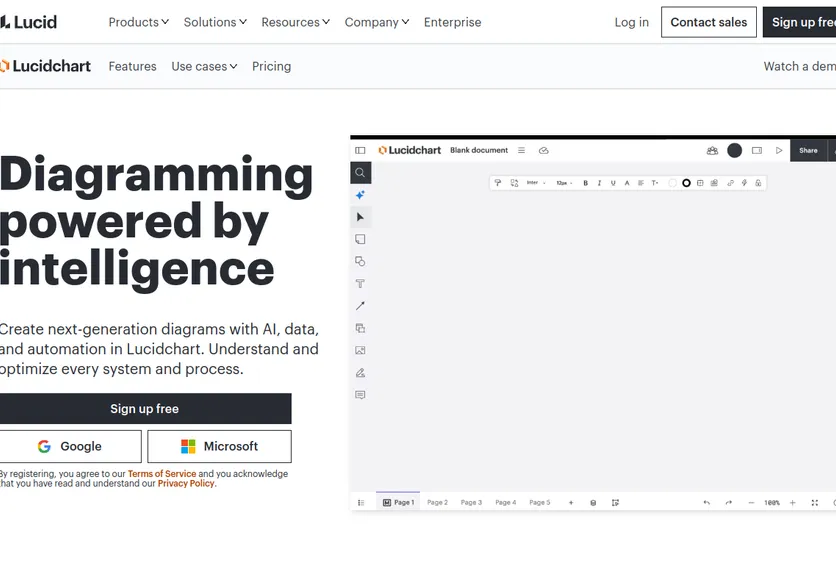
A team that maps processes as diagrams will work fast here, because this Lucidchart plan costs nine dollars a month billed yearly on Individual. Flowcharts, org charts and system diagrams build from a huge shape library, and data linking keeps diagrams current. It is the best pick when the workflow itself needs drawing before it needs tracking.
What we like
- Huge shape library for flowcharts and org charts
- Data linking keeps diagrams in sync with live data
- Real-time co-editing with comments and chat
Watch out for
- Task tracking is light compared with project tools
- The free plan caps at three documents
How to try it
- Start a diagram from a flowchart template
- Drag shapes onto the canvas and connect them
- Share the diagram and collect comments from the team
7. Smartsheet
Best for: Operations teams that think in spreadsheets
Paid tool Starting price: $9/user/month · Nine dollars per user a month on Pro billed annually, or twelve dollars billed monthly; Business is nineteen dollars a user a month billed annually; Pro caps at ten members
Free plan: No free plan; 30-day free trial
A team that thinks in spreadsheets but needs project views will settle here, since this Smartsheet plan costs nine dollars per user a month billed annually on Pro. Grid, Gantt, card and calendar views show the same rows four ways, and forms collect work requests straight into the sheet. It is the best pick for operations teams that already live in rows and columns.

What we like
- Grid, Gantt, card and calendar views of the same data
- Forms collect requests straight into the sheet
- Automations handle approvals and reminders
Watch out for
- Pro caps at ten members, so growing teams must upgrade
- The interface feels more corporate than playful rivals
How to try it
- Build a sheet with the columns your process needs
- Switch to the Gantt view to check the timeline
- Set up a form so requests land in the sheet
8. Wrike
Best for: Marketing and operations teams with approvals
Paid tool Starting price: $9.80/user/month · Nine dollars and eighty cents per user a month on Team billed annually; the next tier is twenty-four dollars and eighty cents per user a month billed annually
Free plan: Free plan
A team that juggles many projects with approvals will stay organised here, because this Wrike plan costs nine dollars and eighty cents per user a month billed annually on Team. Folders, dashboards and request forms keep work visible across departments, and proofing tools handle review cycles. It is the best pick for marketing and operations teams with heavy approval traffic.

What we like
- Dashboards and folders keep many projects visible
- Proofing and approval workflows built in
- Request forms turn asks into tracked work
Watch out for
- Setup takes longer than simpler board tools
- The best reporting needs the higher tiers
How to try it
- Create a folder structure for the team's projects
- Add tasks with owners and due dates
- Set up an approval workflow for review stages
Prices above were checked on each vendor’s own website on Nov 29, 2026 and can change — the vendor’s page is the final word. Vendor links are editorial: nobody paid to be listed or ranked here. Vendors who want a featured listing can see how it works on our Get listed page.
How to choose a workflow view your team will actually use
Start with how the team already talks about work, because a board suits a team that thinks in stages while a timeline suits a team that thinks in dates. Count the people who need a paid seat, since per-seat pricing makes a cheap-looking tool dear at scale, and check the free plan limits before rolling it out. Test the view on a real project for a week, not a demo, because the tool that looks tidy empty can turn messy with fifty live tasks. Pick the view the team opens without being asked, since the prettiest board is useless if nobody looks at it.
Before you buy
- Count the paid seats you really need, since per-seat pricing grows with the team
- Check the free plan limits before rolling the tool out to everyone
- Test the board on a real project for a week, not on a clean demo
- Make sure the views cover your work: boards, timelines and calendars
- Confirm the tool connects to the apps the team already uses daily
Official websites
Official websites of the products reviewed above. Features and prices were checked against these sites when this guide was written, and they can change, so confirm on the vendor site before you buy.
Frequently asked questions
What is team workflow visualization software?
Team workflow visualization software turns tasks into a picture the whole team can read, using boards, timelines, calendars or diagrams to show who is doing what and what happens next. It replaces scattered chats and spreadsheets with one shared view, so bottlenecks and overdue work stand out before they become missed deadlines.
How much does monday.com cost?
monday.com costs twelve dollars per seat a month on Standard billed annually, or fourteen dollars billed monthly, with a three-seat minimum. Basic is nine dollars a seat a month and Pro is nineteen dollars billed annually, so a small team pays around thirty-six dollars a month at the entry tier. The free plan covers up to two seats.
Is there a free tool for visualizing team workflows?
Yes, with Trello, which offers a free plan covering up to ten boards, and ClickUp and Wrike, which both offer free plans for small teams. Asana and monday.com also have free plans, though Asana caps at ten users and monday.com at two seats. A free plan is enough for a small team to run its real work before paying.
Which tool is best for kanban boards?
Trello is the best pick for pure kanban, because its simple boards need no training and cost five dollars a user a month on Standard. monday.com and Asana suit teams that also want timelines and workload views, while ClickUp covers kanban plus docs and goals. Choose the simplest board the team will actually keep updated.
Do I need Gantt charts to visualize a workflow?
Gantt charts help when work has strict dates and dependencies, such as a product launch or a construction schedule, and Asana, ClickUp, Smartsheet and Wrike all include them. A team with flexible, stage-based work will get more from a kanban board in Trello or monday.com. Pick the view that matches how the team plans, not the one with the most features.
Compare the eight tools above, then start with a free plan or trial on the tool whose view matches how your team already talks about its work.
Browse Productivity Tools tools