On this page
A law firm answers client questions under pressure, and a missed email can mean a missed deadline or a lost client. The eight tools below mix legal practice managers with client intake built in and general help desks that firms adapt for client mail, with prices checked on each vendor site on November 27, 2026. They range from nineteen dollars per agent a month to fifty-nine dollars per user a month. Clio is our first pick — the practice manager that pairs client intake with billing at forty-nine dollars per user a month.
How we researched this
We started with the legal practice managers firms actually buy, then added general help desks that handle client mail well, and read each price on the vendor pricing page on November 27, 2026. We judged them for a firm that needs client intake, conflict checks and billing beside the inbox. We left out quote-only enterprise suites that a small firm cannot price without a sales call.
Compare the tools
| Name | Best for | Starting price | Free plan | |
|---|---|---|---|---|
 Clio | Small and mid-size firms that want intake, matters and billing in one login | $49/user/month | No free plan; 7-day free trial | Visit |
 MyCase | Small firms that want practice management with accounting built in | $50/user/month | No free plan; free trial available | Visit |
 PracticePanther | Solo lawyers and small firms that want an easy practice manager | $49/user/month | No free plan; free trial available | Visit |
 CosmoLex | Firms that want practice management with trust accounting included | $49/user/month | No free plan; free trial available | Visit |
 Rocket Matter | Firms that want legal billing and matter management with strong reporting | $59/user/month | No free plan; free trial available | Visit |
 Help Scout | Firms that want a polished shared inbox for client mail | $25/user/month | Free plan for up to 5 users | Visit |
 Freshdesk | Small firms that want a free start for client support mail | $19/agent/month | Free plan available | Visit |
 Zendesk | Firms that want client support across email, chat and voice in one queue | $19/agent/month | No free plan; 14-day free trial | Visit |
The customer support software for law firms, compared
1. Clio
Best for: Small and mid-size firms that want intake, matters and billing in one login
Paid tool Starting price: $49/user/month · Forty-nine dollars per user a month billed annually for the EasyStart plan, or fifty-nine dollars per user a month billed monthly; higher plans are now quoted by sales under new plan names
Free plan: No free plan; 7-day free trial
Clio is the practice manager most law firms start with, pairing client intake with matter files, time tracking and billing in one login. This Clio EasyStart plan costs forty-nine dollars per user a month billed annually and adds intake forms and a client portal to the inbox. A firm that answers clients all day gets one system for intake, matters and billing instead of three separate tools.

What we like
- Intake, matters, billing and payments in one platform
- Client portal that keeps clients updated without calls
- Huge integration library for legal tools
Watch out for
- No free plan, so the trial is the only way to test it
- Higher tiers are now quoted by sales under new plan names
How to try it
- Open the Clio site and start the 7-day trial
- Set up your practice areas, matter types and intake forms
- Turn on the client portal and send a test intake link
2. MyCase
Best for: Small firms that want practice management with accounting built in
Paid tool Starting price: $50/user/month · Fifty dollars per user a month billed annually for the Basic plan, or sixty dollars per user a month billed monthly; Pro costs one hundred dollars and Advanced costs one hundred thirty dollars per user a month billed annually, and the accounting add-on costs thirty-nine dollars per user a month
Free plan: No free plan; free trial available
MyCase is the practice manager for small firms that want billing and accounting beside client communication, with an add-on that keeps the books inside the same login. This MyCase Basic plan costs fifty dollars per user a month billed annually and adds intake forms and a client portal. A small firm gets matter files, messaging and payments together without buying a separate accounting tool.

What we like
- Accounting add-on keeps billing inside the same login
- Intake forms and client portal included on Basic
- Simple layout that small firms learn in a day
Watch out for
- No free plan, so the trial is the only way to test it
- Accounting add-on costs thirty-nine dollars per user a month extra
How to try it
- Open the MyCase site and start the free trial
- Add your practice areas and build an intake form
- Invite clients to the portal and test online payments
3. PracticePanther
Best for: Solo lawyers and small firms that want an easy practice manager
Paid tool Starting price: $49/user/month · Forty-nine dollars per user a month billed annually for the Solo plan, or fifty-nine dollars per user a month billed monthly; Essential costs sixty-nine dollars, Business costs eighty-nine dollars and Business Pro costs one hundred fourteen dollars per user a month billed annually
Free plan: No free plan; free trial available
PracticePanther is the practice manager solo lawyers pick when they want matter files, billing and client messaging without a steep learning curve. This PracticePanther Solo plan costs forty-nine dollars per user a month billed annually and covers matters, time tracking and invoicing. A solo lawyer gets the whole practice in one login and spends evenings on cases instead of admin.

What we like
- Built for solo lawyers and small firms
- Time tracking and invoicing beside the matter file
- Fast setup with templates for common practice areas
Watch out for
- No free plan, so the trial is the only way to test it
- Solo plan limits some automation and reporting
How to try it
- Open the PracticePanther site and start the free trial
- Add your matters, contacts and billing rates
- Turn on online payments and the client portal
4. CosmoLex
Best for: Firms that want practice management with trust accounting included
Paid tool Starting price: $49/user/month · Forty-nine dollars per user a month billed annually for the Launch plan; Core costs ninety-nine dollars and Pro costs one hundred twenty-nine dollars per user a month billed annually, and annual billing saves one hundred twenty dollars per user
Free plan: No free plan; free trial available
CosmoLex is the practice manager for firms that want trust accounting built in, keeping client funds and billing in the same system as matters and mail. This CosmoLex Launch plan costs forty-nine dollars per user a month billed annually and adds matter management and time tracking. A firm that handles trust accounts gets compliant bookkeeping without a separate accounting login.

What we like
- Trust accounting built into the platform
- Matter files, email and billing in one login
- Annual billing saves one hundred twenty dollars per user
Watch out for
- No free plan, so the trial is the only way to test it
- Learning curve is steeper than simpler help desks
How to try it
- Open the CosmoLex site and start the free trial
- Set up your trust accounts and matter types
- Add your time entries and test an invoice
5. Rocket Matter
Best for: Firms that want legal billing and matter management with strong reporting
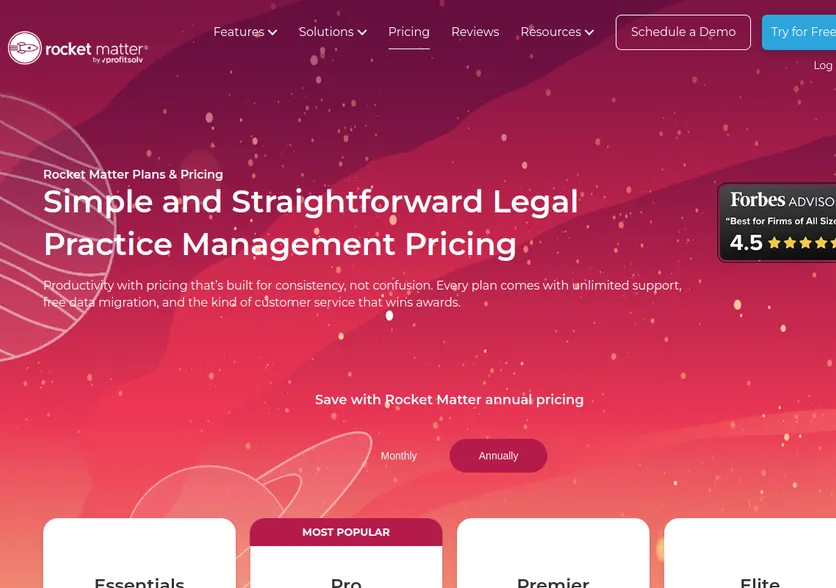
Paid tool Starting price: $59/user/month · Fifty-nine dollars per user a month billed annually for the Essentials plan; Pro costs ninety-five dollars, Premier costs one hundred fifteen dollars and Elite costs one hundred forty-five dollars per user a month billed annually
Free plan: No free plan; free trial available
Rocket Matter is the practice manager for firms that want billing and matter management with reporting that shows where every hour goes. This Rocket Matter Essentials plan costs fifty-nine dollars per user a month billed annually and covers matters, time tracking and invoicing. A firm that bills by the hour gets clean time capture and invoices that go out on schedule.
What we like
- Strong billing and reporting for hourly firms
- Matter management with document storage
- Client portal keeps clients updated
Watch out for
- Vendor FAQ mentions plans from forty-nine dollars, so confirm the tier at checkout
- No free plan, so the trial is the only way to test it
How to try it
- Open the Rocket Matter site and start the free trial
- Add your matters and set up billing rates
- Turn on time tracking and send a test invoice
6. Help Scout
Best for: Firms that want a polished shared inbox for client mail
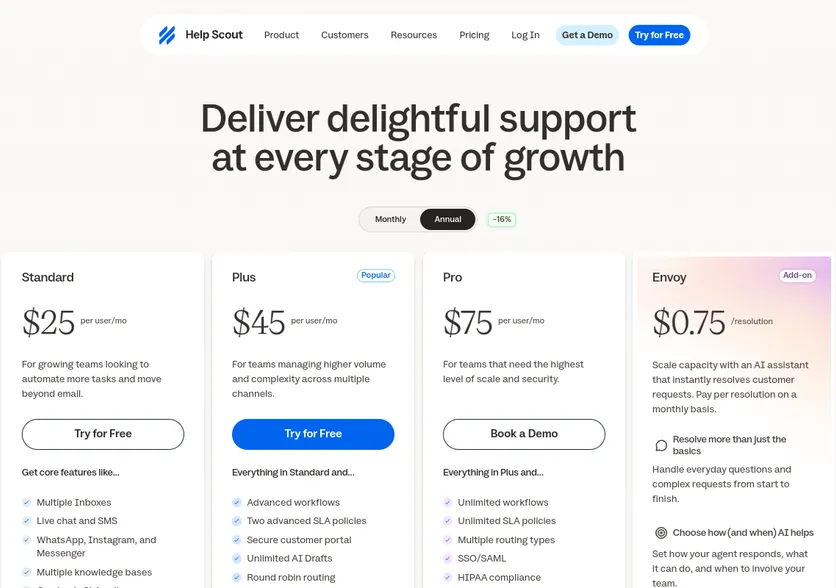
Paid tool Starting price: $25/user/month · Twenty-five dollars per user a month billed annually for the Standard plan, or thirty dollars per user a month billed monthly; Plus costs forty-five dollars and Pro costs seventy-five dollars per user a month billed annually
Free plan: Free plan for up to 5 users
Help Scout is the shared inbox law firms use when client mail needs a tidy queue and a knowledge base, without the weight of a full practice manager. This Help Scout Standard plan costs twenty-five dollars per user a month billed annually and adds workflows and a client-facing help center. A firm that answers clients by email all day gets one inbox where nothing slips through.
What we like
- Free plan covers up to five users
- Workflows that route client mail to the right lawyer
- Help center answers common client questions
Watch out for
- No matter files or billing, so cases live in another tool
- Advanced reporting needs the higher plans
How to try it
- Open the Help Scout site and create the free plan
- Connect the firm email and set up mailboxes per practice area
- Turn on workflows and publish the help center
7. Freshdesk
Best for: Small firms that want a free start for client support mail
Paid tool Starting price: $19/agent/month · Nineteen dollars per agent a month billed annually for the Growth plan, or twenty-three dollars per agent a month billed monthly; Pro costs fifty-five dollars and Enterprise costs eighty-nine dollars per agent a month billed annually
Free plan: Free plan available
Freshdesk is the low-cost help desk small firms use to turn client email into tickets that the whole team can see and answer. This Freshdesk Growth plan costs nineteen dollars per agent a month billed annually and adds automations and collision detection. A new firm gets a working client inbox on day one and upgrades only when the caseload demands it.

What we like
- Free plan lets a new firm start at no cost
- Collision detection stops two staff answering one client
- Simple setup that a small firm finishes in a day
Watch out for
- No matter files or billing, so cases live in another tool
- SLA timers need the higher plans
How to try it
- Open the Freshdesk site and create the free plan
- Connect the firm email and set up ticket fields
- Turn on automations and invite the first agents
8. Zendesk
Best for: Firms that want client support across email, chat and voice in one queue
Paid tool Starting price: $19/agent/month · Nineteen dollars per agent a month billed annually for the Support Team plan, or twenty-five dollars per agent a month billed monthly; Suite Team costs fifty-five dollars and Suite Professional costs one hundred fifteen dollars per agent a month billed annually
Free plan: No free plan; 14-day free trial
Zendesk is the help desk law firms reach for when clients write by email, chat and voice and the firm needs one queue to hold every message. This Zendesk Support Team plan costs nineteen dollars per agent a month billed annually and adds a shared inbox with ticket views. A firm that answers clients on several channels gets one workspace instead of four open tabs.

What we like
- One queue for email, chat, voice and social messages
- Macros and views that scale across practice areas
- Huge integration library for legal and billing tools
Watch out for
- No matter files or billing, so cases live in another tool
- Per-agent billing adds up fast on a large team
How to try it
- Open the Zendesk site and start the 14-day trial
- Connect email and chat channels to the shared inbox
- Build ticket views per practice area and turn on macros
Prices above were checked on each vendor’s own website on Nov 27, 2026 and can change — the vendor’s page is the final word. Vendor links are editorial: nobody paid to be listed or ranked here. Vendors who want a featured listing can see how it works on our Get listed page.
What law firm support software costs in 2026
A law firm pays for support software in two ways, the subscription and the billable hours lost to client questions that could have been answered by a portal or a form. A nineteen-dollar help desk looks cheap until staff spend the morning retyping intake answers into a separate case system, so weigh intake forms and billing against the sticker price. Legal practice managers cost more per user because they carry matter files, time tracking and billing beside the inbox, while general help desks stay cheap by doing one job well.
Start with a trial on two tools and run real client matters through each one. Check that intake forms reach the matter file, that billing captures the time spent answering clients, and that the client portal shows case updates without a phone call. Pick the tool whose inbox your staff actually clear, because a polished system that the team avoids is worse than a plain one they use every day.
Before you buy
- Match the tool to your case work, because a firm that bills by the hour needs time tracking beside the inbox.
- Check that client intake forms feed the matter file, because retyping intake answers wastes billable hours.
- Confirm the price covers every user, because per-user billing multiplies fast in a growing firm.
- Test the client portal with a real matter, because clients who cannot reach their case file will call instead.
- Ask who owns the matter data, because a tool that locks records behind an export fee costs more later.
Official websites
Official websites of the products reviewed above. Features and prices were checked against these sites when this guide was written, and they can change, so confirm on the vendor site before you buy.
Frequently asked questions
Which customer support software is best for law firms in 2026?
Clio is the best overall pick at forty-nine dollars per user a month, with client intake, matter files and billing in one login. MyCase is the best value for small firms at fifty dollars per user a month with a built-in accounting add-on. Help Scout is the best budget pick at twenty-five dollars per user a month for firms that only need a polished client inbox.
How much does law firm support software cost?
Prices in this list run from nineteen dollars per agent a month for Freshdesk and Zendesk to fifty-nine dollars per user a month for Rocket Matter, with most legal tools landing between forty-nine and fifty dollars per user a month. Full practice managers cost more because they add matter files, time tracking and billing, while general help desks stay cheap. Multiply the per-user rate by the whole firm before you compare totals.
Do law firms need a practice manager or is a help desk enough?
A firm that only answers client questions by email can run on a general help desk, because the shared inbox and macros cover the daily work. A firm that tracks matters, deadlines and billable hours needs a practice manager, because intake answers and time entries belong in the matter file. The deciding test is whether the firm bills time, since that work has no home in a plain help desk.
Is there a free support tool for law firms?
Help Scout offers a free plan for up to five users, and Freshdesk has a free plan, so a small firm can start without paying. Free plans limit users, mailboxes or automation, so check the caps before you rely on them. Most firms move to a paid plan once client volume grows and intake forms matter.
What should a law firm check before switching support tools?
Check that matter files, client records and billing history export cleanly, because a tool that locks data behind an export fee costs more later. Confirm the new tool handles conflict checks and trust accounting the way the firm already works. Run both systems side by side for two weeks so no client message falls between them.
Need everyday business help too? Try Toolsvine's free business tools right in your browser.
Browse Business Tools tools