
On this page
Automation starts with data, and the tools below pull it from websites on a schedule so a team never copies and pastes again. The eight options run from ten dollars a month to about three hundred dollars a month, and every price was checked on the vendor site on November 26, 2026. Six of them offer a free plan or free credits, so you can scrape real pages before you spend anything. Octoparse is our first pick — the best point-and-click scraper for automation teams.
How we researched this
We started with the data extraction tools automation teams actually buy, then read each price on the vendor pricing page on November 26, 2026 and noted the free plan or trial each one carries. We judged them for a team that needs scheduled, reliable extraction from real websites, and we kept only tools with a published price. We left out Browse AI, because its Starter price conflicted across sources and no single figure could be trusted.
Compare the tools
| Name | Best for | Starting price | Free plan | |
|---|---|---|---|---|
 Octoparse | Teams that want point-and-click extraction without writing code | $69/month | Free plan included | Visit |
 ParseHub | Teams that need a desktop scraper with a free tier for small jobs | $189/month | Free plan, 200 pages per run | Visit |
 Apify | Developers who want a marketplace of ready scrapers plus a platform to run them | $19/month | Free $5 platform credit | Visit |
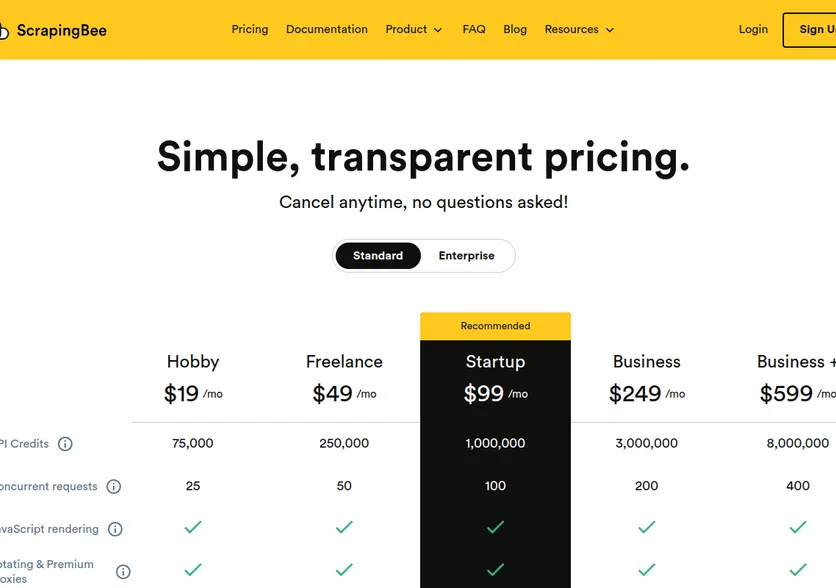
 ScrapingBee | Developers who want a simple API that handles proxies and browsers for them | $49/month | No free plan; free trial available | Visit |
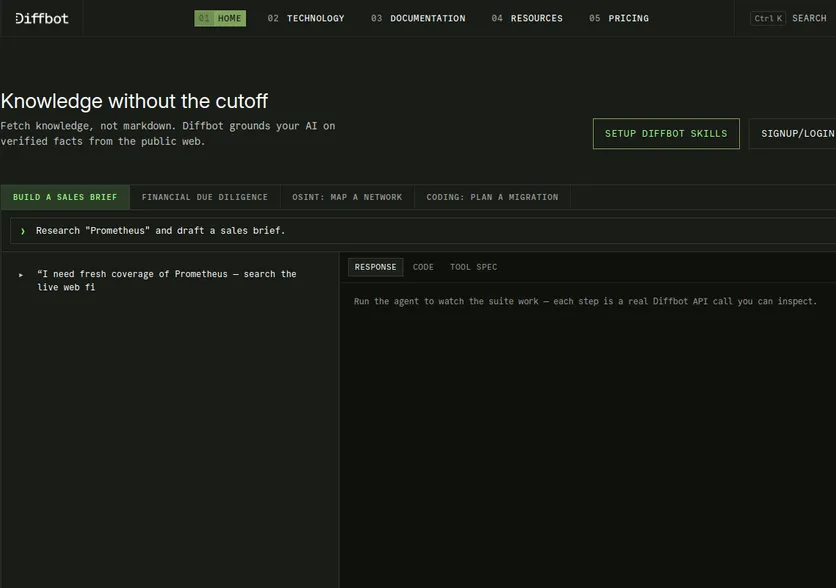
 Diffbot | Teams that need structured data from the whole web at scale | $299/month | Free 10,000 credits a month | Visit |
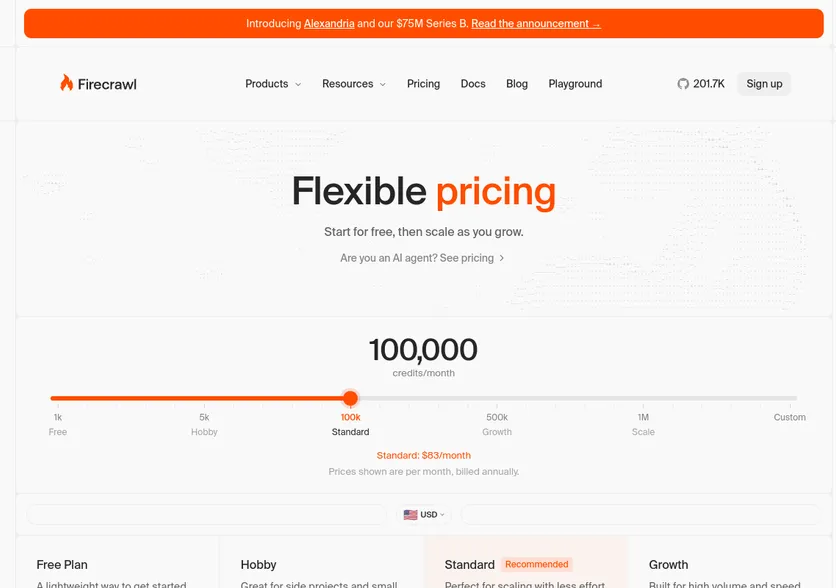
 Firecrawl | Developers who want clean markdown from any page for AI workflows | $19/month | Free 1,000 credits | Visit |
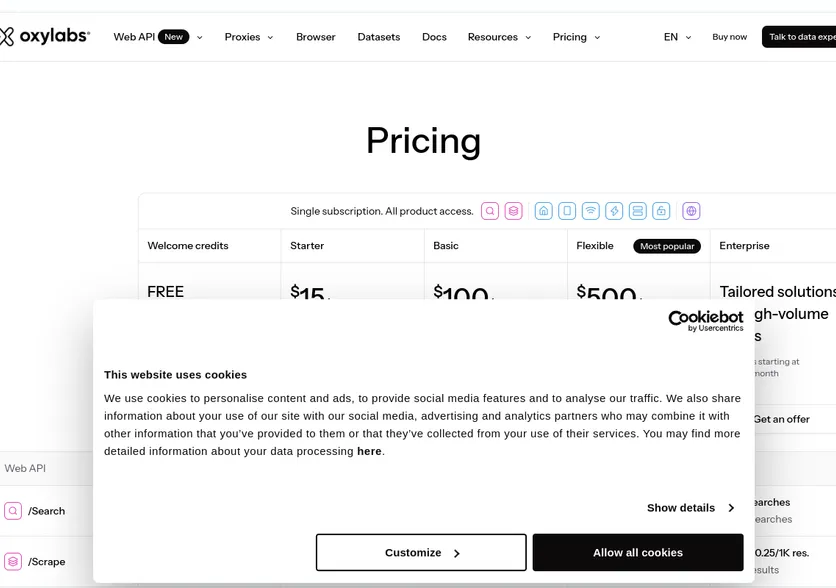
 Oxylabs | Teams that need a large proxy network behind their scraping API | $15/month | Free $5 welcome credit | Visit |
 Bardeen | Go-to-market teams that want browser automation with a generous free tier | $10/month | Free 100 credits | Visit |
The data extraction software for automation, compared
1. Octoparse
Best for: Teams that want point-and-click extraction without writing code
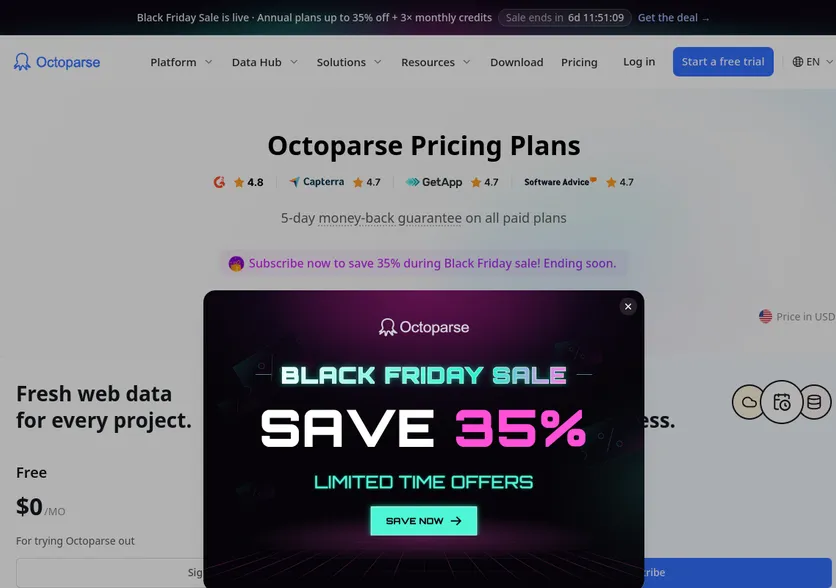
Paid tool Starting price: $69/month · Standard plan, $69 a month billed annually ($83 a month billed monthly); Basic $19 a month; Professional $249 a month billed annually ($299 billed monthly); the larger Standard variant with 6 cloud runs is $119 a month billed monthly
Free plan: Free plan included
Octoparse is the visual scraper that lets a team point at a web page and pull out the data, with no code needed for most jobs. This Octoparse Standard plan costs sixty-nine dollars a month on annual billing and covers cloud runs, scheduling and the template library. A researcher or analyst who needs price lists, listings or directories will like the speed, because a working scraper takes minutes to build and runs on a schedule.
What we like
- True point-and-click building, no code needed
- Large template library for common sites
- Cloud runs and scheduling included
Watch out for
- Standard plan caps cloud runs on the entry tier
- Heavy bot protection needs extra work
How to try it
- Open the Octoparse pricing page and claim the free plan
- Point the visual builder at a page and select the data
- Schedule the task to run in the cloud every day
2. ParseHub
Best for: Teams that need a desktop scraper with a free tier for small jobs
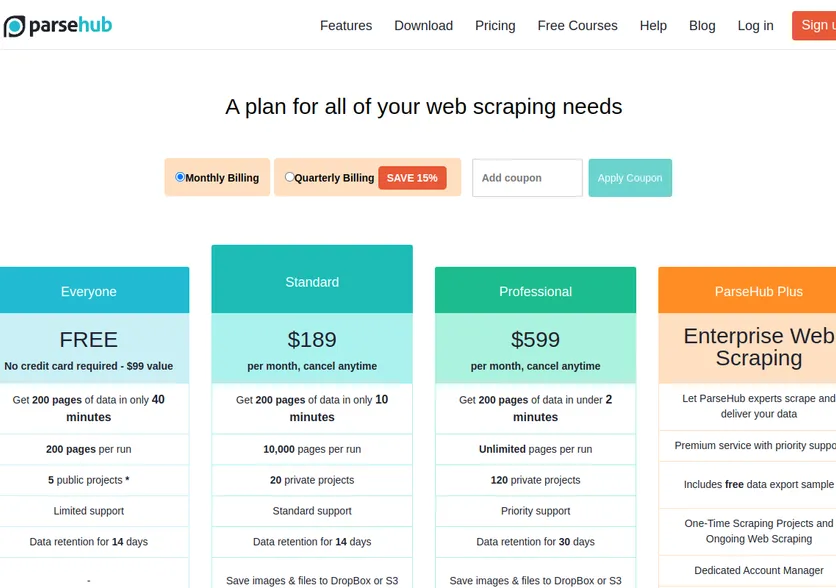
Paid tool Starting price: $189/month · Standard plan, $189 a month, or $155 a month billed quarterly; Professional $599 a month
Free plan: Free plan, 200 pages per run
ParseHub is a desktop scraping tool that handles JavaScript pages, logins and infinite scroll, with a free tier that covers small jobs. This ParseHub Standard plan costs one hundred and eighty-nine dollars a month and covers faster runs, more projects and priority support. A data team that scrapes a few complex sites will like the control, because every click, form and page turn can be scripted in the visual editor.
What we like
- Handles logins, forms and infinite scroll
- Free tier covers small scraping jobs
- Visual editor with full control over clicks
Watch out for
- Priciest entry plan in this comparison
- Desktop app, not a cloud dashboard
How to try it
- Open the ParseHub pricing page and download the free app
- Build a project that clicks through your target site
- Run it and export the results as a spreadsheet
3. Apify
Best for: Developers who want a marketplace of ready scrapers plus a platform to run them
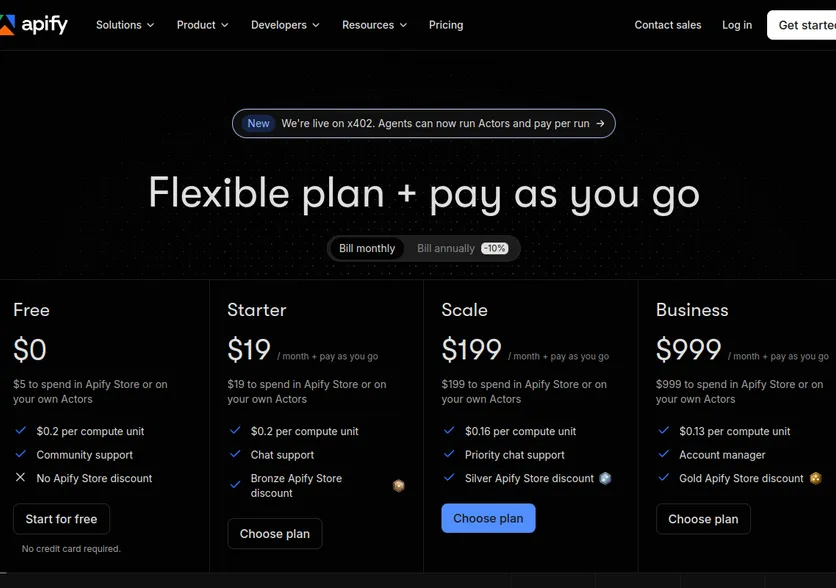
Paid tool Starting price: $19/month · Starter plan, $19 a month in platform credits ($17 a month billed yearly); Scale $199 and Business $999 a month; free $5 credit to start
Free plan: Free $5 platform credit
Apify is a cloud platform where ready-made scrapers, called actors, pull data from sites and APIs on a schedule, and developers can build their own. This Apify Starter plan costs nineteen dollars a month in platform credits and covers actors, scheduling and storage. A developer who needs data flowing into a pipeline will like the API, because every run can push results straight into a database or webhook.
What we like
- Huge marketplace of ready-made scrapers
- API-first design fits automation pipelines
- Credits flex across actors and storage
Watch out for
- Credit math takes time to learn
- Costs grow with heavy scraping volume
How to try it
- Open the Apify pricing page and claim the free credit
- Pick an actor for your target site and run it once
- Schedule it and connect the output to your pipeline
4. ScrapingBee
Best for: Developers who want a simple API that handles proxies and browsers for them
Paid tool Starting price: $49/month · Freelance plan, $49 a month for 250,000 credits; Hobby $19, Startup $99 and Business $249 a month
Free plan: No free plan; free trial available
ScrapingBee is a scraping API that takes a URL and returns the rendered page, handling proxies, browsers and bot checks behind the scenes. This ScrapingBee Freelance plan costs forty-nine dollars a month for two hundred and fifty thousand credits and covers JavaScript rendering and proxy rotation. A developer who writes scrapers in code will like the simplicity, because one API call replaces a whole proxy and browser setup.
What we like
- One API call replaces proxy and browser setup
- Handles JavaScript rendering and rotation
- Simple credit pricing, easy to budget
Watch out for
- No free plan, so the trial is the only test
- Credits burn fast on heavy pages
How to try it
- Open the ScrapingBee pricing page and start the trial
- Send your first API request with a target URL
- Add the JavaScript rendering flag for dynamic pages
5. Diffbot
Best for: Teams that need structured data from the whole web at scale
Paid tool Starting price: $299/month · Startup plan, $299 a month for 250,000 credits; free 10,000 credits a month; Plus $899 a month
Free plan: Free 10,000 credits a month
Diffbot reads web pages with AI and returns structured data, so a team can pull articles, products and discussions without writing a scraper per site. This Diffbot Startup plan costs two hundred and ninety-nine dollars a month for two hundred and fifty thousand credits. A data team that tracks products or prices across many sites will like the coverage, because one API handles the structure while the team focuses on the analysis.
What we like
- AI reads page structure without per-site scrapers
- Huge coverage across products and articles
- Free credits cover real testing
Watch out for
- Highest entry price in this comparison
- Overkill for scraping one or two sites
How to try it
- Open the Diffbot pricing page and claim the free credits
- Send an article or product URL to the extraction API
- Check the structured output and map it to your database
6. Firecrawl
Best for: Developers who want clean markdown from any page for AI workflows
Paid tool Starting price: $19/month · Hobby plan, $19 a month, or $16 billed annually; Standard $99 a month for 100,000 credits; free 1,000 credits
Free plan: Free 1,000 credits
Firecrawl turns any web page into clean markdown that AI tools can read, with an API built for agents, search and research pipelines. This Firecrawl Hobby plan costs nineteen dollars a month and covers crawling, scraping and search with generous credits. A developer building an AI research tool will like the markdown output, because pages arrive ready to feed into a model without extra cleaning.
What we like
- Clean markdown output ready for AI tools
- Simple API built for modern pipelines
- Free credits cover real testing
Watch out for
- Hobby plan caps credits for big crawls
- Newer tool with a smaller community
How to try it
- Open the Firecrawl pricing page and claim the free credits
- Scrape a page and check the markdown output
- Add crawling to pull a whole site into your pipeline
7. Oxylabs
Best for: Teams that need a large proxy network behind their scraping API
Paid tool Starting price: $15/month · Starter plan, $15 a month; Basic $100, Flexible $500 and Enterprise custom; one subscription covers all products including the Web Scraper API
Free plan: Free $5 welcome credit
Oxylabs runs one of the largest proxy networks in the business, and its Web Scraper API uses that network to pull pages reliably at scale. This Oxylabs Starter plan costs fifteen dollars a month, and one subscription now covers every product including the Web Scraper API. A team that scrapes protected sites will like the infrastructure, because residential and datacenter proxies rotate automatically behind every request.
What we like
- Huge proxy network behind the API
- Strong success rates on protected sites
- Clear per-plan limits for budgeting
Watch out for
- One subscription covers all products, with usage metered on top of the plan fee
- Heavy use needs the higher tiers
How to try it
- Open the Oxylabs pricing page and claim the welcome credit
- Send a request through the Web Scraper API
- Check the success rate and scale up the plan
8. Bardeen
Best for: Go-to-market teams that want browser automation with a generous free tier
Paid tool Starting price: $10/month · Basic plan, $10 a month for 100 credits; Premium $50 a month for 1,000 credits; 100 free credits to start
Free plan: Free 100 credits
Bardeen automates browser work, pulling data from pages, enriching it and pushing it into sheets and CRMs without code. This Bardeen Basic plan costs ten dollars a month for one hundred credits and covers the core automations and integrations. A sales or ops team that copies data between tabs all day will like the one-click playbooks, because a repetitive job becomes a button press.
What we like
- Cheapest paid plan in this comparison
- One-click playbooks for repetitive jobs
- Free credits cover real daily use
Watch out for
- Credits cap at one hundred on the entry plan
- Browser-based, not a server scraper
How to try it
- Open the Bardeen pricing page and install the browser extension
- Run a playbook that scrapes a list page into a sheet
- Automate the next repetitive browser job the same way
Prices above were checked on each vendor’s own website on Nov 26, 2026 and can change — the vendor’s page is the final word. Vendor links are editorial: nobody paid to be listed or ranked here. Vendors who want a featured listing can see how it works on our Get listed page.
What data extraction software costs in 2026
Extraction pricing splits in two, because some tools charge a flat monthly fee and others sell credits by volume. Octoparse costs sixty-nine dollars a month flat and Bardeen ten dollars a month flat, while Apify starts at nineteen dollars a month in credits and ScrapingBee at forty-nine dollars a month. The headline plan each vendor shows on its own pricing page is the number in the table above, checked on November 26, 2026.
Start with the free credits on two tools and run your five hardest pages through each one, including any login wall or bot check. Compare the success rate, the cleanliness of the output and how the credits burn. Pick the tool that returns good data from the pages you actually need, because a cheap plan that fails on protected sites is money wasted.
Before you buy
- Check the credit math first, because a forty-nine-dollar plan can mean very different page counts on different tools.
- Confirm the sites you need are supported, because some tools block or struggle with heavily protected pages.
- Test with your hardest page, because a demo scrape hides login walls and bot checks.
- Count the runs you need, because cloud runs and scheduling limits decide the real monthly cost.
- Compare annual and monthly billing, because most tools here cut the price by about a fifth on annual plans.
Official websites
Official websites of the products reviewed above. Features and prices were checked against these sites when this guide was written, and they can change, so confirm on the vendor site before you buy.
Frequently asked questions
Which data extraction software is best for automation in 2026?
Octoparse is the best overall pick, because it is a true point-and-click scraper with cloud runs and scheduling from sixty-nine dollars a month. Apify is the best developer pick, with a marketplace of ready scrapers and an API-first platform from nineteen dollars a month. Firecrawl is the cheapest start at nineteen dollars a month, and its markdown output fits AI workflows better than any rival here.
How much does data extraction software cost?
Most tools here cost between ten and sixty-nine dollars a month for a small setup, with Diffbot at two hundred and ninety-nine dollars a month and ParseHub at one hundred and eighty-nine dollars a month at the top. Credit-based tools charge by pages or requests, so the real cost depends on volume. Always test with your hardest pages, because a cheap plan that fails on protected sites costs more in the end.
Is there free data extraction software?
Octoparse, ParseHub, Diffbot, Firecrawl, Oxylabs and Bardeen all offer a free plan or free credits, and Apify gives a free five-dollar credit to start. A free tier is enough to scrape a few hundred pages and test whether the tool handles your sites. Move to a paid plan when you need scheduling, higher limits or priority support.
How do I choose between Octoparse, Apify and Firecrawl?
Start with the site, because the hardest page you need decides the tool: a simple directory suits Octoparse, while a protected site needs ScrapingBee or Oxylabs. Then check the output format, because AI workflows want markdown from Firecrawl while pipelines want JSON from Apify. Run the same five pages through two trials and compare success rates before you buy.
Is web scraping legal?
Scraping public data is legal in many cases, but the rules depend on the site terms, local law and what you do with the data. Respect robots rules and terms of service, avoid personal data, and keep request rates reasonable so you do not overload a site. When in doubt, ask the site owner or a lawyer before you automate at scale.
Need everyday business help too? Try Toolsvine's free business tools right in your browser.
Browse Business Tools tools


