On this page
An electrical contractor loses money on every missed call, every double-booked van and every invoice that waits until the weekend. The right software turns the phone call into a scheduled job, the job into an invoice and the invoice into a payment without a second system. We compared seven tools on published price and service-call fit. Jobber is our first pick, the best-known field service software for small electrical shops.
How we researched this
We started with the field service vendors that publish a starting price on their own site, because an electrical contractor should be able to budget before the first sales call. We checked each price on the vendor site on November 27, 2026 and weighed per-user cost, job caps, dispatch, QuickBooks sync and contract terms. Workiz, FieldPulse, ServiceTitan, Simpro and FieldEdge were left out because they publish no price and sell by quote only.
Compare the tools
| Name | Best for | Starting price | Free plan | |
|---|---|---|---|---|
 Jobber | Owner-operators adding their first staff | $29/month | No free plan; 14-day free trial | Visit |
| Housecall Pro | Growing residential electrical businesses | $59/month | No free plan; 14-day free trial | Visit |
 ServiceM8 | Job-light shops that want unlimited seats | $29/month | Free plan with 30 jobs a month for one user | Visit |
 Kickserv | Small teams that run their books in QuickBooks | $60/month | No free plan; 30-day free trial | Visit |
| Service Fusion | Shops with more staff than budget | $208/month | No free plan; demo only | Visit |
 RazorSync | Small crews that want dispatch and payments in one system | $85/month | No free plan; 14-day free trial | Visit |
| mHelpDesk | Established service companies that want guided setup and training | $169/month | No free plan; demo available | Visit |
The electrical contracting software for service calls, compared
1. Jobber
Best for: Owner-operators adding their first staff
Paid tool Starting price: $29/month · Twenty-nine dollars a month for Core billed annually, or $49 billed monthly; Core covers one user, with extra users at $29 a month each
Free plan: No free plan; 14-day free trial
This Jobber plan is the best-known field service software for small electrical shops, with Core at $29 a month billed annually or $49 billed monthly. Core covers one user, with extra users at $29 a month each, and the higher tiers add quoting, invoicing, online booking and customer reminders. A shop that starts with one electrician can add staff one seat at a time without changing systems.

What we like
- Best-known field service software for small shops
- Add users one seat at a time for $29 each
- Quoting, invoicing and booking in one system
Watch out for
- Core covers only one user
- Monthly billing costs $49, not $29
How to try it
- Open the Jobber pricing page and compare annual with monthly billing
- Count your users against the $29 per-user add-on
- Start the trial on the Grow plan for the full feature set
2. Housecall Pro
Best for: Growing residential electrical businesses
Paid tool Starting price: $59/month · Fifty-nine dollars a month for Basic billed annually, or $79 billed monthly; Basic covers one user, Essentials covers five and Max covers eight
Free plan: No free plan; 14-day free trial
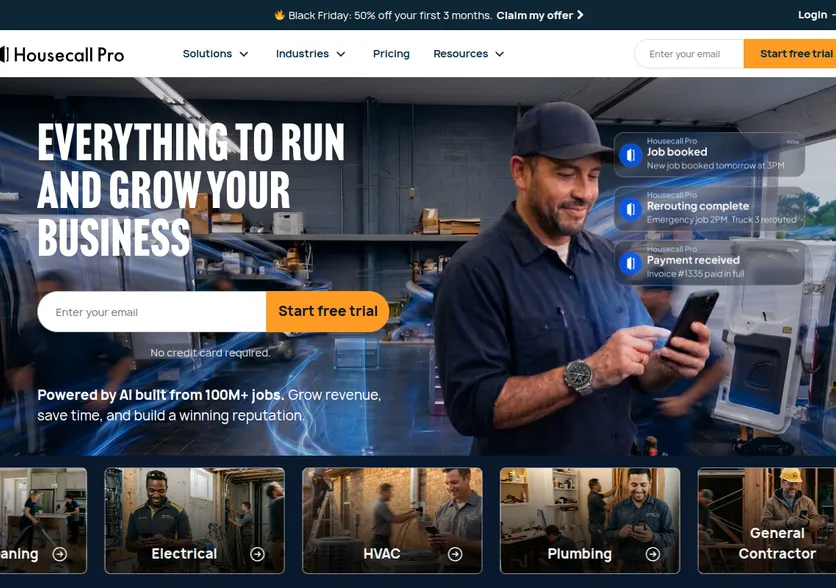
This Housecall Pro plan suits a residential electrical business that is adding trucks, with Basic at $59 a month billed annually or $79 billed monthly. Basic covers one user, Essentials covers five and Max covers eight, and the platform adds dispatch, estimates, invoicing, online booking and customer text updates. A shop that books most jobs by phone will feel the difference in the first week.
What we like
- Built for residential service businesses
- Dispatch, estimates and booking in one system
- Customer text updates included
Watch out for
- Basic covers only one user
- Max tier jumps the price for larger crews
How to try it
- Open the Housecall Pro pricing page and compare Basic with Essentials
- Count your technicians against the five-user Essentials tier
- Start the trial with your real dispatch board
3. ServiceM8
Best for: Job-light shops that want unlimited seats
Paid tool Starting price: $29/month · Twenty-nine dollars a month for Starter with unlimited users and 50 jobs a month; Growing is $79 for 150 jobs, Premium $149 for 500 and Premium Plus $349 for 1,500
Free plan: Free plan with 30 jobs a month for one user
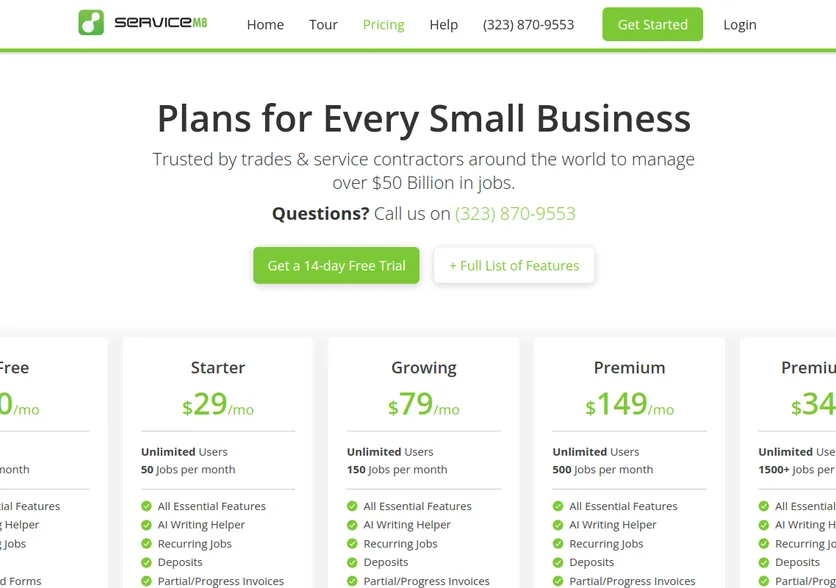
This ServiceM8 plan is the best value for a shop that runs fewer than 50 jobs a month, with Starter at $29 a month for unlimited users. The meter is job cards, not seats: Growing costs $79 for 150 jobs, Premium $149 for 500 and Premium Plus $349 for 1,500, and a free plan covers 30 jobs a month for one user. A three-truck shop with a light job count pays $29 while a per-seat vendor would charge three times that.
What we like
- Unlimited users on every paid plan
- Free plan for shops under 30 jobs a month
- Job-based pricing suits light-volume shops
Watch out for
- Job cap decides the real price, not the seat count
- A busy month can push you to the next tier
How to try it
- Count your monthly jobs before you pick a tier
- Start on the free plan if you run under 30 jobs a month
- Compare the job cap with your busiest month, not your average
4. Kickserv
Best for: Small teams that run their books in QuickBooks
Paid tool Starting price: $60/month · Sixty dollars a month for Start covering five users, or $48 on annual billing; Run is $119 for ten users and Scale is $199 for twenty
Free plan: No free plan; 30-day free trial
This Kickserv plan is the pick for a five-person electrical crew, with Start at $60 a month covering five users, or $48 on annual billing. Run costs $119 for ten users and Scale $199 for twenty, with no per-user charge inside the band. It includes scheduling, dispatch, invoicing, estimates and QuickBooks Online sync, plus a 30-day trial that gives a small team time to test it properly.

What we like
- Five users included in the $60 Start plan
- QuickBooks Online sync built in
- 30-day trial, the longest in this comparison
Watch out for
- Sixth user means jumping to the $119 Run plan
- Fewer integrations than Jobber or Housecall Pro
How to try it
- Open the Kickserv pricing page and compare monthly with annual billing
- Check that QuickBooks Online sync is included on Start
- Start the 30-day trial with your real job list
5. Service Fusion
Best for: Shops with more staff than budget
Paid tool Starting price: $208/month · Two hundred and eight dollars a month for Starter billed annually, or $245 billed monthly; Plus is $325 and Pro is $533, with unlimited users on every plan
Free plan: No free plan; demo only
This Service Fusion plan is the pick for a shop with a large crew, because every plan includes unlimited users. Starter costs $208 a month billed annually or $245 billed monthly, Plus is $325 and Pro is $533, and the platform covers customer management, estimates, scheduling, dispatch, payments and QuickBooks integration. A ten-person electrical shop pays the same $208 as a three-person one.
What we like
- Unlimited users on every plan
- Flat rate that does not grow with headcount
- Estimates, dispatch and payments in one system
Watch out for
- Highest starting price in this comparison
- No free trial, demo only
How to try it
- Open the Service Fusion pricing page and compare annual with monthly billing
- Count your staff to see the unlimited-user saving
- Ask for a demo with your own dispatch workflow
6. RazorSync
Best for: Small crews that want dispatch and payments in one system
Paid tool Starting price: $85/month · Eighty-five dollars a month for Solo billed annually, or $90 billed monthly; Solo covers two users, Team $195 for seven and Pro $439 for fifteen
Free plan: No free plan; 14-day free trial
This RazorSync plan suits a small electrical crew that wants dispatch, scheduling, estimating, invoicing and card payments in one place. Solo costs $85 a month billed annually, or $90 billed monthly, for up to two users, Team is $195 for seven and Pro is $439 for fifteen. The standard feature set covers recurring jobs, a customer portal, time cards and GPS mapping, with one-on-one training included.
What we like
- Dispatch, payments and portal in one system
- One-on-one training included
- Recurring jobs built into the standard set
Watch out for
- Solo stops at two users, so a third login needs Team
- Enterprise is quoted, not published
How to try it
- Open the RazorSync pricing page and compare annual with monthly billing
- Check whether Solo covers your whole crew at two users
- Start the trial with a recurring job schedule
7. mHelpDesk
Best for: Established service companies that want guided setup and training
Paid tool Starting price: $169/month · One hundred and sixty-nine dollars a month for Pro covering three users; Growth is $249 for eight users and Success is $374 for ten; published only in the vendor help center
Free plan: No free plan; demo available
This mHelpDesk plan is the most expensive entry in this comparison, with Pro at $169 a month for three users, Growth at $249 for eight and Success at $374 for ten. The price is published only in the vendor help center, since the marketing pricing page returns a 404 and routes buyers to a sales call. It suits an established service company that wants guided setup, training and success coaches included in the subscription.
What we like
- Guided setup and training included
- Success coaches for every account
- Built for established service companies
Watch out for
- Most expensive entry in this comparison
- No pricing on the marketing site, only in the help center
How to try it
- Open the mHelpDesk help center and find the Pro rate card
- Ask what the price is for users beyond the included three
- Confirm the guided setup and training are included
Prices above were checked on each vendor’s own website on Nov 27, 2026 and can change — the vendor’s page is the final word. Vendor links are editorial: nobody paid to be listed or ranked here. Vendors who want a featured listing can see how it works on our Get listed page.
How an electrical contractor should choose service-call software
Start with the dispatch board on a real day. Open the trial, load tomorrow's calls and watch whether the board shows every van, every job and every customer note in one place. If the dispatcher still needs a whiteboard or a group chat to run the day, the software is not doing its job.
Then check how the vendor charges, because the pricing models here are all different. Jobber and Housecall Pro charge per user, ServiceM8 charges per job, Kickserv and RazorSync charge per user band, and Service Fusion charges one flat rate for unlimited users. A three-truck shop with a light job count pays $29 on ServiceM8 and $87 on Jobber, so count your jobs and your users before you compare prices.
Before you buy
- Count your users, since most plans charge per seat or per user band
- Check whether the job cap fits your monthly volume before you pick a tier
- Confirm QuickBooks sync is included on your plan, not a higher tier
- Ask what the price becomes when you add a second truck or technician
- Test the dispatch board on a real day of service calls before you commit
Official websites
Official websites of the products reviewed above. Features and prices were checked against these sites when this guide was written, and they can change, so confirm on the vendor site before you buy.
Frequently asked questions
What is the cheapest field service software for an electrical contractor?
Jobber and ServiceM8 tie for the cheapest entry at $29 a month, but they charge differently. Jobber Core at $29 covers one user, with extra users at $29 each, while ServiceM8 Starter at $29 covers unlimited users and 50 jobs a month. A one-person shop pays the same either way, while a three-person shop with a light job count pays $29 on ServiceM8 and $87 on Jobber.
Which software is best for an electrical shop with ten technicians?
Service Fusion is the best pick for a large crew because every plan includes unlimited users, so a ten-person shop pays the same $208 a month as a three-person one. ServiceM8 also offers unlimited users, but its job cap decides the price: a crew running more than 500 jobs a month needs the $149 Premium plan. Jobber and Housecall Pro charge per user, so their cost grows with every hire.
Why is Workiz not in this comparison?
Workiz publishes no base price and sells by quote, so it is not in this comparison. Third-party estimates put it between $187 and $275 a month and conflict with each other, which means no figure can be verified on the vendor site. FieldPulse is also quote-only, and its $99 figure comes from a calculator input rather than a published price. ServiceTitan, Simpro and FieldEdge publish no prices either.
Why is mHelpDesk pricing hard to find?
mHelpDesk does not publish its prices on its marketing site: mhelpdesk.com/pricing returns a 404 and routes buyers to a sales call. The rate card sits only in the vendor help center, where Pro is listed at $169 a month for three users, Growth at $249 for eight and Success at $374 for ten. Annual billing prices are not published, so a buyer should ask for the annual rate in writing.
How much does field service software cost a one-truck electrical shop?
A one-truck electrical shop pays between $29 and $169 a month on the published prices here, before add-ons. Jobber Core at $29 and ServiceM8 Starter at $29 are the cheapest entries, while Kickserv Start at $60 covers five users for a growing crew. Budget separately for payment processing fees and any per-user add-ons, and check whether QuickBooks sync is included on your plan.
Shortlist two systems from the seven above, run a real day of service calls through each trial, and confirm the per-user price and job cap before you sign.
Browse Business Tools tools