On this page
A store rota lives and dies by the weekend: Saturday needs the full team, Tuesday needs three people, and the holiday season needs everyone you can hire. We compared eight tools on published price, shift cover and how they handle swaps and time off. Homebase is our first pick — a flat per-location price with unlimited employees, so seasonal hiring never moves the bill.
How we researched this
We started with scheduling tools that publish a real price and can run a store rota, then read each price on the vendor site on November 27, 2026 and noted the trial each plan carries. We judged them for retailers that roster sales staff, cashiers and stockroom teams across weekends, holidays and seasonal peaks. We dropped quote-only workforce suites and enterprise retail systems because a store needs a price it can budget around and a trial it can test.
Compare the tools
| Name | Best for | Starting price | Free plan | |
|---|---|---|---|---|
 Homebase | Stores that want a flat per-location price as headcount grows | $24/location/month | Free Basic plan for 1 location and up to 10 employees | Visit |
 Deputy | Retailers that need labor-law compliance and auto-scheduling | $5/user/month | No free plan; 30-day free trial | Visit |
| When I Work | Stores that want auto-scheduling at the lowest per-seat price | $2.50/user/month | No free plan; 14-day free trial | Visit |
 7shifts | Retailers that want a hospitality-built scheduler with a free tier | $39.99/location/month | Free Comp plan for 1 location and up to 15 employees | Visit |
 Sling | Stores that want a free plan that covers scheduling for up to thirty staff | $1.70/user/month | Free plan for up to 30 users; 15-day free trial on paid plans | Visit |
 Planday | Stores that need working-time warnings at a low per-user price | $2.99/user/month | No free plan; 30-day free trial | Visit |
 ZoomShift | Small stores that want scheduling, time clock and time off free up to twenty users | $2/user/month | Free Essentials plan for up to 20 users at 1 location; 14-day free trial | Visit |
 Connecteam | Small retailers that want scheduling, time clock and chat free up to ten users | $29/month | Free plan for up to 10 users; 14-day free trial on paid plans | Visit |
The employee scheduling software for retail, compared
1. Homebase
Best for: Stores that want a flat per-location price as headcount grows
Paid tool Starting price: $24/location/month · Twenty-four dollars per location a month billed annually on Essentials, or thirty dollars billed monthly, with unlimited employees; Plus is fifty-six dollars annual and All-in-One ninety-six dollars; free Basic plan covers one location and up to ten employees
Free plan: Free Basic plan for 1 location and up to 10 employees
This Homebase plan charges per location with unlimited employees, so a store pays the same as seasonal headcount rises. Essentials adds advanced scheduling, GPS clock-ins and late arrival alerts for twenty-four dollars per location a month billed annually. The free Basic plan covers one location and up to ten employees, which fits a single small shop with no budget at all.

What we like
- Per-location pricing with unlimited employees on paid plans
- Free plan covers a single small store with no budget
- GPS clock-in and late arrival alerts on Essentials
Watch out for
- AI schedule building waits for the Plus plan
- Payroll is a separate add-on on every plan
How to try it
- Open the Homebase pricing page and start with the free Basic plan
- Add your store staff and build a week of shifts
- Upgrade to Essentials when you need GPS clock-ins and alerts
2. Deputy
Best for: Retailers that need labor-law compliance and auto-scheduling
Paid tool Starting price: $5/user/month · Five dollars per user a month billed annually on Lite, or five dollars fifty cents billed monthly; Core is six dollars fifty cents annual and Pro nine dollars; monthly plans carry a thirty-dollar minimum spend per invoice
Free plan: No free plan; 30-day free trial
This Deputy plan gives a store the compliance tools a rota needs, with labor-law warnings, shift swaps and leave management from five dollars per user a month. Lite covers basic scheduling, timesheets and a time clock, while Core adds auto-scheduling, demand forecasting and wage budgets. Per-user billing means a large sales team costs more, and monthly plans carry a thirty-dollar minimum spend per invoice.

What we like
- Labor-law compliance warnings built into the rota
- Auto-scheduling and demand forecasting from the Core plan
- Clear per-user pricing with a thirty-day trial
Watch out for
- Per-user billing gets expensive with a large sales team
- Monthly plans carry a thirty-dollar minimum spend per invoice
How to try it
- Open the Deputy pricing page and start the thirty-day trial
- Set your labor rules and build a week of store rosters
- Test auto-scheduling on Core before you commit to a plan
3. When I Work
Best for: Stores that want auto-scheduling at the lowest per-seat price
Paid tool Starting price: $2.50/user/month · Two dollars and fifty cents per user a month on Essentials for single-location teams; Pro is five dollars and Premium eight dollars; the vendor FAQ prices multi-location teams at five dollars per user a month; time tracking is a separate add-on
Free plan: No free plan; 14-day free trial
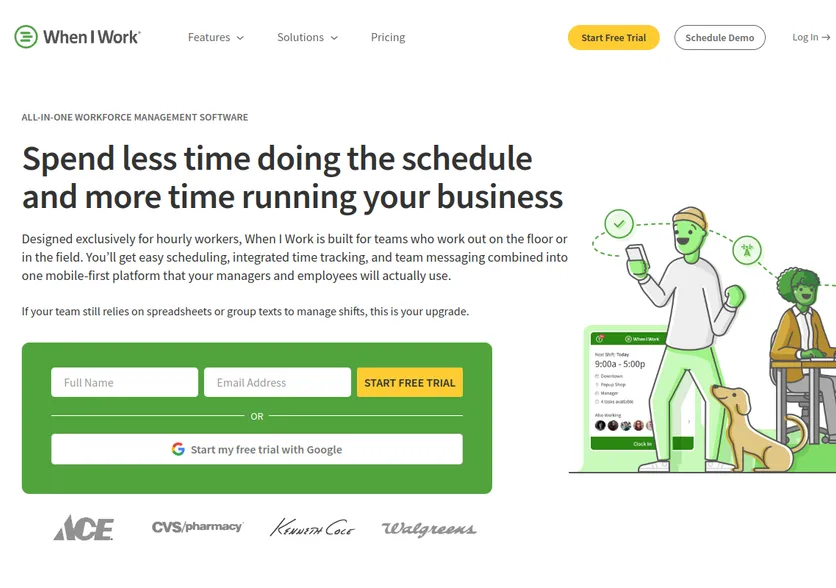
Retail teams on a tight budget get auto-scheduling and forecast tools on this When I Work plan, the cheapest per-seat option in this comparison. Essentials covers multi-week schedules, templates, open shifts, shift swapping and team messaging for two dollars and fifty cents per user a month. Time tracking is a paid add-on, and multi-location retailers pay five dollars per user a month according to the vendor FAQ.
What we like
- Auto-scheduling and forecast tools on the cheapest plan
- Clean, fast scheduling interface with shift swaps built in
- No minimum seat count and no free-plan limits to outgrow
Watch out for
- Time tracking is a paid add-on, not part of Essentials
- Multi-location retailers pay double the single-location rate
How to try it
- Open the When I Work pricing page and start the fourteen-day trial
- Build a week of store shifts with templates and auto-scheduling
- Check the time tracking add-on price before you budget
4. 7shifts
Best for: Retailers that want a hospitality-built scheduler with a free tier
Paid tool Starting price: $39.99/location/month · Thirty-nine dollars and ninety-nine cents per location a month billed annually on Essentials, or forty-four dollars and ninety-nine cents billed monthly, for up to thirty employees; Pro is seventy-nine dollars ninety-nine cents and Premium one hundred and thirty-four dollars ninety-nine cents; free Comp plan for one location and up to fifteen employees
Free plan: Free Comp plan for 1 location and up to 15 employees
This 7shifts plan is the per-location pick for a store, with scheduling, labor forecasting and payroll integrations from thirty-nine dollars and ninety-nine cents per location a month. Essentials covers schedules, labor budgets and time off for up to thirty employees, while Pro adds labor demand forecasting, manager logbooks and auto-scheduling. A free Comp plan covers one location with up to fifteen employees.

What we like
- Per-location pricing keeps costs predictable as headcount grows
- Free plan covers a single small store
- Auto-scheduling and manager logbooks from the Pro plan
Watch out for
- Per-location price rises sharply on Pro and Premium
- Essentials caps at thirty employees per location
How to try it
- Open the 7shifts pricing page and start with the free Comp plan
- Build a week of store shifts and set your labor budget
- Test the labor budget before you upgrade to Essentials
5. Sling
Best for: Stores that want a free plan that covers scheduling for up to thirty staff
Paid tool Starting price: $1.70/user/month · One dollar and seventy cents per user a month billed annually on Premium, or two dollars billed monthly; Business is three dollars forty cents annual or four dollars monthly; free plan covers scheduling for up to thirty users
Free plan: Free plan for up to 30 users; 15-day free trial on paid plans
This Sling plan is the free-first pick for a store, with the full scheduling tool free for up to thirty users. The free plan covers scheduling, time tracking, newsfeed and a labor cost report, while Premium adds an automated time clock and a budget dashboard for one dollar and seventy cents per user a month billed annually. Business adds open shifts, labor budgets and payroll export at three dollars and forty cents.

What we like
- Free scheduling for up to thirty users, not a short trial
- Lowest paid price here at one dollar seventy cents per user
- Time tracking and labor cost reports included free
Watch out for
- The automated time clock waits for the paid Premium plan
- No built-in payroll on any plan
How to try it
- Open the Sling pricing page and start with the free plan
- Add up to thirty staff and build a week of store shifts
- Upgrade to Premium when you need the automated time clock
6. Planday
Best for: Stores that need working-time warnings at a low per-user price
Paid tool Starting price: $2.99/user/month · Two dollars and ninety-nine cents per user a month on Starter, with a five-user minimum and billing in bundles of five; Plus is four dollars forty-nine cents per user a month plus a fifteen-dollar monthly fee; Pro is a custom quote
Free plan: No free plan; 30-day free trial
This Planday plan suits a store that must watch working-time rules, with compliance warnings on the entry plan. Starter covers intuitive scheduling, simple time tracking, working-time warnings and basic payroll reporting for two dollars and ninety-nine cents per user a month. Users are billed in bundles of five, so a team of eight pays for ten, and auto-scheduling waits for the custom-priced Pro plan.
What we like
- Working-time rule warnings on the cheapest plan
- Simple scheduling with shift swaps and messaging included
- Thirty-day trial with no card required
Watch out for
- Users are billed in bundles of five, so small teams overpay
- Auto-scheduling is only on the custom-priced Pro plan
How to try it
- Open the Planday pricing page and start the thirty-day trial
- Add your team in bundles of five and build a week of rosters
- Check a shift that breaks a working-time rule to see the warning
7. ZoomShift
Best for: Small stores that want scheduling, time clock and time off free up to twenty users
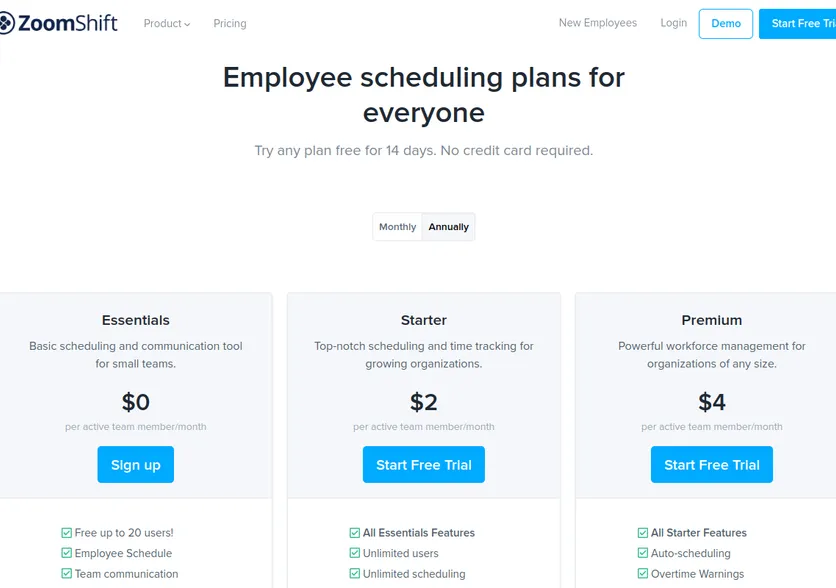
Paid tool Starting price: $2/user/month · Two dollars per user a month billed annually on Starter, or two dollars fifty cents billed monthly; Premium is four dollars annual or five dollars monthly; free Essentials plan covers up to twenty users at one location
Free plan: Free Essentials plan for up to 20 users at 1 location; 14-day free trial
This ZoomShift plan is the low-cost pick for a small store team, with a free Essentials plan for up to twenty users at one location. Starter adds overtime alerts, shift notes, time off requests and payroll export for two dollars per user a month billed annually, while Premium adds labor cost reports and overtime calculations. The free plan already includes scheduling, a time clock and time off, which is generous at this price.
What we like
- Free plan covers scheduling, time clock and time off for twenty users
- Lowest paid tiers here at two dollars per user a month
- Simple setup with no minimum seat count
Watch out for
- Multi-location pricing is not published on the pricing page
- No built-in payroll processing on any plan
How to try it
- Open the ZoomShift pricing page and start with the free Essentials plan
- Build a week of store shifts and test the time clock
- Upgrade to Starter when you need overtime alerts and payroll export
8. Connecteam
Best for: Small retailers that want scheduling, time clock and chat free up to ten users
Paid tool Starting price: $29/month · Twenty-nine dollars a month billed annually for the Operations hub on Basic, covering the first thirty users, or thirty-five dollars billed monthly; Advanced is forty-nine dollars and Expert ninety-nine; each hub is billed separately
Free plan: Free plan for up to 10 users; 14-day free trial on paid plans
This Connecteam plan gives a small store the full product free for up to ten users, with scheduling, time clock, chat and HR in one mobile app. The Operations hub on Basic adds GPS clock-in, open shifts and payroll integration for twenty-nine dollars a month once the team grows past ten. Each hub is billed separately, so the full suite costs three times the entry price.

What we like
- Free for up to ten users with every hub and feature included
- One mobile app covers scheduling, clock-in, chat and HR
- Flat price for the first thirty users keeps small-team costs predictable
Watch out for
- Each hub is a separate subscription, so the full suite costs three times the entry price
- Advanced scheduling tools wait for the higher plans
How to try it
- Open the Connecteam pricing page and start with the free Small Business plan
- Build the store rota in the Operations hub and add the time clock
- Check which hubs you actually need before you upgrade
Prices above were checked on each vendor’s own website on Nov 27, 2026 and can change — the vendor’s page is the final word. Vendor links are editorial: nobody paid to be listed or ranked here. Vendors who want a featured listing can see how it works on our Get listed page.
How a retailer should run its rota
Start with the peaks, not the calendar. Map the weekend, holiday and sale-day rushes across the month, then build the rota around those hours and keep a bench of part-time staff for the surges. Publish a week ahead and confirm changes the moment they happen, because store staff plan second jobs around the schedule.
Count every login when you price a per-user tool, since seasonal and part-time staff count as users too, and check whether the cheapest plan covers the time-off and overtime alerts you actually need before you commit to a year. A flat per-location plan can be cheaper than per-seat billing once headcount passes thirty, so run the numbers for your holiday season, not your quiet month.
Before you buy
- Check whether the plan covers split shifts and weekend cover without an upgrade
- Count part-time and seasonal staff as users when you price a per-user plan
- Make sure shift swaps need manager approval before they go live
- Confirm the mobile app works for staff who rarely check email
- Test the time clock with the store team before you pay
Official websites
Official websites of the products reviewed above. Features and prices were checked against these sites when this guide was written, and they can change, so confirm on the vendor site before you buy.
Frequently asked questions
What is the cheapest scheduling tool for a small store?
Sling schedules up to thirty users free, and Homebase Basic is free for one location and up to ten employees. Among paid plans, When I Work Essentials costs two dollars and fifty cents per user a month, and ZoomShift Starter costs two dollars per user a month billed annually. A twelve-person store can run free on Sling or pay thirty dollars a month on When I Work.
Can a scheduling tool handle multiple store locations?
Yes, if the plan supports recurring shifts, multi-location rosters and availability rules. Deputy handles recurring rosters with auto-scheduling on Core, Homebase covers unlimited employees per location on paid plans, and Connecteam Expert supports up to twelve schedules. Confirm multi-location pricing specifically, since some tools price each location separately and others need a workaround.
How do we cover a last-minute call-out in a store?
Use a tool with open shifts so staff can claim the vacancy themselves, such as Sling, Deputy or When I Work. Set the swap rules so only staff trained for that department can claim the shift, and keep manager approval on. A broadcast that reaches every available employee at once fills a Saturday shift far faster than phoning down a list.
Do we need a separate time clock with these tools?
Most of these tools include a mobile time clock, so a separate purchase is rarely needed. Deputy, Homebase, Sling and ZoomShift all include GPS clock-in, and Connecteam adds it on the Operations hub. 7shifts covers time off and labor budgets on Essentials, while Planday adds simple time tracking on Starter.
Can these tools forecast how many staff a busy weekend needs?
Yes, if the plan supports demand forecasting and labor budgets. Deputy Core adds demand forecasting and wage budgets, 7shifts Essentials covers labor budgets and Pro adds demand forecasting, and Sling Business adds labor budgets and payroll export. Check whether the forecast uses your sales data or just headcount, since the two give very different answers.
Compare the eight tools above, then run a free trial on one store before you move the whole chain over.
Browse Business Tools tools