
On this page
Event planning runs on guest lists, ticket sales and check-in sheets, and the wrong tool turns each one into a spreadsheet. Eventbrite is the pick that most freelancers land on: free events cost nothing, paid events pay only when tickets sell, and the marketplace brings buyers you never invited. This guide compares eight event planning tools for freelancers, from $0.85 a ticket to $119 a month, with live 2026 prices, free plans and trials, so a solo planner can pick by event type and budget instead of by sales pitch.
How we researched this
We checked the pricing page of every vendor on this list on November 26, 2026, and kept only tools that publish a real dollar price. Each tool had to handle event registration, ticketing or planning for a freelancer, not just enterprise conferences. We compared entry prices, free plans, trial length and how the bill scales as events and attendees grow.
Compare the tools
| Name | Best for | Starting price | Free plan | |
|---|---|---|---|---|
 Eventbrite | Freelancers who want the biggest marketplace behind their tickets | $0/mo | Free plan (free events) | Visit |
 Eventzilla | Freelancers who want a flat per-registration fee with no monthly bill | $1.50 per registration | Free plan (free events) | Visit |
 Ticket Tailor | Freelancers who want the lowest flat fee per ticket sold | $0.85 per ticket | Free plan (free events) | Visit |
 RegFox | Freelancers who want transparent per-registrant fees with a cap | $0.99 + 1% per registrant | No free plan | Visit |
 Planning Pod | Freelancers who plan weddings and corporate events end to end | $74/mo | Free demo, no free plan | Visit |
 Eventleaf | Freelancers who run association events with badges and check-in | $1/attendee | Free Starter plan (100 attendees a year) | Visit |
 Zoho Backstage | Freelancers who want an all-in-one event platform with no ticket commission | $119/mo | Free plan (100 attendees per event) | Visit |
 RSVPify | Freelancers who manage RSVPs for weddings and private events | $39/mo | Free plan (100 guests) | Visit |
The event planning tools for freelancers, compared
1. Eventbrite
Best for: Freelancers who want the biggest marketplace behind their tickets
Paid tool Starting price: $0/mo · Essentials is $0 a month with a 2% plus $0.79 fee per paid ticket; Professional is 3.7% plus $1.79 per ticket; payment processing of 2.9% applies on top
Free plan: Free plan (free events)
Eventbrite is the best-known ticketing platform, with a marketplace that puts public events in front of millions of buyers. This Eventbrite Essentials plan costs nothing a month and charges a small fee per paid ticket, so a freelancer pays only when tickets sell. Free events cost nothing to list, while the Professional tier adds reserved seating, team access and more email tools for busier organizers.
What we like
- Marketplace reach no rival can match
- Free events cost nothing to list
- Checkout is familiar to buyers
Watch out for
- Per-ticket fees grow with every sale
- Professional costs more per ticket than Essentials
How to try it
- Open the Eventbrite pricing page and create a free account
- Publish a free event or set a ticket price
- Share the event link and watch registrations come in
2. Eventzilla
Best for: Freelancers who want a flat per-registration fee with no monthly bill
Paid tool Starting price: $1.50 per registration · Basic is $1.50 per registration with no monthly fee; Pro is 1.9% plus $1.50 and Plus is 2.9% plus $1.50 per registration; Scale is quoted
Free plan: Free plan (free events)
Eventzilla is an event registration and ticketing platform with a flat fee per registration and no monthly subscription. This Eventzilla Basic plan charges a flat fee per paid registration and covers unlimited events with one paid ticket type. Free events cost nothing, while the Pro and Plus tiers add more ticket types and the ability to pass all fees to attendees.
What we like
- No monthly fee on any plan
- Flat fee is easy to predict
- Free events cost nothing
Watch out for
- Basic allows only one paid ticket type
- Processing fees are charged separately
How to try it
- Open the Eventzilla pricing page and create a free account
- Build an event page with a paid ticket type
- Publish the page and share the registration link
3. Ticket Tailor
Best for: Freelancers who want the lowest flat fee per ticket sold
Paid tool Starting price: $0.85 per ticket · Pay as you go is $0.85 per ticket in USD, or from $0.30 with prepaid credits; GBP rates are 0.60 pounds and from 0.22 pounds; processing is separate
Free plan: Free plan (free events)
Ticket Tailor is a ticketing platform with a flat fee per ticket and no monthly subscription, built for workshops, classes and small festivals. This Ticket Tailor pay-as-you-go plan charges under a dollar per ticket sold, with the first five tickets free. Prepaid credits cut the fee further, and free events cost nothing for up to 5,000 free tickets a year.
What we like
- No monthly bill of any kind
- Flat fee stays the same at any ticket price
- First five paid tickets are free
Watch out for
- Card processing is charged separately
- Seated tickets use extra credits
How to try it
- Open the Ticket Tailor pricing page and create a free box office
- Add your event with ticket types and prices
- Share the box office link and sell the first tickets
4. RegFox
Best for: Freelancers who want transparent per-registrant fees with a cap
Paid tool Starting price: $0.99 + 1% per registrant · Standard is $0.99 plus 1% per registrant, capped at $4.99; Premium is $1.99 plus 1%, capped at $5.99; Professional is $499 a month billed annually
Free plan: No free plan
RegFox is an event registration platform with clear per-registrant fees and a cap, so an expensive ticket never means an expensive fee. This RegFox Standard plan charges under a dollar plus one percent per registrant, capped at just under five dollars. There is no monthly fee, and the Premium tier adds waivers, payment plans and more customization for busier organizers.
What we like
- Fees are capped, unlike most rivals
- No monthly fee on Standard or Premium
- Conditional logic handles complex registrations
Watch out for
- Free events still cost a per-registrant fee
- Email and SMS cost extra on Standard
How to try it
- Open the RegFox pricing page and create a free account
- Build a registration page with the visual builder
- Set the ticket price and publish the page
5. Planning Pod
Best for: Freelancers who plan weddings and corporate events end to end
Paid tool Starting price: $74/mo · Event Management Planner is $74 a month flat for up to 10 events; Business is $109 a month and Enterprise 50 is $159 a month; Venue Management is $149 a month
Free plan: Free demo, no free plan
Planning Pod is an event management platform for planners, caterers and venues, with CRM, proposals, contracts, floorplans and budgets in one place. This Planning Pod Planner plan costs $74 a month flat and covers up to 10 events with unlimited users. Flat pricing means adding staff costs nothing extra, and the Business tier adds more events and data sharing for busier planners.
What we like
- Flat pricing covers the whole team
- Proposals, contracts and budgets share one tool
- Floorplans are built in, not an add-on
Watch out for
- Event caps force an upgrade in a busy season
- No free plan, only a demo
How to try it
- Open the Planning Pod pricing page and book a demo
- Create a client proposal with a budget
- Build the event timeline and floorplan
6. Eventleaf
Best for: Freelancers who run association events with badges and check-in
Paid tool Starting price: $1/attendee · Basic is $1 per attendee from $500 a year for 500 attendees; Professional is $2 per attendee from $2,000 a year for 1,000 attendees; Starter is free to 100 attendees a year
Free plan: Free Starter plan (100 attendees a year)
Eventleaf is an event registration platform with badge printing, check-in and attendee engagement, priced by annual attendee volume. This Eventleaf Basic plan costs one dollar per attendee from $500 a year for 500 attendees, with unlimited events and users. A free Starter plan covers up to 100 attendees a year, while the Professional tier adds check-in apps, polls and certificates.
What we like
- Free Starter plan covers small events
- Badge printing is built in
- Unlimited events and users on every plan
Watch out for
- Annual attendee blocks must be forecast in advance
- Check-in app needs the Professional tier
How to try it
- Open the Eventleaf pricing page and start the free Starter plan
- Build an event website with a registration form
- Design badges and print them on site
7. Zoho Backstage
Best for: Freelancers who want an all-in-one event platform with no ticket commission
Paid tool Starting price: $119/mo · Essentials is $119 a month billed monthly, or $99 billed annually, for 200 attendees per event; Premium is $249 a month and Ultimate is $499 a month; pay-per-event from $299
Free plan: Free plan (100 attendees per event)
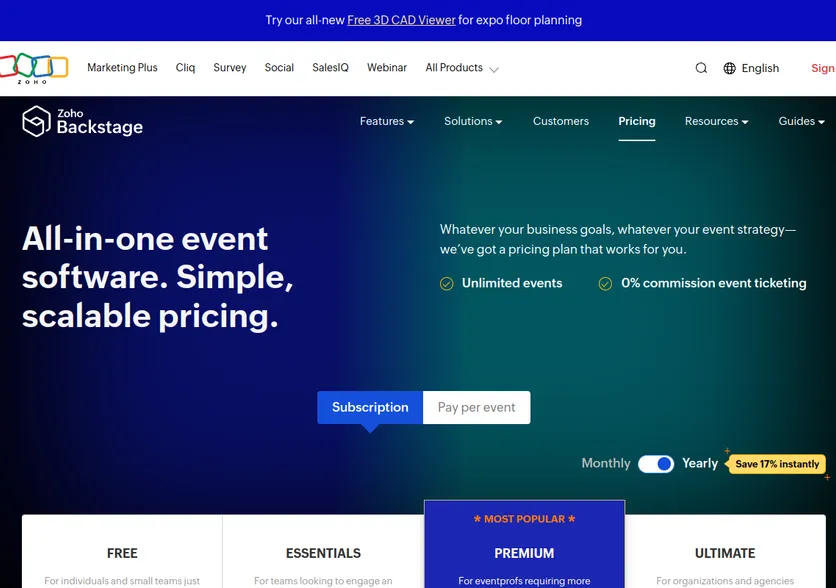
Zoho Backstage is the event platform in the Zoho suite, with event websites, registration, sessions, sponsors and check-in in one place. This Zoho Backstage Essentials plan costs $119 a month and covers 200 attendees per event with no commission on ticket sales. Annual billing drops the rate, and a pay-per-event option suits freelancers who run one event a year.
What we like
- No commission on ticket sales
- Free plan covers 100 attendees per event
- Pay-per-event option suits one-off events
Watch out for
- Attendee caps force an upgrade for bigger events
- Best value only if you already use Zoho
How to try it
- Open the Zoho Backstage pricing page and start the free plan
- Build an event website with the drag-and-drop builder
- Set up registration and check-in for the event
8. RSVPify
Best for: Freelancers who manage RSVPs for weddings and private events
Paid tool Starting price: $39/mo · Business Starter is $39 a month billed monthly, or $24 billed annually, for 150 registrations a month; Plus is $125 a month and Professional is $409 a month
Free plan: Free plan (100 guests)
RSVPify is an RSVP and event management platform for weddings, parties and business events, with seating charts, guest lists and reminders built in. This RSVPify Starter plan costs $39 a month and covers 150 registrations a month with custom questions and a seating chart. Annual billing drops the rate, and the Plus and Professional tiers add check-in, form logic and more registrations for busier planners.
What we like
- Seating charts are built in
- Custom questions cover meal choices and plus-ones
- Free plan covers 100 guests per event
Watch out for
- Registration caps are tight on Starter
- Ticketed events carry a per-ticket fee
How to try it
- Open the RSVPify pricing page and start the free plan
- Create an event page with custom questions
- Send invitations and track RSVPs as they arrive
Prices above were checked on each vendor’s own website on Nov 26, 2026 and can change — the vendor’s page is the final word. Vendor links are editorial: nobody paid to be listed or ranked here. Vendors who want a featured listing can see how it works on our Get listed page.
How to read the price before you commit
Prices on this list run from $0.85 a ticket to $119 a month, and the billing unit is the whole story: per-ticket tools are cheap for occasional events and expensive for busy calendars, while subscriptions flip that math. A $0.85 fee looks tiny until 500 tickets turn it into hundreds of dollars, and a $119 plan looks steep until it covers unlimited events with no commission. Before paying, run a real event on the free plan and count the true cost at your real attendee numbers. Check whether check-in, badging and the attendee app are included or priced separately.
Before you buy
- Count the attendees and ticketed events you actually run, because per-ticket fees punish a busy calendar.
- Check whether the free plan covers free events or charges per registrant anyway.
- Run the trial on a real event with real registrations, not on a demo page.
- Ask whether check-in, badging and the attendee app are included or cost extra.
- Confirm the plan exports your attendee list, because the list is the asset you keep.
Official websites
Official websites of the products reviewed above. Features and prices were checked against these sites when this guide was written, and they can change, so confirm on the vendor site before you buy.
Frequently asked questions
What is the cheapest event planning software for freelancers?
Ticket Tailor is the cheapest per-ticket option, at $0.85 a ticket with no monthly fee, or from $0.30 with prepaid credits. Eventzilla is next at $1.50 per registration with no monthly fee. Eventbrite costs nothing a month on Essentials, but the per-ticket fee is higher than both rivals.
Should I use Eventbrite or RSVPify?
Eventbrite suits public ticketed events where marketplace discovery matters, because buyers can find your event without an invitation. RSVPify suits private events like weddings, where seating charts and custom questions matter more than discovery. Pick Eventbrite for public sales, and RSVPify for guest lists.
Do per-ticket fees matter for a small event?
Yes, if you run ticketed events. Per-ticket fees look small until 200 tickets at $20 each turn into hundreds of dollars in fees, and the platform you pick decides that number. A flat-fee tool like Ticket Tailor or a capped-fee tool like RegFox keeps the cost predictable.
Which tools have a free plan?
Zoho Backstage and Eventleaf both offer free plans that cover real events: Zoho covers 100 attendees per event, and Eventleaf covers 100 attendees a year. Eventbrite, Eventzilla and Ticket Tailor charge nothing for free events. Start on a free plan and upgrade when paid events arrive.
How should I choose between these tools?
Count the events, attendees and ticket sales you expect in a year, then compare the plans at those numbers. A monthly subscription suits a freelancer with regular events, while a per-ticket fee suits one with occasional events. Run a real event on the free plan first and let the numbers decide.
Running the business on spreadsheets? Try the free business tools on Toolsvine right in your browser.
Browse Business Tools tools


