On this page
A growing business leaks money when expenses live in inboxes, spreadsheets and shoeboxes, and the finance team spends the month chasing receipts instead of closing the books. The seven tools below run from free to about eighteen dollars per user a month, and every price was checked on the vendor site on November 26, 2026. Some bundle a corporate card with the expense tool, while others work with the cards you already have. Brex is our first pick — full spend control from twelve dollars per user a month.
How we researched this
We started with the expense tools that growing businesses actually buy and that publish a price on their own site, then read each price on the vendor pricing page on November 26, 2026. We kept only tools with a published list price, which ruled out the quote-only enterprise platforms, and we judged them for a business that needs approvals, policy controls and accounting sync. We also noted the free plan or trial each tool offers, so you can test it on real expenses before you pay.
Compare the tools
| Name | Best for | Starting price | Free plan | |
|---|---|---|---|---|
 Brex | Growing businesses that want spend control with cards, bill pay and travel in one place | $12/user/month | Free Essentials plan for up to 2 entities | Visit |
 Expensify | Businesses that need fast receipt capture with multi-level approvals and ERP sync | $18/user/month | Free Submit workspace for individuals | Visit |
 Ramp | Businesses that want a free card platform with paid controls for deeper accounting | $15/user/month | Free plan for unlimited cards and basic expense tools | Visit |
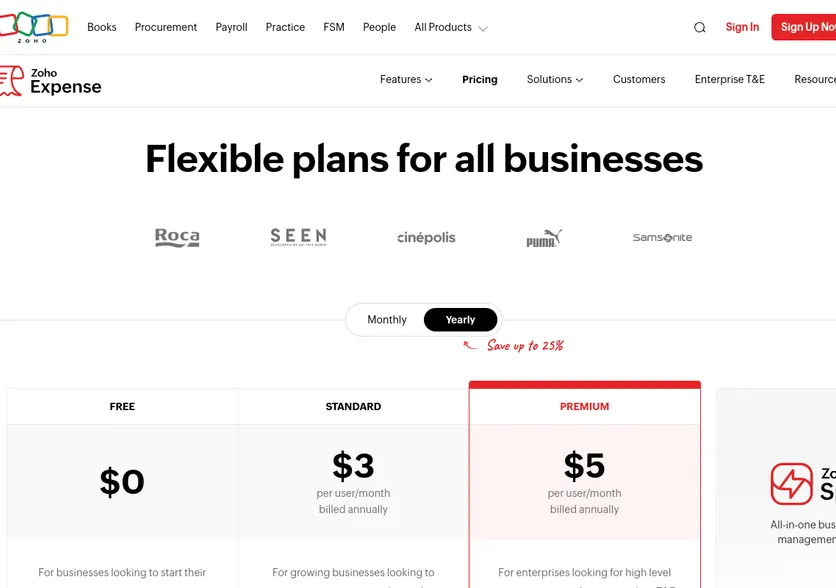
 Zoho Expense | Businesses on Zoho that want the cheapest published plan with travel and per diem | $5/user/month | Free plan for up to 3 users | Visit |
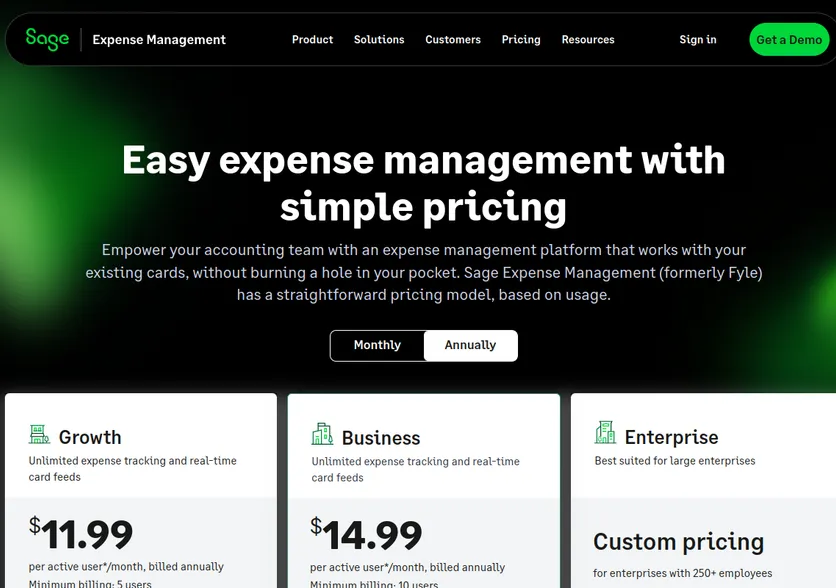
 Sage Expense Management | Businesses that want expense automation on top of the cards they already have | $14.99/active user/month | No free plan; free trial available | Visit |
 Rydoo | Businesses that spend across countries and need per diems and local compliance | $11/user/month | No free plan; free trial availability not published | Visit |
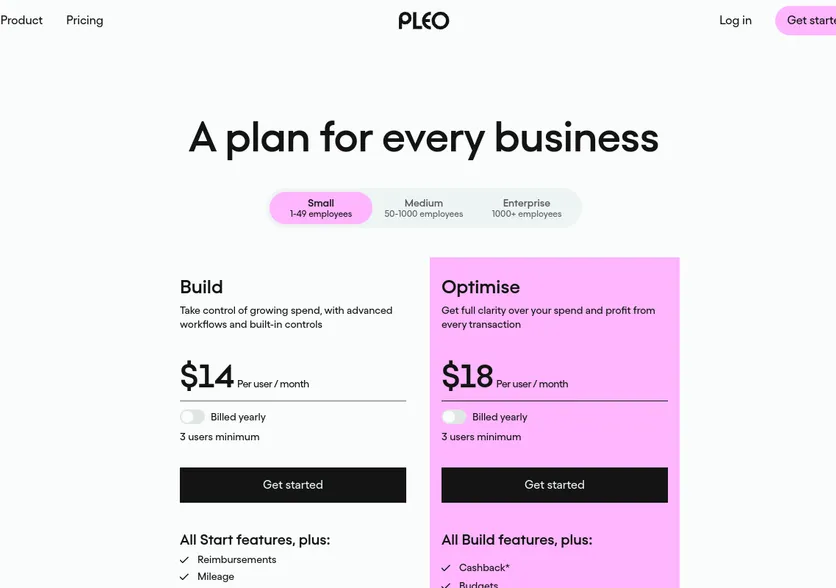
 Pleo | Businesses that want company cards with AI spend guidelines and budgets | $18/user/month | No free plan or free trial shown on the US pricing page | Visit |
The expense management software for businesses, compared
1. Brex
Best for: Growing businesses that want spend control with cards, bill pay and travel in one place
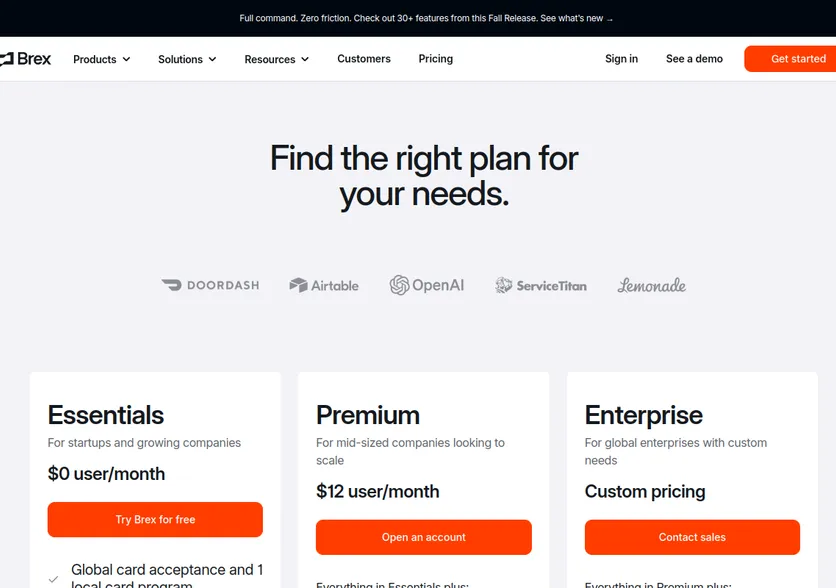
Paid tool Starting price: $12/user/month · Premium plan, twelve dollars per active user a month; Essentials is free per user and Enterprise is custom-priced
Free plan: Free Essentials plan for up to 2 entities
Brex is a corporate card and spend platform that applies expense policy at the moment of purchase, with AI receipts, approvals and bill pay built in. This Brex Premium plan costs twelve dollars per active user a month and adds multiple expense policies, live budgets and ERP integrations. A growing business that spends across teams and entities will like that the controls travel with the card.
What we like
- Full spend control with a free Essentials plan
- Multiple expense policies on Premium
- Cards accepted in over two hundred countries
Watch out for
- Premium bills active users from the prior month
- Currency conversion carries a markup of up to three percent
How to try it
- Open the Brex pricing page and claim the free Essentials plan
- Set one expense policy and test it on a real purchase
- Upgrade to Premium when you need multiple policies
2. Expensify
Best for: Businesses that need fast receipt capture with multi-level approvals and ERP sync
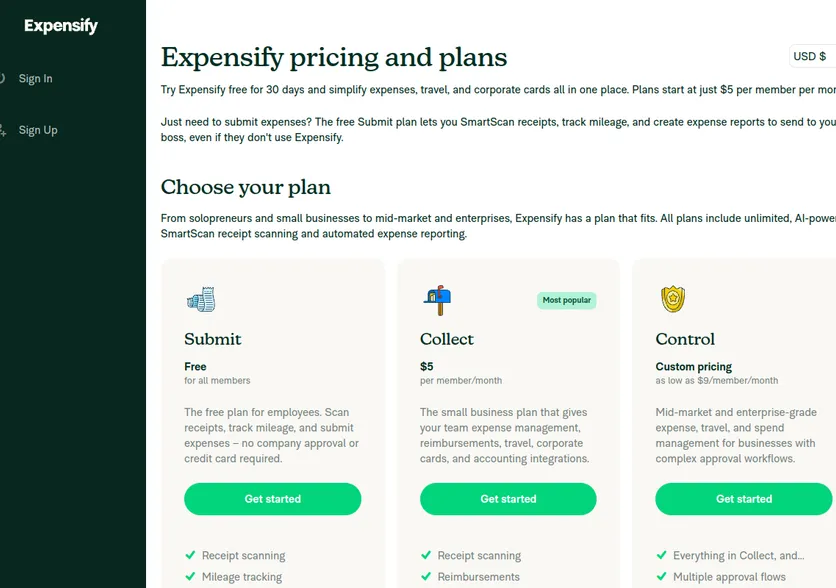
Paid tool Starting price: $18/user/month · Control plan, eighteen dollars per committed member a month on an annual subscription; pay-per-use is thirty-six dollars, and card spend can cut the annual rate to nine dollars
Free plan: Free Submit workspace for individuals
Expensify is built around fast receipt capture, with SmartScan reading a photo or a forwarded email and Concierge AI coding the expense and flagging policy breaks. This Expensify Control plan costs eighteen dollars per member a month on an annual subscription and adds multi-level approvals, NetSuite and Sage Intacct integrations and single sign-on. A business that files hundreds of reports a month will save hours on every close.
What we like
- Fastest receipt capture in this list
- Multi-level approvals and ERP integrations on Control
- Free workspace for individual submitters
Watch out for
- Members above the committed size cost thirty-six dollars each
- Control needs a twelve-month commitment
How to try it
- Open the Expensify pricing page and start a free workspace
- Scan ten real receipts and check the coding
- Test multi-level approvals on one report
3. Ramp
Best for: Businesses that want a free card platform with paid controls for deeper accounting
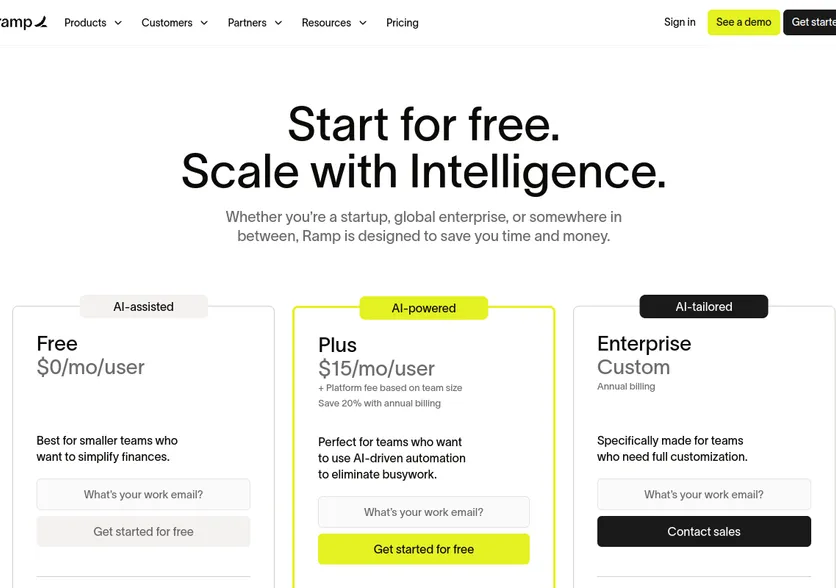
Paid tool Starting price: $15/user/month · Plus plan, fifteen dollars per user a month plus a platform fee based on team size that Ramp does not publish; Free is zero dollars per user and Enterprise is custom
Free plan: Free plan for unlimited cards and basic expense tools
Ramp is a corporate card and spend platform whose free tier covers unlimited cards, expense management, bill pay and QuickBooks or Xero sync at no cost. This Ramp Plus plan costs fifteen dollars per user a month and adds NetSuite and Sage Intacct integrations, multi-entity support and AI review. A business ready to run spend on free cards will like that the core platform costs nothing.
What we like
- Free tier covers cards, expenses and bill pay
- Plus adds NetSuite and Sage Intacct sync
- Thirty-day trial on the Plus plan
Watch out for
- The platform fee is not published on the pricing page
- Advanced approvals need the Plus plan
How to try it
- Open the Ramp pricing page and claim the free plan
- Issue cards to your team and test receipt matching
- Start the Plus trial when you need NetSuite sync
4. Zoho Expense
Best for: Businesses on Zoho that want the cheapest published plan with travel and per diem
Paid tool Starting price: $5/user/month · Premium plan, five dollars per user a month billed annually; Standard is three dollars and the free plan covers up to three users
Free plan: Free plan for up to 3 users
Zoho Expense is the expense arm of the Zoho suite, with receipt OCR, mileage tracking, approvals and travel booking at the lowest published price in this list. This Zoho Expense Premium plan costs five dollars per user a month and adds travel self-booking, per diem automation and multi-entity expenses. A business already on Zoho gets expenses that plug straight into its accounting and CRM tools.
What we like
- Lowest published price in this list
- Travel booking and per diem on Premium
- Free plan for up to three users
Watch out for
- Receipt scans are capped per user a month
- Travel self-booking is a paid add-on on Standard
How to try it
- Claim the free plan and scan twenty receipts
- Set one expense policy and test approvals
- Upgrade to Premium when you need travel booking
5. Sage Expense Management
Best for: Businesses that want expense automation on top of the cards they already have
Paid tool Starting price: $14.99/active user/month · Business plan, fourteen dollars and ninety-nine cents per active user a month billed annually; Growth is eleven dollars and ninety-nine cents and Enterprise is custom
Free plan: No free plan; free trial available
Fyle, now sold as Sage Expense Management, adds expense automation on top of the cards a business already holds, with real-time feeds instead of a new card program. This Fyle Business plan costs fourteen dollars and ninety-nine cents per active user a month and adds multi-stage approvals, ACH reimbursements and Sage Intacct integration. A business that keeps its existing bank cards will like that nothing changes at the till.
What we like
- Works with the cards you already have
- Real-time card feeds with no new card program
- Multi-stage approvals on the Business plan
Watch out for
- Business needs a ten-user minimum
- Only active users are billed, so headcount does not predict the bill
How to try it
- Open the Sage Expense Management pricing page and start a trial
- Connect your existing cards and check the feeds
- Test multi-stage approvals on one report
6. Rydoo
Best for: Businesses that spend across countries and need per diems and local compliance
Paid tool Starting price: $11/user/month · Pro plan, eleven dollars per user a month billed annually; Essentials is nine dollars and Business and Enterprise are custom-priced
Free plan: No free plan; free trial availability not published
Rydoo is expense and travel software for companies that spend across countries, with per diems, mileage and local compliance rules in one hundred thirty countries. This Rydoo Pro plan costs eleven dollars per user a month and adds per diems, custom policies and multilevel approvals. A business with staff travelling abroad will like the per diem and compliance depth.
What we like
- Per diems and compliance across many countries
- Custom policies and multilevel approvals on Pro
- Fair billing only for active users on higher plans
Watch out for
- No free plan and no published trial
- Both paid plans start at five users
How to try it
- Open the Rydoo pricing page and compare Essentials and Pro
- Set a per diem rule for one country and test it
- Check the accounting sync against your real books
7. Pleo
Best for: Businesses that want company cards with AI spend guidelines and budgets
Paid tool Starting price: $18/user/month · Optimise plan, eighteen dollars per user a month billed yearly; Build is fourteen dollars and Scale starts at two hundred forty-nine dollars a month
Free plan: No free plan or free trial shown on the US pricing page
Pleo is a spend management platform that gives every employee a company card with individual limits, while finance keeps control from one dashboard. This Pleo Optimise plan costs eighteen dollars per user a month and adds budgets, HRIS integrations, AI expense review and vendor insights. A business that wants every purchase checked before it happens will like the AI spend guidelines.
What we like
- Company cards with individual spending limits
- AI expense review on the Optimise plan
- Budgets and vendor insights included
Watch out for
- No free plan or trial on the US pricing page
- Direct reimbursements cost ninety cents each
How to try it
- Open the Pleo pricing page and compare Build and Optimise
- Issue cards to a test team and set spending limits
- Test the AI expense review on real receipts
Prices above were checked on each vendor’s own website on Nov 26, 2026 and can change — the vendor’s page is the final word. Vendor links are editorial: nobody paid to be listed or ranked here. Vendors who want a featured listing can see how it works on our Get listed page.
What expense management software costs in 2026
Expense software in this list runs from free to about eighteen dollars per user a month, and the pricing model decides who wins. Per-user tools like Expensify and Zoho Expense grow with every login, per-active-user tools like Fyle and Brex bill only the people who actually spend, and card platforms like Ramp and Brex fund the free tier from card interchange. Count your active spenders before you compare, because a cheap per-user price costs more than a free card platform once the whole team is on it.
Start with a free plan or trial on two tools and run one real month of expenses through each, from receipt photo to approved report. Compare how the receipt capture handles your receipts, whether approvals match your policy, and whether the accounting sync matches. Pick the tool your team and your finance lead both trust, because an expense system nobody files in is worse than a spreadsheet.
Before you buy
- Count active spenders first, because per-active-user billing on Fyle and Brex charges only people who spend.
- Check the platform fee, because Ramp Plus adds an unpublished fee on top of the per-user price.
- Confirm the accounting sync, because a tool that cannot reach NetSuite or Sage Intacct wastes hours at month end.
- Test receipt capture, because a tool that misreads receipts creates more work than it saves.
- Compare annual and monthly billing, because most tools here cut the monthly rate on annual plans.
Official websites
Official websites of the products reviewed above. Features and prices were checked against these sites when this guide was written, and they can change, so confirm on the vendor site before you buy.
Frequently asked questions
Which expense management software is best for businesses in 2026?
Brex is the best all-round value at twelve dollars per active user a month on Premium, with cards, bill pay and full spend control. Expensify suits a business that files hundreds of reports a month, with the fastest receipt capture from eighteen dollars per user a month on Control. Ramp is best for a business that wants the core platform free, with Plus at fifteen dollars per user a month.
How much does expense management software cost for a business?
Published prices in this list run from free for Ramp and Brex Essentials to about eighteen dollars per user a month for Expensify Control, with Zoho Expense Premium at five dollars per user a month and Rydoo Pro at eleven dollars per user a month. Ramp Plus adds an unpublished platform fee on top of its fifteen dollars per user a month.
Do I need a corporate card as well as expense software?
No, several tools here include a corporate card, though the model varies. Ramp and Brex bundle cards with the expense tool at no extra cost, while Expensify, Zoho Expense, Fyle and Rydoo work with the cards you already have. Check whether the plan you buy includes cards, since a card program changes how expenses are captured.
Is there free expense management software for businesses?
Ramp Free covers cards, expenses and bill pay at zero dollars per user, Brex Essentials is free for up to two entities, and Zoho Expense has a free plan for up to three users. Expensify offers a free workspace for individual submitters, while Fyle, Rydoo and Pleo offer trials instead of a permanent free plan.
What should I look for in expense management software?
Look for receipt capture that works, approvals that match your policy, and an accounting sync you trust. Check whether the price is per user or per active user, whether a platform fee sits on top, and whether the card program fits your team. The best tool is the one your team and your finance lead both trust.
Need everyday business help too? Try Toolsvine's free business tools right in your browser.
Browse Finance Calculators tools