
On this page
A freelancer in the field has no office manager, so the software has to do the quoting, the scheduling and the chasing for payment. Jobber is the pick that covers the most ground for the least money, with a Core plan at $49 a month for one user. This guide compares seven field service management tools for freelancers, from $49 to $259 a month, with live 2026 prices and free trials, so the choice comes down to crew size and how much marketing help is needed.
How we researched this
We checked the pricing page of every vendor on this list on November 26, 2026, and kept only tools that publish a real dollar price for field service work. Each tool had to cover scheduling, invoicing and customer management for a solo operator or a small crew, and we compared entry prices, trial length and whether the bill grows per user, per route or per team.
Compare the tools
| Name | Best for | Starting price | Free plan | |
|---|---|---|---|---|
| Jobber | Freelancers who want one system for quoting, scheduling and getting paid | $49/month | Free trial, no credit card required | Visit |
| Housecall Pro | Home service pros who run the business from a phone | $79/month | 14-day free trial | Visit |
| Kickserv | Freelancers working with a helper or two on one shared bill | $60/month | No free plan listed | Visit |
| RazorSync | Solo operators who want every feature in one flat monthly price | $90/month | 14-day free trial | Visit |
| GorillaDesk | Solo techs in pest control and lawn care who run one route | $49/month | 14-day free trial | Visit |
| Service Fusion | Freelancers planning to grow into a multi-tech operation | $259/month | No free plan listed | Visit |
| Thryv | Freelancers whose biggest problem is getting found, not getting organized | $99/month | No free plan listed | Visit |
The field service tools, compared
1. Jobber
Best for: Freelancers who want one system for quoting, scheduling and getting paid
Paid tool Starting price: $49/month · Core plan, $49 a month for 1 user; the page shows a $21 a month promo for 12 months, then $29 — the list price is used here
Free plan: Free trial, no credit card required
Jobber is the field service tool most solo pros start with, because it covers the whole job from quote to payment in one app. This Jobber Core plan costs $49 a month for one user and adds scheduling, invoicing, online booking and client reminders. It is the pick when a freelancer wants one system for the office work and the field work alike.

What we like
- Quote, schedule, invoice and payment in one place
- Online booking brings in jobs while you work
- Client reminders cut no-shows
Watch out for
- The page headline is a promo, not the renewal price
- Higher tiers jump sharply in price
How to try it
- Open the Jobber pricing page and start the free trial
- Add a client and build a first quote
- Schedule the job and send the invoice from the app
2. Housecall Pro
Best for: Home service pros who run the business from a phone
Paid tool Starting price: $79/month · Basic plan, $79 a month list price; the page shows a $39.50 a month promo for 3 months
Free plan: 14-day free trial
Housecall Pro is built for home service pros who live on their phone, with scheduling, dispatch and payments in a single mobile app. This Housecall Pro Basic plan costs $79 a month and covers online booking, estimates, invoicing and review management. It fits a freelancer who wants the crew tools of a bigger company without hiring a crew.

What we like
- Strong mobile app for techs in the field
- Price book keeps quotes consistent
- Review management is built in
Watch out for
- The displayed price is a 3-month promo
- Routes and GPS tracking need the higher tiers
How to try it
- Open the Housecall Pro pricing page and start the 14-day trial
- Set up online booking and the price book
- Send a first estimate and take payment in the field
3. Kickserv
Best for: Freelancers working with a helper or two on one shared bill
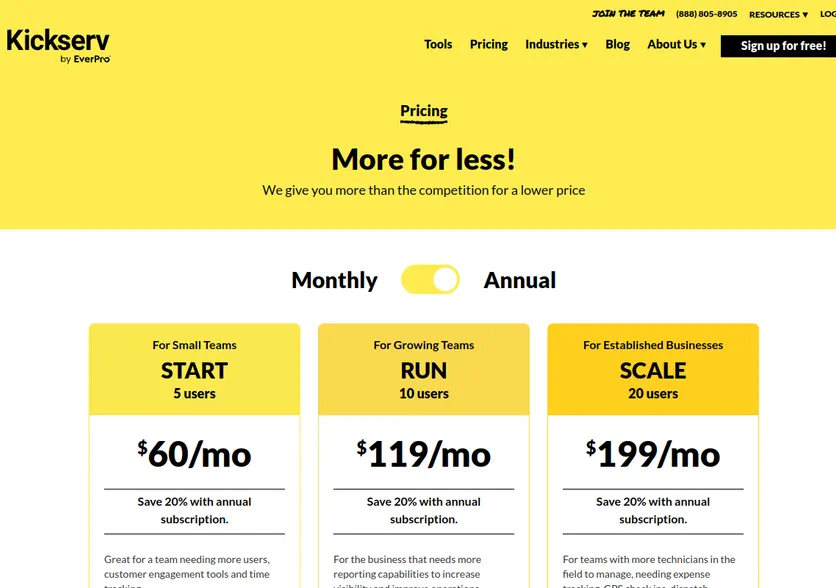
Paid tool Starting price: $60/month · Start plan, $60 a month for 5 users; Run is $119 a month for 10 users and Scale is $199 a month for 20 users
Free plan: No free plan listed
Kickserv keeps the price low by charging per team instead of per user, so a small crew shares one bill. This Kickserv Start plan costs $60 a month for five users and covers scheduling, dispatch, time tracking and QuickBooks Online sync. It is the pick when the freelancer works with a helper or two and wants the whole team on one plan.
What we like
- Per-team pricing, not per-user pricing
- Time and expense tracking included
- QuickBooks Online sync on the entry plan
Watch out for
- No free plan is listed on the pricing page
- Dispatch mapping needs the Run plan
How to try it
- Open the Kickserv pricing page and pick the Start plan
- Add the team and set up dispatch mapping
- Connect QuickBooks Online and send a first invoice
4. RazorSync
Best for: Solo operators who want every feature in one flat monthly price
Paid tool Starting price: $90/month · Solo plan, $90 a month for up to 2 users, per the vendor FAQ on the pricing page; Team is $225 a month for up to 7 users
Free plan: 14-day free trial
RazorSync is the no-frills option for a freelancer who wants scheduling and invoicing without a sales call first. This RazorSync Solo plan costs $90 a month for up to two users and includes the mobile apps, dispatch, invoicing and card payments. It suits a solo operator who wants every plan feature in one flat monthly price.
What we like
- Flat price with no per-user surprises
- Mobile apps for iOS and Android included
- One-on-one training is part of the plan
Watch out for
- Add-ons like route optimization cost extra
- Annual billing is the only discount on offer
How to try it
- Open the RazorSync pricing page and start the 14-day trial
- Schedule a first job and dispatch it from the mobile app
- Send the invoice and take a card payment on site
5. GorillaDesk
Best for: Solo techs in pest control and lawn care who run one route
Paid tool Starting price: $49/month · Basic plan, $49 a month for the first route; Pro is $99 a month and Growth is $149 a month, with unlimited users on every plan
Free plan: 14-day free trial
GorillaDesk prices by route instead of by user, which makes it cheap for a solo tech who runs one schedule. This GorillaDesk Basic plan costs $49 a month for the first route and covers scheduling, invoicing, estimates and work orders. It is the pick for pest control and lawn care freelancers who want route order built into the plan.

What we like
- Per-route pricing keeps solo costs low
- Unlimited admin and crew users included
- Route ordering is built into the plan
Watch out for
- Extra routes cost $50 a month each on Basic
- Customer portal needs the Pro plan
How to try it
- Open the GorillaDesk pricing page and start the 14-day trial
- Build the route and schedule the first week of jobs
- Send invoices and take payment through Stripe or Square
6. Service Fusion
Best for: Freelancers planning to grow into a multi-tech operation
Paid tool Starting price: $259/month · Starter plan, $259 a month billed monthly ($220 a month on annual billing); Plus is $399 a month and Pro is $649 a month
Free plan: No free plan listed
Service Fusion is the heavyweight on this list, with unlimited users on every plan and a full dispatch board. This Service Fusion Starter plan costs $259 a month and covers customer management, estimates, scheduling, invoicing and QuickBooks integration. It fits a freelancer who plans to grow into a multi-tech operation and wants the system to scale with them.
What we like
- Unlimited users on every plan
- Full dispatch board included
- QuickBooks sync on the entry plan
Watch out for
- Five times the price of the cheapest pick here
- Inventory and voice tools are paid add-ons
How to try it
- Open the Service Fusion pricing page and pick the Starter plan
- Import customers and build the first estimates
- Schedule jobs on the dispatch board and invoice from it
7. Thryv
Best for: Freelancers whose biggest problem is getting found, not getting organized
Paid tool Starting price: $99/month · Starter plan, $99 a month; Signature is $399 a month and Custom is tailored pricing
Free plan: No free plan listed
Thryv is not a pure field service tool, and it earns its place here as the marketing-led pick for a freelancer who needs bookings and customers. This Thryv Starter plan costs $99 a month and adds an AI website builder, listings across 60+ directories and review management. It suits a freelancer whose biggest problem is getting found, not getting organized.
What we like
- Listings across 60+ directories included
- AI website builder on the entry plan
- Review management keeps ratings growing
Watch out for
- Marketing-led, not a full dispatch system
- Onboarding costs $250 unless waived
How to try it
- Open the Thryv pricing page and pick the Starter plan
- Build the AI website and claim the business listings
- Turn on review management and trackable phone numbers
Prices above were checked on each vendor’s own website on Nov 26, 2026 and can change — the vendor’s page is the final word. Vendor links are editorial: nobody paid to be listed or ranked here. Vendors who want a featured listing can see how it works on our Get listed page.
How to read the price before you commit
Prices here run from $49 to $259 a month, and the spread is mostly about who pays for growth. Per-user tools look cheap for a solo freelancer and double the moment a helper joins, while per-route and per-team tools stay flat as the crew grows. Unlimited-user plans look generous until the monthly base price is compared with a $49 starter plan that already covers the same jobs. Trials matter more here than in most categories, because scheduling and dispatch are hard to judge from a feature list, so run the trial on real jobs for a full week. Finally, check what happens when a job is cancelled or rescheduled, since the tools that handle changes gracefully are the ones that survive a busy season.
Before you buy
- Count the people who will log in before comparing prices, because per-user billing doubles fast.
- Confirm the plan covers online booking and card payments, not just scheduling and dispatch.
- Run the free trial on real jobs for a full week, including a cancellation and a reschedule.
- Check whether QuickBooks sync and route tools are included or sold as paid add-ons.
- Ask how the price changes when a second technician or a second route is added.
Official websites
Official websites of the products reviewed above. Features and prices were checked against these sites when this guide was written, and they can change, so confirm on the vendor site before you buy.
Frequently asked questions
What is the cheapest field service software for freelancers?
Jobber and GorillaDesk both start at $49 a month, and they split the cheap crown by billing model. Jobber charges $49 for one user with scheduling, invoicing and online booking included, while GorillaDesk charges $49 for one route with unlimited users. A solo freelancer with no crew is fine on either, but GorillaDesk wins the moment a helper joins, since extra users cost nothing there.
Do I need field service software as a solo freelancer?
Yes, if the work involves quotes, site visits and invoices, because spreadsheets and text messages break as soon as two jobs overlap. A field service tool keeps the schedule, the customer history and the payment in one place, so nothing is lost between the van and the desk. The $49 entry plans here cost less than one missed job a month.
Per user or per route: which billing is better for a freelancer?
Per-user billing is cheapest for a true solo operator, since one seat is all that is needed. Per-route or per-team billing wins as soon as a helper, an office manager or a second technician appears, because extra people cost nothing. Check the pricing page for the exact unit: Jobber and Housecall Pro bill per user, while GorillaDesk bills per route and Kickserv bills per team.
Can field service software handle invoicing and payments?
Yes, every tool on this list handles invoicing, and most take card payments in the field as well. Jobber, Housecall Pro, RazorSync and GorillaDesk all let a technician send an invoice and collect payment on site through Stripe or Square. Service Fusion adds integrated payments with QuickBooks sync, so the books stay current without a second round of data entry.
What is the best field service software for a cleaning freelancer?
Housecall Pro is the strongest fit for cleaning work, with online booking, a price book and review management that suit repeat residential visits. Jobber is the close second at $49 a month, with client reminders and recurring invoicing that fit weekly cleans. GorillaDesk is worth a look too if the cleaning crew runs fixed routes, since its per-route pricing keeps the bill flat.
Still running the business on spreadsheets? Try free invoice, budget and time tools on Toolsvine right in your browser.
Browse Business Tools tools


