
On this page
Hourly work runs on the clock, and the seven tools below keep schedules, time clocks and job costs on track for field crews and shift teams without an enterprise price tag. Prices run from about two dollars a user a month to forty-two dollars plus a per-user charge, and every figure was checked on the vendor site on November 26, 2026. Four offer a free plan, the rest offer a trial, and the cheapest paid plan costs under two dollars a user. ClockShark is our first pick — the strongest time tracking for field teams.
How we researched this
We started with the HR tools hourly teams actually buy, then read each price on the vendor pricing page on November 26, 2026 and noted the free plan or trial each one carries. We judged them for a crew that clocks in on site and needs scheduling, time tracking, GPS clocks and job costing without an enterprise sales process, and we kept only tools with a published price. We dropped quote-only platforms such as Push Operations and kept the list to tools a manager can buy today.
Compare the tools
| Name | Best for | Starting price | Free plan | |
|---|---|---|---|---|
 ClockShark | Field teams that want time tracking with GPS and job costing | $42/month + $9.50/user | 14-day Pro trial, no free plan | Visit |
 Sling | Hourly teams that want free scheduling for up to thirty staff | $1.70/user/month | Free plan for up to 30 users | Visit |
 Deputy | Hourly teams that want scheduling plus time tracking on one price | $4.50/user/month | 14-day free trial | Visit |
 Connecteam | Hourly teams that want an all-in-one hub with a free start | $29/month | Free Small Business plan for up to 10 users | Visit |
 When I Work | Hourly teams that want fast scheduling with a free start | $2.50/user/month | 14-day free trial | Visit |
 ZoomShift | Hourly teams that want cheap scheduling with a free start | $2/user/month | Free Essentials plan for up to 20 users | Visit |
 7shifts | Restaurants and field teams that want scheduling with labor cost controls | $39.99/location/month | Free Comp plan for 1 location up to 15 employees | Visit |
The HR software for hourly workforces, compared
1. ClockShark
Best for: Field teams that want time tracking with GPS and job costing
Paid tool Starting price: $42/month + $9.50/user · Standard plan, $42 a month plus $9.50 an active user; Pro $63 a month plus $11.50 a user; every plan carries a three-year contract term; 14-day Pro trial, no free plan
Free plan: 14-day Pro trial, no free plan
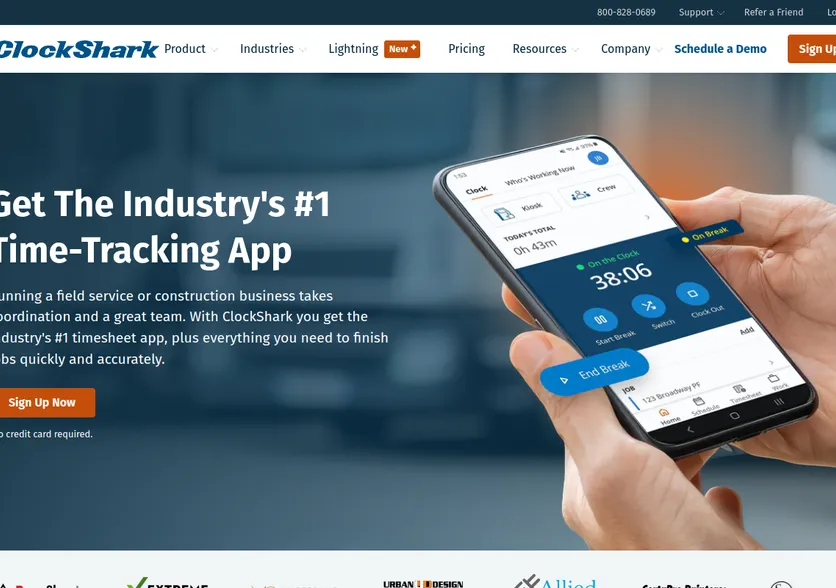
ClockShark is the time tracking tool built for construction and field service, with GPS time clocks, job costing, scheduling and payroll integrations in one app. This ClockShark Standard plan charges a base fee plus a per-user rate, with the Pro level adding GPS fencing, overtime alerts and more reporting. The GPS tracking is strong and the job costing is deep, though every plan carries a three-year contract term and there is no free plan.
What we like
- Strong GPS time clocks for field teams
- Deep job costing and reporting
- Scheduling built in with time tracking
Watch out for
- Three-year contract term on every plan
- No free plan, only a trial
How to try it
- Open the ClockShark pricing page and start the 14-day Pro trial
- Clock in one real job with the GPS time clock
- Check the three-year contract term before you commit
2. Sling
Best for: Hourly teams that want free scheduling for up to thirty staff
Paid tool Starting price: $1.70/user/month · Premium plan, $1.70 a user a month billed annually or $2.00 billed monthly; Business $3.40 a user a month billed annually; free for up to 30 users
Free plan: Free plan for up to 30 users
Sling is the budget play for hourly team scheduling, with a clean rota builder, time clocks, team messaging and task management in one app. This Sling Premium plan is one of the cheapest paid tiers in this list, with the Business level adding labor cost tools and advanced reporting. The free plan covers up to thirty users, which is generous for a small crew, though the interface is simpler than Homebase and the integration set is smaller.

What we like
- Free plan for up to thirty users
- Very cheap paid plans
- Scheduling, time clocks and messaging in one place
Watch out for
- Interface is simpler than Homebase
- Smaller integration set than rivals
How to try it
- Open the Sling pricing page and start on the free plan
- Build one real weekly schedule and test shift swaps
- Check the labor cost tools on the Business plan before you commit
3. Deputy
Best for: Hourly teams that want scheduling plus time tracking on one price
Paid tool Starting price: $4.50/user/month · Scheduling plan, $4.50 a user a month; Premium bundle with time tracking $6 a user a month; 14-day free trial
Free plan: 14-day free trial
Deputy is the scheduling and time tracking tool for hourly workforces, with a clean rota builder, GPS time clocks, leave management and labor cost controls in one app. This Deputy Scheduling plan covers the rota and time clocks, while the Premium bundle adds time tracking and performance tools. The GPS time clock is a real advantage for multi-site teams, though the interface feels less modern than Homebase and the Premium bundle costs more.

What we like
- GPS time clocks for multi-site teams
- Scheduling and time tracking in one app
- Labor cost controls built in
Watch out for
- Interface feels less modern than Homebase
- Premium bundle costs more for time tracking
How to try it
- Open the Deputy pricing page and start the 14-day trial
- Build one real weekly schedule with the GPS time clock
- Compare the Scheduling plan with the Premium bundle before you commit
4. Connecteam
Best for: Hourly teams that want an all-in-one hub with a free start
Paid tool Starting price: $29/month · Basic hub billed annually, $29 a month for the first 30 users; each hub billed separately; free Small Business plan for up to 10 users
Free plan: Free Small Business plan for up to 10 users
For hourly crews, Connecteam gathers scheduling, time clocks, team chat, training and forms into one hub built for staff who never sit at a desk. This Connecteam Basic hub is billed per month for the first thirty users, with each hub billed separately and higher levels adding more features. The free Small Business plan covers up to ten users, which suits a small crew, though the per-hub billing can surprise you when you add more than one hub.

What we like
- All-in-one hub for deskless teams
- Free plan for up to ten users
- Training and forms built in
Watch out for
- Each hub is billed separately
- Per-user pricing climbs with headcount
How to try it
- Open the Connecteam pricing page and start on the free Small Business plan
- Build one real weekly schedule and test the team chat
- Check the per-hub billing before you add a second hub
5. When I Work
Best for: Hourly teams that want fast scheduling with a free start
Paid tool Starting price: $2.50/user/month · Essentials plan, $2.50 a user a month; Pro $5 and Premium $8 a user a month; 14-day free trial
Free plan: 14-day free trial
When I Work is the scheduling tool hourly managers reach for first, with a clean drag-and-drop rota, shift swaps, time clocks and team messaging in one app. This When I Work Essentials plan is one of the cheapest paid tiers in this list, with Pro and Premium levels adding forecasting, labor cost tracking and advanced reporting. The interface is quick to learn and the mobile app is strong, though the entry plan leaves out the labor cost tools that larger crews need.

What we like
- Very quick to learn for managers
- Strong mobile app for staff
- Shift swaps and time clocks built in
Watch out for
- Labor cost tools need higher plans
- No payroll built in
How to try it
- Open the When I Work pricing page and start the 14-day trial
- Build one real weekly schedule and test shift swaps
- Check the labor cost tools on the Pro plan before you commit
6. ZoomShift
Best for: Hourly teams that want cheap scheduling with a free start
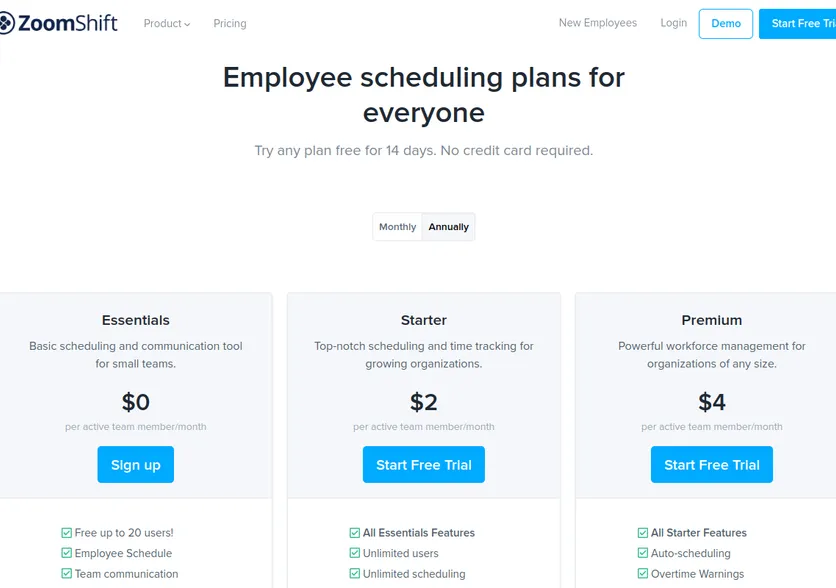
Paid tool Starting price: $2/user/month · Starter plan, $2 a user a month billed annually or $2.50 billed monthly; Premium $4 a user a month billed annually; Essentials free for up to 20 users; 14-day free trial
Free plan: Free Essentials plan for up to 20 users
ZoomShift is the simple scheduling tool for small hourly teams, with a clean rota builder, time clocks, team messaging and shift swaps in one app. This ZoomShift Starter plan is one of the cheapest paid tiers in this list, with the Premium level adding labor cost tools and advanced reporting. The free Essentials plan covers up to twenty users, which suits a small crew, though the integration set is smaller than Homebase and the interface is basic.
What we like
- Free plan for up to twenty users
- Very cheap paid plans
- Simple interface managers pick up fast
Watch out for
- Smaller integration set than Homebase
- Interface is basic compared with rivals
How to try it
- Open the ZoomShift pricing page and start on the free Essentials plan
- Build one real weekly schedule and test shift swaps
- Check the labor cost tools on the Premium plan before you commit
7. 7shifts
Best for: Restaurants and field teams that want scheduling with labor cost controls
Paid tool Starting price: $39.99/location/month · Essentials plan, $39.99 a location a month billed annually or $44.99 billed monthly; Pro $79.99 and Premium $134.99; Comp free for 1 location up to 15 employees; payroll add-on $39.99 a location plus $6 an employee
Free plan: Free Comp plan for 1 location up to 15 employees
7shifts is the scheduling tool built for restaurants and hourly teams, with a clean rota builder, labor cost tracking, team messaging and payroll integrations in one app. This 7shifts Essentials plan is billed per location, with Pro and Premium levels adding forecasting, advanced reporting and more integrations. The labor cost tools are strong for the price, though the per-location price climbs as you add sites and payroll costs extra.

What we like
- Strong labor cost tracking
- Built for restaurants and hourly teams
- Free plan for a single location
Watch out for
- Per-location pricing climbs with every site
- Payroll costs extra on top of the plan
How to try it
- Open the 7shifts pricing page and start on the free Comp plan
- Build one real weekly schedule and test labor cost tracking
- Check the payroll add-on cost before you commit
Prices above were checked on each vendor’s own website on Nov 26, 2026 and can change — the vendor’s page is the final word. Vendor links are editorial: nobody paid to be listed or ranked here. Vendors who want a featured listing can see how it works on our Get listed page.
What hourly workforce software costs in 2026
Most hourly teams pay per user or per location, so the headline rate is never the whole bill. Sling costs one dollar and seventy cents a user a month on annual billing, ZoomShift costs two dollars, and When I Work costs two dollars and fifty cents. ClockShark costs forty-two dollars a month plus nine dollars and fifty cents an active user, while 7shifts costs thirty-nine dollars and ninety-nine cents a location. The headline plan each vendor shows on its own pricing page is the number in the table above, checked on November 26, 2026.
Start with the free plan or trial on two tools and run one real week through each, from rota to clock-in to payroll export. Compare how GPS tracking works on site, whether job costing needs a higher plan, and what the bill looks like at twice your current crew size. Pick the tool your crew will actually clock into every day, because a time tracker nobody opens is money wasted.
Before you buy
- Add up the base fee and the per-user charge, because a cheap per-user rate hides an expensive base fee.
- Count the active users first, because per-user pricing climbs with every field worker you add.
- Check whether GPS tracking is built in or an add-on, because it sits on higher plans at most vendors.
- Test the free plan or trial on a real job site, because a demo never shows your team's clock-ins.
- Confirm the contract term, because some tools here require a three-year commitment.
Official websites
Official websites of the products reviewed above. Features and prices were checked against these sites when this guide was written, and they can change, so confirm on the vendor site before you buy.
Frequently asked questions
Which HR software is best for hourly workforces in 2026?
ClockShark is the best overall pick for hourly workforces, at forty-two dollars a month plus nine dollars and fifty cents a user, with GPS time clocks and deep job costing. Sling wins for budget teams at one dollar and seventy cents a user a month on annual billing, with a free plan for up to thirty users. When I Work is the quickest scheduler at two dollars and fifty cents a user a month.
How much does HR software cost for hourly workforces?
Most tools in this list cost between one dollar and seventy cents and forty dollars a month, with per-user or per-location pricing. Sling costs one dollar and seventy cents a user, ZoomShift costs two dollars, and When I Work costs two dollars and fifty cents. ClockShark costs forty-two dollars a month plus nine dollars and fifty cents a user, and 7shifts costs thirty-nine dollars and ninety-nine cents a location.
Is there a free HR tool for hourly workforces?
Yes, several tools offer a free plan. Sling gives you a free plan for up to thirty users, ZoomShift gives you a free plan for up to twenty users, and Connecteam gives you a free Small Business plan for up to ten users. 7shifts offers a free Comp plan for one location, and ClockShark offers a fourteen-day Pro trial with no free plan.
Which tool has the best GPS time tracking?
It depends on the work. ClockShark leads on GPS tracking and job costing, with a three-year contract term on every plan. Deputy leads on GPS time clocks for multi-site teams, with scheduling and time tracking in one app. Sling and When I Work lead on simplicity, with a clean rota and a free start for small crews.
What should an hourly team look for in HR software?
Add up the base fee and the per-user charge, because a cheap per-user rate hides an expensive base fee. Count the active users, because per-user pricing climbs with every field worker you add. Test the free plan or trial on a real job site before you commit, because a demo never shows your team's clock-ins.
Need everyday business help too? Try Toolsvine's free business tools for small teams right in your browser.
Browse Business Tools tools


