
On this page
A small HVAC team cannot afford software that only works in the office: the job happens in attics, basements and crawl spaces. Housecall Pro leads this list as the most complete option for a small crew, and the other six are ranked on the same test: what a small team actually pays each month, and how well each tool keeps the office, the truck and the customer on the same page. The quote-only enterprise tools publish no prices, so they are not in this list.
How we researched this
We checked every price on the vendor pricing page on November 27, 2026, and only included tools with a published US dollar list price, a free plan or a free trial. We ranked each tool on what a small HVAC team actually pays, including per-user versus per-job billing, dispatching depth and offline mobile use. Quote-only tools like ServiceTitan and FieldEdge publish no prices and were excluded, and FieldPulse is included because its vendor calculator publishes a planning rate, which we flag clearly.
Compare the tools
| Name | Best for | Starting price | Free plan | |
|---|---|---|---|---|
 Housecall Pro | Small HVAC teams that want one app for the office and the field | $59/mo | Free trial available, no free plan | Visit |
 Jobber | Small teams that want the cheapest full job cycle | $29/mo | Free trial available, no free plan | Visit |
 Service Fusion | Small teams that hire seasonally and want unlimited users | $208/mo | No free trial; demo available | Visit |
 Kickserv | Small teams that want simple field service software with a 30-day trial | $60/mo | 30-day free trial, no free plan | Visit |
 ServiceM8 | Small teams with many technicians and a modest job count | $29/mo | Free plan for 1 user and 30 jobs | Visit |
 RazorSync | Small crews that want clear per-user pricing | $85/mo | 2-week free trial, no free plan | Visit |
| FieldPulse | Small teams that want a modern field service app with a custom quote | $99/user/mo | Free trial available, no free plan | Visit |
The HVAC field service software for small teams, compared
1. Housecall Pro
Best for: Small HVAC teams that want one app for the office and the field
Paid tool Starting price: $59/mo · Basic is fifty-nine dollars a month billed annually; the trade view lists seventy-nine dollars a month instead, so confirm which price applies to HVAC, and higher tiers add dispatching boards and marketing tools
Free plan: Free trial available, no free plan
A small team that wants the office and the field on the same page will find Housecall Pro at fifty-nine dollars a month billed annually on the Basic plan. It covers scheduling, dispatching, estimates, invoicing and customer messaging in one app, so a two-truck team stops juggling a calendar, a spreadsheet and a card reader. The trade view lists seventy-nine dollars a month instead, so confirm which price applies to HVAC, and higher tiers add dispatching boards and marketing tools.

What we like
- Scheduling, dispatching and invoicing in one app
- Strong mobile app for technicians in the field
- Customer messaging built into every job
Watch out for
- Trade view lists a higher seventy-nine dollar price
- No free plan, only a trial
How to try it
- Create a Housecall Pro account and add technicians and service areas
- Build the first schedule and dispatch jobs from the board
- Send the first invoice and collect payment by card
2. Jobber
Best for: Small teams that want the cheapest full job cycle
Paid tool Starting price: $29/mo · Core is twenty-nine dollars a month billed annually; Connect and Grow cost more and add automation, online booking and marketing
Free plan: Free trial available, no free plan
A small team counting every dollar will like Jobber at twenty-nine dollars a month billed annually on the Core plan, the cheapest option in this list. It covers quoting, scheduling, dispatching, invoicing and payments, so a residential crew gets the full job cycle without a big monthly bill. The Connect and Grow plans cost more and add automation, online booking and marketing, so a team can start cheap and upgrade as the job count grows.

What we like
- Cheapest full job cycle in this list
- Quoting through to payment in one place
- Online booking on higher plans
Watch out for
- Automation needs the higher Connect or Grow plans
- No free plan, only a trial
How to try it
- Create a Jobber account and add technicians and customers
- Build the first schedule and dispatch the day's jobs
- Send invoices and collect payments online
3. Service Fusion
Best for: Small teams that hire seasonally and want unlimited users
Paid tool Starting price: $208/mo · Starter is two hundred eight dollars a month billed annually, or two hundred forty-five dollars month to month; Plus is three hundred twenty-five dollars and Pro is five hundred thirty-three dollars, with unlimited users on every plan and no free trial
Free plan: No free trial; demo available
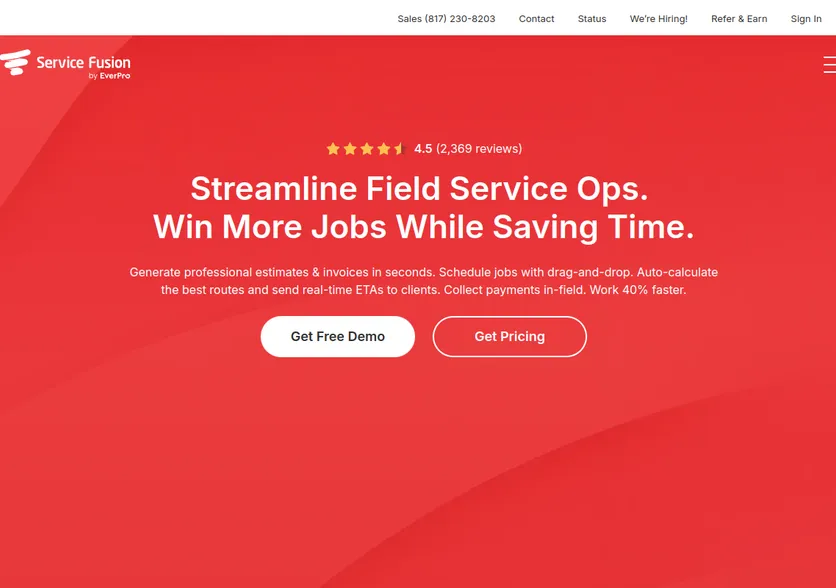
A team that hires extra technicians for the summer will value Service Fusion at two hundred eight dollars a month billed annually on the Starter plan. Every plan covers unlimited users, so the bill does not grow as seasonal technicians join, which suits a residential HVAC company with a changing crew. Plus costs three hundred twenty-five dollars a month and Pro five hundred thirty-three, and there is no free trial, so ask for a demo before committing.
What we like
- Unlimited users on every plan
- Strong dispatch board for busy days
- Pricebook and inventory included
Watch out for
- No free trial, demo only
- Starter price is high for a one-truck team
How to try it
- Book a Service Fusion demo with your dispatch workflow
- Add technicians, service areas and pricebook items
- Dispatch the first jobs from the board and invoice them
4. Kickserv
Best for: Small teams that want simple field service software with a 30-day trial
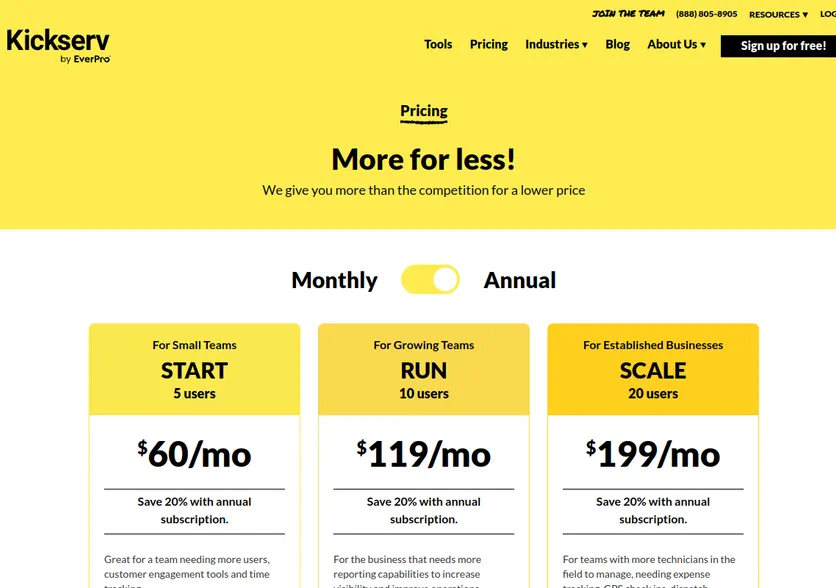
Paid tool Starting price: $60/mo · Start is sixty dollars a month billed annually, or seventy-five dollars month to month, for five users; Run is one hundred nineteen dollars for ten users and Scale is one hundred ninety-nine dollars for twenty, with a thirty-day trial; one October 2026 read lists sixty dollars monthly and forty-eight dollars annual, which conflicts with the newer price-change log, so confirm before buying
Free plan: 30-day free trial, no free plan
A small team that wants to keep it simple should try Kickserv at sixty dollars a month billed annually on the Start plan for five users. It covers scheduling, dispatching, invoicing and customer history without the extra modules bigger tools push, so a crew can get jobs out the door fast. Run costs one hundred nineteen dollars a month for ten users and Scale one hundred ninety-nine for twenty, with a thirty-day trial and no free plan.
What we like
- Simple dispatching without extra modules
- Thirty-day trial to test with real jobs
- Per-plan user limits are clear and honest
Watch out for
- Price reads conflict across sources, confirm in writing
- Fewer automation features than bigger tools
How to try it
- Start the Kickserv trial and add the team
- Schedule the first jobs and dispatch them to technicians
- Invoice the completed jobs and track payments
5. ServiceM8
Best for: Small teams with many technicians and a modest job count
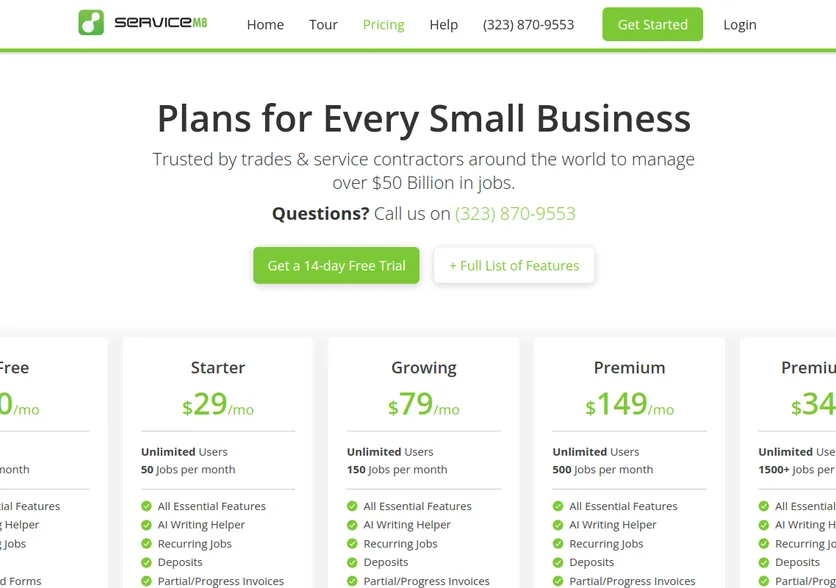
Paid tool Starting price: $29/mo · Starter is twenty-nine dollars a month with unlimited users and fifty new jobs a month; Growing is seventy-nine dollars for one hundred fifty jobs, Premium is one hundred forty-nine dollars for five hundred, and Premium Plus is three hundred forty-nine dollars for one thousand five hundred or more, with no annual discount published
Free plan: Free plan for 1 user and 30 jobs
A small team with more technicians than jobs will save money on ServiceM8 at twenty-nine dollars a month on the Starter plan. Every plan includes unlimited users, with pricing based on new jobs per month instead, so the bill follows the workload rather than the headcount. Growing costs seventy-nine dollars a month for one hundred fifty jobs, Premium one hundred forty-nine for five hundred, and Premium Plus three hundred forty-nine for one thousand five hundred or more.
What we like
- Unlimited users on every plan
- Free plan for one user and thirty jobs
- Pricing follows job count, not headcount
Watch out for
- Job limits can bite during peak season
- No annual discount published
How to try it
- Create a ServiceM8 account and add the team
- Set up job templates for common residential calls
- Dispatch jobs and invoice from the mobile app
6. RazorSync
Best for: Small crews that want clear per-user pricing
Paid tool Starting price: $85/mo · Solo is eighty-five dollars a month billed annually, or ninety dollars month to month, for up to two users; Team is one hundred ninety-five dollars for up to seven users and Pro is four hundred thirty-nine dollars for fifteen, Enterprise is quoted with the help center listing one thousand ninety-five dollars a month, and extra users cost fifty dollars per user a month
Free plan: 2-week free trial, no free plan
A small crew that wants to pay only for the seats it uses can pick RazorSync at eighty-five dollars a month billed annually on the Solo plan for up to two users. It covers scheduling, dispatching, invoicing and customer management in one system, so the office and the truck stop working from different lists. Team costs one hundred ninety-five dollars a month for up to seven users, Pro four hundred thirty-nine for fifteen, and Enterprise is quoted with the help center listing one thousand ninety-five dollars a month.
What we like
- Clear per-user pricing for small crews
- Two-week trial to test with real jobs
- Extra users cost fifty dollars each, no surprises
Watch out for
- Enterprise pricing needs a quote
- Per-user costs grow as the crew grows
How to try it
- Start the RazorSync trial and add technicians
- Schedule and dispatch the first residential jobs
- Invoice from the field and track payments
7. FieldPulse
Best for: Small teams that want a modern field service app with a custom quote
Paid tool Starting price: $99/user/mo · The main pricing page is quote-only; the vendor's public pricing calculator shows a ninety-nine dollar per user planning rate, and the final price is a custom quote, so treat ninety-nine dollars as a planning figure, not a list price
Free plan: Free trial available, no free plan
FieldPulse is quote-only on its main pricing page, with the vendor's public pricing calculator showing a ninety-nine dollar per user planning rate. It covers scheduling, dispatching, estimates, invoicing and customer management in a modern app built for small field service teams, which suits a crew that wants a polished tool and is willing to get a quote. Treat the ninety-nine dollar figure as a planning rate rather than a list price, since the final price is a custom quote.
What we like
- Modern app built for small field service teams
- Scheduling through to invoicing in one place
- Planning rate published on the vendor calculator
Watch out for
- Final price is a custom quote, not a list price
- No published list price to budget against
How to try it
- Request a FieldPulse quote for your team size
- Start a trial and add technicians and customers
- Dispatch the first jobs and test the mobile app
Prices above were checked on each vendor’s own website on Nov 27, 2026 and can change — the vendor’s page is the final word. Vendor links are editorial: nobody paid to be listed or ranked here. Vendors who want a featured listing can see how it works on our Get listed page.
How a small HVAC team should pick field service software
Start with the mobile app, because a small team has no office staff to cover for a tool that fails in the field. Test it offline in a real basement or attic, since signal is never guaranteed where the work happens. Next, count the real monthly cost both ways: per-user pricing punishes a big crew, while per-job pricing punishes a busy summer, and the cheaper model depends on the team's shape. Check the invoice flow too, because a job is not done until the customer pays, and card payment from the invoice is what turns a finished repair into cash. Finally, run a real week of jobs on a trial, because a week of live dispatching reveals more than any demo.
Before you buy
- Check whether scheduling, dispatching and invoicing are included or sold as separate add-ons
- Confirm the mobile app works offline in basements and attics with no signal
- Count the real monthly cost including per-user fees and job limits
- Ask whether the tool supports a pricebook for consistent residential quotes
- Run a real week of jobs on a trial before moving the whole team across
Official websites
Official websites of the products reviewed above. Features and prices were checked against these sites when this guide was written, and they can change, so confirm on the vendor site before you buy.
Frequently asked questions
What is the cheapest field service software for small HVAC teams?
Jobber and ServiceM8 both start at twenty-nine dollars a month, with Jobber billed annually and ServiceM8 charging per job count with unlimited users. Housecall Pro starts at fifty-nine dollars a month, and Kickserv at sixty dollars a month for five users. ServiceM8 also offers a free plan for one user and thirty jobs, so a very small team can start free. The cheapest pick depends on whether the team pays per user or per job.
What features matter most for small field service teams?
Field service software for a small team should cover scheduling, dispatching, invoicing and customer history in one app, with a mobile app that works offline. A pricebook keeps residential quotes consistent, and card payment from the invoice turns finished jobs into cash faster. The dispatch board matters most on busy days, so test it with a full week of real jobs before committing.
Is there free field service software for small teams?
Yes, ServiceM8 offers a free plan for one user and thirty jobs, which suits a one-truck operator starting out. The other tools here offer free trials instead, from two weeks on RazorSync to thirty days on Kickserv. A growing team will outgrow the free plan's job cap quickly, so treat it as a starting point rather than a permanent home.
Why is FieldPulse priced by quote?
FieldPulse is the only quote-only tool in this list, and its vendor pricing calculator shows a ninety-nine dollar per user planning rate. The final price is a custom quote based on team size and features, so a small team should request the quote early and compare it against the published prices here. Do not budget on the planning rate alone, because the quoted price can differ.
How do I pick field service software for a small team?
Count the technicians and the monthly job volume first, because some tools bill per user and others per job, and the cheaper model flips with team size. Check whether scheduling, dispatching and invoicing are included or sold as add-ons. Test the mobile app offline in a real basement or attic, since a field service tool that needs signal everywhere will fail a technician on the job.
Compare the seven tools above, then run a real week of jobs on the one that fits your small team before you commit.
Browse Business Tools tools


