On this page
An immigration law firm holds the most sensitive files a client owns: passports, visa petitions, asylum statements and family records. One leaked folder can end a case and a reputation, so the software that stores those files has to treat security as the product, not a setting. Clio leads this list because it combines matter management with a client portal and document controls for forty-nine dollars a user a month, and the other six tools are judged on the same test: how safely a client's file moves from intake to filing.
How we researched this
We checked every price on the vendor pricing page on November 28, 2026, and only included tools with a published US dollar list price and a free trial or free plan. The dedicated legal document systems in this category, including NetDocuments, iManage and Filevine, publish no prices, so they are not in this list. The seven tools below secure client files, signatures and credentials at published prices, and prices change, so confirm the current figure on the vendor site before you buy.
Compare the tools
| Name | Best for | Starting price | Free plan | |
|---|---|---|---|---|
 Clio | Immigration firms that want matter files, a client portal and document controls in one system | $49/user/month | Free trial | Visit |
 MyCase | Immigration firms that want client messaging, documents and e-signatures in one place | $50/user/month | Free trial | Visit |
 Docusign | Firms that need signed petitions and retainers with a defensible audit trail | $25/user/month | Free trial | Visit |
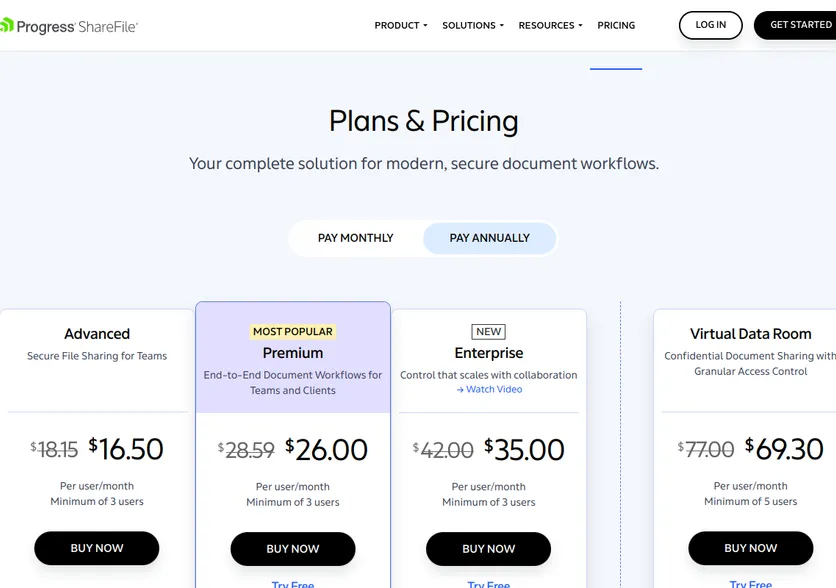
 ShareFile | Firms that need a secure client portal for large case files | $16.50/user/month | Free trial | Visit |
 Egnyte | Firms that want file governance and ransomware detection on a budget | $22/user/month | Free trial | Visit |
 Box | Firms that want enterprise-grade file controls with familiar integrations | $15/user/month | Free plan | Visit |
 1Password Business | Firms that need shared logins kept out of email and spreadsheets | $7.99/user/month | Free trial | Visit |
The law firm data security software for immigration law firms, compared
1. Clio
Best for: Immigration firms that want matter files, a client portal and document controls in one system
Paid tool Starting price: $49/user/month · Forty-nine dollars per user per month on the Starter plan billed annually; Core, Signature and Elite are quoted, and a free trial is available
Free plan: Free trial
An immigration practice runs on documents that cannot leak, and this Clio plan keeps them inside a matter record with permissions, a client portal and an audit trail for forty-nine dollars a user a month. Clients upload passports and petitions through the portal instead of email, so sensitive files never sit in an inbox. The Starter plan covers the essentials, while the higher tiers add the deeper reporting and intake automation a growing firm eventually needs.

What we like
- Client portal keeps sensitive files out of email
- Permissions and audit trails on every matter record
- Matter management and billing share one system
Watch out for
- Higher tiers are quoted rather than published
- The Starter plan is light on intake automation
How to try it
- Create the matter and set who on the team can open its documents
- Invite the client to the portal and ask for passports and petitions there
- Check the audit trail before you file to confirm nothing changed unnoticed
2. MyCase
Best for: Immigration firms that want client messaging, documents and e-signatures in one place
Paid tool Starting price: $50/user/month · Fifty dollars per user per month on the Basic plan billed annually, or sixty dollars month to month; Pro is one hundred dollars and Advanced is one hundred and thirty dollars
Free plan: Free trial
Client messages are where immigration files usually leak, so MyCase moves them into a secure portal with documents, e-signatures and case updates for fifty dollars a user a month. A client can sign a form, upload a passport scan and check the case status without ever opening email. The Basic plan covers a small firm well, and the higher tiers add the workflow automation and reporting that a busier practice needs.

What we like
- Built-in e-signatures keep forms inside the case file
- Clients check status themselves, cutting phone calls
- Documents, messages and billing share one record
Watch out for
- The Basic plan has limited automation
- The company behind MyCase now trades as 8am, so the name varies across review sites
How to try it
- Open the case and invite the client to the secure portal
- Send forms for e-signature and collect uploads in the same place
- Share case updates through the portal instead of email
3. Docusign
Best for: Firms that need signed petitions and retainers with a defensible audit trail
Paid tool Starting price: $25/user/month · Twenty-five dollars per user per month on the Standard plan billed annually, or thirty dollars billed monthly; Business Pro is forty dollars and Personal is ten dollars
Free plan: Free trial
A signature is the moment an immigration filing becomes real, and Docusign captures it with encryption, identity checks and a tamper-evident audit trail for twenty-five dollars a user a month. The Standard plan covers the signing volume a small firm needs, with templates for the forms a practice sends again and again. Every completed envelope carries its own certificate, so the firm can prove when and how a document was signed.

What we like
- Audit trail proves when and how each document was signed
- Templates speed up the forms a firm sends repeatedly
- Clients sign from any device without an account
Watch out for
- Envelope limits apply on the lower plans
- Advanced identity checks cost more on higher tiers
How to try it
- Upload the petition or retainer and place the signature fields
- Send it to the client for signing from any device
- Download the completed document with its audit certificate
4. ShareFile
Best for: Firms that need a secure client portal for large case files
Paid tool Starting price: $16.50/user/month · Sixteen dollars and fifty cents per user per month on the Advanced plan billed annually, or eighteen dollars and fifteen cents month to month; Premium is twenty-six dollars and a three-user minimum applies
Free plan: Free trial
Large immigration files do not belong in email attachments, and ShareFile gives clients a branded portal to upload and download them securely for sixteen dollars and fifty cents a user a month. Encryption covers files in transit and at rest, and the firm controls exactly who sees each folder. The Advanced plan suits a small practice, while Premium adds the e-signature and workflow tools a busier firm wants.
What we like
- Branded portal keeps large files out of email
- Folder permissions control who sees each case file
- Download tracking shows when a client opens a file
Watch out for
- A three-user minimum applies on paid plans
- E-signatures need the Premium plan
How to try it
- Create a folder for the client and set who can open it
- Ask the client to upload documents through the portal
- Track downloads and set expiry dates on shared links
5. Egnyte
Best for: Firms that want file governance and ransomware detection on a budget
Paid tool Starting price: $22/user/month · Twenty-two dollars per user per month on the Business plan billed annually for ten to one hundred users; Enterprise Lite is thirty-nine dollars and Elite is forty-eight dollars. Egnyte's Team plan, listed at ten dollars a user a month for one to ten users, appears to have been removed from Egnyte's pricing page in November 2026, so confirm the current price before buying
Free plan: Free trial
A shared drive full of client files is only safe if someone watches it, and Egnyte pairs file sharing with governance, permissions and anomaly detection for twenty-two dollars a user a month. The Business plan fits a firm of ten to one hundred people, with version history that recovers a file changed by mistake or by malware. Higher tiers add the compliance reporting and data controls a firm needs as it grows.

What we like
- Anomaly detection flags unusual file activity early
- Version history recovers files changed by mistake
- Low entry price for a firm of up to ten people
Watch out for
- The Team plan caps at ten users
- Compliance reporting needs the higher tiers
How to try it
- Move case files into Egnyte and set folder permissions
- Turn on anomaly alerts for unusual file activity
- Use version history to restore any file changed by mistake
6. Box
Best for: Firms that want enterprise-grade file controls with familiar integrations
Paid tool Starting price: $15/user/month · Fifteen dollars per user per month on the Business plan billed annually, or twenty dollars month to month; Business Starter is five dollars and Business Plus is twenty-five dollars
Free plan: Free plan
Most firms already use the apps Box connects to, and Box puts the firm's files behind admin controls, encryption and granular permissions for fifteen dollars a user a month. The Business plan covers unlimited storage with the sharing controls a practice needs, and watermarking and retention rules arrive on the higher tiers. It is the plainest fit for a firm that wants strong file security without learning a new system.

What we like
- Unlimited storage on the Business plan
- Works with the office apps firms already use
- Admin controls cover sharing, retention and access
Watch out for
- Watermarking needs the higher tiers
- The interface can feel heavy for a very small team
How to try it
- Create folders per matter and set sharing permissions
- Turn on link expiry for any file shared outside the firm
- Review the admin console weekly for unusual sharing activity
7. 1Password Business
Best for: Firms that need shared logins kept out of email and spreadsheets
Paid tool Starting price: $7.99/user/month · Seven dollars and ninety-nine cents per user per month billed annually on the Business plan; a free trial is available
Free plan: Free trial
Staff logins are the weakest link in most firms, and 1Password Business moves them into shared vaults with admin controls and breach alerts for seven dollars and ninety-nine cents a user a month. Each person gets their own vault plus the shared vaults their role needs, so nobody emails a password again. When someone leaves, the firm revokes access in one place instead of hunting through inboxes.
What we like
- Shared vaults end passwords sent by email
- Breach alerts warn when a login appears in a leak
- Admin controls show who can open each vault
Watch out for
- It secures logins, not the case files themselves
- Staff need a short habit change to use it daily
How to try it
- Create shared vaults for each team and its logins
- Move staff passwords out of email and spreadsheets
- Revoke access in one place when someone leaves
Prices above were checked on each vendor’s own website on Nov 28, 2026 and can change — the vendor’s page is the final word. Vendor links are editorial: nobody paid to be listed or ranked here. Vendors who want a featured listing can see how it works on our Get listed page.
How an immigration law firm should lock down client files
Start with the inbox, because that is where most client files leak. Move every passport scan, petition and signed form into a system with permissions and an audit trail, and stop sending sensitive files as email attachments. Give clients a portal to upload through, so the file lands in the right matter with the right permissions from the start. Keep logins in a password manager instead of a shared spreadsheet, and revoke access the day someone leaves. Finally, check the audit trail monthly: a security tool nobody reviews is a lock nobody tests.
Before you buy
- Check that client files live behind permissions and an audit trail, not in shared email inboxes
- Confirm encryption covers files both in transit and at rest before you trust a tool with passports
- Ask how a client uploads documents and whether the portal brands the firm or the vendor
- Count the cost per user against the whole team, since per-seat prices climb fast in a growing firm
- Run a trial with one real case file, from client upload to signed filing, before you commit
Official websites
Official websites of the products reviewed above. Features and prices were checked against these sites when this guide was written, and they can change, so confirm on the vendor site before you buy.
Frequently asked questions
What is law firm data security software for immigration law firms?
It is software that stores client files, passports and petitions behind permissions, encryption and an audit trail, instead of in email attachments and shared drives. The tools in this list cover matter files, client portals, e-signatures and shared logins. None of them replaces a firm's own habits, but they make a leak far less likely and give the firm proof of how every file was handled.
Why should immigration firms avoid email for client documents?
Email copies live forever in inboxes, on phones and in sent folders, and one forwarded message can expose a passport or an asylum statement. A client portal keeps the file in one place with permissions and a record of who opened it. The firm also avoids the most common leak of all: a client replying to the wrong address with a sensitive attachment.
What does Clio cost for data security?
Clio costs forty-nine dollars per user per month on the Starter plan billed annually, with Core, Signature and Elite quoted rather than published. Matter records carry permissions and an audit trail, and the client portal keeps uploads out of email. A free trial is available, so a firm can test the portal with a real case before it pays.
Which tool is cheapest for a small immigration firm?
1Password Business is cheapest at seven dollars and ninety-nine cents per user per month, but it secures logins rather than case files. Egnyte follows at ten dollars per user per month for file sharing with governance, and Box is fifteen dollars. Compare the whole stack, since a firm usually needs a file system, a signature tool and a password manager together.
Do these tools keep client files private from other clients?
Yes, when the firm sets permissions per matter. Each client sees only their own portal folder, and staff see only the matters their role allows. The audit trail records every view and download, so the firm can show a client exactly who touched their file. The weak point is setup: permissions only protect a file if someone configures them before the file arrives.
Compare the seven tools above, then start with a free trial on the tool that matches how your firm already handles client files before you pay for a full year.
Browse Security & Privacy tools