On this page
A solo attorney is the compliance department, the billing department and the lawyer, so the software has to carry the controls a bigger firm spreads across a team. The tools below do that job at solo prices: trust accounting, audit trails, conflict checks and document retention, all inside practice management. Lawcus leads the list because it covers those controls from thirty-nine dollars a user a month, and the other seven tools are ranked on the same practical test: how much compliance a single attorney gets for the money.
How we researched this
We checked every price on the vendor pricing page on November 27, 2026, and only included tools with a published US dollar list price and a free trial or free demo. A solo practice needs trust accounting, audit trails, conflict checks and document retention, not a seven thousand dollar a year GRC platform, so this list compares practice software with those controls built in. Prices change, so confirm the current figure before you buy.
Compare the tools
| Name | Best for | Starting price | Free plan | |
|---|---|---|---|---|
 Lawcus | Solo attorneys who want the lowest price with real compliance controls | $39/user/month | Free trial | Visit |
 Clio | Solo attorneys who want the most widely used practice platform | $49/user/month | Free 7-day trial | Visit |
 CosmoLex | Solo attorneys who want accounting and practice management in one tool | $49/user/month | Free trial | Visit |
 MyCase | Solo attorneys who want a clean interface with strong client intake | $50/user/month | Free trial | Visit |
 PracticePanther | Solo attorneys who want automation on a simple plan | $49/user/month | Free trial | Visit |
 Smokeball | Solo attorneys who want automatic time capture for compliance records | $49/user/month | Free demo | Visit |
 CaseFox | Solo attorneys who want billing-first practice software at a low price | $39/user/month | Free Solo plan for 2 users | Visit |
 CARET Legal | Solo attorneys who want white-glove onboarding with their software | $79/user/month | Free demo | Visit |
The legal compliance software for solo attorneys, compared
1. Lawcus
Best for: Solo attorneys who want the lowest price with real compliance controls
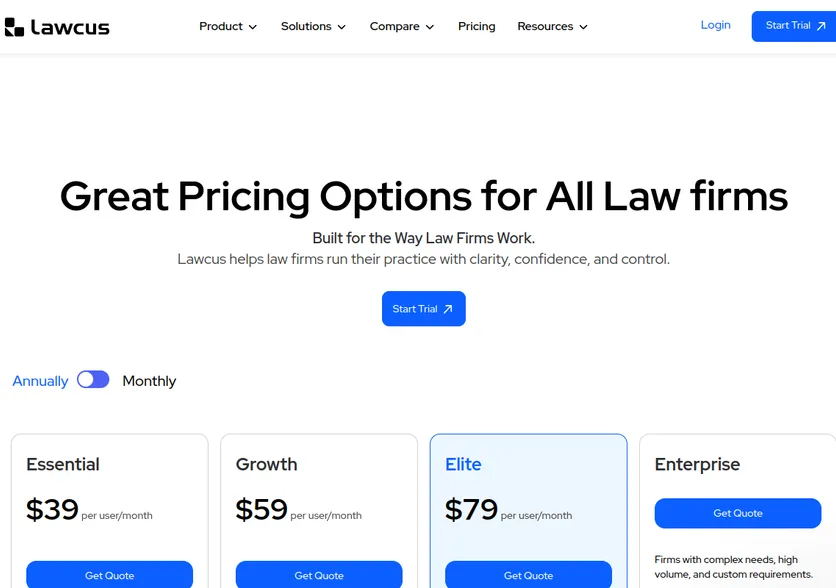
Paid tool Starting price: $39/user/month · Thirty-nine dollars per user a month billed annually on the Essential plan, or forty-nine dollars on monthly billing; Growth is fifty-nine dollars and Elite is seventy-nine dollars
Free plan: Free trial
This Lawcus plan costs thirty-nine dollars per user a month billed annually, and it gives a solo practice the compliance basics without the enterprise price. Trust accounting, conflict checks, document automation and time tracking sit in one system, so a single attorney can run intake, matters and billing without juggling tools. Two-way texting is a ten-dollar add-on per attorney a month, which is worth knowing before you budget.
What we like
- Lowest price in this list at thirty-nine dollars a month
- Trust accounting with three-way reconciliation is included
- Conflict checks and document automation share one system
Watch out for
- Two-way texting costs ten dollars per attorney a month extra
- Smaller vendor with fewer integrations than Clio or MyCase
How to try it
- Set up your trust accounts and turn on three-way reconciliation
- Run a conflict check before you open each new matter
- Use document automation to keep client files consistent and filed
2. Clio
Best for: Solo attorneys who want the most widely used practice platform
Paid tool Starting price: $49/user/month · Forty-nine dollars per user a month billed annually on the EasyStart plan, or fifty-nine dollars on monthly billing; Essentials is eighty-nine dollars, Advanced is one hundred and nineteen dollars and Complete is one hundred and forty-nine dollars
Free plan: Free 7-day trial
This Clio plan costs forty-nine dollars per user a month billed annually on EasyStart, and it is the practice platform most solo attorneys already know. Client intake, matters, documents, time tracking and billing share one system, and the audit trail records who changed what and when. Clio Draft handles court forms, and the huge integration library means your existing tools usually connect without workarounds.

What we like
- The most widely used practice platform for solo attorneys
- Full audit trail on matters, documents and billing
- Huge integration library covers most tools a firm already uses
Watch out for
- EasyStart is the entry tier, so advanced features need higher plans
- Per-user pricing climbs fast if you add staff
How to try it
- Open your first matter and set up trust accounting for client funds
- Use Clio Draft to generate court forms from your matter data
- Track time and bill from the same record the work lives in
3. CosmoLex
Best for: Solo attorneys who want accounting and practice management in one tool
Paid tool Starting price: $49/user/month · Forty-nine dollars per user a month billed annually on the Launch plan, or fifty-nine dollars on monthly billing; Core is ninety-nine dollars and Pro is one hundred and twenty-nine dollars
Free plan: Free trial
This CosmoLex plan costs forty-nine dollars per user a month billed annually on Launch, and its strength is that accounting is built in rather than bolted on. Trust accounting with three-way reconciliation, general ledger, billing and matter management share one database, so the numbers a bar auditor asks for come from the same system as the case file. That single-system design is exactly what a solo attorney needs when compliance is a one-person job.

What we like
- Accounting is built in, not an add-on or integration
- Three-way trust reconciliation runs in the same database as matters
- One system for billing, accounting and case management
Watch out for
- Launch is the entry tier, so advanced reporting needs Core or Pro
- Fewer third-party integrations than Clio
How to try it
- Set up trust and operating accounts with three-way reconciliation turned on
- Link each matter to its client ledger so every dollar is traceable
- Run the compliance reports your bar association expects at year end
4. MyCase
Best for: Solo attorneys who want a clean interface with strong client intake
Paid tool Starting price: $50/user/month · Fifty dollars per user a month billed annually on the Basic plan, or sixty dollars on monthly billing; Pro is one hundred dollars and Advanced is one hundred and thirty dollars
Free plan: Free trial
This MyCase plan costs fifty dollars per user a month billed annually on Basic, and it pairs a clean interface with the compliance pieces a solo practice needs. Matters, documents, time tracking and billing are organized around the client, and the client portal keeps communications and payments in one auditable place. MyCase is now part of 8am, the company behind LawPay, which also means payment processing is native rather than an add-on.

What we like
- Clean interface that a solo attorney learns in a day
- Client portal keeps communications and payments auditable
- Payment processing is native through the 8am family
Watch out for
- Basic is the entry tier, so automation needs Pro or Advanced
- Accounting add-on costs thirty-nine dollars per user a month extra
How to try it
- Create a matter and invite the client to the portal for documents and messages
- Track time and expenses against the matter as the case progresses
- Bill and collect payment through the built-in payment processing
5. PracticePanther
Best for: Solo attorneys who want automation on a simple plan
Paid tool Starting price: $49/user/month · Forty-nine dollars per user a month billed annually on the Solo plan, or fifty-nine dollars on monthly billing; Essential is sixty-nine dollars, Business is eighty-nine dollars and Business Pro is one hundred and fourteen dollars
Free plan: Free trial
This PracticePanther plan costs forty-nine dollars per user a month billed annually on Solo, and it is built around automation: intake forms, document templates, reminders and e-signature run with little manual work. A solo attorney can set up a workflow once and let the system chase signatures, send reminders and file documents. The same automation that saves time also creates the paper trail a compliance review wants to see.

What we like
- Automation covers intake, documents, reminders and e-signature
- Workflow setup is simple enough for one person to run
- The same automation creates a clean paper trail
Watch out for
- Solo is the entry tier, so deeper reporting needs higher plans
- Advanced accounting features are limited next to CosmoLex
How to try it
- Build an intake form and a document template for your most common matter
- Set up automated reminders for deadlines, signatures and payments
- Let e-signature close the loop on every agreement
6. Smokeball
Best for: Solo attorneys who want automatic time capture for compliance records
Paid tool Starting price: $49/user/month · Forty-nine dollars per user a month on the Bill plan and eighty-nine dollars on Boost; Grow and Prosper+ are priced on request. One third-party scrape of Smokeball's pricing page lists all four tiers at one hundred and forty-nine dollars a seat, which conflicts with the vendor-supplied directory figures, so confirm the current price before buying
Free plan: Free demo
This Smokeball plan costs forty-nine dollars per user a month on Bill, and its standout feature is automatic time tracking: it records the time you spend on documents, emails and tasks without you starting a timer. That matters for compliance because the time record is complete and honest rather than reconstructed at the end of the week. Boost at eighty-nine dollars adds more automation, while Grow and Prosper+ are priced on request.
What we like
- Automatic time capture keeps billing records complete
- Matter-centric design suits litigation and family law
- Strong document automation for standard forms
Watch out for
- One third-party scrape lists all tiers at one hundred and forty-nine dollars, so confirm the price
- Higher tiers are priced on request, not published
How to try it
- Let Smokeball capture time automatically as you work on matters
- Review the captured time each day and assign it to the right matter
- Bill from the captured record so invoices match the work done
7. CaseFox
Best for: Solo attorneys who want billing-first practice software at a low price
Paid tool Starting price: $39/user/month · Thirty-nine dollars per user a month billed annually on the Pro plan, or forty-five dollars on monthly billing; Enterprise is seventy-nine dollars a user a month billed annually, and a free Solo plan covers two users and four cases
Free plan: Free Solo plan for 2 users
This CaseFox plan costs thirty-nine dollars per user a month billed annually on Pro, and it leads with billing: time tracking, invoicing and trust accounting are the core, with matter and document management around them. A free Solo plan covers two users and four cases, which lets a brand-new practice run for free until it outgrows it. Enterprise at seventy-nine dollars a user a month billed annually adds more capacity and controls.
What we like
- Billing-first design with trust accounting included
- Free Solo plan covers two users and four cases
- Low entry price that matches Lawcus at thirty-nine dollars a month
Watch out for
- Billing-first, so matter and document features are thinner than Clio
- Fewer integrations than the bigger practice platforms
How to try it
- Start on the free Solo plan with your first cases
- Track time and expenses against each matter as you work
- Invoice from the time record and manage trust funds in the same tool
8. CARET Legal
Best for: Solo attorneys who want white-glove onboarding with their software
Paid tool Starting price: $79/user/month · Seventy-nine dollars per user a month billed annually on the Enterprise plan; Enterprise Plus is ninety-nine dollars and Enterprise Insights is one hundred and nineteen dollars, plus one-time implementation fees whose amount is not published
Free plan: Free demo
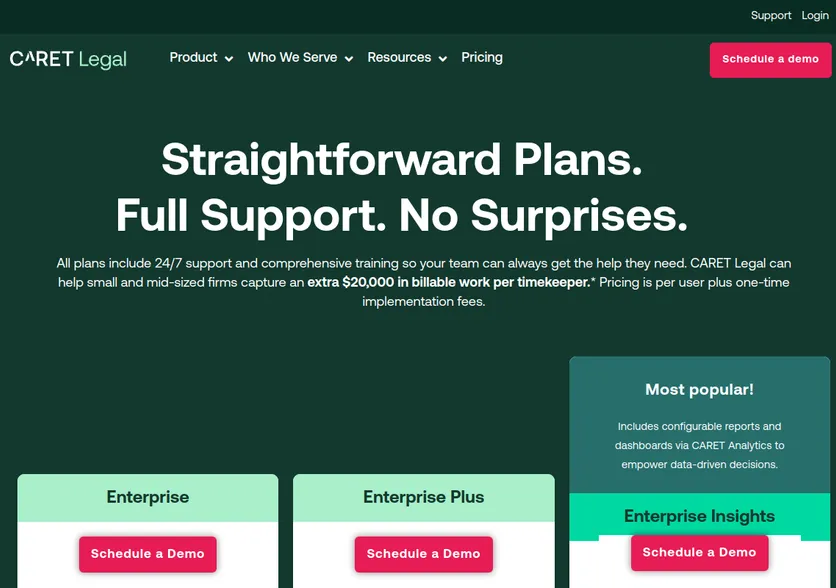
This CARET Legal plan costs seventy-nine dollars per user a month billed annually on Enterprise, and it is the most expensive tool in this list for a reason: every subscription includes dedicated onboarding, data migration, training and twenty-four-hour support. Email, document management, calendaring, billing, accounting and a client portal are all built in, and Enterprise Plus at ninety-nine dollars adds analytics, workflows and unlimited matter document storage. A solo attorney who wants hand-holding rather than a help center gets it here.
What we like
- Dedicated onboarding, migration and training are included
- Email, documents, billing and accounting in one system
- Twenty-four-hour phone support on every plan
Watch out for
- Most expensive tool in this list at seventy-nine dollars a month
- One-time implementation fees are not published
How to try it
- Book the onboarding session and let CARET migrate your existing files
- Set up email, documents and billing inside the one platform
- Use the client portal for secure messages and payments
Prices above were checked on each vendor’s own website on Nov 28, 2026 and can change — the vendor’s page is the final word. Vendor links are editorial: nobody paid to be listed or ranked here. Vendors who want a featured listing can see how it works on our Get listed page.
How a solo attorney should run compliance with software
Start with trust accounting, because that is where bar audits bite first. Turn on three-way reconciliation on day one and never hold client funds outside the system. Run a conflict check before every new matter, even when the client seems familiar, because the check takes a minute and a missed conflict costs a case. Keep every client communication inside the portal or the matter record, not in personal email, so the audit trail is complete. Finally, export a full client file at least once a year and check that it opens cleanly, because retention rules only help if the export actually works.
Before you buy
- Check that trust accounting is built in, with three-way reconciliation, not an add-on
- Confirm the tool keeps a full audit trail of who changed each record and when
- Ask how conflict checks run before you open a new matter
- Make sure document retention rules and client file exports work without extra fees
- Run a trial with a real matter, from intake to invoice, before you commit
Official websites
Official websites of the products reviewed above. Features and prices were checked against these sites when this guide was written, and they can change, so confirm on the vendor site before you buy.
Frequently asked questions
What is legal compliance management software for solo attorneys?
It is practice management software with the compliance controls a solo attorney actually needs: trust accounting with three-way reconciliation, an audit trail of who changed each record, conflict checks before a matter opens, and document retention rules. The tools in this list cost thirty-nine to seventy-nine dollars per user a month, which is a different world from the seven thousand dollar plus GRC platforms built for certified frameworks.
Do solo attorneys need a GRC platform like Vanta or Drata?
Almost never. GRC platforms like Vanta or Drata exist to produce SOC 2 or ISO 27001 certification with an auditor's report, which most solo practices are never asked for. A solo attorney needs trust accounting, audit trails, conflict checks and retention, and the practice tools in this list cover all four. Add a GRC platform only when a client or insurer demands a certification.
How much does Lawcus cost?
Lawcus costs thirty-nine dollars per user a month billed annually on the Essential plan, or forty-nine dollars on monthly billing. Growth is fifty-nine dollars and Elite is seventy-nine dollars per user a month. Two-way texting is a ten-dollar add-on per attorney a month, and a free trial is available before you pay.
Which tool is best for trust accounting?
CosmoLex is the strongest pick here because accounting is built into the same database as matters, so trust reconciliation and the general ledger are never out of sync. Clio and Lawcus also include trust accounting, and CaseFox leads with billing and trust funds. Whichever tool you choose, confirm three-way reconciliation is included on the plan you buy, because some vendors reserve it for higher tiers.
What compliance features should a solo practice look for?
Look for four things: trust accounting with three-way reconciliation, a full audit trail showing who changed each record and when, conflict checks that run before a matter opens, and document retention rules with easy client file export. A client portal and e-signature help too, because they keep communications and agreements inside the auditable system instead of scattered across email.
Compare the eight tools above, then start with a free trial on the tool that matches how your practice already works before you pay for a full year.
Browse Business Tools tools