
On this page
An estate planning firm takes payment at the most sensitive moment in a client's life, and the money has to land in the right account, with the fee taken from operating funds and never from trust. The processor a firm picks decides whether that separation happens automatically or by hand at month end. LawPay leads this list because it is built for lawyers, with trust account protection and a nineteen-dollar monthly plan, and the other seven tools are ranked on the same test: how safely client money is handled.
How we researched this
We checked every price on the vendor pricing page on November 28, 2026, and only included tools with a published US dollar price and a way to try or use them without a sales call. The legal-specific processors publish flat monthly fees plus per-transaction rates, while the general processors charge per transaction only. Prices change, so confirm the current figure on the vendor site before you buy.
Compare the tools
| Name | Best for | Starting price | Free plan | |
|---|---|---|---|---|
| LawPay | Estate planning firms that want trust-safe card payments built for lawyers | $19/month | No free plan; no setup fee | Visit |
| Stripe | Estate planning firms that want simple online payments with no monthly fee | 2.9% + $0.30 per transaction | No monthly fee; pay only per transaction | Visit |
 Square | Estate planning firms that take payments in person as well as online | 3.3% + $0.30 per online transaction | Free plan with no monthly fee | Visit |
| PayPal | Estate planning firms whose clients already trust PayPal | 2.99% + $0.49 per online transaction | No monthly fee; pay only per transaction | Visit |
 QuickBooks Payments | Estate planning firms that already run QuickBooks Online | 2.99% per online transaction | No separate monthly fee; QuickBooks subscription required | Visit |
| Helcim | Estate planning firms that want interchange-plus pricing with no monthly fee | Interchange + 0.5% + $0.25 per online transaction | No monthly fee; pay only per transaction | Visit |
| TrustBooks | Estate planning firms that need trust accounting beside their processor | $59/month | Free trial | Visit |
 MyCase | Estate planning firms that want payments inside their practice system | $50/user/month | Free trial | Visit |
The legal payment processing software for estate planning firms, compared
1. LawPay
Best for: Estate planning firms that want trust-safe card payments built for lawyers
Paid tool Starting price: $19/month · Nineteen dollars a month with no contract, plus two point nine nine percent plus thirty cents per Visa, Mastercard or Discover transaction, three point nine percent plus thirty cents for American Express, one percent for eCheck, and a seven dollar and ninety-nine cent monthly card-brand pass-through allocation; LawPay is now part of 8am (MyCase and LawPay rebranded under 8am in 2026).
Free plan: No free plan; no setup fee
Taking a card payment for an estate plan is not like taking one for a shop, because the retainer belongs to the client until it is earned, and LawPay is built around that rule. Fees come out of the operating account, never the trust account, and chargebacks cannot pull money from client funds. The nineteen-dollar monthly plan includes payment links, cards on file, scheduled payments and next-day funding, with eCheck at one percent for clients who prefer bank payments.
What we like
- Trust account protection and IOLTA compliance built in
- Fees debited from operating, never from trust
- Next-day funding on cards and eCheck
Watch out for
- A seven dollar and ninety-nine cent pass-through allocation is added monthly
- The Clio integration ended in August 2026, so Clio firms need another route
How to try it
- Connect the trust and operating accounts at onboarding
- Send the client a payment link for the retainer
- Check at month end that fees left the operating account only
2. Stripe
Best for: Estate planning firms that want simple online payments with no monthly fee
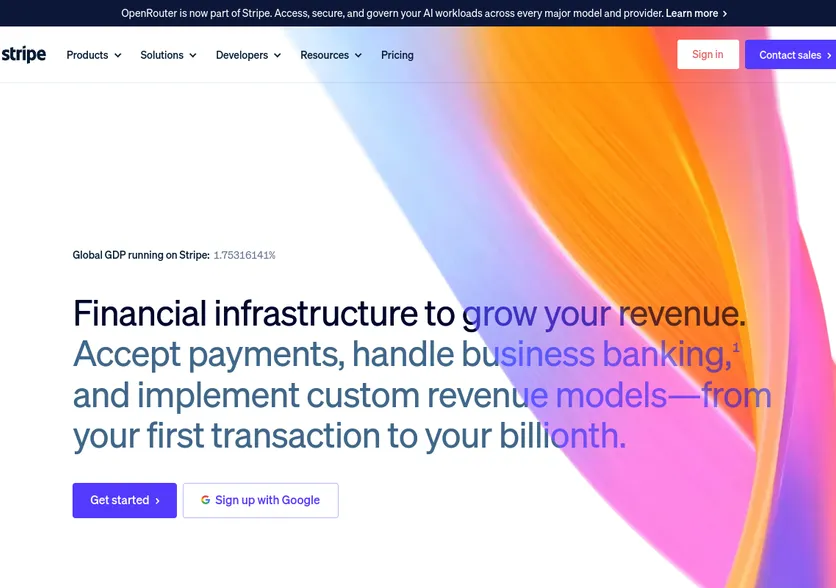
Paid tool Starting price: 2.9% + $0.30 per transaction · Two point nine percent plus thirty cents per successful domestic card charge on Standard pricing, with no monthly fee and no setup fee; international cards add one point five percent and in-person payments are two point seven percent plus five cents
Free plan: No monthly fee; pay only per transaction
For a firm that mainly takes payments online, Stripe keeps it simple with no monthly fee and a flat rate of two point nine percent plus thirty cents per domestic card charge. Payment links, invoices and subscriptions work without a separate billing tool, and the dashboard shows every payment beside its fee. The trade-off is trust handling, because Stripe does not separate trust and operating funds the way a legal processor does.
What we like
- No monthly fee and no setup fee
- Payment links and invoicing work out of the box
- Clear dashboard showing every fee
Watch out for
- No built-in trust account separation for client funds
- Refunds do not return the original processing fee
How to try it
- Create a payment link for the estate plan fee
- Send the invoice with the payment link attached
- Reconcile payments against matters at month end
3. Square
Best for: Estate planning firms that take payments in person as well as online
Paid tool Starting price: 3.3% + $0.30 per online transaction · Three point three percent plus thirty cents per online transaction on the free plan, with no monthly fee; in-person is two point six percent plus fifteen cents, and the Plus plan at forty-nine dollars a month per location lowers online to two point nine percent plus thirty cents
Free plan: Free plan with no monthly fee
Some estate planning clients still prefer to pay in the office, and Square covers both the card reader and the online invoice from one account. In-person payments cost two point six percent plus fifteen cents, while online payments are three point three percent plus thirty cents on the free plan. The Plus plan at forty-nine dollars a month per location lowers the online rate, which suits a firm with steady volume.

What we like
- In-person and online payments in one account
- Free plan with no monthly fee to start
- Simple setup with hardware that just works
Watch out for
- No built-in trust account separation for client funds
- Online rate is higher than Stripe on the free plan
How to try it
- Take the payment at the signing meeting with the card reader
- Send an online invoice for clients who pay later
- Reconcile both channels against the matter at month end
4. PayPal
Best for: Estate planning firms whose clients already trust PayPal
Paid tool Starting price: 2.99% + $0.49 per online transaction · Two point nine nine percent plus forty-nine cents per debit or credit card payment through PayPal Checkout, with no monthly fee; Expanded Checkout is two point eight nine percent plus twenty-nine cents, and PayPal or Venmo payments are three point four nine percent plus forty-nine cents
Free plan: No monthly fee; pay only per transaction
Many clients already have a PayPal account, and PayPal lets them pay with it, by card or by Venmo, without creating anything new. Online card payments through PayPal Checkout cost two point nine nine percent plus forty-nine cents, with no monthly fee, and invoicing works from the same account. The higher per-transaction fee is the price of the familiarity, so the firm should weigh client convenience against the cost on large retainers.

What we like
- Clients pay with accounts they already have
- No monthly fee for standard service
- Invoicing and payment links built in
Watch out for
- Per-transaction fees are higher than Stripe on card payments
- No built-in trust account separation for client funds
How to try it
- Send the client an invoice with the PayPal payment option
- Let the client pay by card, PayPal balance or Venmo
- Reconcile the payment against the matter at month end
5. QuickBooks Payments
Best for: Estate planning firms that already run QuickBooks Online
Paid tool Starting price: 2.99% per online transaction · Two point nine nine percent per online or invoiced card payment for QuickBooks Online users, with no per-transaction cents fee and no separate monthly Payments fee; in-person is two point five percent, keyed cards are three point five percent and ACH is one percent. A QuickBooks Online subscription is required
Free plan: No separate monthly fee; QuickBooks subscription required
A firm that already runs its books on QuickBooks Online can take payments without leaving the system, because QuickBooks Payments is built into the invoicing the firm already sends. Online card payments cost two point nine nine percent with no per-transaction cents fee, which favours small retainers, and ACH costs one percent. The catch is the QuickBooks subscription itself, which the firm must already pay for.
What we like
- Payments reconcile inside QuickBooks automatically
- No per-transaction cents fee on card payments
- ACH at one percent suits larger retainers
Watch out for
- A QuickBooks Online subscription is required
- No built-in trust account separation for client funds
How to try it
- Send the invoice from QuickBooks with the payment link on
- Let the client pay by card, bank transfer or PayPal
- Reconcile the payment in QuickBooks automatically
6. Helcim
Best for: Estate planning firms that want interchange-plus pricing with no monthly fee
Paid tool Starting price: Interchange + 0.5% + $0.25 per online transaction · Interchange plus zero point five percent and twenty-five cents per online or manually keyed transaction, and interchange plus zero point four percent and eight cents in person, for under fifty thousand dollars a month in card volume; no monthly fee, and margins fall as volume rises
Free plan: No monthly fee; pay only per transaction
Flat-rate processors hide the real cost inside one percentage, while Helcim shows it with interchange-plus pricing, adding zero point five percent and twenty-five cents to the interchange cost on online payments. There is no monthly fee, and the margin falls as monthly volume rises past fifty thousand dollars. The model suits a firm with steady volume that wants to see exactly what each payment costs.

What we like
- Interchange-plus pricing shows the true cost
- No monthly fee and no setup fee
- Margins fall as monthly volume rises
Watch out for
- Interchange varies per card, so the total is less predictable
- No built-in trust account separation for client funds
How to try it
- Create a payment link or invoice for the estate plan fee
- Let the client pay online and watch the interchange breakdown
- Review the effective rate monthly as volume grows
7. TrustBooks
Best for: Estate planning firms that need trust accounting beside their processor
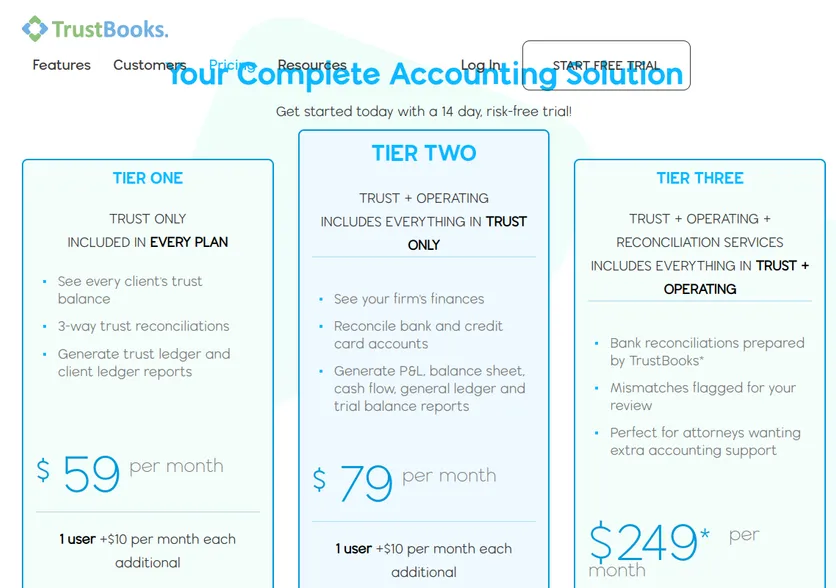
Paid tool Starting price: $59/month · Fifty-nine dollars a month per firm, flat, on the Tier One trust accounting plan; Tier Two with firm accounting is seventy-nine dollars, Tier Three reconciliation service is two hundred forty-nine dollars, and extra users are ten dollars each
Free plan: Free trial
Payment processing is only half the job when client money is involved, and TrustBooks handles the other half with trust accounting built for law firms. Client ledgers stay current, three-way reconciliation runs with one click, and state bar reports are ready for audit. The flat fifty-nine dollars a month covers the whole firm, which suits a practice that already likes its payment processor and only needs the trust piece fixed.
What we like
- Three-way reconciliation with one click
- Flat monthly price for the whole firm, not per user
- Built only for legal trust accounting
Watch out for
- Not a payment processor, so pair it with one of the tools above
- Narrow scope means no billing or practice management
How to try it
- Record each retainer into the client ledger on receipt
- Run the three-way reconciliation before month end
- Produce the state bar report when the audit comes
8. MyCase
Best for: Estate planning firms that want payments inside their practice system
Paid tool Starting price: $50/user/month · Fifty dollars per user per month billed annually on the Basic plan (sixty dollars on monthly billing); Pro is one hundred dollars and Advanced is one hundred thirty dollars per user per month
Free plan: Free trial
For a firm that already runs its matters on MyCase, taking payment from the same system removes a whole step from the workflow. Clients pay online from the matter, the fee lands against the file, and trust accounting keeps the retainer in the right account. The firm avoids reconciling two systems at month end, because the payment, the matter and the ledger already agree.

What we like
- Payments, matters and trust accounting in one place
- No reconciliation between two systems
- Client messaging keeps clients updated on progress
Watch out for
- Payments are part of the fifty-dollar practice plan, not standalone
- Processing rates are competitive rather than the cheapest
How to try it
- Send the client a payment link from the matter
- Record the payment against the file automatically
- Check the trust ledger before the month closes
Prices above were checked on each vendor’s own website on Nov 28, 2026 and can change — the vendor’s page is the final word. Vendor links are editorial: nobody paid to be listed or ranked here. Vendors who want a featured listing can see how it works on our Get listed page.
How an estate planning firm should take payments safely
Separate the money first, then take the payment. A firm that keeps trust and operating accounts apart, takes fees only from operating funds, and reconciles three ways at month end will pass an audit without drama. Offer the client two ways to pay, card and bank transfer, because the bank route costs less on large retainers. Check the fee on every payment against the matter, and never let a chargeback or refund touch trust funds for any reason. Keep the trust ledger separate from the operating account every day, not just at month end, because daily discipline prevents the errors audits find.
Before you buy
- Check that fees are debited from operating funds, never from trust
- Confirm the full per-transaction cost, including any pass-through allocation
- Ask how chargebacks and refunds are handled against trust accounts
- Test the payment link on a phone, since most clients pay from one
- Run a trial with one real retainer payment before you switch processors
Official websites
Official websites of the products reviewed above. Features and prices were checked against these sites when this guide was written, and they can change, so confirm on the vendor site before you buy.
Frequently asked questions
What is legal payment processing software for estate planning firms?
It is software that takes client payments for estate plans while keeping trust and operating funds separate, as the bar rules require. The tools in this list do that through payment links, invoicing, trust ledgers and reconciliation. None of them replaces the attorney's duty to handle client money correctly, but a legal-specific processor makes the separation automatic instead of manual.
How much does legal payment processing cost for an estate planning firm?
The legal-specific option, LawPay, costs nineteen dollars a month plus two point nine nine percent plus thirty cents per card transaction. General processors charge no monthly fee: Stripe is two point nine percent plus thirty cents, Square is three point three percent plus thirty cents online, and PayPal is two point nine nine percent plus forty-nine cents. TrustBooks adds fifty-nine dollars a month for the trust ledger itself.
Why can a general payment processor be risky for a law firm?
General processors do not separate trust and operating funds, so a retainer can land in the wrong account and a fee or chargeback can pull money from client funds. Bar rules forbid both. A legal processor debits fees from operating only and blocks debits from trust entirely. If the firm uses a general processor, it must handle the separation by hand, which is where mistakes happen.
Should clients pay by card or by bank transfer?
Offer both. Cards are convenient and fund fast, but the percentage fee bites on large retainers. Bank transfers through ACH cost around one percent, which saves real money on a five-figure estate plan fee. Let the client choose, and show the bank option first on large invoices. The tools in this list all support both routes.
What is three-way reconciliation and why does it matter?
Three-way reconciliation checks the trust bank balance, the firm checkbook and the individual client ledgers against each other, and all three must agree. State bars expect it regularly, and it catches errors before they become discipline problems. TrustBooks generates it with one click, while CosmoLex and MyCase include it in their ledgers. Run it monthly without fail.
Compare the eight tools above, then start with a trial on the processor that matches how your firm already handles client money before you switch.
Browse Business Tools tools