
On this page
Estate planning runs on appointments: initial consultations, signing meetings, reviews with families and deadlines that cannot slip. The eight tools below keep that calendar honest, from practice platforms that schedule beside the matter file to deadline engines that calculate court dates from the rules. Clio leads the list because it pairs calendaring with matters, documents, billing and time tracking from forty-nine dollars per user a month, and the rest are ranked on the same test: how reliably they keep the firm's calendar full and its deadlines safe for the price.
How we researched this
We checked every price on the vendor pricing page on November 28, 2026, and only included tools with a published US dollar list price. The deadline engines that sell by quote, including CompuLaw, Milana and CalendarRules, publish no prices, so they are not in this list. Prices change, so confirm the current figure on the vendor site before you buy.
Compare the tools
| Name | Best for | Starting price | Free plan | |
|---|---|---|---|---|
 Clio | Estate firms that schedule beside the matter file | $49/user/month | 7-day free trial | Visit |
 MyCase | Firms that schedule client meetings and intake | $50/user/month | 10-day free trial | Visit |
 PracticePanther | Firms that want bookings tied to workflows | $49/user/month | 7-day free trial | Visit |
 CosmoLex | Firms that want the calendar tied to billing | $49/user/month | 10-day free trial | Visit |
 Rocket Matter | Firms that plan the week on visual boards | $59/user/month | 10-day free trial | Visit |
| LawToolBox | Firms that need court rules deadlines calculated | $39/user/month | No free plan; demo and free tour available | Visit |
| Deadlines.com | Firms with a small number of litigated cases | $35/open case/month | Free trial | Visit |
| Jural | Firms whose deadlines arrive inside documents | $24/user/month | Free trial | Visit |
The legal scheduling software for estate planning firms, compared
1. Clio
Best for: Estate firms that schedule beside the matter file
Paid tool Starting price: $49/user/month · Forty-nine dollars per user a month billed annually on EasyStart ($59 billed monthly); Essentials is $89 a user a month billed annually ($99 monthly), Advanced $119, Complete $149; higher tiers are quoted; the $79 Essentials figure in older guides is stale
Free plan: 7-day free trial
For an estate firm that books consultations all day, this Clio plan costs forty-nine dollars per user a month billed annually on EasyStart, and calendaring sits beside matters, documents, billing and time tracking. Court rules calendaring is built into the higher tiers, and the client portal lets families book and confirm without phone tag. It is the most complete scheduling platform in this comparison.

What we like
- The largest legal app directory, with more than 250 integrations
- Trust accounting and three-way reconciliation on every plan
- Court rules calendaring built into the higher tiers
Watch out for
- Document templates and the client portal start on Essentials, not EasyStart
- Add-ons such as Clio Grow and Clio Draft cost extra per user
How to try it
- Create the matter and add the client, contacts and documents
- Log time and expenses against the matter as work happens
- Generate the invoice and send it through the client portal
2. MyCase
Best for: Firms that schedule client meetings and intake
Paid tool Starting price: $50/user/month · Fifty dollars per user a month billed annually on Basic ($60 billed monthly); Pro is $100 a user a month billed annually ($120 monthly) and Advanced is $130 ($150 monthly); MyCase Accounting adds $39 per user a month on Pro and Advanced; prices rose in August 2026 from $39, $89 and $109
Free plan: 10-day free trial
A firm that wants appointments, intake and billing in one login will find it here, since this MyCase plan costs fifty dollars per user a month billed annually on Basic. The calendar syncs with the case, the client portal handles booking confirmations, and online payments land with next-day deposits. It suits a firm that schedules mostly client meetings rather than court deadlines.

What we like
- Clear published pricing with no quote needed for any tier
- Two-way texting and a client portal on Pro
- Online payments with next-day deposits included
Watch out for
- Workflows, intake forms and the legal CRM start on Pro at twice the entry price
- Court rules calendaring needs a separate subscription
How to try it
- Open a case and add the client, documents and deadlines
- Send the engagement letter for e-signature from the case
- Track time, invoice and take payment without leaving the case
3. PracticePanther
Best for: Firms that want bookings tied to workflows
Paid tool Starting price: $49/user/month · Forty-nine dollars per user a month billed annually on Solo ($59 billed monthly); Essential is $69 ($79 monthly), Business $89 ($99 monthly) and Business Pro $114 ($124 monthly); annual billing saves $120 per user a year
Free plan: 7-day free trial
Workflows that turn a booking into a prepared meeting are the strength here, because this PracticePanther plan costs forty-nine dollars per user a month billed annually on Solo. Task and event workflows, document templates and PantherPayments come on every plan, and the Business tier adds intake forms and calendar rules. It is a practical pick for a firm that wants every appointment to arrive with its paperwork ready.

What we like
- Every plan includes workflows, templates and PantherPayments
- QuickBooks Online sync on the entry plan
- Unlimited e-signature from the Business tier
Watch out for
- Trust accounting and reconciliation sit only on Business Pro
- Texting, intake forms and e-signature start on Business
How to try it
- Create the matter and set up its workflow and templates
- Assign tasks and deadlines to the team from the matter
- Bill the matter and collect payment through PantherPayments
4. CosmoLex
Best for: Firms that want the calendar tied to billing
Paid tool Starting price: $49/user/month · Forty-nine dollars per user a month billed annually on Launch ($59 billed monthly); Core is $99 a user a month billed annually ($109 monthly) and Pro is $129 ($139 monthly)
Free plan: 10-day free trial
Billing and scheduling in one login is the draw here, since this CosmoLex plan costs forty-nine dollars per user a month billed annually on Launch. The calendar sits beside time tracking and trust accounting, so a signing meeting is billed from the same screen it was booked on. It suits a firm that wants the calendar connected to the money, not floating free.

What we like
- Legal accounting and trust reconciliation built in, no QuickBooks needed
- Time, billing and matter reports in one login
- Client portal lets clients view case updates and pay online
Watch out for
- The CRM and website are separate add-ons
- The Launch tier is limited, so growing firms move up fast
How to try it
- Open the matter and record the client and fee arrangement
- Enter time and expenses as the work happens
- Run the trust reconciliation and send the invoice from the same screen
5. Rocket Matter
Best for: Firms that plan the week on visual boards
Paid tool Starting price: $59/user/month · Fifty-nine dollars per user a month billed annually on Essentials; Pro is $95, Premier $115 and Elite $145 on the same billing basis; the CRM add-on carries a $399 onboarding fee
Free plan: 10-day free trial
Visual planning is what this tool does best, because this Rocket Matter plan costs fifty-nine dollars per user a month billed annually on Essentials. Matter boards show where every case stands, the calendar shows who is free, and time logged against a meeting flows straight into billing. It is the pick for a firm that plans the week by looking at a board.

What we like
- Matter-level billing and profitability reports are its strength
- Visual matter boards show where every case stands
- Flat-fee and LEDES billing handled without add-ons
Watch out for
- Fewer integrations than Clio or PracticePanther
- The CRM is a separate add-on with its own onboarding fee
How to try it
- Create the matter and set the billing arrangement
- Log time from any device and attach it to the matter
- Review the matter profitability report before invoicing
6. LawToolBox
Best for: Firms that need court rules deadlines calculated
Paid tool Starting price: $39/user/month · Thirty-nine dollars per user a month billed annually ($46 billed monthly) for firms of 2 to 9 users; rates fall with headcount to $21 a user a month at 80 or more users; one-year minimum; some integrations add $4 per user
Free plan: No free plan; demo and free tour available
Court deadlines are a different job from booking meetings, and this LawToolBox plan costs thirty-nine dollars per user a month billed annually for firms of two to nine users. Its rules engine calculates deadlines for all fifty states and federal courts inside Microsoft 365 and Outlook, and AI deadline extraction was added in 2026. It is the deadline specialist in this list, and the only one that calculates dates from the rules.

What we like
- Court rules for all 50 states and federal courts
- Lives inside Microsoft 365 and Outlook where the firm already works
- AI deadline extraction added in 2026
Watch out for
- One licence per Microsoft 365 mailbox, so costs scale with staff
- One-year minimum commitment on every plan
How to try it
- Connect the Microsoft 365 mailboxes for the team
- Enter the trigger date and let the rules engine build the deadlines
- Sync the deadlines to Outlook calendars and matter records
7. Deadlines.com
Best for: Firms with a small number of litigated cases
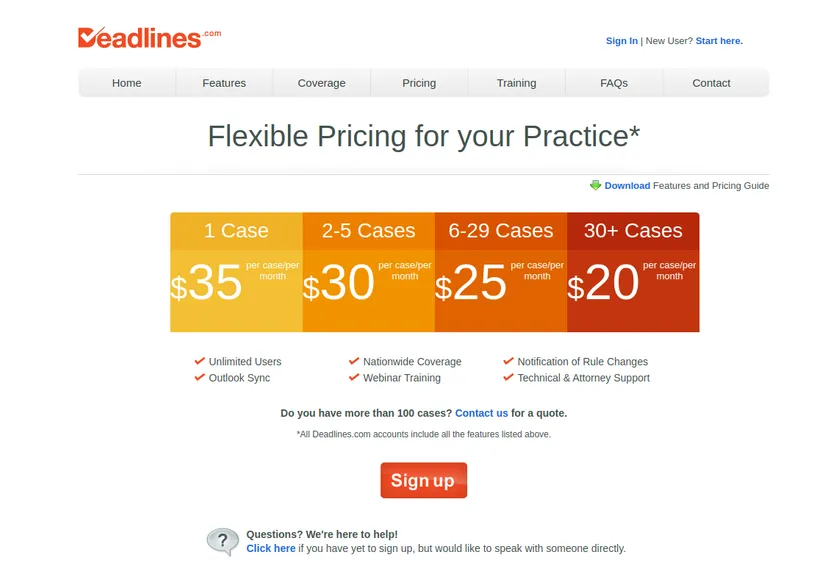
Paid tool Starting price: $35/open case/month · Thirty-five dollars per open case a month for one case, $30 for 2 to 5 cases, $25 for 6 to 29 and $20 for 30 or more, with unlimited users; a quote applies above 100 cases; powered by Aderant CompuLaw rules
Free plan: Free trial
A firm with only a few open litigated cases should pay per case, not per user, and this Deadlines.com plan costs thirty-five dollars per open case a month for one case. The price falls to twenty dollars per case at thirty or more cases, with unlimited users, and the CompuLaw rules engine sits behind the calculations. It is the cheapest way onto proper rules-based deadlines for a small caseload.
What we like
- Per-case pricing with unlimited users suits small caseloads
- CompuLaw rules engine behind the calculations
- Outlook sync or iCalendar files for every deadline
Watch out for
- The per-case price adds up fast once the caseload grows
- No per-user option, so a firm with many cases pays for each one
How to try it
- Add the open case and enter the trigger date
- Review the calculated deadlines against the court rules
- Sync the deadlines to Outlook or export them as iCalendar files
8. Jural
Best for: Firms whose deadlines arrive inside documents
Paid tool Starting price: $24/user/month · Twenty-four dollars per user a month billed annually on Solo ($49 billed monthly); Firm is $49 a user a month billed annually ($99 monthly) and adds intake, conflict checks and contract review
Free plan: Free trial
Deadlines that arrive buried in PDFs are the problem this tool solves, because this Jural plan costs twenty-four dollars per user a month billed annually on Solo. It reads dates and triggers out of served pleadings, orders, notices and contracts, shows the source sentence for each one, and puts them on the matter calendar once an attorney confirms. It is the cheapest entry in this list and the smartest at finding hidden dates.

What we like
- Reads dates and triggers out of pleadings and orders automatically
- Shows the source sentence for every deadline it finds
- Intake, conflicts and drafting sit in the same plan on Firm
Watch out for
- An attorney must confirm every extracted deadline before it counts
- The Solo plan is research-light compared with full practice suites
How to try it
- Upload the pleading, order or notice to Jural
- Review the extracted dates against the source sentences
- Confirm the deadlines and push them to the matter calendar
Prices above were checked on each vendor’s own website on Nov 28, 2026 and can change — the vendor’s page is the final word. Vendor links are editorial: nobody paid to be listed or ranked here. Vendors who want a featured listing can see how it works on our Get listed page.
How to keep an estate planning calendar full and safe
Book the signing meeting at the first consultation, not after, because an estate plan that waits for a diary slot is a plan that never gets signed. Send every booking through the client portal with a confirmation and a reminder, since no-shows cost more than the reminder ever will. Keep court deadlines in a rules engine, not in a head: a calendar entry typed by hand is a malpractice claim waiting for a tired afternoon. Review the next two weeks every Monday morning, and leave one buffer slot a day for the urgent call that always comes.
Before you buy
- Confirm the calendar syncs with the tools the firm already uses, especially Outlook or Google
- Check whether court deadlines are calculated from the rules or typed in by hand
- Ask if clients can book and confirm through a portal without calling the office
- Make sure reminders go out automatically, since no-shows are the most expensive calendar failure
- Test the scheduling on a real week of consultations before paying for the whole firm
Official websites
Official websites of the products reviewed above. Features and prices were checked against these sites when this guide was written, and they can change, so confirm on the vendor site before you buy.
Frequently asked questions
What is legal scheduling software for estate planning firms?
It is software that books client consultations and signing meetings, manages the firm's calendar and calculates court and filing deadlines. Practice management tools such as Clio and MyCase schedule beside the matter file, while deadline engines such as LawToolBox and Deadlines.com calculate dates from court rules, and AI tools such as Jural read deadlines out of documents. Most firms need one of each.
How much does LawToolBox cost for a small firm?
LawToolBox costs thirty-nine dollars per user a month billed annually, or forty-six dollars billed monthly, for firms of two to nine users. Rates fall with headcount to twenty-one dollars a user a month at eighty or more users, and there is a one-year minimum. Some integrations add four dollars per user, and partner pricing through a practice platform is reported lower, at twenty-nine dollars billed annually.
Can clients book estate planning appointments online?
Yes, with the practice platforms in this list: Clio, MyCase and PracticePanther all offer client portals where families can book, confirm and reschedule without calling the office. The portals also collect intake information before the meeting, so the first consultation starts with the facts rather than the forms. Reminders go out automatically to cut no-shows.
Which tool calculates court deadlines automatically?
LawToolBox is the best pick for calculated deadlines, at thirty-nine dollars per user a month billed annually, with court rules for all fifty states and federal courts inside Microsoft 365. Deadlines.com is the cheapest route at thirty-five dollars per open case a month for one case, with unlimited users. Jural at twenty-four dollars a user a month reads deadlines out of documents instead of calculating them from rules.
Which scheduling tool is best for a small estate firm?
Clio is the best overall pick at forty-nine dollars per user a month billed annually, because calendaring sits beside matters, billing and documents in one system. LawToolBox is the best addition when the firm handles litigated estates and needs rules-based deadlines. Jural is the cheapest specialist at twenty-four dollars a month and suits firms whose deadlines arrive inside pleadings and orders.
Compare the eight tools above, then start with a free trial or demo on the tool that matches how the firm books meetings and tracks deadlines before paying for a full year.
Browse Business Tools tools