
On this page
Engineering work lives in backlogs, sprints and release plans, and the wrong tracker turns all three into busywork. The eight tools below run from four dollars a user a month to about twenty-nine dollars a user a month, and every price was checked on the vendor site on November 26, 2026. Most include free plans or trials, so compare how each one handles sprint planning, dependencies and release tracking before you commit. Jira is our first pick — the tracker most engineering teams already know.
How we researched this
We started with the project tools engineering teams actually buy, then read each price on the vendor pricing page on November 26, 2026 and noted the free plan or trial each one carries. We judged them for an engineering team that needs sprint planning, issue tracking, dependencies and release roadmaps in one place, and we kept only tools with a published price.
Compare the tools
| Name | Best for | Starting price | Free plan | |
|---|---|---|---|---|
 Jira | Engineering teams who want the standard tracker for sprints, backlogs and releases | $9.70/user/month | Free plan for up to 10 users | Visit |
 Monday | Engineering teams who want visual boards and dashboards that non-technical stakeholders can read | $9/user/month | Free plan for up to 2 seats | Visit |
 Asana | Engineering teams who want clean timelines and portfolios across several projects | $10.99/user/month | Free Personal plan for up to 2 users | Visit |
 ClickUp | Engineering teams who want sprints, docs and automations on one low-cost plan | $9/user/month | Free Forever plan | Visit |
 Wrike | Engineering teams who need workload views, proofing and enterprise-grade reporting | $9.80/user/month | Free plan for up to 5 users | Visit |
 Smartsheet | Engineering teams who plan in sheets and need grid, Gantt and card views of the same data | $9/user/month | No free plan; 30-day free trial | Visit |
 GanttPRO | Engineering teams who want a focused Gantt tool with auto scheduling and critical path | $7/user/month | No free plan; 14-day free trial | Visit |
 Forecast | Engineering firms who want AI-assisted scheduling tied to budgets and time tracking | $29/user/month | No free plan; 14-day free trial | Visit |
The project management software for engineers, compared
1. Jira
Best for: Engineering teams who want the standard tracker for sprints, backlogs and releases
Paid tool Starting price: $9.70/user/month · Standard plan, $9.70 a user a month on monthly billing for 1 to 100 users (Atlassian list price after the October 13, 2026 rise); annual plans are sold in fixed user tiers ($950 a year for up to 10 users; $9,700 for up to 100); Premium $19.60 a user a month on monthly billing; free plan for up to 10 users
Free plan: Free plan for up to 10 users
Jira is the tracker most engineering teams reach for first, because issues, sprints and releases live in one backlog instead of scattered docs. This Jira Standard plan gives a team boards, backlogs and roadmaps, with automation and reporting built in. An engineering lead can run standups, sprint planning and release tracking from the same board the developers already open every day.

What we like
- Purpose-built sprint boards, backlogs and roadmaps
- Deep automation and reporting for delivery teams
- Huge integration library for developer tools
Watch out for
- The interface can feel heavy for small teams
- Per-user pricing climbs fast as the team grows
How to try it
- Open the Jira pricing page and start the free plan
- Create a project, add a backlog and plan your first sprint
- Connect your code repository and watch commits link to issues
2. Monday
Best for: Engineering teams who want visual boards and dashboards that non-technical stakeholders can read
Paid tool Starting price: $9/user/month · Basic plan, nine dollars a user a month billed annually or twelve dollars billed monthly; Standard twelve dollars and Pro nineteen dollars a month on annual billing
Free plan: Free plan for up to 2 seats
Monday turns an engineering roadmap into a colorful board that product managers and executives can read without learning a new tool. This Monday Basic plan starts at nine dollars a user a month and covers unlimited items, docs and templates for the whole team. A team that needs timeline and Gantt views will want Standard, which adds the planning views engineers rely on.

What we like
- Boards and dashboards anyone can read at a glance
- Strong timeline and Gantt views from Standard up
- Automations cut the manual status-update work
Watch out for
- Paid plans start at three seats, so a solo engineer pays for three
- Basic has no timeline view, so most teams need Standard
How to try it
- Open the Monday pricing page and start the fourteen-day Pro trial
- Build a board for your next sprint with timeline and Gantt views
- Invite the product team and set up one automation for status changes
3. Asana
Best for: Engineering teams who want clean timelines and portfolios across several projects
Paid tool Starting price: $10.99/user/month · Starter plan, ten dollars ninety-nine cents a user a month billed annually or thirteen dollars forty-nine cents billed monthly; Advanced twenty-four dollars ninety-nine cents a month
Free plan: Free Personal plan for up to 2 users
Asana keeps engineering work visible with timelines, Gantt views and portfolios that roll several projects into one view. This Asana Starter plan costs ten dollars ninety-nine cents a user a month and adds timeline views, dashboards and unlimited automations. A team that ships across many repos can track goals and capacity without a second reporting tool.

What we like
- Timeline and Gantt views included from Starter
- Portfolios and goals for multi-project teams
- Unlimited free guests for stakeholders
Watch out for
- Time tracking needs a paid add-on
- Advanced jumps to about twenty-five dollars a user a month
How to try it
- Open the Asana pricing page and start with the free Personal plan
- Create a project and switch on the timeline view
- Add a portfolio to watch every active sprint in one place
4. ClickUp
Best for: Engineering teams who want sprints, docs and automations on one low-cost plan
Paid tool Starting price: $9/user/month · Core plan, $9 a user a month billed annually ($12 billed monthly); Business $17 a user a month billed annually
Free plan: Free Forever plan
ClickUp packs sprints, docs, goals and automations into one workspace, so an engineering team can retire three tools at once. This ClickUp Core plan lists at nine dollars a user a month billed annually billed annually, with unlimited Gantt charts and storage included. A small team can run standups, sprint reviews and docs from the same login for less than most rivals charge.

What we like
- Sprints, docs and goals in one workspace
- Unlimited Gantt charts from the Core plan
- Generous free plan for trying real work
Watch out for
- The feature list is so wide it can overwhelm new teams
- The page shows a nine-dollar promotional rate, not the twelve-dollar list price
How to try it
- Open the ClickUp pricing page and start the Free Forever plan
- Create a sprint with a board, a doc and a goal
- Turn on automations for moving tasks between sprint stages
5. Wrike
Best for: Engineering teams who need workload views, proofing and enterprise-grade reporting
Paid tool Starting price: $9.80/user/month · Team plan, nine dollars eighty cents a user a month billed annually, usually shown as ten dollars; Business twenty-four dollars eighty cents a user a month
Free plan: Free plan for up to 5 users
Wrike gives engineering managers workload views and request forms alongside the usual boards and Gantt charts. This Wrike Team plan costs nine dollars eighty cents a user a month and adds Gantt charts, dashboards and custom workflows. A team that juggles intake requests and delivery will like the way work arrives as a form and leaves as a finished task.

What we like
- Workload views show who is overloaded before it slips
- Request forms turn intake into tracked work
- Strong reporting from the Business plan up
Watch out for
- Business costs about twenty-five dollars a user a month
- Seats are sold in groups, so small teams overbuy
How to try it
- Open the Wrike pricing page and start the fourteen-day trial
- Build a request form for incoming engineering work
- Set up a workload view and check capacity before the next sprint
6. Smartsheet
Best for: Engineering teams who plan in sheets and need grid, Gantt and card views of the same data
Paid tool Starting price: $9/user/month · Pro plan, nine dollars a member a month billed annually or twelve dollars billed monthly; Business nineteen dollars a member a month on annual billing
Free plan: No free plan; 30-day free trial
Smartsheet suits engineers who think in rows and columns, because the same plan shows as a grid, a Gantt chart or a card board. This Smartsheet Pro plan costs nine dollars a member a month and covers up to ten members with unlimited contributors. A team that already lives in spreadsheets can keep its habits and still get real project tracking.

What we like
- Grid, Gantt, card and calendar views of one plan
- Unlimited free contributors on every plan
- Strong formulas and reports for data-heavy teams
Watch out for
- No free plan, only a thirty-day trial
- The sheet interface feels plain next to visual boards
How to try it
- Open the Smartsheet pricing page and start the thirty-day trial
- Import a spreadsheet and switch it to a Gantt view
- Share the sheet with contributors who need no paid seat
7. GanttPRO
Best for: Engineering teams who want a focused Gantt tool with auto scheduling and critical path
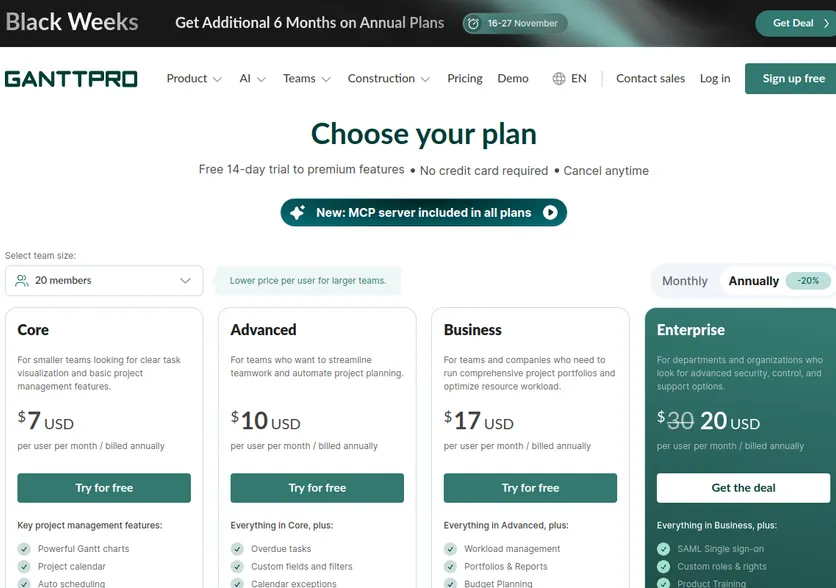
Paid tool Starting price: $7/user/month · Core plan, seven dollars a user a month billed annually; Advanced ten dollars and Business seventeen dollars a user a month
Free plan: No free plan; 14-day free trial
GanttPRO does one thing well: it turns a project plan into a clean Gantt chart with dependencies, baselines and auto scheduling. This GanttPRO Core plan costs seven dollars a user a month and includes auto scheduling, a project calendar and virtual resources. An engineering lead who plans by dates rather than boards will find the schedule easier to read here than anywhere else.
What we like
- Auto scheduling and critical path out of the box
- Clean Gantt view that non-technical readers grasp fast
- Lowest starting price in this comparison
Watch out for
- No free plan, only a fourteen-day trial
- Lacks the docs and chat that all-in-one tools bundle
How to try it
- Open the GanttPRO pricing page and start the fourteen-day trial
- Build a schedule with tasks, dependencies and milestones
- Turn on auto scheduling and check the critical path
8. Forecast
Best for: Engineering firms who want AI-assisted scheduling tied to budgets and time tracking
Paid tool Starting price: $29/user/month · Lite plan, twenty-nine dollars a user a month billed annually; Pro forty-nine dollars a user a month
Free plan: No free plan; 14-day free trial
Forecast pairs resource scheduling with project budgets, so an engineering manager can see who is free and whether the project still makes money. This Forecast Lite plan costs twenty-nine dollars a user a month and covers projects, scheduling and time tracking. A firm that bills by the hour will value the way logged time feeds straight into the budget view.
What we like
- Scheduling suggestions based on availability and skills
- Budgets and time tracking in the same view
- Clear project health signals as work moves
Watch out for
- The highest starting price in this comparison
- No free plan, only a fourteen-day trial
How to try it
- Open the Forecast pricing page and start the fourteen-day trial
- Add your team, set rates and schedule the next sprint
- Log time for a week and compare actual hours with the budget
Prices above were checked on each vendor’s own website on Nov 26, 2026 and can change — the vendor’s page is the final word. Vendor links are editorial: nobody paid to be listed or ranked here. Vendors who want a featured listing can see how it works on our Get listed page.
What project management software costs for engineers in 2026
Engineering teams usually pay per seat, so the headline rate is only half the story — a ten-person team on the cheapest paid plans here spends between forty and about one hundred twenty dollars a month. The spread in this list runs from four dollars a user a month to twenty-nine dollars a user a month, and the free plans from Jira, Asana, Monday and ClickUp cover small teams well enough to test real sprints before spending anything.
Start with the free plan or trial on two tools and run one real sprint through each, from backlog to release. Compare how fast the team can plan, how clear the board is during standup, and whether reporting needs a second tool. Pick the tracker your developers actually open every day, because the best sprint tool is the one the team uses.
Before you buy
- Count the seats first, because per-user pricing turns a ten-person team into a four-figure yearly bill.
- Check the free plan limits, because Jira caps free at ten users and Monday caps it at two seats.
- Test sprint planning on a real backlog, because a demo board hides how dependencies behave.
- Confirm time tracking is included, because Asana and others charge extra for it as an add-on.
- Compare annual and monthly billing, because most tools here cut the price by a fifth on annual plans.
Official websites
Official websites of the products reviewed above. Features and prices were checked against these sites when this guide was written, and they can change, so confirm on the vendor site before you buy.
Frequently asked questions
Which project management software is best for engineers in 2026?
Jira, at about seven dollars fifty-three cents a user a month on the Standard plan, is the safest default because sprints, backlogs and releases are its home ground. GanttPRO wins on schedule value at seven dollars a user a month for teams that plan by dates. ClickUp is the cheapest all-rounder at a twelve-dollar list price, with sprints, docs and automations in one login.
How much does project management software cost for an engineering team?
Most tools in this list cost between four and twelve dollars a user a month for a small team, with annual billing cutting the monthly rate. A ten-person team on the cheapest plans spends roughly forty to one hundred twenty dollars a month, while Forecast starts at twenty-nine dollars a user a month. Expect the bill to rise with headcount, because every tool here charges per seat except the flat-rate options.
Do engineers need a separate tool for time tracking?
No, most tools here track time or connect to a tracker, though the depth varies. Wrike and Forecast include time tracking on their paid plans, while Asana sells it as an add-on and Smartsheet needs an integration. Check that the plan you buy includes the tracking your team needs, since a second subscription wipes out the savings of a cheap plan.
Is there a free project management tool for engineers?
Yes, Jira is free for up to ten users, Asana offers a free Personal plan for two users, and Monday covers two seats free. ClickUp runs a Free Forever plan with unlimited tasks, and Trello-style boards cost nothing to start. A free plan is enough to run one sprint end to end, then upgrade when the team outgrows the limits.
What should engineers look for in project management software?
Look for sprint boards, backlogs and roadmaps first, then check dependencies, automations and reporting. Make sure the tool connects to your code repository and chat, because context switching kills velocity. Test it on a real sprint with real tickets before you buy, and pick the tracker your developers open without being asked.
Need everyday business help too? Try Toolsvine's free business tools right in your browser.
Browse Business Tools tools


