
On this page
Solo work still needs a system — without one, tasks live in your head and deadlines slip past unnoticed. The eight tools below run from free to about thirteen dollars a month, and every price was checked on the vendor site on November 26, 2026. Most include free plans, so compare how each one handles capture, planning and review before you commit. Todoist is our first pick — the fastest way to get through the day.
How we researched this
We started with the project tools individuals actually buy, then read each price on the vendor pricing page on November 26, 2026 and noted the free plan or trial each one carries. We judged them for one person who needs fast capture, clear views and a low price, and we kept only tools with a published price.
Compare the tools
| Name | Best for | Starting price | Free plan | |
|---|---|---|---|---|
 Todoist | Individuals who want the fastest way to capture tasks and get through the day | $5/month | Free Beginner plan | Visit |
 Notion | Individuals who want notes, tasks and docs in one flexible workspace | $10/user/month | Free plan for individuals | Visit |
 Trello | Individuals who want simple visual boards for personal projects | $5/user/month | Free plan for up to 10 collaborators | Visit |
 ClickUp | Individuals who want tasks, docs and goals in one powerful free plan | $9/user/month | Free Forever plan | Visit |
 Plaky | Individuals who want the cheapest paid boards with unlimited users | $3.99/seat/month | Free plan for unlimited users | Visit |
 Zenkit | Individuals who want a flexible database tool for tasks, lists and collections | $9/user/month | Free Personal plan | Visit |
 MeisterTask | Individuals who want beautiful Kanban boards with a gentle learning curve | $13/user/month | Free plan for individuals | Visit |
 Nifty | Individuals and tiny teams who want tasks, chat and docs for one flat price | $79/month | Free plan for 2 projects | Visit |
The project management software for individuals, compared
1. Todoist
Best for: Individuals who want the fastest way to capture tasks and get through the day
Paid tool Starting price: $5/month · Pro plan, five dollars a month with sixty dollars billed yearly; Business eight dollars a user a month
Free plan: Free Beginner plan
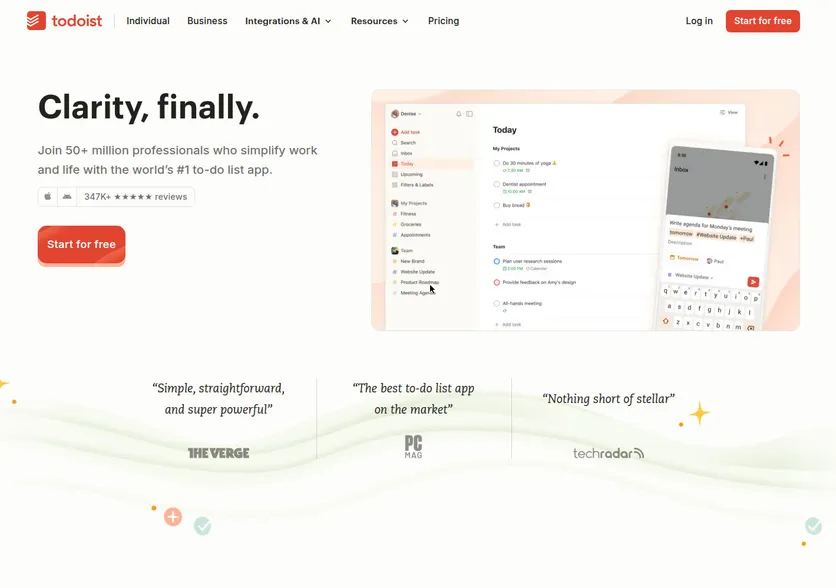
Todoist is the quickest capture tool in this list, because a task goes from thought to list in seconds and the day view keeps it honest. This Todoist Pro plan costs five dollars a month and unlocks three hundred personal projects, calendar and table layouts, and full reporting history. A solo user who wants a clean list rather than a project system will finish the day with more done and less fiddling.
What we like
- Fastest task capture in this comparison
- Clean day view that keeps priorities visible
- Works everywhere with a strong mobile app
Watch out for
- The free plan caps you at five personal projects
- No Gantt view for bigger personal projects
How to try it
- Open the Todoist pricing page and start the free Beginner plan
- Add your tasks for today and set priorities and deadlines
- Try the Pro plan when you need more than five projects
2. Notion
Best for: Individuals who want notes, tasks and docs in one flexible workspace
Paid tool Starting price: $10/user/month · Plus plan, ten dollars a user a month billed annually or twelve dollars billed monthly; Business twenty dollars a user a month on annual billing
Free plan: Free plan for individuals
Notion turns a personal workspace into whatever you need it to be, because pages, databases and tasks all live in the same place. This Notion Plus plan costs ten dollars a user a month and adds unlimited blocks, unlimited file uploads and thirty days of page history. A solo user can plan a project, keep notes and track habits without opening a second app.

What we like
- Notes, tasks and docs in one flexible workspace
- Templates for almost any personal project
- Generous free plan for solo use
Watch out for
- The blank page can overwhelm new users
- Full AI features need the twenty-dollar Business plan
How to try it
- Open the Notion pricing page and start the free plan
- Build a page for your next project with tasks and notes
- Upgrade to Plus when you need unlimited blocks and uploads
3. Trello
Best for: Individuals who want simple visual boards for personal projects
Paid tool Starting price: $5/user/month · Standard plan, five dollars a user a month billed annually or six dollars billed monthly; Premium ten dollars a user a month on annual billing
Free plan: Free plan for up to 10 collaborators
Trello keeps personal work visual, because every project is a board of cards you drag from to-do to done. This Trello Standard plan costs five dollars a user a month and adds unlimited boards, card mirroring and more automation. A solo user planning a move, a course or a side project will see the whole plan at a glance.

What we like
- Simplest boards in this comparison
- Unlimited cards even on the free plan
- Huge template library for personal projects
Watch out for
- No Gantt view until the Premium plan
- Automation limits bite on bigger boards
How to try it
- Open the Trello pricing page and start the free plan
- Create a board for your next project with three lists
- Upgrade to Standard when you need unlimited boards
4. ClickUp
Best for: Individuals who want tasks, docs and goals in one powerful free plan
Paid tool Starting price: $9/user/month · Core plan, $9 a user a month billed annually ($12 billed monthly); Business $17 a user a month billed annually
Free plan: Free Forever plan
ClickUp gives a solo user more free features than any rival here, with unlimited tasks, docs and boards from the first login. This ClickUp Core plan lists at nine dollars a user a month billed annually billed annually, with unlimited Gantt charts and storage included. An individual who wants one workspace for work, study and side projects can run all three without paying for a team seat.

What we like
- Most generous free plan in this comparison
- Tasks, docs and goals in one workspace
- Unlimited Gantt charts from the Core plan
Watch out for
- The feature list is so wide it can overwhelm one person
- The page shows a nine-dollar promotional rate, not the twelve-dollar list price
How to try it
- Open the ClickUp pricing page and start the Free Forever plan
- Create a space for work and one for personal projects
- Upgrade to Core when you need custom fields and more automations
5. Plaky
Best for: Individuals who want the cheapest paid boards with unlimited users
Paid tool Starting price: $3.99/seat/month · PRO plan, three dollars ninety-nine cents a seat a month billed annually or four dollars ninety-nine cents billed monthly; Business five dollars forty-nine cents a seat a month
Free plan: Free plan for unlimited users
Plaky is the budget board in this list, with a free plan for unlimited users and a paid plan that costs less than a coffee. This Plaky PRO plan costs three dollars ninety-nine cents a seat a month and adds automations, bulk actions and task templates. A solo user who wants clean boards without a team price tag will find it hard to beat.
What we like
- Cheapest paid plan in this comparison
- Free plan covers unlimited users
- Clean boards that are quick to learn
Watch out for
- Fewer views than bigger rivals
- Smaller template library than Trello
How to try it
- Open the Plaky pricing page and start the free plan
- Create a board for your next project with groups and fields
- Upgrade to PRO when you need automations and templates
6. Zenkit
Best for: Individuals who want a flexible database tool for tasks, lists and collections
Paid tool Starting price: $9/user/month · Plus plan, nine dollars a user a month; Business twenty-five dollars a user a month
Free plan: Free Personal plan
Zenkit lets a solo user shape one tool into a task list, a database or a calendar, because every collection shows in several views. This Zenkit Plus plan costs nine dollars a user a month and adds unlimited collections, five thousand items per collection and more storage. An individual who likes to organize data their own way will enjoy the freedom here.
What we like
- One tool that bends to any personal workflow
- Several views of the same collection
- Clean interface that stays out of the way
Watch out for
- Smaller community and fewer templates than rivals
- Plus caps the team at ten users
How to try it
- Open the Zenkit pricing page and start the free Personal plan
- Create a collection for your next project and add tasks
- Upgrade to Plus when you need more items and storage
7. MeisterTask
Best for: Individuals who want beautiful Kanban boards with a gentle learning curve
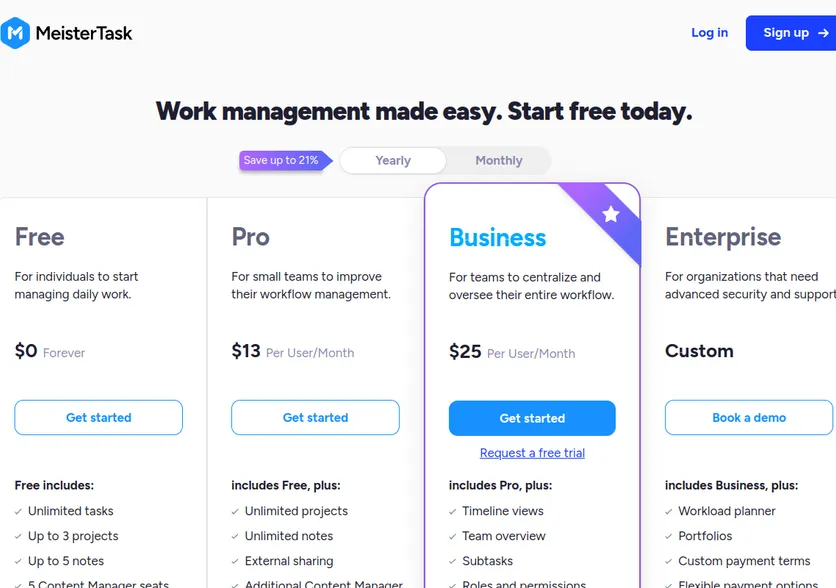
Paid tool Starting price: $13/user/month · Pro plan, thirteen dollars a user a month; Business twenty-five dollars a user a month
Free plan: Free plan for individuals
MeisterTask makes personal work feel calm, because its Kanban boards are clean, colorful and quick to set up. This MeisterTask Pro plan costs thirteen dollars a user a month and adds unlimited projects, automations and integrations. A solo user who wants a board that looks good and stays simple will settle in fast.
What we like
- Beautiful Kanban boards that are easy to read
- Quick setup with almost no learning curve
- Strong mobile and desktop apps
Watch out for
- No Gantt view until the Business plan
- Pricier than simpler task apps
How to try it
- Open the MeisterTask pricing page and start the free plan
- Create a board for your next project with three columns
- Upgrade to Pro when you need unlimited projects
8. Nifty
Best for: Individuals and tiny teams who want tasks, chat and docs for one flat price
Paid tool Starting price: $79/month · Pro plan, seventy-nine dollars a month flat for up to ten members billed annually or ninety-nine dollars billed monthly; Business one hundred twenty-four dollars a month
Free plan: Free plan for 2 projects
Nifty packs tasks, chat, docs and reporting into one flat monthly price, so a solo user pays the same no matter how the work grows. This Nifty Pro plan costs seventy-nine dollars a month flat for up to ten members and covers one hundred active projects with time tracking. An individual planning to add a collaborator or two will like that the price does not rise per seat.
What we like
- Flat price that does not rise per seat
- Tasks, chat, docs and reporting in one place
- Time tracking included from Pro
Watch out for
- Flat price is steep for one person alone
- The free plan caps you at two projects
How to try it
- Open the Nifty pricing page and start the free plan
- Create a project and invite one collaborator
- Upgrade to Pro when you need more projects and time tracking
Prices above were checked on each vendor’s own website on Nov 26, 2026 and can change — the vendor’s page is the final word. Vendor links are editorial: nobody paid to be listed or ranked here. Vendors who want a featured listing can see how it works on our Get listed page.
What project management software costs for individuals in 2026
One person pays the headline price and nothing more, so the cheapest plans here cost between free and about thirteen dollars a month. The spread in this list runs from free to thirteen dollars a month, and the free plans from ClickUp, Trello, Notion, Todoist and Plaky cover real personal work without spending anything. The only flat-rate exception is Nifty at seventy-nine dollars a month, which suits a solo user who plans to add collaborators soon.
Start with the free plan on two tools and run one real project through each, from first task to finished. Compare how fast you can capture a task, how clear the plan looks at a glance, and whether the mobile app works away from your desk. Pick the tool you open without thinking, because the best personal system is the one you actually use every day.
Before you buy
- Start with the free plan first, because most solo tools here cost nothing until you need more projects.
- Count your projects, because Todoist caps the free plan at five personal projects.
- Check the monthly price, because annual billing saves about a fifth on most tools here.
- Test the mobile app, because a solo tool lives or dies on quick capture away from your desk.
- Pick one tool and stay with it, because moving tasks between apps costs more time than any feature saves.
Official websites
Official websites of the products reviewed above. Features and prices were checked against these sites when this guide was written, and they can change, so confirm on the vendor site before you buy.
Frequently asked questions
Which project management software is best for individuals in 2026?
Todoist, at five dollars a month on the Pro plan, is the safest default because task capture is instant and the day view keeps priorities visible. Notion wins for flexible work at ten dollars a user a month, with notes, tasks and docs in one workspace. Trello is the simplest start at five dollars a user a month, with boards anyone can read at a glance.
How much does project management software cost for one person?
Most tools in this list cost between four and thirteen dollars a month for one person, with annual billing cutting the monthly rate by about a fifth. The cheapest paid plans are Plaky at three dollars ninety-nine cents a seat a month and Todoist and Trello at five dollars a month. Several tools cost nothing to start, so a solo user can run real projects free before paying anything.
Is there a free project management tool for individuals?
Yes, ClickUp runs a Free Forever plan with unlimited tasks, Trello is free for up to ten collaborators, and Notion is free for individuals. Todoist offers a free Beginner plan with five personal projects, and Plaky is free for unlimited users. A free plan is enough to run personal projects end to end, then upgrade when you outgrow the limits.
Do I need a paid plan as a solo user?
No, a solo user rarely needs a team tool, because the free plans here cover real personal work. Todoist handles daily tasks, Trello covers visual planning, and Notion holds notes and docs. Upgrade only when you hit a limit that matters, such as the five-project cap on the free Todoist plan.
What should an individual look for in project management software?
Look for fast capture first, because a tool you open in two seconds gets used and a slow one gets abandoned. Check the mobile app, the free plan limits and whether the views match how you think. Pick the tool that feels natural on day one, because the best personal system is the one you actually open every morning.
Need everyday business help too? Try Toolsvine's free business tools right in your browser.
Browse Business Tools tools


