On this page
Sales teams need a clear place to track deals, follow-ups and handoffs without losing visibility, and the project tool has to keep up with a fast pipeline. The seven tools below range from simple boards for small teams to governed platforms for large sales organizations. monday.com leads because it runs a shared sales workspace with AI agents and clear ownership for nine dollars per seat a month, and the rest are ranked on how they fit a sales workflow.
How we researched this
We checked every price on the vendor pricing page on November 28, 2026, and only included tools with a published US dollar list price. These are project and work management tools, not dedicated CRMs, and none replaces a CRM for formal deal management. Prices change, so confirm the current figure on the vendor site before you buy.
Compare the tools
| Name | Best for | Starting price | Free plan | |
|---|---|---|---|---|
| monday.com | Sales teams wanting a shared workspace with AI agents | $9/seat/month | Free plan (up to 2 seats) | Visit |
 Asana | Sales operations teams running repeatable processes | $10.99/user/month | Free plan (Personal, up to 2 users) | Visit |
 ClickUp | Sales teams consolidating notes, follow-ups and targets | $9/user/month | Free plan | Visit |
 Smartsheet | Enterprise sales teams needing governance and visibility | $9/member/month | No free plan; 30-day free trial | Visit |
 Wrike | Large sales teams coordinating across departments | $9.80/user/month | Free plan (up to 5 users) | Visit |
 Trello | Small sales teams wanting simple board tracking | $5/user/month | Free plan (up to 10 collaborators) | Visit |
 Airtable | Sales teams building custom workflows around accounts | $20/user/month | Free plan | Visit |
The project management software for sales teams, compared
1. monday.com
Best for: Sales teams wanting a shared workspace with AI agents
Paid tool Starting price: $9/seat/month · Nine dollars per seat a month billed annually on Basic ($12 billed monthly); Standard is $12 a seat a month billed annually ($14 monthly); Pro is $19 ($24 monthly); paid plans start at 3 seats and seats are sold in blocks
Free plan: Free plan (up to 2 seats)
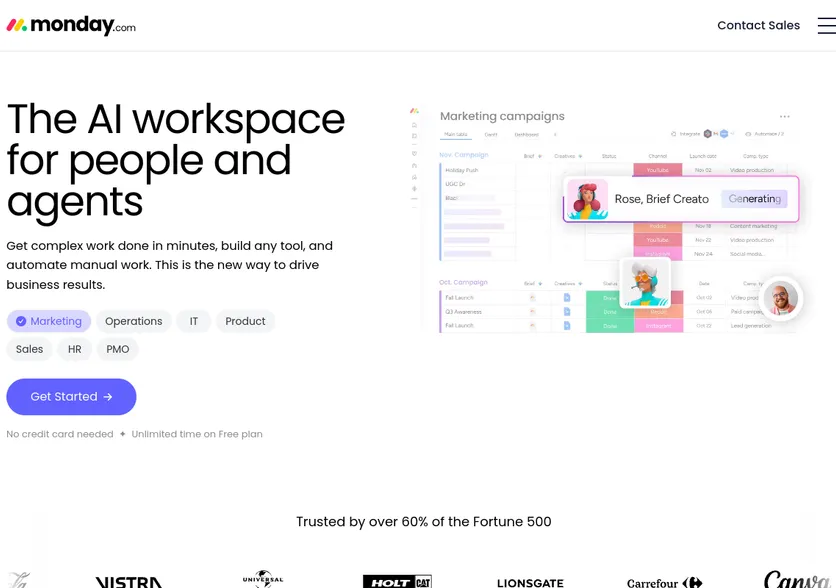
A sales team that wants one place to run tasks, track ownership and keep execution visible will find its shared workspace here, because this Monday plan costs nine dollars per seat a month billed annually on Basic. Boards, automations and AI agents keep follow-ups and handoffs moving, and the workspace grows with the process rather than forcing a narrow tracker. It fits teams that want a single workspace with room for AI-assisted work. Guest access brings managers and clients into the right boards without giving them the whole workspace.
What we like
- Boards turn any workflow into a visual plan in minutes
- Hundreds of templates shorten setup for common processes
- Automations and integrations cut repetitive admin work
Watch out for
- The 3-seat minimum means a solo user still pays for three seats
- Basic has no timeline view and almost no automations
How to try it
- Pick a template that matches the process to track
- Add status, owner and date columns to the board
- Set one automation that updates status when work moves
2. Asana
Best for: Sales operations teams running repeatable processes
Paid tool Starting price: $10.99/user/month · Ten dollars and ninety-nine cents per user a month billed annually ($13.49 billed monthly); Advanced is $24.99 a user a month billed annually ($30.49 monthly); Enterprise is quoted
Free plan: Free plan (Personal, up to 2 users)
A sales operations team that relies on repeatable processes such as onboarding or campaign launches will find the structured option here, since this Asana plan costs ten dollars and ninety-nine cents per user a month billed annually on Starter. Workflows map each step with clear ownership, and automation rules move routine work without manual chasing. It suits organized teams that value structure over improvisation. Forms collect intake requests from the field, so nothing arrives as a lost email thread.

What we like
- Timeline and Gantt views keep deadlines visible
- Automation rules move routine work without manual chasing
- Unlimited free guests on paid plans for outside collaborators
Watch out for
- Portfolios and workload views need the Advanced tier
- Per-user pricing climbs quickly as the team grows
How to try it
- Create a project from a template that matches the work
- Assign every task an owner and a due date
- Turn on a rule that moves completed work automatically
3. ClickUp
Best for: Sales teams consolidating notes, follow-ups and targets
Paid tool Starting price: $9/user/month · Nine dollars per user a month billed annually on Core ($12 billed monthly); Business is $17 a user a month billed annually; Enterprise is quoted; the old $7 Unlimited tier is gone
Free plan: Free plan
A sales team juggling separate tools for notes, follow-ups and targets will find the consolidator here, because this ClickUp plan costs nine dollars per user a month billed annually on Core. Tasks, docs, goals and chat share one platform with list, board, calendar and Gantt views, and the free plan covers unlimited members. It fits teams willing to learn a broad platform in exchange for fewer separate apps. Native time tracking shows where the selling hours actually go each week.

What we like
- Tasks, docs, goals and chat live in one workspace
- List, board, calendar and Gantt views share the same data
- The free plan covers unlimited members with core task features
Watch out for
- Feature breadth can overwhelm a team that wants a simple tracker
- Workspaces drift without regular housekeeping and conventions
How to try it
- Create a Space for the team and add one List per workstream
- Switch the List to the view each role prefers
- Set a goal and link the tasks that feed into it
4. Smartsheet
Best for: Enterprise sales teams needing governance and visibility
Paid tool Starting price: $9/member/month · Nine dollars per member a month billed annually on Pro ($12 billed monthly) for 1 to 10 members; Business is $19 a member a month billed annually ($24 monthly) for 3 or more members; Enterprise and Advanced Work Management are quoted
Free plan: No free plan; 30-day free trial
A sales team inside a bigger company that must track campaigns, approvals and cross-team handoffs with clear oversight will find the governed option here, since this Smartsheet plan costs nine dollars per member a month billed annually on Pro. Structured sheets, reports and dashboards keep control and reporting visible, and the grid layout suits teams that already plan in rows and columns. It fits environments where control and reporting matter.

What we like
- Grid sheets feel familiar to anyone who plans in spreadsheets
- Gantt, card and calendar views show the same plan differently
- Forms, reports and dashboards turn sheets into a working system
Watch out for
- There is no permanent free plan, only a 30-day trial
- Pro stops at 10 members, so growing teams must move to Business
How to try it
- Build a sheet with one row per job and columns for owner and date
- Switch the sheet to Gantt view to check dependencies
- Add a report that rolls up status across sheets
5. Wrike
Best for: Large sales teams coordinating across departments
Paid tool Starting price: $9.80/user/month · Nine dollars and eighty cents per user a month billed annually on Team, shown as ten dollars on the vendor page, for two to twenty-five users; Business is twenty-four dollars and eighty cents a user a month billed annually (shown as twenty-five dollars), for five to two hundred users; Enterprise and Pinnacle are quoted
Free plan: Free plan (up to 5 users)
A sales team in a larger organization that must coordinate projects, approvals and delivery across departments will find the enterprise option here, because this Wrike plan costs nine dollars and eighty cents per user a month billed annually on Team. Custom workflows, dashboards and automation keep delivery visible, and request forms turn incoming work into tracked tasks. It fits teams where cross-department coordination and control are central.

What we like
- Folders, projects and custom workflows give clear delivery chains
- Request forms turn incoming work into tracked tasks
- Dashboards and approvals suit teams with sign-off steps
Watch out for
- The most useful reporting and automation sit on Business, not Team
- Setup takes deliberate planning before the platform pays off
How to try it
- Create a folder for the department and a project inside it
- Build a custom workflow that matches the approval steps
- Add a request form so new work arrives as tracked tasks
6. Trello
Best for: Small sales teams wanting simple board tracking
Paid tool Starting price: $5/user/month · Five dollars per user a month billed annually on Standard ($6 billed monthly); Premium is $10 a user a month billed annually ($12.50 monthly); Enterprise is $17.50 a user a month billed annually
Free plan: Free plan (up to 10 collaborators)
A small sales team that wants a straightforward board to track leads, follow-ups and simple projects will find the fastest start here, since this Trello plan costs five dollars per user a month billed annually on Standard. Boards, Inbox and Planner work on mobile from anywhere, and a new rep can learn the system in minutes. It fits small teams or individual reps who value speed over depth. Calendar and timeline views on Premium show the whole pipeline at a glance when the board grows.

What we like
- Boards, lists and cards take minutes to learn
- Butler automation handles routine card moves without code
- Mobile apps keep the board in hand away from the desk
Watch out for
- Reporting stays light next to full project platforms
- Heavy dependencies and layered planning outgrow boards fast
How to try it
- Make a board with one list per stage of the work
- Add a card for each job with an owner and due date
- Drag cards across lists as the work moves forward
7. Airtable
Best for: Sales teams building custom workflows around accounts
Paid tool Starting price: $20/user/month · Twenty dollars per user a month billed annually on Team ($24 billed monthly); Business is $45 a user a month billed annually; Enterprise Scale is quoted
Free plan: Free plan
A sales team with a specific process, such as tracking accounts or managing handoffs, will find the tailored option here, because this Airtable plan costs twenty dollars per user a month billed annually on Team. Linked tables, automations and interfaces shape a base around the exact process, and real-time collaboration keeps the whole team on the same records. It fits teams that want to customize rather than adopt a fixed template.

What we like
- Relational tables link records across projects and clients
- Automations move data between tables without manual copying
- Interfaces turn a base into a lightweight app for the team
Watch out for
- You build the structure yourself, so setup takes real thought
- It is less of a ready-made task tracker than a board tool
How to try it
- Create a base with one table per record type
- Link the tables so records connect across the workflow
- Add an automation that updates records when status changes
Prices above were checked on each vendor’s own website on Nov 28, 2026 and can change — the vendor’s page is the final word. Vendor links are editorial: nobody paid to be listed or ranked here. Vendors who want a featured listing can see how it works on our Get listed page.
How to track deals and follow-ups without losing visibility
Start by listing the deal stages and follow-up steps the team actually uses, because the tool has to mirror that pipeline rather than force a generic one. Simple boards suit small teams that want speed, while governed platforms suit larger organizations with cross-team handoffs. Check mobile access first, since reps work in the field, and remember these are project tools, not CRMs: for formal deal management and forecasting, a dedicated CRM is usually the better fit, and many teams use both together. Price the shortlist on the real headcount, since seat minimums and blocks change the monthly total more than the headline rate.
Before you buy
- Check that the tool supports the deal stages and follow-up tracking the team uses
- Confirm how tasks, owners and deadlines are assigned and viewed
- Review automation options for repetitive sales admin work
- Check mobile access if reps work in the field daily
- Confirm reporting and visibility options for managers across the whole team
Official websites
Official websites of the products reviewed above. Features and prices were checked against these sites when this guide was written, and they can change, so confirm on the vendor site before you buy.
Frequently asked questions
Which tool is best for a small sales team?
Trello is often the quickest to adopt for a small team that wants simple board tracking, at five dollars per user a month on Standard with a free plan. monday.com is a strong choice if you want a shared workspace that can grow with the process, at nine dollars per seat a month on Basic. Match the tool to how complex the sales workflow really is.
Do sales teams need AI features in project management software?
AI features can help with repetitive admin and agent-assisted work, and several tools here highlight them, including monday.com and Asana. They are useful but not essential for every team. Focus first on whether the core workflow fits the sales process, then weigh the AI extras.
How do enterprise tools differ from simpler boards?
Tools such as Smartsheet and Wrike emphasize governance, visibility and controlled delivery across large organizations. Smartsheet Pro is nine dollars per member a month and Wrike Team is ten dollars per user a month. Simpler boards like Trello prioritize speed and ease of use, and larger sales organizations usually benefit from the enterprise options.
Can these tools replace a dedicated CRM?
These are project and work management tools, not dedicated sales CRMs, though some teams track pipeline stages in them. For formal deal management and forecasting, a CRM is usually the better fit. Many teams use both together, with the project tool handling tasks and follow-ups around the CRM.
How much does monday.com cost for a sales team?
monday.com Basic costs nine dollars per seat a month billed annually, or twelve dollars billed monthly, with a three-seat minimum, so the smallest Basic subscription is twenty-seven dollars a month. Standard is twelve dollars and Pro is nineteen dollars per seat a month billed annually. Seats are sold in blocks, so the headcount drives the real bill.
Compare the seven tools above, then start with a free plan on the tool that matches how the sales team already tracks deals before paying for a full year.
Browse Business Tools tools