
On this page
Startups run lean — a small team needs a tool that covers product, marketing and ops without a big bill or a week of setup. The eight tools below run from three dollars ninety-nine cents a seat a month to twenty dollars a user a month, and every price was checked on the vendor site on November 26, 2026. Most include free plans or trials, so compare how each one handles sprints, launches and growth before you commit. ClickUp is our first pick — the fullest workspace for a growing team.
How we researched this
We started with the project tools startups actually buy, then read each price on the vendor pricing page on November 26, 2026 and noted the free plan or trial each one carries. We judged them for a small team that needs clear boards, fast setup and a low price across product and growth, and we kept only tools with a published price.
Compare the tools
| Name | Best for | Starting price | Free plan | |
|---|---|---|---|---|
 ClickUp | Startups who want tasks, docs and automations on one low-cost plan | $9/user/month | Free Forever plan | Visit |
 Monday | Startups who want visual boards and dashboards that every founder can read | $9/user/month | Free plan for up to 2 seats | Visit |
 Asana | Startups who want clean timelines and portfolios across many projects | $10.99/user/month | Free Personal plan for up to 2 users | Visit |
 Notion | Startups who want notes, docs and tasks in one flexible workspace | $10/user/month | Free plan for individuals | Visit |
 Trello | Startups who want simple visual boards everyone can read | $5/user/month | Free plan for up to 10 collaborators | Visit |
 Plaky | Startups who want the cheapest real project tool with unlimited users free | $3.99/seat/month | Free plan with unlimited users | Visit |
 Airtable | Startups who run on data and need a flexible database under the work | $20/user/month | Free plan | Visit |
 Todoist | Startups who want simple task lists with priorities and reminders | $5/month | Free Beginner plan with 5 personal projects | Visit |
The project management software for startups, compared
1. ClickUp
Best for: Startups who want tasks, docs and automations on one low-cost plan
Paid tool Starting price: $9/user/month · Core plan, $9 a user a month billed annually ($12 billed monthly); Business $17 a user a month billed annually
Free plan: Free Forever plan
ClickUp lets a startup run product, marketing and ops from one workspace instead of three apps. This ClickUp Core plan lists at nine dollars a user a month billed annually billed annually, with unlimited Gantt charts and storage included. A small team can plan a launch, draft the launch post and track the whole sprint from the same login for less than most rivals charge.

What we like
- Tasks, docs and goals in one workspace
- Unlimited Gantt charts from the Core plan
- Generous free plan for trying real work
Watch out for
- The feature list is so wide it can overwhelm new teams
- The page shows a nine-dollar promotional rate, not the twelve-dollar list price
How to try it
- Open the ClickUp pricing page and start the Free Forever plan
- Create a space for your startup with a board, a doc and a goal
- Turn on automations for moving tasks between sprint stages
2. Monday
Best for: Startups who want visual boards and dashboards that every founder can read
Paid tool Starting price: $9/user/month · Basic plan, nine dollars a user a month billed annually or twelve dollars billed monthly; Standard twelve dollars and Pro nineteen dollars a month on annual billing
Free plan: Free plan for up to 2 seats
Monday gives a startup boards that show every project, owner and deadline in one colorful view. This Monday Basic plan starts at nine dollars a user a month and covers unlimited items, docs and templates. Standard adds the timeline and Gantt views that help a small team plan a launch across product and marketing at once.

What we like
- Boards and dashboards anyone can read at a glance
- Strong timeline and Gantt views from Standard up
- Automations cut the manual follow-up work
Watch out for
- Paid plans start at three seats, so a tiny team pays for three
- Basic has no timeline view, so most teams need Standard
How to try it
- Open the Monday pricing page and start the fourteen-day Pro trial
- Build a board for your next launch with owners and due dates
- Invite the whole team and set up one automation for status changes
3. Asana
Best for: Startups who want clean timelines and portfolios across many projects
Paid tool Starting price: $10.99/user/month · Starter plan, ten dollars ninety-nine cents a user a month billed annually or thirteen dollars forty-nine cents billed monthly; Advanced twenty-four dollars ninety-nine cents a month
Free plan: Free Personal plan for up to 2 users
Asana keeps a startup aligned with timelines, Gantt views and portfolios that roll every project into one view. This Asana Starter plan costs ten dollars ninety-nine cents a user a month and adds timeline views, dashboards and unlimited automations. A team juggling product and growth can watch every project in a portfolio instead of waiting for the next meeting.

What we like
- Timeline and Gantt views included from Starter
- Portfolios and goals for multi-project teams
- Unlimited free guests for outside partners
Watch out for
- Time tracking needs a paid add-on
- Advanced jumps to about twenty-five dollars a user a month
How to try it
- Open the Asana pricing page and start with the free Personal plan
- Create a project for your team and switch on the timeline view
- Add a portfolio to watch every active project in one place
4. Notion
Best for: Startups who want notes, docs and tasks in one flexible workspace
Paid tool Starting price: $10/user/month · Plus plan, ten dollars a user a month billed annually or twelve dollars billed monthly; Business twenty dollars a user a month on annual billing
Free plan: Free plan for individuals
Notion lets a startup keep docs, wikis and tasks together, because pages, databases and boards all live in the same place. This Notion Plus plan costs ten dollars a user a month and adds unlimited blocks, unlimited file uploads and thirty days of page history. A small team can write the handbook, plan the sprint and track the work without opening a second app.

What we like
- Docs, wikis and tasks in one flexible workspace
- Templates for almost any startup workflow
- Generous free plan for small teams
Watch out for
- The blank page can overwhelm new users
- Full AI features need the twenty-dollar Business plan
How to try it
- Open the Notion pricing page and start the free plan
- Build a page for your team with a board and shared docs
- Upgrade to Plus when you need unlimited blocks and uploads
5. Trello
Best for: Startups who want simple visual boards everyone can read
Paid tool Starting price: $5/user/month · Standard plan, five dollars a user a month billed annually or six dollars billed monthly; Premium ten dollars a user a month on annual billing
Free plan: Free plan for up to 10 collaborators
Trello keeps startup work visual, because every project is a board of cards you drag from to-do to done. This Trello Standard plan costs five dollars a user a month and adds unlimited boards, card mirroring and more automation. A small team will see the whole launch at a glance, no matter who opens the board.

What we like
- Simplest boards in this comparison
- Unlimited cards even on the free plan
- Huge template library for startups
Watch out for
- No Gantt view until the Premium plan
- Automation limits bite on bigger boards
How to try it
- Open the Trello pricing page and start the free plan
- Create a board for your next launch with three lists
- Upgrade to Standard when you need unlimited boards
6. Plaky
Best for: Startups who want the cheapest real project tool with unlimited users free
Paid tool Starting price: $3.99/seat/month · Pro plan, three dollars ninety-nine cents a seat a month billed annually or four dollars ninety-nine cents billed monthly; Business five dollars forty-nine cents and Enterprise eight dollars ninety-nine cents a seat a month
Free plan: Free plan with unlimited users
Plaky is the budget pick that still behaves like a full project system, with boards, timelines and automations included. This Plaky Pro plan costs three dollars ninety-nine cents a seat a month and covers unlimited projects, boards and Gantt views. A startup that needs the basics without a big bill can run real work on the free plan and upgrade when the team grows.
What we like
- Cheapest starting price in this comparison
- Unlimited users on the free plan
- Strong value against per-user priced rivals
Watch out for
- A smaller integration list than bigger rivals
- Fewer advanced features on the lower plans
How to try it
- Open the Plaky pricing page and start the free plan
- Create a board for your next launch and add your team
- Upgrade to Pro when you need unlimited boards and automations
7. Airtable
Best for: Startups who run on data and need a flexible database under the work
Paid tool Starting price: $20/user/month · Team plan, twenty dollars a user a month billed annually; Business forty-five dollars a user a month on annual billing
Free plan: Free plan
Airtable gives a startup a spreadsheet that acts like a database, because records, views and automations all live in one place. This Airtable Team plan costs twenty dollars a user a month and adds ten thousand records per base, unlimited automations and a Gantt view. A data-heavy team can track a launch, a customer list and a content calendar without a second app.

What we like
- Spreadsheet ease with database power
- Strong views, automations and integrations
- Templates for launches, content and CRM
Watch out for
- Team costs twenty dollars a user a month, the highest here
- Record limits can bite on data-heavy work
How to try it
- Open the Airtable pricing page and start the free plan
- Build a base for your next launch with a table and a board view
- Upgrade to Team when you need more records and automations
8. Todoist
Best for: Startups who want simple task lists with priorities and reminders
Paid tool Starting price: $5/month · Pro plan, five dollars a month billed yearly; Business eight dollars a user a month billed yearly
Free plan: Free Beginner plan with 5 personal projects
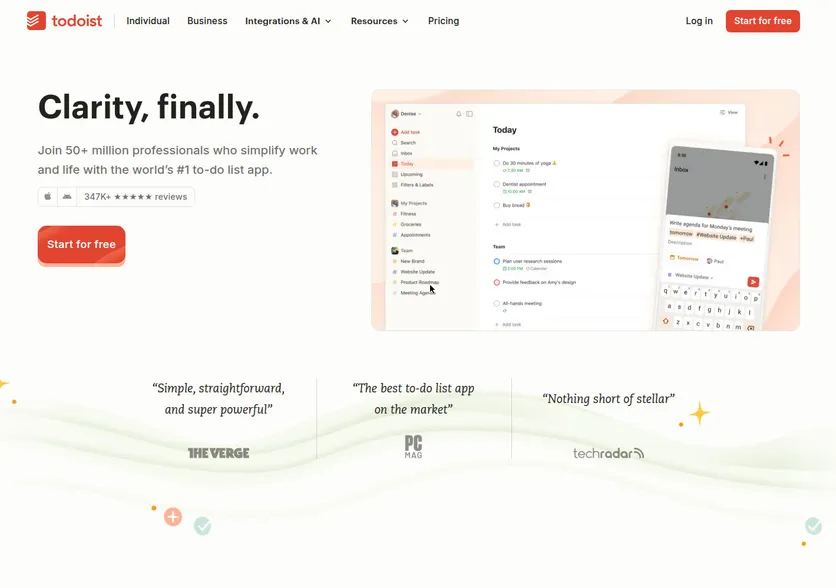
Todoist keeps a startup moving with clean task lists, priorities and reminders that anyone can learn in minutes. This Todoist Pro plan costs five dollars a month for one person billed yearly and adds two hundred projects, a task history and reminders. A founder who just needs a reliable list will find the speed and simplicity hard to beat.
What we like
- The fastest task lists in this comparison
- Clean priorities, reminders and filters
- Generous free plan for one person
Watch out for
- No Gantt view for project planning
- Pro is per person, not per team
How to try it
- Open the Todoist pricing page and start the free plan
- Create a project for your next launch and add tasks
- Upgrade to Pro when you need more projects and reminders
Prices above were checked on each vendor’s own website on Nov 26, 2026 and can change — the vendor’s page is the final word. Vendor links are editorial: nobody paid to be listed or ranked here. Vendors who want a featured listing can see how it works on our Get listed page.
What project management software costs for startups in 2026
Startups usually pay per seat, so the headline rate is only half the story — a five-person team on the cheapest paid plans here spends between twenty and about sixty dollars a month. The exception is Airtable at twenty dollars a user a month, which costs about one hundred dollars for the same five-person team. The spread in this list runs from three dollars ninety-nine cents a seat a month to twenty dollars a user a month, and the free plans from Monday, Asana, ClickUp, Trello and Plaky cover small teams well enough to test a real sprint before spending anything.
Start with the free plan or trial on two tools and run one real sprint through each, from kickoff to delivery. Compare how clear the board is to a new hire, how fast automations replace manual updates, and whether the price fits your runway. Pick the tool your team opens every morning without a meeting to prompt it, because the best startup tool is the one the whole team uses.
Before you buy
- Count the seats first, because per-user pricing turns a growing team into a four-figure yearly bill.
- Check the free plan limits, because Monday caps free at two seats and Asana caps it at two users.
- Test the tool on one real sprint, because a demo board hides how the team behaves.
- Confirm integrations are included, because some tools reserve them for higher plans.
- Compare annual and monthly billing, because most tools here cut the price by a fifth on annual plans.
Official websites
Official websites of the products reviewed above. Features and prices were checked against these sites when this guide was written, and they can change, so confirm on the vendor site before you buy.
Frequently asked questions
Which project management software is best for startups in 2026?
ClickUp, at a twelve-dollar list price on the Core plan, is the safest default because tasks, docs and goals share one workspace. Plaky wins on price at three dollars ninety-nine cents a seat a month, with unlimited users on the free plan. Notion is the strongest choice for docs-heavy teams at ten dollars a user a month, with wikis and tasks in one place.
How much does project management software cost for a startup?
Most tools in this list cost between four and twelve dollars a user a month for a small team, with annual billing cutting the monthly rate. A five-person team on the cheapest plans spends roughly twenty to sixty dollars a month, while Airtable at twenty dollars a user a month costs about one hundred dollars for the same team. Start free, then pay only when the team outgrows the limits.
Is there a free project management tool for startups?
Yes, Monday covers two seats free, Asana offers a free Personal plan for two users, and ClickUp runs a Free Forever plan with unlimited tasks. Trello is free for up to ten collaborators, Plaky is free for unlimited users, and Notion is free for individuals. A free plan is enough to run one launch end to end, then upgrade when the team outgrows the limits.
What should a startup look for in project management software?
Look for clear boards your whole team can open without training, plus automations that cut the manual follow-up work. Check the per-user cost if you plan to hire, and test the tool on one real sprint before you buy. The best tool is the one your team opens every morning without a meeting to prompt it, not the one with the longest feature list.
Can a startup run on a free plan?
Yes, many startups run on the free plan for months, because Plaky, ClickUp and Trello all cover real work for free. Upgrade when you hit board limits, need a Gantt view or want more automations. The cheapest paid plans here start at about four dollars a seat a month, so the jump from free is small.
Need everyday business help too? Try Toolsvine's free business tools right in your browser.
Browse Business Tools tools


