
On this page
Professional services firms live or die by who is free next week, so resource management is the heart of any PSA platform. The seven tools below run from five dollars per person a month to twenty-nine dollars, and every price was checked on the vendor site on November 26, 2026. Some are full PSA suites with billing and invoicing, while others are pure schedulers that do one job brilliantly. Productive is our first pick — the best all-round PSA value for resource management.
How we researched this
We started with the PSA and resource tools professional services firms actually buy, then read each price on the vendor site on November 26, 2026 and noted the seat minimums and free trials each plan carries. We judged them for a firm that plans people across projects and needs capacity, utilization and billing in one login, and we kept only tools with a published price. We dropped the quote-only platforms, because a price you cannot see before the sales call is no help when you are comparing options.
Compare the tools
| Name | Best for | Starting price | Free plan | |
|---|---|---|---|---|
 Productive | Professional services firms that want staffing, time and billing in one system | $10/user/month | No free plan; 14-day free trial | Visit |
 Resource Guru | Small teams that want simple visual scheduling with no billing attached | $5/person/month | No free plan; 30-day free trial | Visit |
 Float | Agencies that want a visual schedule with capacity and forecasting | $7/person/month | No free plan; 30-day free trial | Visit |
 Teamwork | Agencies that want client work, time tracking and budgets on flat per-seat pricing | $9.99/user/month | Free plan for up to 5 users | Visit |
 Scoro | Service firms that want quoting, projects, resourcing and invoicing in one system | $29/user/month | No free plan; 14-day free trial | Visit |
 BigTime | Accounting, engineering and consulting firms that bill clients for project work | $20/user/month | No free plan or trial; free demo available | Visit |
 Runn | Technical teams that forecast capacity and hiring months ahead | $7/resource seat/month | No free plan; 30-day free trial | Visit |
The PSA software for resource management, compared
1. Productive
Best for: Professional services firms that want staffing, time and billing in one system
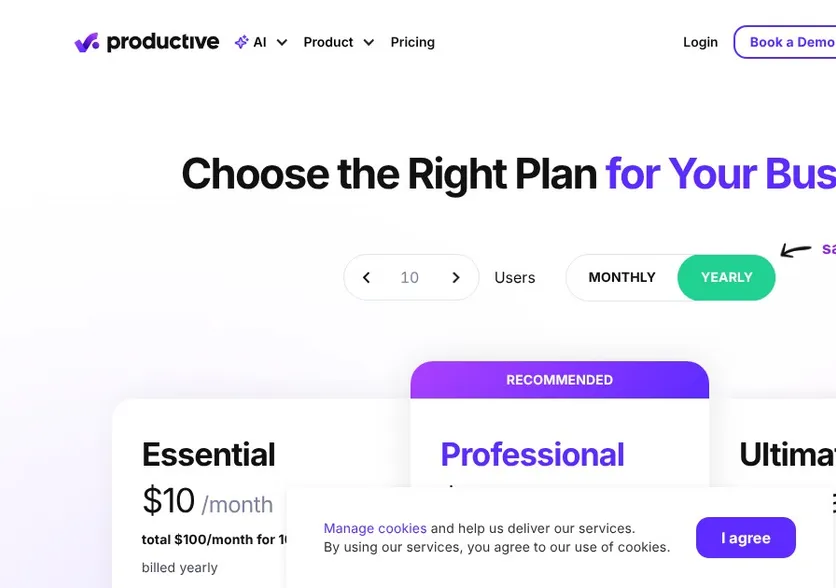
Paid tool Starting price: $10/user/month · Essential from $10 per user a month billed annually or $12 billed monthly; Professional from $25 a month; Ultimate quoted; a 3-seat minimum applies
Free plan: No free plan; 14-day free trial
Productive links people, projects and money in one system, so resource planning, budgets and invoicing share the same numbers. This Productive Essential plan costs ten dollars per user a month billed annually and covers scheduling, time tracking, budgets and invoicing, with a three-seat minimum. A firm that wants staffing, time and billing together without enterprise pricing will find the entry plan hard to beat.
What we like
- Staffing, time tracking and billing share one set of numbers
- Lowest entry price of any full PSA in this list
- Budgets forecast burn from scheduled work
Watch out for
- Three-seat minimum raises the floor for solo operators
- Ultimate plan is quote-only, so NetSuite integration pricing needs a call
How to try it
- Open the Productive pricing page and start the fourteen-day trial
- Add three seats and build one project with a budget
- Schedule your team and check the utilization report before you commit
2. Resource Guru
Best for: Small teams that want simple visual scheduling with no billing attached
Paid tool Starting price: $5/person/month · Grasshopper from $5 per person a month billed annually or $6 billed monthly; Blackbelt from $8 and Master from $12; non-human resources cost extra
Free plan: No free plan; 30-day free trial
Resource Guru is the simplest dedicated scheduler here, built around a drag-and-drop board that shows who is booked and who is free. This Resource Guru Grasshopper plan costs five dollars per person a month billed annually and covers unlimited projects, clients and bookings without any reports. Teams that only need clean scheduling and clash management, with no billing attached, will like the low price and the thirty-day trial.
What we like
- Cheapest dedicated scheduler in this list at five dollars a person
- Clean drag-and-drop board with clash management
- Unlimited projects and clients on every plan
Watch out for
- No free plan, only a thirty-day trial
- Reports and timesheets need the pricier Blackbelt plan
How to try it
- Open the Resource Guru pricing page and start the free trial
- Add your people and drag their bookings onto the board
- Test clash management with an overlapping booking before you pay
3. Float
Best for: Agencies that want a visual schedule with capacity and forecasting
Paid tool Starting price: $7/person/month · Starter from $7 per scheduled person a month billed annually or $8.50 billed monthly; Pro from $12 a month; Enterprise quoted
Free plan: No free plan; 30-day free trial
Float is a visual resource scheduler built around a timeline of people and projects, with capacity views that show overload at a glance. This Float Starter plan costs seven dollars per scheduled person a month billed annually and covers unlimited projects, capacity management and forecasting. Only people on the schedule are billed, so bench staff who are not scheduled cost nothing, which keeps the bill honest.
What we like
- Cleanest visual schedule in this list
- Only scheduled people are billed, so bench staff cost nothing
- Capacity and forecasting built into the Starter plan
Watch out for
- Time tracking needs the Pro plan at twelve dollars a person
- No free plan, only a thirty-day trial
How to try it
- Open the Float pricing page and start the thirty-day trial
- Add your team and drag projects onto the timeline
- Check the capacity view for overload before you commit
4. Teamwork
Best for: Agencies that want client work, time tracking and budgets on flat per-seat pricing
Paid tool Starting price: $9.99/user/month · Basics from $9.99 per user a month billed annually or $13.99 billed monthly; Accelerate from $24.99 a month; Optimize and Enterprise quoted; a 3-seat minimum applies to Basics
Free plan: Free plan for up to 5 users
Teamwork is the client-work platform that pairs project delivery with time tracking, budgets and resource scheduling in one place. This Teamwork Basics plan costs just under ten dollars per user a month billed annually, with a three-seat minimum and a free plan for up to five users. Agencies that want flat per-seat pricing and a gentle learning curve will settle in fast.

What we like
- Flat per-seat pricing with a free plan for up to five users
- Time tracking built into project delivery
- Unlimited client users at no extra charge
Watch out for
- Optimize and Enterprise plans are quote-only, so larger teams need a sales call
- AI features now draw on monthly credits, so heavy AI use has a cap
How to try it
- Claim the free Teamwork plan for up to five users
- Upgrade to Basics when you need unlimited projects and time tracking
- Test workload management with one real client project
5. Scoro
Best for: Service firms that want quoting, projects, resourcing and invoicing in one system
Paid tool Starting price: $29/user/month · Projects & Resources from $29 per user a month; Time-billing from $17 and End-to-end from $57; a 5-user minimum applies to every plan; annual billing saves 13 to 17 percent
Free plan: No free plan; 14-day free trial
Scoro is the most complete PSA here, running quoting, projects, resourcing, time and invoicing in one connected system. This Scoro Projects and Resources combination costs twenty-nine dollars per user a month and covers task management, project delivery, time tracking and resource scheduling. The five-seat minimum sets the floor at one hundred forty-five dollars a month, so small teams should check the total before they commit.

What we like
- Most complete PSA here, from quote to invoice in one system
- Modular setup lets you pick only the apps you need
- Retainer tracking catches over-servicing period by period
Watch out for
- Five-seat minimum sets the floor at one hundred forty-five dollars a month
- No free plan, only a fourteen-day trial
How to try it
- Open the Scoro pricing page and pick the Projects and Resources combination
- Start the fourteen-day trial with five seats
- Build one quote-to-invoice flow end to end before you commit
6. BigTime
Best for: Accounting, engineering and consulting firms that bill clients for project work
Paid tool Starting price: $20/user/month · Essentials from $20 per user a month, the only published price; Advanced, Premier and Enterprise are quoted; the pricing page states no billing period or seat minimum
Free plan: No free plan or trial; free demo available
BigTime is the traditional PSA for firms that bill clients for project work, connecting recorded time with delivery and finance. This BigTime Essentials plan costs twenty dollars per user a month and includes time and expense tracking, billing and invoicing, plus a QuickBooks integration. Higher editions and the resource management module are quoted on request, so ask for the full price in writing before you budget.

What we like
- Only published price among traditional PSAs here
- Deep QuickBooks integration with two-way sync
- Rate management and approvals included on Essentials
Watch out for
- Higher editions and the resource module are quote-only
- No free trial is listed, only a demo
How to try it
- Open the BigTime pricing page and book a demo
- Ask for the Advanced and Premier prices in writing
- Test the QuickBooks sync with one real project before you sign
7. Runn
Best for: Technical teams that forecast capacity and hiring months ahead
Paid tool Starting price: $7/resource seat/month · Lite from $7 per resource seat a month billed annually or $9 billed monthly; Standard from $11 a month; Advanced quoted; every plan starts at 20 resource seats
Free plan: No free plan; 30-day free trial
Runn is a dedicated resource and capacity planner that sells itself on making planning simple, with tentative projects and saved scenarios for pipeline what-ifs. This Runn Lite plan costs seven dollars per resource seat a month billed annually and covers scheduling, capacity charts, project budgets and rate cards. Every plan starts at twenty resource seats, so a small team pays for seats it does not use, which is the catch to check first.
What we like
- Tentative projects and saved scenarios show pipeline what-ifs
- Placeholders are unlimited and free on every plan
- People who only log in are free, only planned resources need seats
Watch out for
- Twenty-seat minimum means small teams pay for unused seats
- Timesheets and integrations need the Standard plan
How to try it
- Open the Runn pricing page and start the thirty-day trial
- Add twenty resource seats and build one capacity plan
- Test a tentative project against your real pipeline before you commit
Prices above were checked on each vendor’s own website on Nov 26, 2026 and can change — the vendor’s page is the final word. Vendor links are editorial: nobody paid to be listed or ranked here. Vendors who want a featured listing can see how it works on our Get listed page.
What PSA software for resource management costs in 2026
PSA pricing splits into two camps, and the split matters more than the headline rate. Full suites from Productive, Teamwork, Scoro and BigTime cover projects, time, budgets and billing, while pure schedulers from Resource Guru, Float and Runn do planning brilliantly and leave billing to another tool. Seat minimums set the real floor, because Scoro needs five seats and Runn needs twenty, so always work out the total for your exact team size before you compare.
Start with the free trial on two tools and run one real project through each, from plan to schedule to invoice. Compare how fast you can spot overload, how clear the utilization report reads, and whether timesheets need a pricier plan. Pick the tool your delivery leads will actually open every morning, because the cheapest plan is the one you use.
Before you buy
- Check the seat minimum first, because Scoro needs five seats and Runn needs twenty, so small teams pay for seats they do not use.
- Compare full suites against pure schedulers, because Resource Guru and Float plan brilliantly but leave billing to another tool.
- Work out the total for your team size, because a low per-person rate means nothing until the minimum seats are counted.
- Test the trial with one real project, because Productive, Float and Resource Guru all offer a free trial period.
- Confirm what the entry plan leaves out, because time tracking and reports often sit on a pricier tier.
Official websites
Official websites of the products reviewed above. Features and prices were checked against these sites when this guide was written, and they can change, so confirm on the vendor site before you buy.
Frequently asked questions
Which PSA software is best for resource management in 2026?
Productive, from ten dollars per user a month billed annually, is the safest default for a firm that wants staffing, time and billing in one system. Resource Guru is the cheapest dedicated scheduler at five dollars a person a month, and Float is the best visual schedule at seven dollars. Pick Productive for the full suite, Resource Guru for simple scheduling, or Float for capacity views.
How much does PSA software for resource management cost?
Dedicated schedulers run from five dollars per person a month on Resource Guru to seven dollars on Float and Runn, while full PSA suites run from just under ten dollars on Teamwork Basics to twenty dollars on BigTime Essentials and twenty-nine dollars on Scoro. Seat minimums set the real floor, because Scoro needs five seats and Runn needs twenty. Add the trial first, because most tools here offer one.
Is there a free PSA software for resource management?
Teamwork has a free plan for up to five users, which covers basic project work, while the other tools here offer free trials of fourteen or thirty days instead of a permanent free plan. A free plan is enough to test the workflow with a small team, but resource scheduling, budgets and billing usually need a paid tier. Start on the trial and run one real project through it.
What is the difference between PSA software and a resource scheduler?
PSA software covers the whole service business, from quoting and projects to time tracking, budgets and invoicing, while a resource scheduler only plans people and capacity. Resource Guru, Float and Runn are schedulers, so they show who is free and who is overloaded but leave billing to another tool. Productive, Teamwork, Scoro and BigTime are full PSA suites, so they carry the work all the way to the invoice.
What should I look for in PSA software for resource management?
Look for capacity views, utilization reports and tentative project planning in one login, plus time tracking and budgets that share the same numbers. Check the seat minimum before you compare rates, because a cheap per-person price means nothing below the floor. Test the trial with one real project, from plan to invoice, before you move the whole team.
Need everyday business help too? Try Toolsvine's free business tools for service firms right in your browser.
Browse Business Tools tools


