
On this page
Small businesses lose money on purchases that nobody approved, invoices that nobody matched and suppliers nobody tracked. The seven tools below run from nine dollars per user a month to eight hundred thirty dollars a month flat, and every price was checked on the vendor site on November 26, 2026. Some charge per user, others charge one flat fee, so compare the total for your team before you compare the rate. Spendwise is our first pick — the cheapest real purchasing software for a small team.
How we researched this
We started with the purchasing tools small businesses actually buy, then read each price on the vendor site on November 26, 2026 and noted the user limits, transaction caps and free trials each plan carries. We judged them for a small business that needs requests, approvals, purchase orders and invoice matching in one login, and we kept only tools with a published price. We dropped the quote-only enterprise suites, because a price you cannot see before the sales call is no help when you are comparing options.
Compare the tools
| Name | Best for | Starting price | Free plan | |
|---|---|---|---|---|
 Spendwise | Very small teams on a tight budget that raise a few orders a week | $9/user/month | No free plan; 30-day free trial | Visit |
 Tradogram | Small teams that want core purchasing for one flat monthly fee | $79.20/month | No free plan; no trial listed | Visit |
 Precoro | Mid-market teams that need central purchase control | $499/month | No free plan; free demo available | Visit |
 ProcurementExpress | Nonprofits and small finance teams that buy against budgets | $415/month | No free plan; 14-day free trial | Visit |
 ProcureDesk | Finance-led teams that want a quicker month-end close | $830/month | No free plan; 14-day free trial | Visit |
 ApprovalMax | Xero and QuickBooks Online users who need multi-step bill and PO approvals | $49.50/organisation/month | No free plan; 14-day free trial | Visit |
 BILL | Businesses that want AP automation with procurement on the Corporate plan | $89/user/month | No free plan; free trial available | Visit |
The purchasing software for small businesses, compared
1. Spendwise
Best for: Very small teams on a tight budget that raise a few orders a week
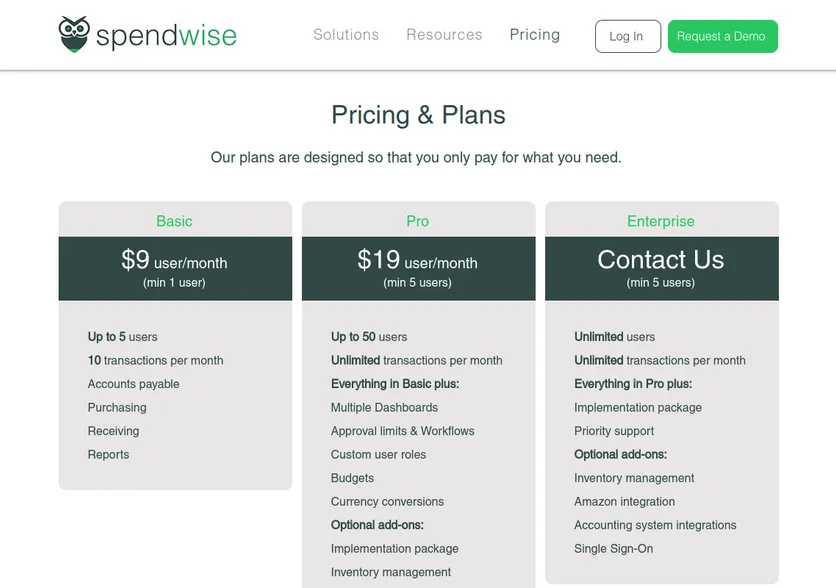
Paid tool Starting price: $9/user/month · Basic from $9 per user a month for up to 5 users and 10 transactions a month; Pro from $19 per user a month for 5 to 50 users with unlimited transactions; Enterprise quoted
Free plan: No free plan; 30-day free trial
Spendwise is the cheapest way into real purchasing software, built for small teams rather than scaled down from an enterprise suite. This Spendwise Basic plan costs nine dollars per user a month for up to five users and covers purchasing, receiving, accounts payable and reports, with ten transactions a month. A business raising a handful of orders a week will find the workflow complete, though the transaction cap forces a step up once ordering turns weekly.
What we like
- Cheapest real purchasing software in this list
- Covers purchasing, receiving and accounts payable on Basic
- No implementation project, most teams set up in weeks
Watch out for
- Basic caps at five users and ten transactions a month
- Inventory and accounting integrations are paid add-ons
How to try it
- Open the Spendwise pricing page and start the free trial
- Add your first five users and raise ten real orders
- Check the transaction count before the month ends
2. Tradogram
Best for: Small teams that want core purchasing for one flat monthly fee
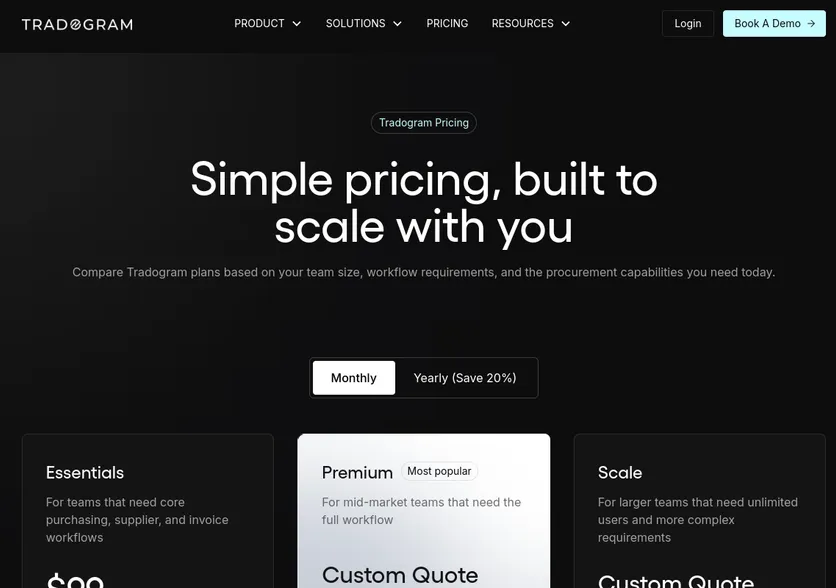
Paid tool Starting price: $79.20/month · Essentials $79.20 a month billed annually ($950.40 a year) or $99 billed monthly, for 1 or more users plus an unpublished fee per extra user; Premium and Scale quoted
Free plan: No free plan; no trial listed
Tradogram gives small teams core purchasing, supplier and invoice workflows for one flat monthly fee, with no per-seat maths to do. This Tradogram Essentials plan costs just under eighty dollars a month billed annually and covers purchase orders, supplier management, invoices, expenses and payments. Extra users carry an unpublished fee, so ask for the total in writing before you count the whole team.
What we like
- One flat monthly fee with no per-seat maths
- Purchase orders, suppliers, invoices and expenses in one plan
- Annual billing saves twenty percent against monthly
Watch out for
- Extra users carry an unpublished fee
- Requisitions and budget tracking need the quoted Premium plan
How to try it
- Open the Tradogram pricing page and compare monthly and annual billing
- List your team size and ask for the extra-user fee in writing
- Test the purchase order flow with one real supplier
3. Precoro
Best for: Mid-market teams that need central purchase control
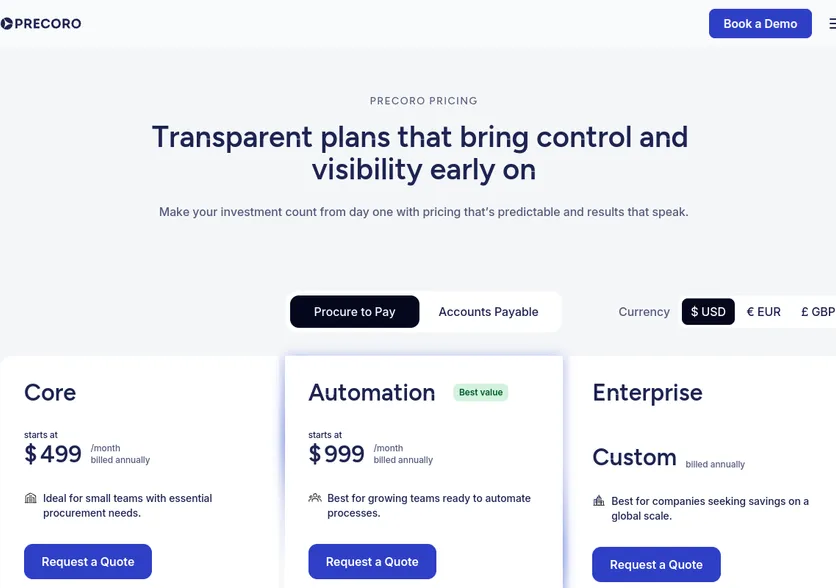
Paid tool Starting price: $499/month · Core from $499 a month billed annually; Automation from $999 a month; Enterprise quoted; a standalone AP Module from $499 a month
Free plan: No free plan; free demo available
Precoro is the full procure-to-pay platform for teams that have outgrown spreadsheets and email approvals, with budgets enforced before money moves. This Precoro Core plan costs four hundred ninety-nine dollars a month billed annually and covers purchase requests, orders, receipts, invoices, three-way matching and automated approvals. A finance lead who wants every approved order to create a committed-spend record will find the control worth the flat fee.
What we like
- Published prices, no sales call needed to budget
- Budgets enforced before spend happens
- Three-way matching and automated approvals on Core
Watch out for
- No free plan, only a demo on the pricing page
- Intake, PunchOut and real-time budgets need the Automation plan
How to try it
- Open the Precoro pricing page and compare Core and Automation
- Book a demo and ask for the annual total in writing
- Test one approval flow with a real purchase request
4. ProcurementExpress
Best for: Nonprofits and small finance teams that buy against budgets
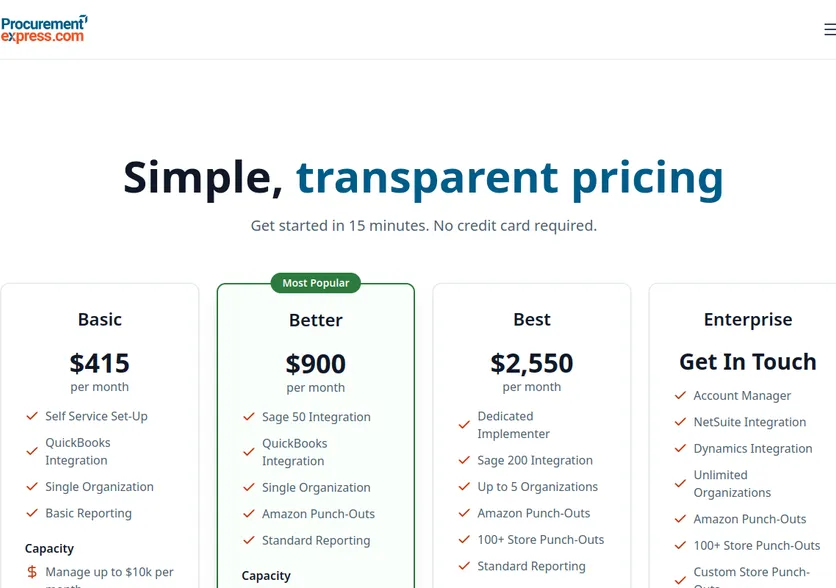
Paid tool Starting price: $415/month · Basic $415 a month flat for up to $10,000 of managed spend a month; Better $900 and Best $2,550; Enterprise quoted; no annual rate published
Free plan: No free plan; 14-day free trial
ProcurementExpress is purchase order and approval software that prices by the spend you manage, not by headcount, so adding requesters never changes the bill. This ProcurementExpress Basic plan costs four hundred fifteen dollars a month and covers up to ten thousand dollars of managed spend a month with self-service setup and a QuickBooks integration. Nonprofits and grant-funded teams will like the budget checks on every order and the audit-ready records.
What we like
- Flat fee by spend, not headcount, so requesters cost nothing extra
- Budget checks on every order with audit-ready records
- Fourteen-day trial with no card required
Watch out for
- Basic covers only ten thousand dollars of spend a month
- A setup fee is reported in some cases, so ask in writing
How to try it
- Open the ProcurementExpress pricing page and check your monthly spend
- Start the fourteen-day trial and raise one real purchase order
- Ask about the setup fee before you commit
5. ProcureDesk
Best for: Finance-led teams that want a quicker month-end close
Paid tool Starting price: $830/month · Startup $830 a month billed annually ($9,960 a year) with 10 users included, $20 a month per extra user; Growth $1,250 a month with 20 users; Enterprise custom
Free plan: No free plan; 14-day free trial
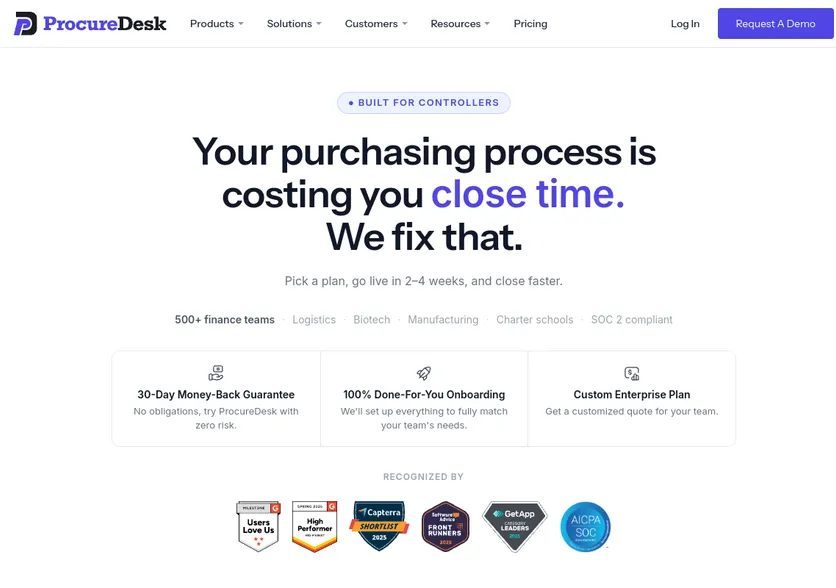
ProcureDesk pairs purchasing with accounts payable automation, promising finance teams a faster month-end close. This ProcureDesk Startup plan costs eight hundred thirty dollars a month billed annually and covers ten users, with requests, approvals, purchase orders, receiving and three-way invoice matching. A controller who wants budgets enforced before spend happens and a done-for-you setup will find the flat fee easy to budget.
What we like
- Flat fee covers ten users with guided setup included
- Three-way matching with OCR on the Startup plan
- Ninety-day outcome guarantee tied to month-end close
Watch out for
- Startup has no supplier onboarding and no single sign-on
- Monthly plans are available but their price is not published
How to try it
- Open the ProcureDesk pricing page and check the Startup plan
- Start the fourteen-day trial with your QuickBooks or Xero data
- Run one month-end close and time it against the old process
6. ApprovalMax
Best for: Xero and QuickBooks Online users who need multi-step bill and PO approvals
Paid tool Starting price: $49.50/organisation/month · Standard $49.50 per organisation a month billed annually or $59.40 billed monthly; Advanced $79.20 and Premium $111 a month billed annually; NetSuite quoted; prices exclude tax
Free plan: No free plan; 14-day free trial
ApprovalMax is the approval layer that sits on top of QuickBooks Online or Xero, routing bills and purchase orders through multi-step workflows with a full audit trail. This ApprovalMax Standard plan costs just under fifty dollars per organisation a month billed annually and covers unlimited users, requests and approvals. Nothing posts to the ledger until the right people have signed off, which is the control a small finance team needs most.
What we like
- One flat fee per organisation covers unlimited approvers
- Multi-step approval workflows with a full audit trail
- Works inside Xero and QuickBooks Online, no new ledger
Watch out for
- Only works on top of Xero, QuickBooks Online or NetSuite
- Bill-to-PO matching needs the Advanced plan
How to try it
- Open the ApprovalMax pricing page and check the Standard plan
- Start the fourteen-day trial and connect your accounting system
- Build one multi-step approval chain and test it with a real bill
7. BILL
Best for: Businesses that want AP automation with procurement on the Corporate plan
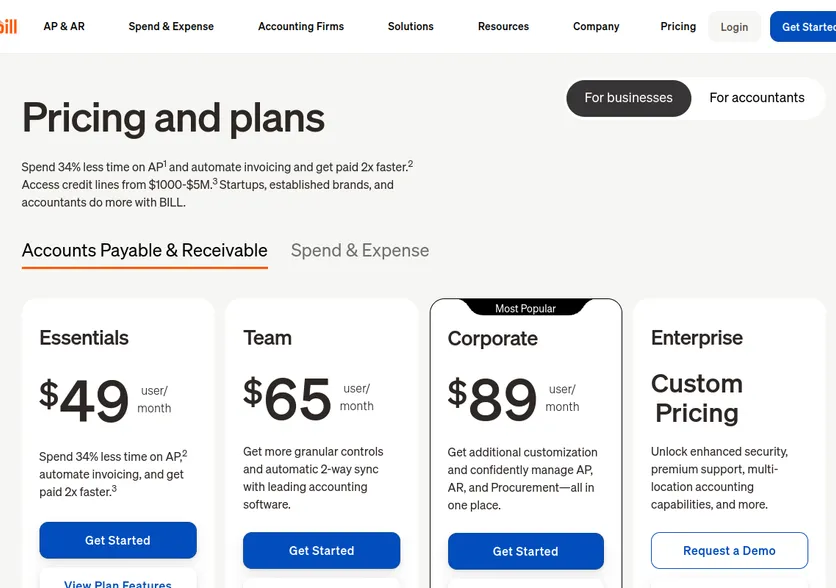
Paid tool Starting price: $89/user/month · Corporate from $89 per user a month and includes procurement with purchase requests, POs and two-way matching; Essentials from $49 and Team from $65 do not include procurement; Enterprise quoted; payment fees extra
Free plan: No free plan; free trial available
BILL is the accounts payable platform that adds procurement on its Corporate plan, pairing purchase requests and orders with bill capture, approvals and payments. This BILL Corporate plan costs eighty-nine dollars per user a month and includes procurement with purchase requests, purchase orders and two-way matching, plus custom approval policies. A business already paying vendors through BILL will find procurement a natural extension, though payment fees sit on top of the subscription.
What we like
- Publishes its prices, rare in AP automation
- Spend and Expense cards and budgets cost nothing per user
- Corporate adds procurement with unlimited purchase requesters
Watch out for
- Procurement needs the Corporate plan at eighty-nine dollars a user
- Payment fees sit on top of the subscription for every payment
How to try it
- Open the BILL pricing page and compare Essentials, Team and Corporate
- Start with Spend and Expense free and add AP when volume grows
- Check the payment fee table before you budget the first month
Prices above were checked on each vendor’s own website on Nov 26, 2026 and can change — the vendor’s page is the final word. Vendor links are editorial: nobody paid to be listed or ranked here. Vendors who want a featured listing can see how it works on our Get listed page.
What purchasing software for small businesses costs in 2026
Purchasing software splits into two camps, and the split matters more than the headline rate. Per-user tools from Spendwise, BILL and ApprovalMax charge for each seat, while flat-fee tools from Tradogram, Precoro, ProcureDesk and ProcurementExpress charge one monthly fee whatever the headcount. User limits and transaction caps set the real floor, because Spendwise Basic stops at five users and ten orders a month, so always work out the total for your team size and order volume before you compare.
Start with the free trial on two tools and run one real purchase through each, from request to approval to invoice match. Compare how fast approvals come back, how clear the budget check reads, and whether the accounting integration needs a pricier plan. Pick the tool your requesters will actually use, because a purchasing system nobody opens is worse than a spreadsheet everyone does.
Before you buy
- Count your users and orders first, because Spendwise Basic stops at five users and ten transactions a month.
- Compare flat fees against per-user pricing, because ProcurementExpress charges by spend while BILL charges per user.
- Check what the entry plan leaves out, because BILL procurement needs Corporate and Tradogram requisitions need Premium.
- Test the trial with one real purchase, because most tools here offer a free trial of fourteen or thirty days.
- Ask about setup and extra-user fees in writing, because Tradogram and ProcurementExpress both hide fees off the price page.
Official websites
Official websites of the products reviewed above. Features and prices were checked against these sites when this guide was written, and they can change, so confirm on the vendor site before you buy.
Frequently asked questions
Which purchasing software is best for small businesses in 2026?
Spendwise, from nine dollars per user a month, is the safest default for a very small team that raises a few orders a week. Precoro is the best full procurement platform at four hundred ninety-nine dollars a month billed annually, and Tradogram is the best flat low-cost option at just under eighty dollars a month. Pick Spendwise for the cheapest start, Precoro for full control, or Tradogram for one flat fee.
How much does purchasing software for small businesses cost?
Per-user plans run from nine dollars a user a month on Spendwise Basic to eighty-nine dollars on BILL Corporate, while flat plans run from just under eighty dollars a month on Tradogram to four hundred fifteen dollars on ProcurementExpress and eight hundred thirty dollars on ProcureDesk. ApprovalMax charges one flat fee per organisation from just under fifty dollars a month. Add setup and payment fees on top, because several tools charge those separately.
Is there a free purchasing software for small businesses?
No tool here offers a permanent free plan, though BILL Spend and Expense cards and budgets cost nothing per user. The other tools offer free trials of fourteen or thirty days instead, so you can test the whole workflow before you pay. A trial is enough to raise real orders and check approvals, but the paid plan starts once the trial ends.
What should purchasing software for small businesses include?
Look for purchase requests, approvals, purchase orders, receiving and invoice matching in one login, plus budget checks that stop overspend before money moves. Check the user limit and the transaction cap before you compare rates, because a cheap per-user price means nothing below the floor. Test the trial with one real order, from request to payment, before you move the whole team.
Do I need purchasing software if I already use QuickBooks?
Yes, if purchase approvals and budgets live in email and spreadsheets, because QuickBooks records what you spent but does not control spending before it happens. Spendwise, Tradogram, Precoro, ProcureDesk and ProcurementExpress all sync with QuickBooks, while ApprovalMax adds approvals inside it. Pick the tool that checks the budget before the order goes out, not after.
Need everyday business help too? Try Toolsvine's free business tools for small businesses right in your browser.
Browse Business Tools tools


