
On this page
When a client calls with a frozen laptop, remote control software lets you fix it from your own desk instead of driving across town. The tools below connect you to a customer computer in seconds, with screen sharing, file transfer and a chat box built in. Prices run from about six dollars a month to just over fifty, and most offer a free plan or trial so you can test a real session first. TeamViewer is our first pick — the most complete remote support tool for a small business.
How we researched this
We started with the remote control tools small businesses actually buy, then read each price on the vendor pricing page on November 26, 2026 and noted the free plan or trial each one carries. We judged them for a one-person or small team support desk that needs unattended access, file transfer and a session that starts in seconds, and we kept only tools with a published price.
Compare the tools
| Name | Best for | Starting price | Free plan | |
|---|---|---|---|---|
 TeamViewer | Small businesses that need the most complete remote support tool | $50.90/month | Free for personal use only | Visit |
 AnyDesk | Small teams that want fast sessions at a lower price | $28.90/month | Free for personal use only | Visit |
 Splashtop | One-person businesses that need cheap remote access to their own computers | $6/month | Free trial, no free plan | Visit |
 RemotePC | Small offices that want several computers covered for one flat yearly price | $99.50/year | Free trial, no free plan | Visit |
 Zoho Assist | Small teams that already use Zoho and want cheap per-technician pricing | $10/technician/month | Free plan for one technician and five unattended computers | Visit |
 ConnectWise ScreenConnect | Small IT teams that want one simple plan with no per-user surprises | $30/month | Free trial, no free plan | Visit |
 LogMeIn Resolve | Small teams that want a free start and room to grow | $23/month | Free plan for up to three agents | Visit |
The remote control software for small business, compared
1. TeamViewer
Best for: Small businesses that need the most complete remote support tool
Paid tool Starting price: $50.90/month · Business plan, $50.90 a month billed annually, one user and one concurrent session
Free plan: Free for personal use only
TeamViewer is the best-known remote support tool, and it earns that spot with a session that starts in seconds and rarely drops. This TeamViewer Business plan gives you unattended access, file transfer and a chat box in one window, plus a mobile app for fixing computers on the move. A support technician can take over a client machine, solve the problem and log the session without leaving the office.
What we like
- Sessions start in seconds and rarely drop
- Unattended access plus file transfer in one window
- Mobile app for fixing computers on the move
Watch out for
- Business costs fifty dollars ninety a month billed annually
- Free plan is for personal use only
How to try it
- Open the TeamViewer pricing page and start a trial
- Install the client on your computer and the remote machine
- Start a session with the partner code and take control
2. AnyDesk
Best for: Small teams that want fast sessions at a lower price
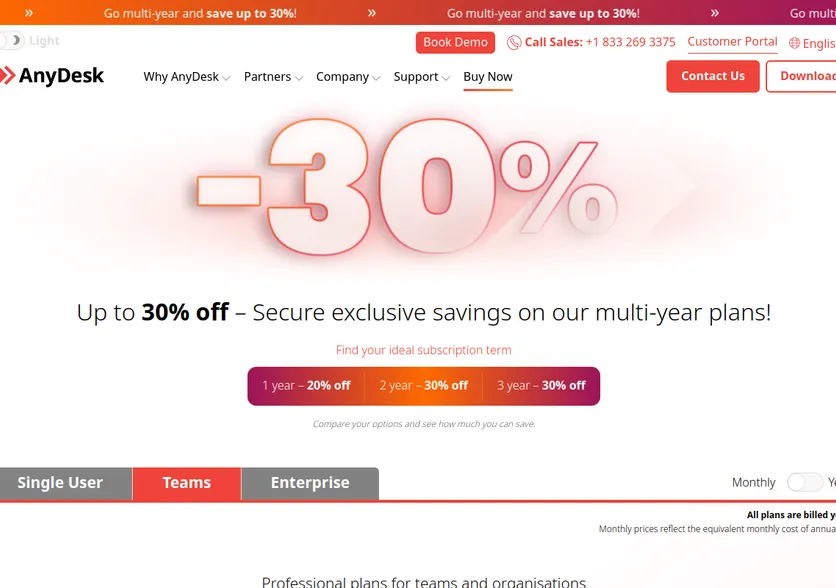
Paid tool Starting price: $28.90/month · Solo plan, $28.90 a month billed annually; list price, with 20% off the first year as a promo
Free plan: Free for personal use only
AnyDesk is the lighter and cheaper rival to TeamViewer, built around a tiny download and a session that feels instant. This AnyDesk Solo plan gives you unattended access, file transfer and a whiteboard for pointing at the problem on screen. A freelancer can support clients from a laptop anywhere, with no server to run and no heavy install to manage.
What we like
- Tiny download and sessions that feel instant
- Cheaper than TeamViewer for one user
- Whiteboard helps you point at the problem
Watch out for
- Solo costs twenty-eight dollars ninety a month billed annually
- Free plan is for personal use only
How to try it
- Open the AnyDesk pricing page and download the app
- Share your address code with the client
- Accept the session and take control of their screen
3. Splashtop
Best for: One-person businesses that need cheap remote access to their own computers
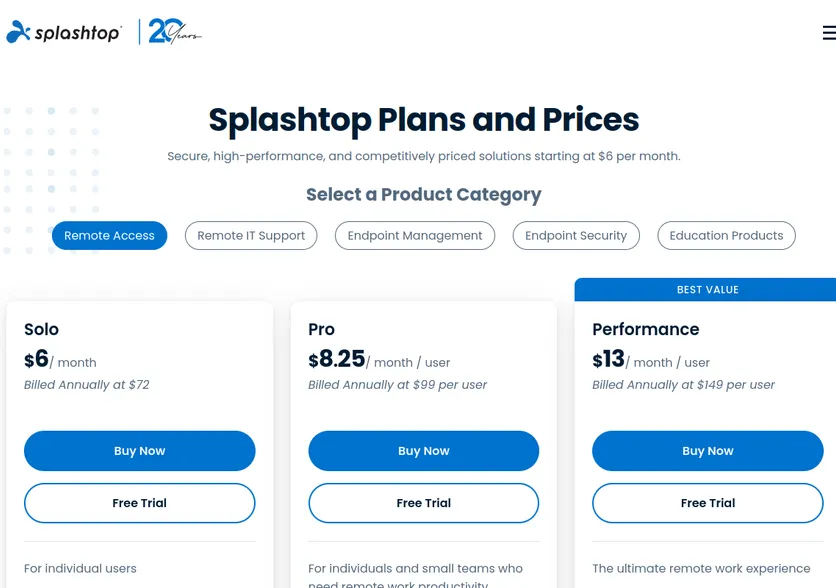
Paid tool Starting price: $6/month · Remote Access Solo, $6 a month billed annually ($72 a year), one user and two computers; price rose from $5 to $6 on March 1, 2026
Free plan: Free trial, no free plan
Splashtop is the budget pick here, and it covers the most common small business need: reaching your own office computer from home. This Splashtop Solo plan gives you remote access to two computers, file transfer and a clean mobile app for working on the move. A shop owner can check the office machine from home at night without paying for a full support suite.
What we like
- Cheapest paid plan in this list
- Simple setup for your own computers
- Clean mobile app for working on the move
Watch out for
- Solo costs six dollars a month billed annually
- Covers two computers on the Solo plan
How to try it
- Open the Splashtop pricing page and start a trial
- Install the streamer on your office computer
- Connect from your laptop or phone and work as normal
4. RemotePC
Best for: Small offices that want several computers covered for one flat yearly price
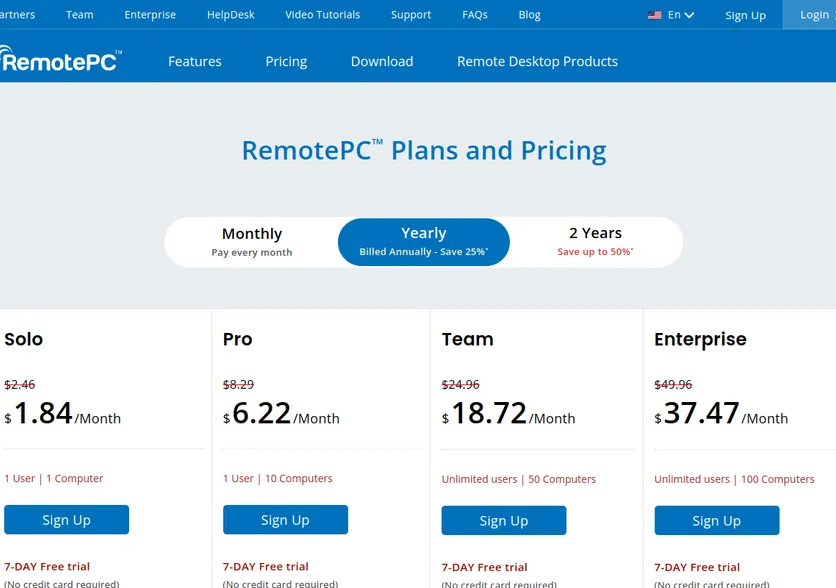
Paid tool Starting price: $99.50/year · SOHO plan, $99.50 a year for five computers and unlimited users; Consumer plan is $29.50 a year for two computers
Free plan: Free trial, no free plan
RemotePC charges by the computer instead of by the user, which makes it the cheapest way to cover a whole small office. This RemotePC SOHO plan covers five computers with unlimited users, file transfer and remote printing for one flat yearly price. An office manager can give the whole team access to the office machines without buying a seat for every person.
What we like
- One flat yearly price for five computers
- Unlimited users on the SOHO plan
- Remote printing included in the plan
Watch out for
- SOHO costs ninety-nine dollars fifty a year
- Per-computer pricing grows with more machines
How to try it
- Open the RemotePC pricing page and start a trial
- Install the agent on each office computer
- Sign in from any device and pick a computer to control
5. Zoho Assist
Best for: Small teams that already use Zoho and want cheap per-technician pricing
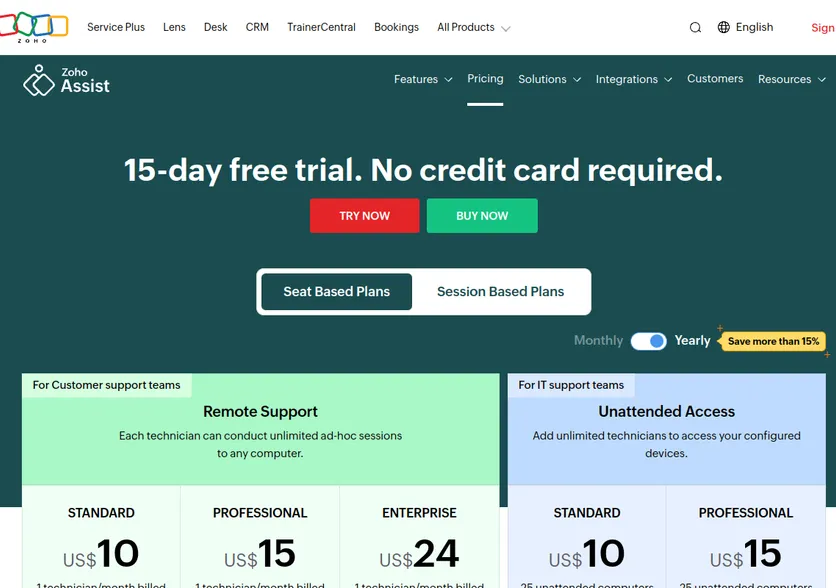
Paid tool Starting price: $10/technician/month · Remote Support Standard, $10 a technician a month billed annually, $12 billed monthly; free plan covers one technician and five unattended computers
Free plan: Free plan for one technician and five unattended computers
Zoho Assist is the value pick for a small support team, with per-technician pricing that stays low as you add customers. This Zoho Assist Standard plan gives you unattended access, remote reboot and session recording for ten dollars a technician a month. A three-person support team can run its whole remote desk for less than a single TeamViewer seat.
What we like
- Cheapest per-technician price here
- Free plan covers one technician and five computers
- Session recording for training and audits
Watch out for
- Standard costs ten dollars a technician a month billed annually
- Monthly billing costs twelve dollars a technician
How to try it
- Open the Zoho Assist pricing page and create a free account
- Add your technicians and their unattended computers
- Start a session from the dashboard and take control
6. ConnectWise ScreenConnect
Best for: Small IT teams that want one simple plan with no per-user surprises
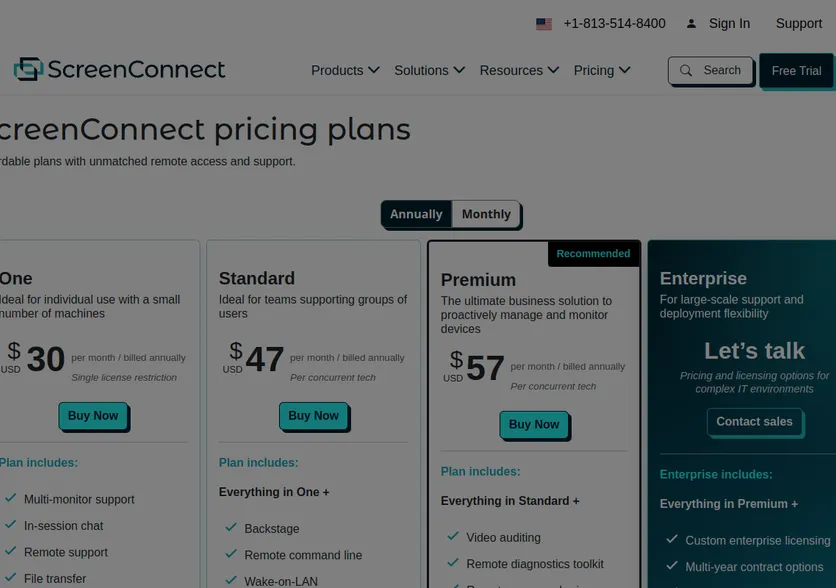
Paid tool Starting price: $30/month · One plan, $30 a month billed annually, one license, one session and ten unattended agents; Standard is $47 per concurrent tech
Free plan: Free trial, no free plan
ScreenConnect is the IT professional pick, a single plan with no tiers to compare and no per-user maths to do. This ScreenConnect One plan gives you one license, one session and ten unattended agents for thirty dollars a month. A small IT team can support a client base of unattended machines from one dashboard without worrying about seat counts.
What we like
- One simple plan with no tiers to compare
- Ten unattended agents included in the price
- Built for IT teams, not just casual use
Watch out for
- One plan costs thirty dollars a month billed annually
- Only one session runs at a time
How to try it
- Open the ScreenConnect pricing page and start a trial
- Install the agent on your unattended machines
- Start a session from the dashboard and connect
7. LogMeIn Resolve
Best for: Small teams that want a free start and room to grow
Paid tool Starting price: $23/month · Starter plan, $23 a month for 25 endpoints billed annually ($29 billed monthly); Advanced $63 a month and Complete $75 a month; remote support is an add-on on Starter
Free plan: Free plan for up to three agents
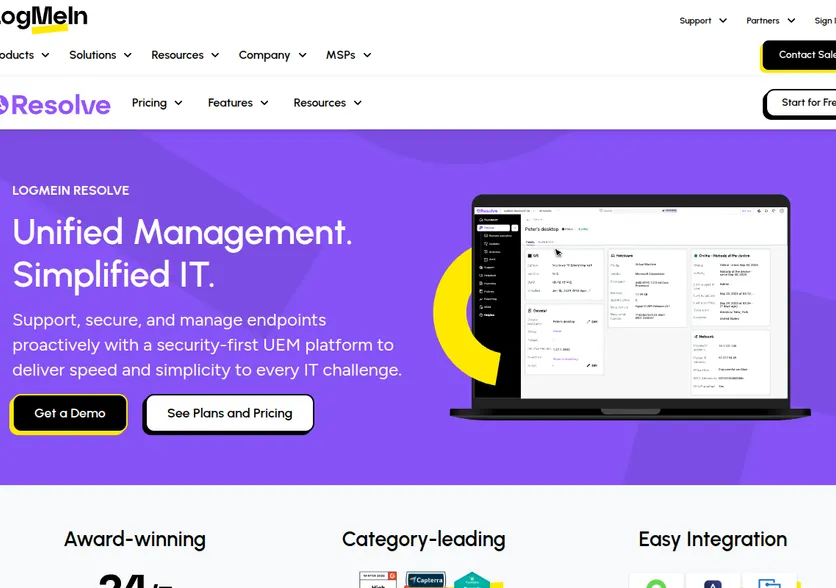
LogMeIn Resolve (formerly GoTo Resolve) is the easiest way to start, because its free plan covers three agents and the paid plans grow with your team. This LogMeIn Resolve Starter plan gives you unattended access to 25 endpoints, background tools and a clean console for twenty-three dollars a month. A growing support team can start free, learn the console, and pay only when the third agent is not enough.
What we like
- Free plan covers up to three agents
- Paid plans grow with your team
- Background tools fix machines without disturbing users
Watch out for
- Starter costs twenty-three dollars a month billed annually
- Full support features sit on higher plans
How to try it
- Open the LogMeIn Resolve pricing page and create a free account
- Add your agents and their unattended devices
- Start a session and use the background tools
Prices above were checked on each vendor’s own website on Nov 26, 2026 and can change — the vendor’s page is the final word. Vendor links are editorial: nobody paid to be listed or ranked here. Vendors who want a featured listing can see how it works on our Get listed page.
What remote control software costs in 2026
Prices here run from about six dollars a month for Splashtop to just over fifty for TeamViewer, and the pricing model matters as much as the number. TeamViewer and AnyDesk charge per user, RemotePC charges per computer, and Zoho Assist charges per technician, so the cheapest tool for a one-person desk is not the cheapest for a five-person team. The headline plan each vendor shows on its own pricing page is the number in the table above, checked on November 26, 2026.
Start with the free plan or trial on two tools and run a real support session through both. Compare how fast each one connects and how the screen feels once you are working, then pick the tool your team will open every day. A twenty-three-dollar tool that connects in seconds beats a fifty-dollar tool that drops mid-session.
Before you buy
- Count your seats and computers first, because some plans charge per user and others charge per machine.
- Check the unattended access limit, because a cheap plan with two computers is no good for a whole office.
- Test a real session before you pay, because a demo never shows how the screen feels on a slow connection.
- Ask whether the tool fits your work: Splashtop suits your own computers, TeamViewer suits client support, and RemotePC suits a small office.
- Add up the yearly cost, because annual billing on most tools here cuts the monthly price by a fifth or more.
Official websites
Official websites of the products reviewed above. Features and prices were checked against these sites when this guide was written, and they can change, so confirm on the vendor site before you buy.
Frequently asked questions
Which remote control software is best for a small business in 2026?
TeamViewer, at about fifty dollars ninety a month billed annually, is the safest default because its sessions start in seconds and rarely drop. Splashtop is better when you only need to reach your own computers, at six dollars a month, and Zoho Assist wins for a small team at ten dollars a technician a month. LogMeIn Resolve is the best free start, with a free plan for up to three agents.
What is the cheapest remote control software for small business?
Splashtop Solo, at six dollars a month billed annually, is the cheapest paid plan in this list and covers two of your own computers. Zoho Assist Standard is ten dollars a technician a month, and LogMeIn Resolve offers a free plan for up to three agents. RemotePC SOHO costs ninety-nine dollars fifty a year and covers five computers with unlimited users.
Can I use remote control software for free?
Yes, LogMeIn Resolve offers a free plan for up to three agents, and Zoho Assist has a free plan for one technician and five unattended computers. TeamViewer and AnyDesk are free for personal use only, so a business needs a paid plan. Most tools here also offer a free trial, which is enough to test a real session before you commit.
What is the difference between remote access and remote support software?
Remote access connects you to your own computers, so you can work from home as if you were at the office, and Splashtop and RemotePC are built for that. Remote support connects you to a customer computer to fix a problem, and TeamViewer, AnyDesk and LogMeIn Resolve are built for that. Some tools do both, so pick the one that matches the job you do most often.
Do I need unattended access for remote control software?
You need it when you want to reach a computer without someone sitting there to accept the session, which is common for servers and office machines. Splashtop, RemotePC, Zoho Assist and ScreenConnect all include unattended access on their entry plans. If you only fix computers while the owner watches, a simple attended session is enough and a cheaper plan will do.
Need free business help too? Try Toolsvine's free business tools for quick calculations right in your browser.
Browse Business Tools tools


