
On this page
Running a small business means juggling sales, projects, invoices and people in one day, and a single management suite can replace four separate subscriptions. The catch is pricing: some vendors charge per seat, some charge one flat rate for the whole company, and the cheapest headline often hides a seat minimum or a first-year discount. We checked every price below on the vendor's own pricing page and used list prices throughout. For the lowest per-seat cost with real depth, start with ClickUp.
How we researched this
We verified every price on the vendor's own pricing page on 2026-11-27 and kept only tools with a published list price. HubSpot was dropped because its own pages show four different Starter figures, from seven to twenty dollars a seat, so no single list price could be trusted. Wrike was left out because its business tiers are quote-led for small teams.
Compare the tools
| Name | Best for | Starting price | Free plan | |
|---|---|---|---|---|
 Bitrix24 | Small teams that want CRM, projects, chat and telephony for one flat fee. | $49/month | Free plan for one to two users with unlimited tasks and CRM | Visit |
 ClickUp | Small teams that want deep project tools at the lowest per-seat price here. | $9/user/month | Free Forever plan with unlimited members and tasks | Visit |
 Monday | Visual teams that think in boards and want simple no-code automations. | $9/seat/month | Free plan for up to two seats and three boards | Visit |
 Asana | Teams that plan to deadlines and need timelines, goals and portfolios. | $10.99/user/month | Personal plan free for up to two users | Visit |
 Zoho One | Businesses where nearly everyone needs the full suite of apps. | $37/employee/month | No free plan; thirty-day free trial | Visit |
 Odoo | Businesses that want an open-source ERP with every app for one fee. | $31.10/user/month | One App Free: one app free for unlimited users | Visit |
 Trello | Small teams that want simple visual boards with calendar and timeline views. | $10/user/month | Free plan for up to ten collaborators per Workspace | Visit |
The best small business management software, compared
1. Bitrix24
Best for: Small teams that want CRM, projects, chat and telephony for one flat fee.
Paid tool Starting price: $49/month · Basic plan, flat per organization for up to five users, billed annually; sixty-nine dollars a month billed monthly
Free plan: Free plan for one to two users with unlimited tasks and CRM
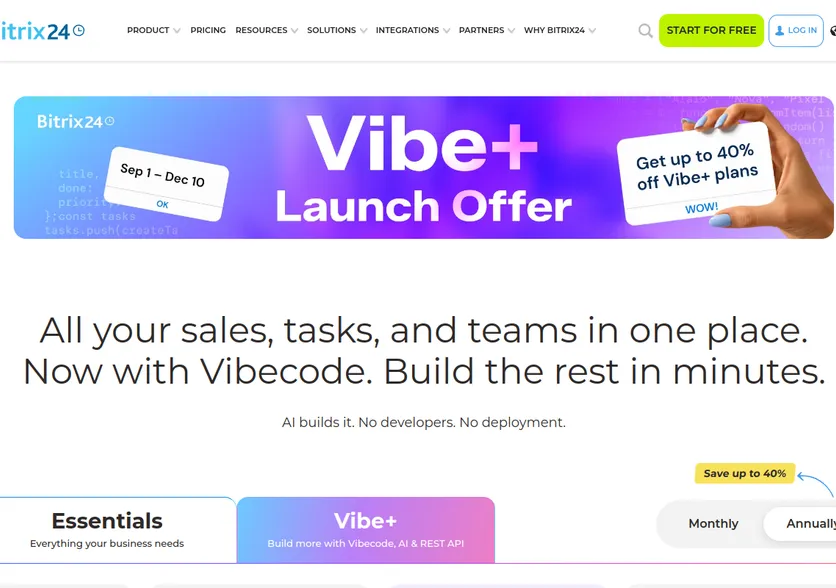
Bitrix24 bundles a CRM, task and project tools, team chat, video calls, telephony and a website builder into one workspace, which makes it the broadest suite in this list. Its unusual pricing charges one flat rate per organization instead of per seat, so a five-person team pays forty-nine dollars a month on annual billing no matter how the seats are used. The trade-off is depth: the Basic tier caps storage at twenty-four gigabytes and limits automation rules, so growing teams step up to Standard at ninety-nine dollars. See Bitrix24 pricing
What we like
- One flat rate covers the whole organization up to the user cap
- CRM, projects, chat, telephony and sites in a single login
- Free plan with unlimited users for the smallest teams
Watch out for
- The sixth user forces a jump to Standard at ninety-nine dollars
- Basic limits automation rules, storage and Market apps
How to try it
- Start on the free plan and add your team and contacts
- Build one pipeline for sales and one board for projects
- Move to Basic when you need telephony or website tools
2. ClickUp
Best for: Small teams that want deep project tools at the lowest per-seat price here.
Paid tool Starting price: $9/user/month · Core plan, $9 a user a month billed annually ($12 billed monthly); Business $17 a user a month billed annually
Free plan: Free Forever plan with unlimited members and tasks
ClickUp packs tasks, docs, whiteboards, chat, goals, time tracking and Gantt charts into one workspace, and its Unlimited plan costs seven dollars per user a month on annual billing, the lowest per-seat price in this comparison. That tier removes the storage cap, unlocks unlimited spaces and integrations, and adds native time tracking and portfolio views that rivals gate behind pricier plans. The cost creep comes later: AI features are separate add-ons, and heavy automation use can push a team toward Business at twelve dollars. See ClickUp pricing

What we like
- Lowest per-seat price in this list at seven dollars a user
- Gantt charts, time tracking and goals included on Unlimited
- Free plan has no limit on members
Watch out for
- AI features cost extra as add-ons on every plan
- The depth of options can overwhelm a first-time setup
How to try it
- Create a workspace and import your existing task list
- Set up spaces for each department and add Gantt views
- Turn on time tracking once the team is settled
3. Monday
Best for: Visual teams that think in boards and want simple no-code automations.
Paid tool Starting price: $9/seat/month · Basic plan billed annually; paid plans start at a three-seat minimum
Free plan: Free plan for up to two seats and three boards
Monday turns work into colourful boards where every project, client and deadline is visible at a glance, and its Basic plan costs nine dollars a seat a month on annual billing. The platform adds unlimited items and free viewers on paid plans, so people who only need to look at a board never consume a seat. The catch is the three-seat minimum, which means a solo owner still pays twenty-seven dollars a month, and timeline and Gantt views only arrive on Standard at twelve dollars. See Monday pricing

What we like
- Boards are visual and easy for non-technical staff to learn
- Viewers are free on every paid plan
- No-code automations start on Standard
Watch out for
- Three-seat minimum means solo users pay for seats they do not use
- Timeline and Gantt views need Standard at twelve dollars a seat
How to try it
- Pick a board template that matches your main workflow
- Invite the team and set viewers to free read-only access
- Add automations for status changes and due-date reminders
4. Asana
Best for: Teams that plan to deadlines and need timelines, goals and portfolios.
Paid tool Starting price: $10.99/user/month · Starter plan billed annually; thirteen dollars and forty-nine cents per user a month billed monthly
Free plan: Personal plan free for up to two users
Asana is the most structured planner in this list, built around timelines, Gantt views, dashboards and unlimited automations on its Starter plan. Starter costs ten dollars and ninety-nine cents per user a month on annual billing and adds custom fields, forms and free guests, which makes it a strong fit for teams that run client work to fixed dates. The trade-off is seat blocks: seats are sold in increments, so a team of six can end up paying for ten. See Asana pricing

What we like
- Timeline and Gantt views included on the first paid tier
- Unlimited automations and free guests on Starter
- Goals and portfolios scale planning as the team grows
Watch out for
- Seats are sold in blocks, so odd team sizes overpay
- Advanced features like workload need the twenty-four dollar tier
How to try it
- Start with the Personal plan to map one real project
- Switch to Starter and build a timeline with dependencies
- Add dashboards so managers see progress without asking
5. Zoho One
Best for: Businesses where nearly everyone needs the full suite of apps.
Paid tool Starting price: $37/employee/month · All Employee plan billed annually; forty-five dollars per employee a month billed monthly
Free plan: No free plan; thirty-day free trial
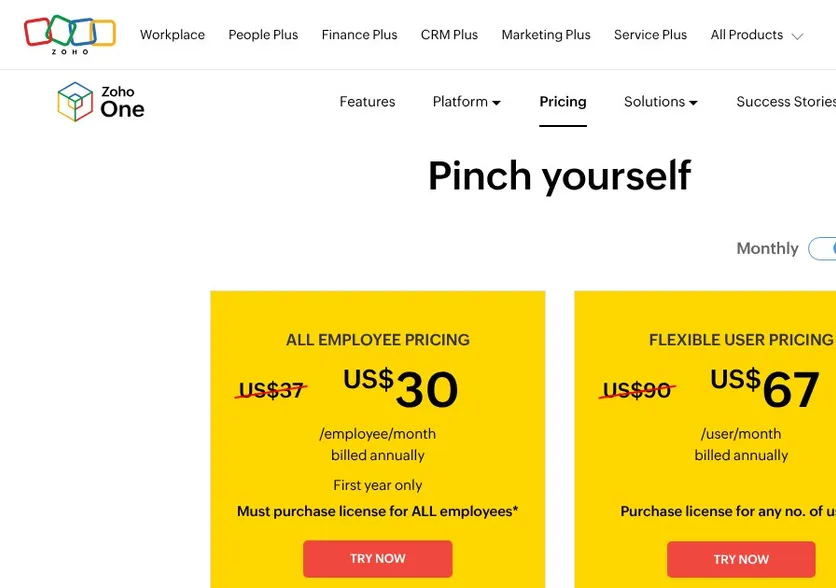
Zoho One bundles more than forty business applications, including CRM, finance, HR, support and collaboration tools, under one login and one invoice. Its All Employee plan costs thirty-seven dollars per employee a month on annual billing, which is strong value when most of the company uses the suite, but it requires a licence for every person on payroll. Teams where only a few people need access should look at the Flexible User plan instead, which costs ninety dollars per user a month on annual billing. See Zoho One pricing
What we like
- More than forty apps under one login and one invoice
- All Employee pricing is cheap when the whole team uses it
- Thirty-day free trial with no card required
Watch out for
- All Employee pricing forces a licence for every person on payroll
- The page also shows lower first-year figures that do not renew
How to try it
- Count how many staff actually need the apps
- Compare All Employee against Flexible User for your headcount
- Trial the suite for thirty days before committing
6. Odoo
Best for: Businesses that want an open-source ERP with every app for one fee.
Paid tool Starting price: $31.10/user/month · Standard list price billed annually; the vendor shows a first-year rate of twenty-four dollars and ninety cents per user a month
Free plan: One App Free: one app free for unlimited users
Odoo is a modular business suite with more than eighty integrated apps covering sales, inventory, accounting, manufacturing, e-commerce, projects and HR in one shared database. Its Standard plan lists thirty-one dollars and ten cents per user a month on annual billing, and that single fee unlocks every app, so a company never pays per module. The headline on the vendor page shows a lower first-year rate of twenty-four dollars and ninety cents, which rises to the list price after twelve months, so budget on the list figure. See Odoo pricing
What we like
- One fee unlocks every app with no per-module charges
- Open-source core gives developers unusual freedom
- One app free forever for unlimited users
Watch out for
- The advertised rate is a first-year discount that rises after twelve months
- Standard runs on Odoo Online only with no custom modules
How to try it
- Start with One App Free for your most urgent function
- Add a second app to move onto the Standard plan
- Map your invoicing and inventory flows before go-live
7. Trello
Best for: Small teams that want simple visual boards with calendar and timeline views.
Paid tool Starting price: $10/user/month · Premium plan billed annually; twelve dollars and fifty cents per user a month billed monthly
Free plan: Free plan for up to ten collaborators per Workspace
Trello organises work as boards made of lists and cards, and it is the simplest tool in this list to learn: most teams are running in an afternoon. Its Premium plan costs ten dollars per user a month on annual billing and adds calendar, timeline, table, dashboard and map views, plus unlimited automation runs and admin controls. The ceiling is real, though: Trello has no native task dependencies or time tracking, so teams with complex schedules outgrow it. See Trello pricing

What we like
- Boards take minutes to learn and need no training
- Premium adds five extra views and unlimited automation
- Free plan covers ten collaborators and unlimited cards
Watch out for
- No native task dependencies or time tracking
- Timeline and dashboard views need the Premium tier
How to try it
- Create a board with lists for each stage of work
- Add due dates and checklists to every card
- Upgrade to Premium when you need timeline views
Prices above were checked on each vendor’s own website on Nov 27, 2026 and can change — the vendor’s page is the final word. Vendor links are editorial: nobody paid to be listed or ranked here. Vendors who want a featured listing can see how it works on our Get listed page.
What a small business actually pays
For a five-person team, the cheapest honest monthly cost in this list is ClickUp Core at forty-five dollars, tied with Monday Basic at forty-five dollars once the three-seat minimum is met. Bitrix24 Basic looks similar at forty-nine dollars, but that flat fee covers the whole organisation, so it wins for teams of four or five and loses for solo owners. Zoho One is the wild card: All Employee pricing at thirty-seven dollars per person only makes sense when nearly everyone uses the apps, while a team where two people need access pays far less on the Flexible User plan.
Watch the renewal step most of all. Odoo Standard is advertised at twenty-four dollars and ninety cents, but that is a first-year rate that rises to thirty-one dollars and ten cents after twelve months, and Zoho One shows similar first-year figures on its page. Always budget on the list price, multiply by your real headcount, and trial the tool on one live project before rolling it out to everyone.
Before you buy
- Multiply the per-seat price by your real headcount, because seat blocks and minimums change the bill fast.
- Check whether the headline price is annual billing, since monthly billing adds roughly twenty percent.
- Confirm the first-year discount end date, because Odoo and Zoho show lower rates that rise on renewal.
- Test the free plan or trial with a real project before paying for the whole team.
- Count viewers and guests separately, since some vendors charge for them and others do not.
Official websites
Official websites of the products reviewed above. Features and prices were checked against these sites when this guide was written, and they can change, so confirm on the vendor site before you buy.
Frequently asked questions
What is the cheapest small business management software in this list?
ClickUp Core is the cheapest per-seat plan here at seven dollars per user a month on annual billing, and Bitrix24 Basic is the cheapest flat-rate option at forty-nine dollars a month for a whole organisation of up to five users. Trello Premium at ten dollars a user is the simplest alternative. The right pick depends on team size, because flat-rate plans win for full teams and per-seat plans win for small ones.
Do any of these tools have a free plan?
Yes, most of them do. Bitrix24, ClickUp, Monday, Asana, Odoo and Trello all offer free plans with real limits, such as user caps or board limits. Zoho One is the exception: it has no free plan, only a thirty-day free trial. Free plans are a good way to test the workflow, but expect to pay once the team grows past the free limits.
Is Monday or Asana better for a small business?
Monday suits teams that think visually and want simple boards with no-code automations, starting at nine dollars a seat a month. Asana suits teams that plan to deadlines, with timelines, Gantt views and unlimited automations on Starter at ten dollars and ninety-nine cents a user. Both have free plans, so try each with one real project before choosing.
Why does Odoo cost more after the first year?
Odoo advertises Standard at twenty-four dollars and ninety cents per user a month, but that is a first-year discount that lasts twelve months. The list price is thirty-one dollars and ten cents per user a month on annual billing, and that is the figure renewals use. Always budget on the list price rather than the first-year rate when comparing Odoo with rivals.
Can one tool replace a CRM, a project tool and invoicing?
Bitrix24 and Zoho One come closest, because both bundle CRM, projects and finance tools in one suite. Odoo goes further with more than eighty apps, including inventory and manufacturing. Simpler tools like Trello and Monday cover projects and collaboration well but need a separate invoicing tool for billing.
Need everyday business help too? Try Toolsvine's free business tools right in your browser.
Browse Business Tools tools


