On this page
Retail buyers juggle suppliers, purchase orders, stock levels and delivery dates across seasons, and a missed reorder means empty shelves. The eight tools below cover vendor management for the way a shop actually buys, from quote comparison to stock-aware ordering. Zoho Inventory leads because it tracks stock, purchase orders and vendors together for twenty-nine dollars a month, and the rest are ranked on how well they keep shelves full without over-ordering.
How we researched this
We checked every price on the vendor pricing page on November 29, 2026, and only included tools with a published US dollar list price. The big enterprise suites that sell by quote, including Coupa, SAP Ariba, BirchStreet, Vroozi and Fraxion, publish no prices, so they are not in this list. Prices change, so confirm the current figure on the vendor site before you buy.
Compare the tools
| Name | Best for | Starting price | Free plan | |
|---|---|---|---|---|
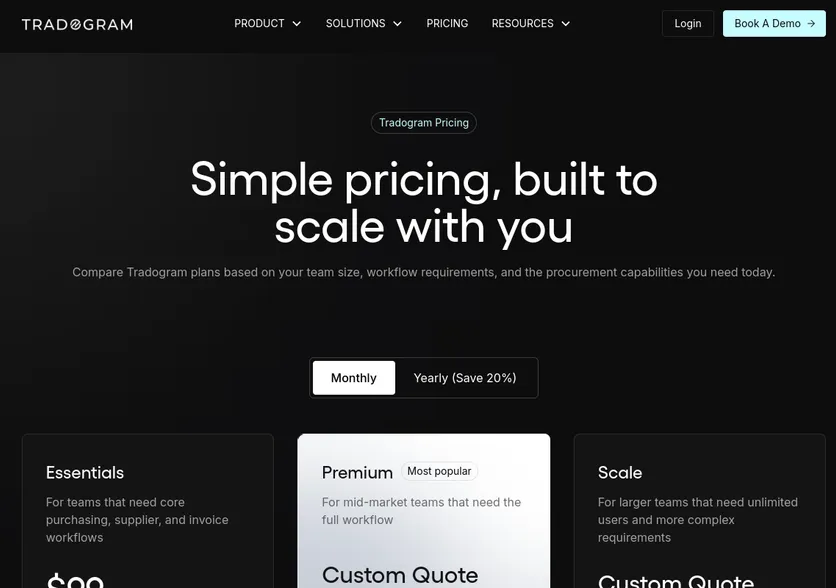
 Tradogram | Very small teams that want supplier payments included | $99/month | Free plan capped at 5 transactions a month | Visit |
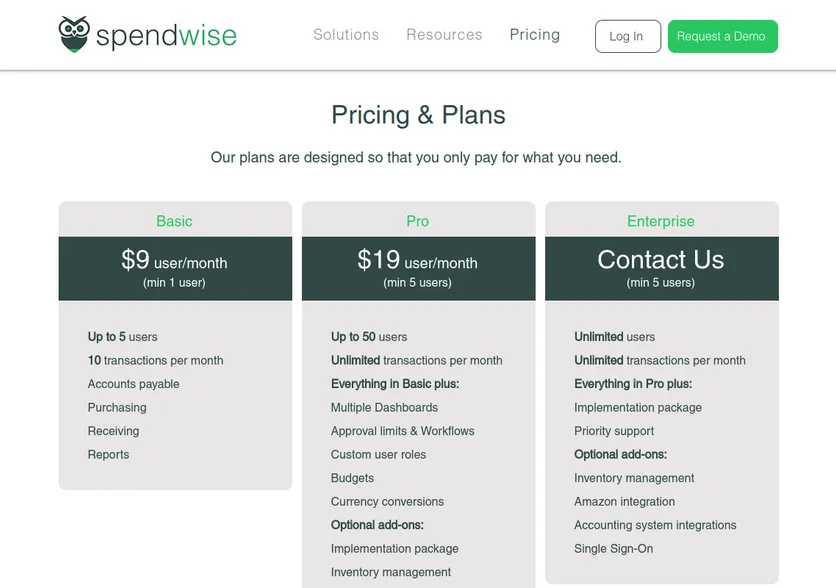
 Spendwise | Tiny teams that want the cheapest per-user purchasing | $9/user/month | No free plan; free trial available | Visit |
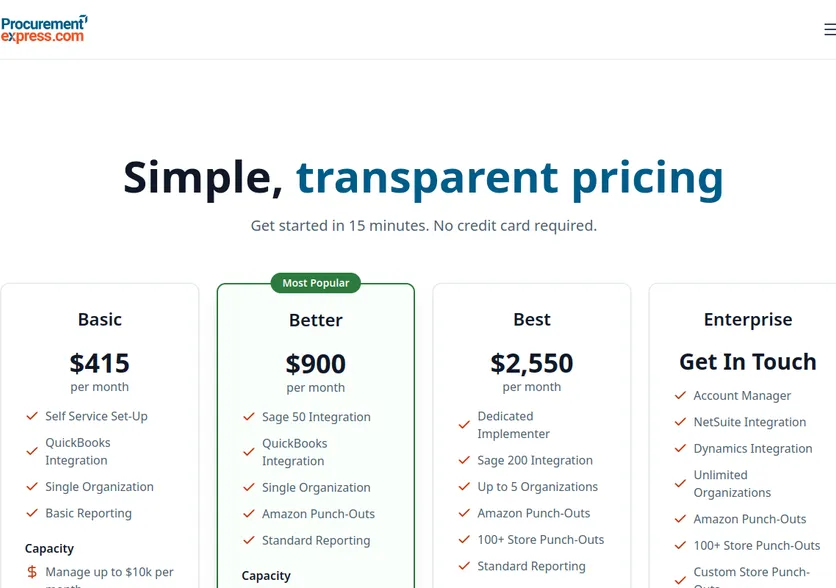
 ProcurementExpress | Teams with many requesters that want flat fees by spend | $415/month | 14-day free trial | Visit |
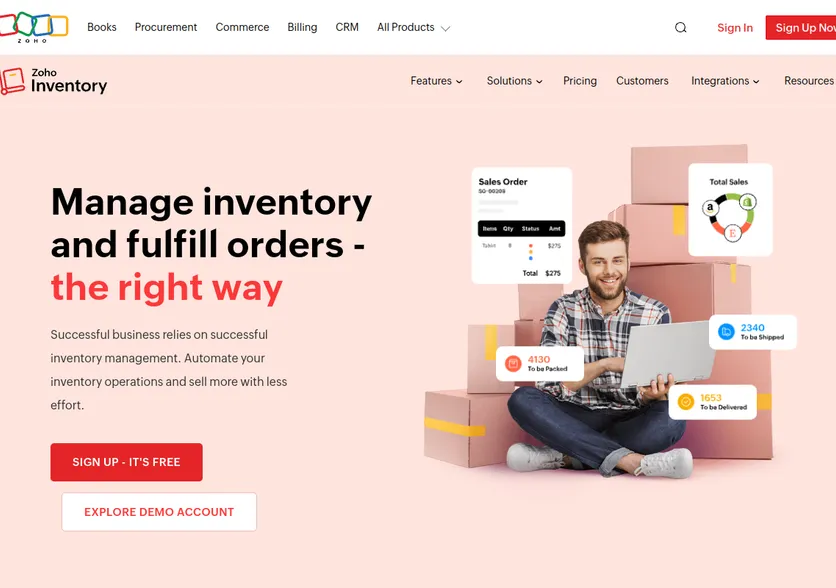
 Zoho Inventory | Small teams that track stock beside vendor orders | $29/month | Free plan with 50 orders a month and 1 user; 14-day trial | Visit |
 BILL | Finance teams drowning in vendor bills | $49/user/month | Free trial available; no free plan on paid tiers | Visit |
 Ramp | Finance teams that want cards, expenses and bill pay together | $15/user/month | Free base tier | Visit |
 AuraVMS | Small teams that get quotes before they buy | $4.99/user/mo | Free trial available, no free plan | Visit |
 Airtable | Teams that want a vendor database that looks like a spreadsheet | $20/user/month | Free plan | Visit |
The vendor management software for retail buyers, compared
1. Tradogram
Best for: Very small teams that want supplier payments included
Paid tool Starting price: $99/month · Essentials plan, $99 a month for 1 user or $950.40 a year billed annually; Premium and Scale are custom-quoted; one directory lists Premium from $425 a month, which the vendor page does not confirm
Free plan: Free plan capped at 5 transactions a month
When retail buyers need a low entry price with supplier payments included, this Tradogram plan costs ninety-nine dollars a month, and it covers purchase orders, suppliers, invoices and payments at the lowest entry price in this list. Sourcing events let a team compare supplier quotes side by side before awarding the order, and the built-in payment tool settles with suppliers in more than one hundred and fifty countries. Budgets are checked against each request, and the free plan covers five transactions a month for a team that wants to test the workflow first.
What we like
- Lowest published entry price in this list
- Supplier payments to more than 150 countries are built in
- Free plan covers five transactions a month
Watch out for
- Requisitions and receiving are paid add-ons on Essentials
- Each extra user carries an additional fee the vendor does not publish
How to try it
- Add the supplier and invite a quote through a sourcing event
- Compare the quotes and raise a purchase order from the winner
- Approve the invoice against the order and pay through TradoPay
2. Spendwise
Best for: Tiny teams that want the cheapest per-user purchasing
Paid tool Starting price: $9/user/month · Basic plan, $9 a user a month for up to 5 users and 10 transactions a month; Pro $19 a user a month for 5 to 50 users with unlimited transactions; Enterprise is quoted
Free plan: No free plan; free trial available
For retail buyers, this Spendwise plan costs nine dollars per user a month, and it is the cheapest per-user option here and it still covers requests, purchase orders and receiving. A request becomes a purchase order in seconds, and approvals, receiving and invoice matching all run in the same small app. Accounting integrations and inventory are sold as add-ons, so the base price stays low for a team that only needs the core buying workflow.
What we like
- Cheapest per-user price in this list
- Purchase orders and receiving in a simple self-serve app
- Free trial lets a small team test it on real orders
Watch out for
- Basic stops at 5 users and 10 transactions a month
- Budgets and approval limits need the Pro plan
How to try it
- Raise a purchase request and send it for approval
- Turn the approved request into a purchase order
- Record the delivery and match the invoice before paying
3. ProcurementExpress
Best for: Teams with many requesters that want flat fees by spend
Paid tool Starting price: $415/month · Basic plan, $415 a month for up to $10,000 a month in spend; Better $900 a month for up to $1M; Best $2,550 a month; Enterprise is quoted; earlier pricing pages mentioned a setup fee and a 10-user minimum, neither of which the current page shows
Free plan: 14-day free trial
When retail buyers need flat fees priced by spend rather than per user, this ProcurementExpress plan costs four hundred and fifteen dollars a month, and it prices by monthly spend instead of per user, so a long list of requesters costs nothing extra. Approvers see the remaining budget on every order, and approvals happen by email, so requesters never need to learn a new system. The Basic plan includes the QuickBooks integration, and higher tiers add Amazon punchout and larger spend caps for busier teams.
What we like
- Flat monthly fee priced by spend, not by user
- Approvals by email, so requesters need no training
- Budget shown on every order before approval
Watch out for
- Basic covers only $10,000 of spend a month
- No desktop accounting listed beyond QuickBooks on Basic
How to try it
- Submit a purchase request from email or the web app
- Check the budget shown on the request and approve it
- Raise the purchase order and track delivery against it
4. Zoho Inventory
Best for: Small teams that track stock beside vendor orders
Paid tool Starting price: $29/month · Standard is $29 per organization a month billed annually ($39 monthly). Premium is $79 and Plus is $129 a month billed annually. Prices exclude local taxes. Extra users are $7.50 a month each.
Free plan: Free plan with 50 orders a month and 1 user; 14-day trial
For retail buyers, this Zoho Inventory plan costs twenty-nine dollars a month billed annually, and it tracks inventory, purchase orders and vendor records together, with a free plan a real business can run on. Purchase orders, reorder points and multiple warehouses sit in one app, with native links to Shopify, Amazon and other sales channels. The free plan covers fifty orders a month for one user, so a small team can run real stock on it before paying anything.
What we like
- Free plan covers 50 orders a month for one user
- Purchase orders and reorder points in the same app
- Native links to Shopify, Amazon and other sales channels
Watch out for
- Standard caps at 500 orders a month
- Bins and batch tracking need the Premium plan
How to try it
- Add vendors and set reorder points for each stocked item
- Raise a purchase order when stock hits the reorder point
- Receive the delivery and update stock across warehouses
5. BILL
Best for: Finance teams drowning in vendor bills
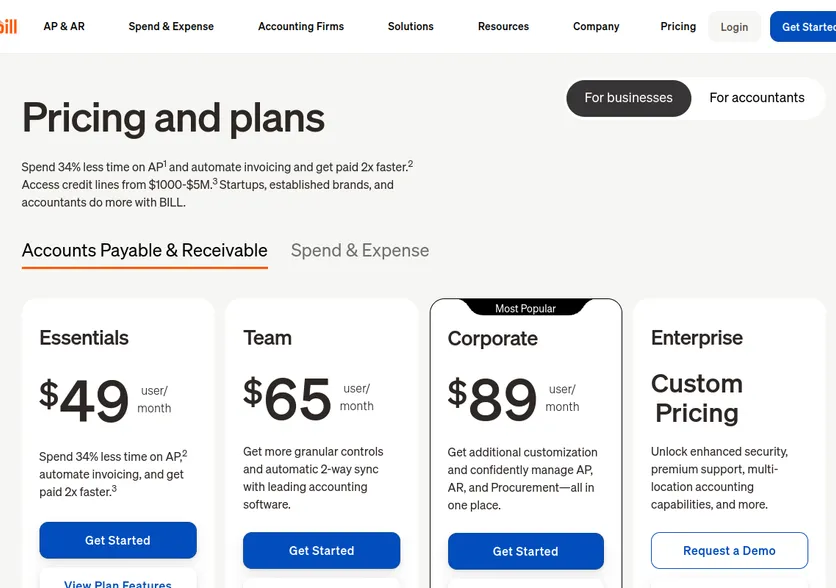
Paid tool Starting price: $49/user/month · Essentials plan per user; Team is sixty-five dollars a user a month and Corporate is eighty-nine dollars; Enterprise is quoted; payment fees sit on top of the seat price
Free plan: Free trial available; no free plan on paid tiers
When retail buyers need accounts payable automated from bill entry to payment, this BILL plan costs forty-nine dollars per user a month, and it automates accounts payable from bill entry to payment, with approvals and matching built in. Bills arrive in a central inbox, get coded by the platform, route for approval and then pay by bank transfer, card, check or international wire. Two-way sync with QuickBooks Online and Xero starts on the Team plan, while Essentials relies on manual file import and export.
What we like
- Automated bill coding with two-way and three-way matching
- Pays vendors by bank transfer, card, check or wire
- Published per-user pricing with no sales call needed
Watch out for
- Automatic ledger sync needs the Team plan, not Essentials
- Payment fees sit on top of the per-user price
How to try it
- Send vendor bills to the central bill inbox
- Route each bill through the approval policy
- Pay the approved bill and sync the entry to the ledger
6. Ramp
Best for: Finance teams that want cards, expenses and bill pay together
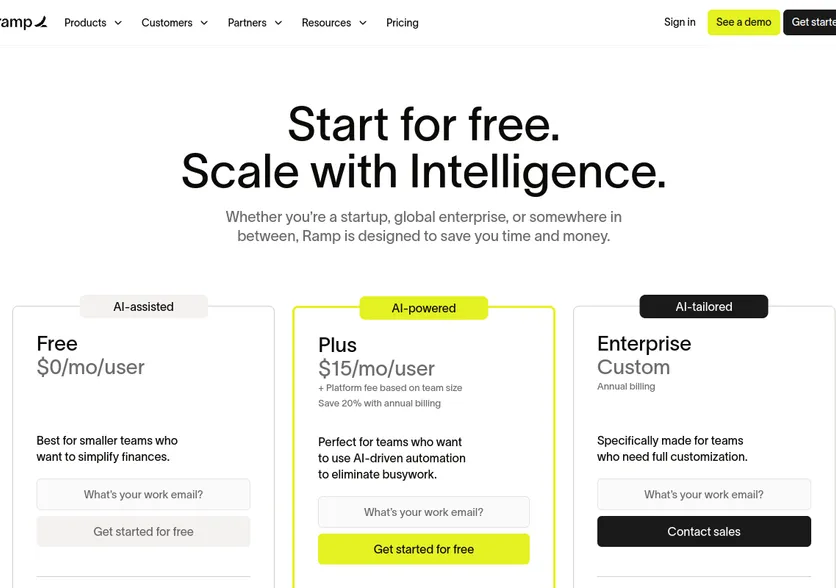
Paid tool Starting price: $15/user/month · Ramp Plus, $15 a user a month plus an unpublished platform fee based on team size; the free base tier covers cards, expenses and bill pay; procurement is a paid add-on on Plus or Enterprise
Free plan: Free base tier
For retail buyers, this Ramp plan costs fifteen dollars per user a month on Plus, and it combines corporate cards, expenses and bill pay, with procurement as an add-on when the team is ready. The free base tier already covers the corporate card, expenses and bill pay, and the Plus tier adds NetSuite and Sage Intacct integrations with multi-entity support. Procurement features such as intake, purchase orders and three-way matching are sold as an add-on to Plus, so a team only pays for them when it needs them.
What we like
- Free base tier covers cards, expenses and bill pay
- Plus adds NetSuite and Sage Intacct integrations
- Procurement add-on brings intake and three-way matching
Watch out for
- Procurement is a paid add-on, not part of the free tier
- Plus carries an unpublished platform fee on top of the seat price
How to try it
- Issue corporate cards and set spend limits per team
- Approve expenses and bills in the same dashboard
- Add the Procurement add-on to raise purchase orders with intake
7. AuraVMS
Best for: Small teams that get quotes before they buy
Paid tool Starting price: $4.99/user/mo · Four dollars and ninety-nine cents per user a month billed annually on the Small Team plan, or nine dollars and ninety-nine cents month to month; Medium Team is seven dollars and ninety-nine cents a user a month, Enterprise is custom quoted, and on-premise starts at two thousand nine hundred and ninety-nine dollars
Free plan: Free trial available, no free plan
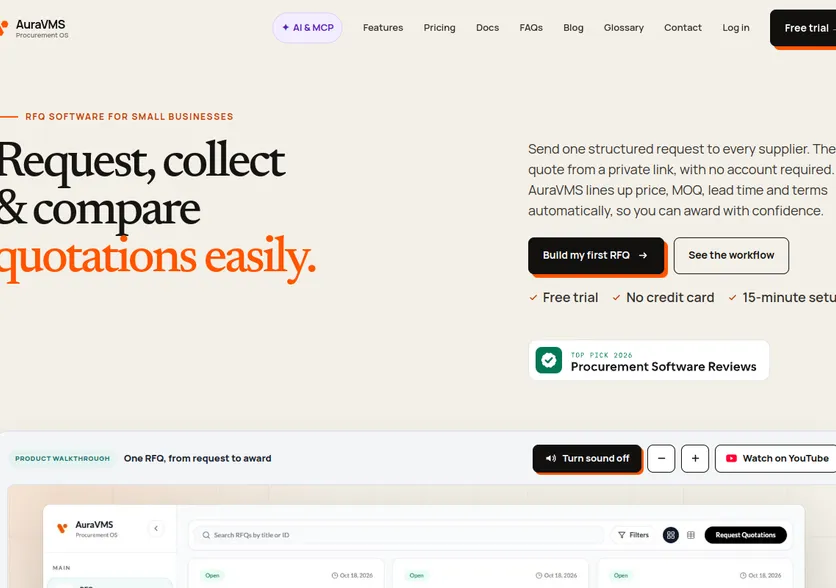
When retail buyers need supplier quotes compared side by side before ordering, this AuraVMS plan costs four dollars and ninety-nine cents per user a month billed annually, and it compares supplier quotes side by side and places the order in one click, for less than five dollars a user a month. Suppliers quote without an account, quotes line up side by side, and one click places the order, split across suppliers when a job needs more than one source. Every action is logged with the user, timestamp and address, so the whole quote history exports as a provable audit trail.
What we like
- Cheapest per-user price in this list
- Side-by-side quote comparison with anonymous bidding
- One-click ordering split across suppliers
Watch out for
- Small Team covers a single user only
- The full audit export needs the Medium Team plan
How to try it
- Invite suppliers to quote on a request without asking them to sign up
- Compare the quotes side by side and pick the winner
- Place the order in one click and track the delivery
8. Airtable
Best for: Teams that want a vendor database that looks like a spreadsheet
Paid tool Starting price: $20/user/month · Team $20 per user a month billed annually ($24 monthly); Business $45 a month; Enterprise by quote; only editors are charged, read-only collaborators are free
Free plan: Free plan
For retail buyers, this Airtable plan costs twenty dollars per user a month billed annually, and it looks like a spreadsheet and behaves like a database, with linked records that tie vendors to orders and renewals. Calendar, gallery and kanban views turn vendor rows into something a non-technical user can actually use, and interfaces hide the complexity from occasional users. Only editors are charged, so read-only collaborators can follow vendor work for free on every plan.

What we like
- Spreadsheet look with real database relations
- Only editors are charged, viewers are free
- Interfaces hide complexity from occasional users
Watch out for
- Team caps at 50,000 records per base
- Business costs more than double the Team rate
How to try it
- Create a base with linked tables for vendors, orders and renewals
- Build an interface that shows each vendor's open orders
- Set automations to flag renewals before they expire
Prices above were checked on each vendor’s own website on Nov 29, 2026 and can change — the vendor’s page is the final word. Vendor links are editorial: nobody paid to be listed or ranked here. Vendors who want a featured listing can see how it works on our Get listed page.
How retail buyers should keep shelves full without over-ordering
Set a reorder point for every stocked line, and let stock levels trigger the purchase request instead of memory or guesswork. Compare supplier quotes side by side for every significant order, and factor delivery time into the decision, since a cheap price means little when the shelf is empty for a week. Match deliveries to orders on arrival and log short shipments at once, because a supplier that shorts orders twice will do it again. Review slow-moving stock every month, and cut the lines that tie up cash while keeping the vendors that deliver fast and complete.
Before you buy
- Confirm the tool links purchase orders to stock levels and reorder points
- Check whether supplier quotes can be compared side by side before ordering
- Ask if the price is per organisation or per user, since several staff need access
- Make sure delivery matching catches short shipments before the invoice is paid
- Test the tool on a real seasonal order, including a rush restock
Official websites
Official websites of the products reviewed above. Features and prices were checked against these sites when this guide was written, and they can change, so confirm on the vendor site before you buy.
Frequently asked questions
What is vendor management software for retail buyers?
Vendor management software for retail buyers is a single place to keep supplier records, agreements, purchase orders and renewal dates, so nothing is tracked in scattered spreadsheets or email threads. It routes each purchase through approval, matches invoices to orders before payment, and flags renewals before they expire. For retail buyers, that means fewer missed deadlines, cleaner audits and a vendor list the whole team can trust.
How much does Zoho Inventory cost?
Zoho Inventory Standard costs twenty-nine dollars a month billed annually, or thirty-nine dollars billed monthly, for five hundred orders, three users and two locations. Premium costs seventy-nine dollars a month and Plus costs one hundred and twenty-nine dollars a month. The free plan covers fifty orders a month for one user, so a small shop can start without paying.
Can retail buyers manage vendors for free?
Yes, with limits. Airtable has a free plan, and Zoho Inventory offers a free plan covering fifty orders a month for one user. Ramp also has a free base tier covering cards, expenses and bill pay. Most free plans cap users, orders or transactions, so a busy team outgrows them quickly. The free tiers are still the cheapest way to test a workflow on real orders before paying.
Which tool is best for a small retail shop?
Spendwise is the cheapest per-user option for a small shop, at nine dollars per user a month for purchase orders, approvals and receiving. The Basic plan caps at five users and ten transactions a month, so a busy shop moves to Pro at nineteen dollars a user. Zoho Inventory at twenty-nine dollars a month is the better pick when stock tracking joins the job.
What should retail buyers check before buying vendor management software?
Check three things before paying. First, whether the entry plan covers the work the team actually does, since several tools here keep purchase orders, budgets or receiving on higher tiers. Second, how the price grows, because per-user billing, spend caps and vendor caps all change the real monthly cost. Third, whether suppliers need an account, since a portal nobody uses is worse than no portal at all.
Compare the eight tools above, then start with a free trial or the free Zoho Inventory plan on the tool that matches how the shop already buys before paying for a full year.
Browse Business Tools tools