On this page
A coach sells hours, and every hour spent retyping bookings, contracts and invoices is an hour that cannot be sold. The eight tools below connect the apps a coaching business already uses, so a booking triggers the contract, the payment and the follow-up without anyone touching it. Zapier leads because it connects more apps than any rival and the Starter plan costs nineteen dollars and ninety-nine cents a month billed annually, and the rest are ranked on how much admin they take off a coach's plate.
How we researched this
We checked every price on the vendor pricing page on November 29, 2026, and only included tools with a published US dollar list price. Enterprise platforms that sell by quote, including Workato, Tray and Boomi, publish no prices, so they are not in this list. Prices change, so confirm the current figure on the vendor site before you buy.
Compare the tools
| Name | Best for | Starting price | Free plan | |
|---|---|---|---|---|
 Zapier | Teams that want the widest app library | $19.99/month | Free plan (100 tasks a month) | Visit |
 Make | Builders who want visual branching cheaply | $9/month | Free plan (1,000 credits a month) | Visit |
 n8n | Technical teams that want self-hosting | $20/month | Free self-hosted Community edition; cloud trial | Visit |
 ClickUp | Teams that want tasks and automation together | $9/user/month | Free plan (unlimited tasks) | Visit |
 Asana | Teams that plan work on timelines | $10.99/user/month | Free plan (Personal, up to 2 users) | Visit |
 monday.com | Teams that want boards with automation | $12/user/month | Free plan (up to 2 seats) | Visit |
 Typeform | Teams that collect answers with forms | $28/month | Free plan (10 responses a month) | Visit |
 Jotform | Teams that need forms with payments | $34/month | Free plan (Starter, 100 submissions a month) | Visit |
The workflow automation software for coaches, compared
1. Zapier
Best for: Teams that want the widest app library
Paid tool Starting price: $19.99/month · Nineteen dollars and ninety-nine cents a month on Starter billed annually ($29.99 billed monthly); Professional is $49 a month billed annually and Team is $69; some October 2026 reads show the entry paid tier labelled Professional at the same $19.99 figure
Free plan: Free plan (100 tasks a month)
A coach who books calls in one app, takes payments in another and chases no-shows by hand will stop retyping the same details between apps with this Zapier plan, which costs nineteen dollars and ninety-nine cents a month billed annually. It connects more than seven thousand apps, so bookings, payments and follow-ups move between tools without retyping. The free plan covers a hundred tasks a month, which is enough to prove the first workflow before paying.

What we like
- Connects more than seven thousand apps
- Visual builder needs no code at all
- Multi-step Zaps with filters on the Starter plan
Watch out for
- Costs rise with task volume, so busy months cost more
- Premium apps need a paid plan to run
How to try it
- Pick a trigger app and the event that starts the workflow
- Add the action steps and map the fields between apps
- Test the Zap on a real record, then switch it on and watch the first runs
2. Make
Best for: Builders who want visual branching cheaply
Paid tool Starting price: $9/month · Nine dollars a month on Core billed annually ($10.59 billed monthly) for 10,000 credits; Pro is $16 a month billed annually and Teams is $29; Make cut the Core annual rate from $12 in late October 2026, so older listings still show $12
Free plan: Free plan (1,000 credits a month)
A coach who books calls in one app, takes payments in another and chases no-shows by hand will get the cheapest serious automation here with this Make plan, which costs nine dollars a month billed annually. The visual canvas shows every branch, filter and error path, so a long workflow stays readable. Ten thousand credits a month cover most small teams, and unlimited scenarios mean no workflow has to wait for a higher tier.

What we like
- Visual canvas shows every branch and filter clearly
- Ten thousand credits a month for nine dollars billed annually
- Unlimited active scenarios on the Core plan
Watch out for
- Each module step spends a credit, so long flows burn fast
- Error handling takes practice for a first-time builder
How to try it
- Create a scenario and pick the trigger module
- Add modules for each step and link them on the canvas
- Schedule the scenario and check the run history after the first day
3. n8n
Best for: Technical teams that want self-hosting
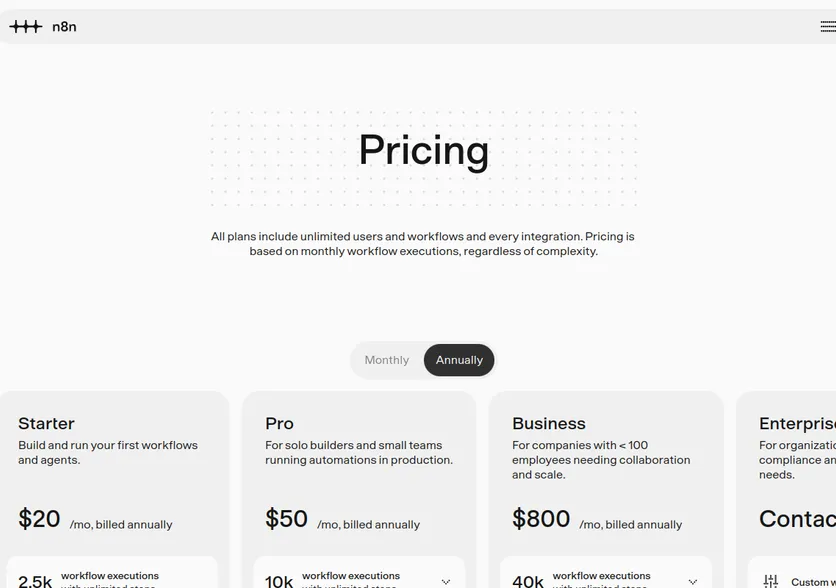
Paid tool Starting price: $20/month · Twenty dollars a month on Starter billed annually ($24 billed monthly) for 2,500 executions; Pro is $50 a month billed annually for 10,000 executions; the self-hosted Community edition is free
Free plan: Free self-hosted Community edition; cloud trial
A coach who books calls in one app, takes payments in another and chases no-shows by hand can automate without per-seat billing with this n8n plan, which costs twenty dollars a month billed annually. One execution covers a whole workflow however many steps it has, which keeps the bill predictable as flows grow. The free self-hosted edition suits a team with a server to spare, while the cloud plan removes the maintenance burden.
What we like
- One execution covers a whole workflow however many steps
- Self-hosted edition is free with unlimited executions
- AI nodes and agents are included on every plan
Watch out for
- Starter caps at five active workflows and five concurrent runs
- Self-hosting means owning updates and uptime
How to try it
- Open the canvas and add a trigger node
- Connect the app nodes in order and set each field
- Run the workflow once by hand, then activate it on a schedule
4. ClickUp
Best for: Teams that want tasks and automation together
Paid tool Starting price: $9/user/month · Nine dollars per user a month on Core billed annually ($12 billed monthly); Business is $17 a user a month billed annually
Free plan: Free plan (unlimited tasks)
A coach who books calls in one app, takes payments in another and chases no-shows by hand will keep tasks and automation in one place with this ClickUp plan, which costs nine dollars per user a month billed annually. Tasks, docs and goals sit beside the automations, so the team works in one place instead of four. The free plan covers unlimited tasks, and the paid plans add the automation runs a busy team needs.

What we like
- Unlimited tasks and members on the free plan
- Automations live beside the work, not in a separate app
- A hundred-plus native integrations cover the common tools
Watch out for
- Automation runs are capped on the lower plans
- The interface packs in a lot and takes a week to learn
How to try it
- Create a list for the work the automation should handle
- Add an automation with a trigger and an action
- Test it on one task, then roll it out to the whole list
5. Asana
Best for: Teams that plan work on timelines
Paid tool Starting price: $10.99/user/month · Ten dollars and ninety-nine cents per user a month on Starter billed annually ($13.49 billed monthly); Advanced is $24.99 a user a month billed annually
Free plan: Free plan (Personal, up to 2 users)
A coach who books calls in one app, takes payments in another and chases no-shows by hand will plan the work and automate the handoffs together with this Asana plan, which costs ten dollars and ninety-nine cents per user a month billed annually. Timeline and Gantt views come with the entry plan, so deadlines stay visible while rules move the work along. Guests are free, which means clients and contractors can follow progress without a paid seat.

What we like
- Unlimited automations on the Starter plan
- Timeline and Gantt views come with the entry plan
- Guests are free, so clients can follow along
Watch out for
- Seats are sold in blocks, so small teams may overpay
- Advanced reporting needs the Advanced plan
How to try it
- Build a project with sections for each stage of the work
- Add a rule that moves tasks when their status changes
- Invite the team and check the rule fires on real tasks
6. monday.com
Best for: Teams that want boards with automation
Paid tool Starting price: $12/user/month · Twelve dollars per user a month on Standard billed annually ($14 billed monthly); Basic is $9 but has no automations, and Pro is $19 a user a month billed annually; seats are sold in bundles with a 3-seat minimum
Free plan: Free plan (up to 2 seats)
A coach who books calls in one app, takes payments in another and chases no-shows by hand will run boards that move themselves with this monday.com plan, which costs twelve dollars per user a month billed annually. Boards flex to almost any process, and Standard adds two hundred and fifty automations and two hundred and fifty integrations a month. The trade-off is the bundle pricing: seats come in groups, and a small team still pays for three.

What we like
- Boards flex to almost any workflow shape
- Standard adds 250 automations a month
- Templates cover most common team processes
Watch out for
- Basic has no automations, so Standard is the real entry price
- Seats are sold in bundles with a three-seat minimum
How to try it
- Create a board with columns for each stage
- Add an automation recipe that moves items when a status changes
- Invite the team and test the recipe on a live item
7. Typeform
Best for: Teams that collect answers with forms
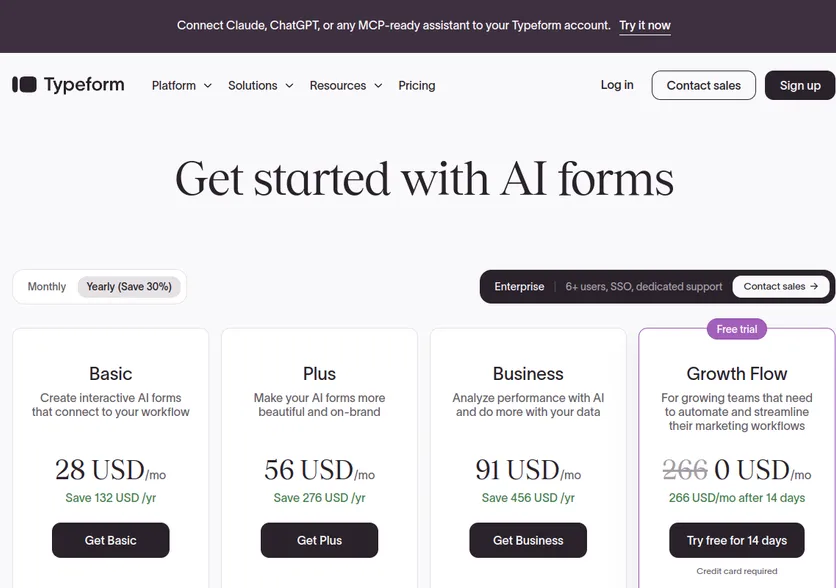
Paid tool Starting price: $28/month · Twenty-eight dollars a month on Basic billed annually ($39 billed monthly); Plus is $56 and Business is $91 a month billed annually
Free plan: Free plan (10 responses a month)
A coach who books calls in one app, takes payments in another and chases no-shows by hand will collect answers people actually finish giving with this Typeform plan, which costs twenty-eight dollars a month billed annually. One question at a time keeps completion rates high, and logic jumps route each respondent down the right path. Answers flow into sheets, CRMs and email tools, so no one retypes a form by hand.
What we like
- Forms people actually finish, with one question at a time
- Logic jumps route each respondent down the right path
- Connects to sheets, CRMs and email tools
Watch out for
- Basic caps responses, so busy months need a higher plan
- Building complex logic takes longer than a plain form
How to try it
- Create a form with the questions the workflow needs
- Add logic jumps and connect the form to the destination app
- Send the form to a small group first and check the answers land
8. Jotform
Best for: Teams that need forms with payments
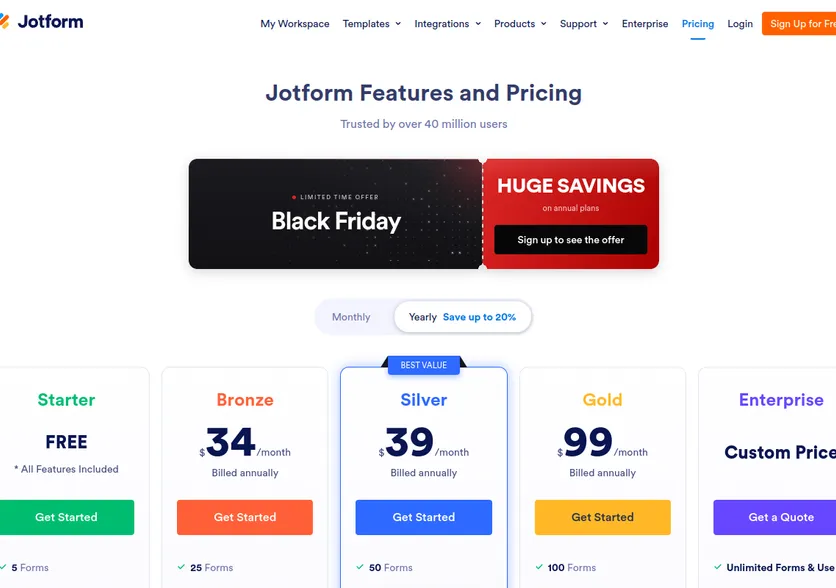
Paid tool Starting price: $34/month · Thirty-four dollars a month on Bronze billed annually ($39 billed monthly); Silver is $39 and Gold is $99 a month billed annually; a 50% first-year discount is sometimes shown and is NOT the list price
Free plan: Free plan (Starter, 100 submissions a month)
A coach who books calls in one app, takes payments in another and chases no-shows by hand will turn forms into finished work with this Jotform plan, which costs thirty-four dollars a month billed annually. A thousand submissions a month on Bronze cover most small teams, and payment fields and e-signatures sit in the same form. Branding comes off on the first paid plan, so the form looks like yours from day one.
What we like
- A thousand submissions a month on the Bronze plan
- Payment fields and e-signatures in the same form
- Branding comes off on the first paid plan
Watch out for
- Paid plans cover one user, so teams need Enterprise
- HIPAA features start on the Gold plan
How to try it
- Build the form and add the fields the workflow needs
- Connect it to the sheet or CRM that should receive answers
- Publish the link and confirm the first submissions arrive
Prices above were checked on each vendor’s own website on Nov 29, 2026 and can change — the vendor’s page is the final word. Vendor links are editorial: nobody paid to be listed or ranked here. Vendors who want a featured listing can see how it works on our Get listed page.
How to automate a coaching business without losing the personal touch
Start with the booking: connect the calendar to the contract and the payment link, so a client who books a call gets everything in one email and you never chase a signature. Automate the reminders next, because no-shows cost more than any subscription in this list. Keep the coaching itself human: let the tools handle scheduling, invoices and follow-ups, and keep every session note and check-in message personal. Review the automations monthly, since a workflow that made sense for five clients can quietly break at fifty.
Before you buy
- Check whether the tool connects your booking app, your payment tool and your email without extra plugins
- Confirm the free plan covers enough tasks for a trial month before you commit
- Ask how the price grows with volume, since a busy month of bookings can double the bill
- Make sure client data stays in the region your privacy policy promises
- Test one full workflow, from booking to paid invoice, before automating anything else
Official websites
Official websites of the products reviewed above. Features and prices were checked against these sites when this guide was written, and they can change, so confirm on the vendor site before you buy.
Frequently asked questions
What is workflow automation software for coaches?
It is software that connects the apps a coaching business uses, so a booking triggers the contract, the payment and the follow-up without manual work. A coach sets up the flow once, and every new client walks the same path. Without it, the same details get retyped into three tools, and no-shows and late invoices pile up.
How much does Zapier cost for a coach?
Zapier costs nineteen dollars and ninety-nine cents a month billed annually on Starter, or twenty-nine dollars and ninety-nine cents billed monthly, and it covers seven hundred and fifty tasks a month. Professional is forty-nine dollars a month billed annually. The free plan covers a hundred tasks a month, which is enough to automate bookings for a small practice.
Can a coach automate for free?
Yes, with Zapier, which offers a free plan covering a hundred tasks a month, and Make, which offers a free plan with a thousand credits a month. ClickUp and Asana also have free plans that include basic automations. All four suit a coach starting out, though a busy practice will outgrow the free limits and should compare the paid plans above.
Which automation tool is best for a solo coach?
Zapier is the best overall for a solo coach, because it connects the booking, payment and email tools a practice already uses. Make is the best value, at nine dollars a month billed annually for ten thousand credits. Coaches who like to tinker should look at n8n, whose free self-hosted edition costs nothing but server time.
What should a coach automate first?
Automate the booking flow first: calendar to contract to payment to reminder, because that chain eats the most admin hours and causes the most no-shows. Add invoice follow-ups next, since late payments are the second-biggest leak. Leave session notes and check-in messages personal, because clients pay for a coach, not a robot.
Compare the eight tools above, then start with the free Zapier or Make plan on the booking flow before paying for a full year.
Browse Productivity Tools tools