
On this page
A retail team lives on the rota, and a rota built in a spreadsheet breaks the week a shift changes. Workforce software schedules staff, tracks time, handles time off and messages the team, so a store manager spends the shift on the floor instead of the phone. The seven tools below range from a free plan for a tiny shop to platforms that run dozens of locations. Homebase is our first pick for a retail store that wants scheduling and time tracking in one place.
How we researched this
We started with the workforce management tools retail stores actually buy, then read each price on the vendor pricing page on November 27, 2026 and noted the free plan or trial each one carries. We judged them for a store manager who needs scheduling, time tracking and team messaging without a big budget or an HR department. We dropped UKG because it publishes no list price, and we left ZoomShift out because its free plan caps scheduling at one location and two weeks ahead.
Compare the tools
| Name | Best for | Starting price | Free plan | |
|---|---|---|---|---|
 Homebase | Retail stores that want scheduling, time tracking and hiring in one place | $24/month | Basic plan free for one location and up to ten employees | Visit |
 7shifts | Restaurants and retail stores that want scheduling built for hourly teams | $39.99/month | Comp plan free for one location and up to fifteen employees | Visit |
 Deputy | Retail stores that want per-user pricing with no location fee | $5/user/month | No free plan; free trial on Lite and Core | Visit |
 When I Work | Retail stores that want the cheapest per-user scheduling | $2.50/user/month | No free plan; fourteen-day trial | Visit |
 Connecteam | Retail stores that want scheduling plus team communication in one app | $29/month | Small Business plan free for up to ten users across all hubs | Visit |
 Sling | Retail stores that want the lowest per-user price with a free plan | $1.70/user/month | Free plan for up to thirty users | Visit |
| Schedulefly | Retail and restaurant teams that want a flat monthly price with no per-user fees | $30/month | No free plan; thirty-day free trial | Visit |
The workforce management software for retail, compared
1. Homebase
Best for: Retail stores that want scheduling, time tracking and hiring in one place
Paid tool Starting price: $24/month · Essentials plan, twenty-four dollars a location a month billed annually, or thirty dollars billed monthly, unlimited employees
Free plan: Basic plan free for one location and up to ten employees
Homebase schedules staff, tracks time, hires and messages the team from one dashboard, so a store manager stops juggling apps for every shift. This Homebase Essentials plan costs twenty-four dollars a location a month billed annually for unlimited employees, with a free Basic plan for one location and up to ten employees. A small shop gets a full team system for the price of a lunch, though the payroll add-on costs extra.

What we like
- Unlimited employees on every paid plan
- Scheduling, time tracking and hiring in one place
- Free Basic plan for a tiny shop
Watch out for
- Payroll add-on costs forty-nine dollars plus six dollars per employee
- Discounted Amex promo prices are not the list price
How to try it
- Open the Homebase pricing page and start the free Basic plan
- Add your team and publish the first rota
- Upgrade to Essentials when you need more than ten employees
2. 7shifts
Best for: Restaurants and retail stores that want scheduling built for hourly teams
Paid tool Starting price: $39.99/month · Essentials plan, thirty-nine dollars and ninety-nine cents a location a month billed annually, or forty-four dollars and ninety-nine cents billed monthly, up to thirty employees
Free plan: Comp plan free for one location and up to fifteen employees
7shifts builds rotas for hourly teams, with shift swaps, time off and team messaging that a store manager can run from a phone. This 7shifts Essentials plan costs thirty-nine dollars and ninety-nine cents a location a month billed annually for up to thirty employees, with a free Comp plan for one location and up to fifteen employees. A store with a changing rota gets a tool built for hourly work, though the price rises with the team size.

What we like
- Built for hourly teams and shift swaps
- Free Comp plan for a small store
- Team messaging keeps everyone in the loop
Watch out for
- Price rises with the team-size selector
- Premium plan costs one hundred thirty-four dollars and ninety-nine cents a month
How to try it
- Open the 7shifts pricing page and start the free Comp plan
- Add your team and build the first rota
- Upgrade to Essentials when you pass fifteen employees
3. Deputy
Best for: Retail stores that want per-user pricing with no location fee
Paid tool Starting price: $5/user/month · Lite plan, five dollars a user a month, with a thirty-dollar monthly minimum and a ten percent saving on annual billing
Free plan: No free plan; free trial on Lite and Core
Deputy schedules staff, tracks time and handles leave, with per-user pricing that suits a store with a small team. This Deputy Lite plan costs five dollars a user a month, with a thirty-dollar monthly minimum and a ten percent saving on annual billing. A shop with five staff pays thirty dollars a month, which is the minimum, though the per-user price adds up across a bigger team.

What we like
- Per-user pricing with no location fee
- Scheduling and time tracking in one app
- Ten percent saving on annual billing
Watch out for
- Thirty-dollar monthly minimum applies
- No free plan, so testing needs the trial
How to try it
- Open the Deputy pricing page and start the trial
- Add your team and build the first rota
- Track time for a week and review the cost
4. When I Work
Best for: Retail stores that want the cheapest per-user scheduling
Paid tool Starting price: $2.50/user/month · Essentials plan, two dollars and fifty cents a user a month; multi-location teams pay five dollars a user a month
Free plan: No free plan; fourteen-day trial
When I Work schedules staff and tracks time for two dollars and fifty cents a user a month, which is the cheapest per-user price here. This When I Work Essentials plan now includes time and attendance in every plan, so a store manager gets the full rota and clock-in tools for one low price. A small shop gets a professional rota for the price of a coffee per person, though the low price applies to single-location teams.

What we like
- Cheapest per-user price in this comparison
- Time and attendance included in every plan
- Simple rota that staff learn fast
Watch out for
- No free plan, so testing needs the trial
- Multi-location teams pay five dollars a user a month
How to try it
- Open the When I Work pricing page and start the trial
- Add your team and publish the first rota
- Track time for a week and check the cost
5. Connecteam
Best for: Retail stores that want scheduling plus team communication in one app
Paid tool Starting price: $29/month · Operations Hub Basic plan, twenty-nine dollars a month billed annually, or thirty-five dollars billed monthly, for the first thirty users
Free plan: Small Business plan free for up to ten users across all hubs
Connecteam runs scheduling, time tracking and team chat from one app, so a store manager can message the whole team without a separate group chat. This Connecteam Operations Hub Basic plan costs twenty-nine dollars a month billed annually for the first thirty users, with a free Small Business plan for up to ten users. A store that wants one app for the whole team gets scheduling and chat together, though each hub is priced separately.

What we like
- Scheduling and team chat in one app
- Free plan for up to ten users
- Each hub can be bought on its own
Watch out for
- Each hub is priced separately, so costs add up
- Extra users cost extra on the Basic plan
How to try it
- Open the Connecteam pricing page and start the free Small Business plan
- Add your team and build the first rota
- Upgrade to Basic when you pass ten users
6. Sling
Best for: Retail stores that want the lowest per-user price with a free plan
Paid tool Starting price: $1.70/user/month · Premium plan, one dollar and seventy cents a user a month billed annually, or two dollars billed monthly
Free plan: Free plan for up to thirty users
Sling schedules staff and tracks time for one dollar and seventy cents a user a month billed annually, which is the lowest per-user price in this list. This Sling Premium plan suits a store with a small team, while the free plan covers up to thirty users for basic scheduling. A shop on a tight budget gets a professional rota for almost nothing, though the free plan caps the team at thirty users.

What we like
- Lowest per-user price in this comparison
- Free plan covers up to thirty users
- Simple rota with shift swaps built in
Watch out for
- Paid plans need a fifteen-day trial to test
- Business plan costs three dollars and forty cents a user a month
How to try it
- Open the Sling pricing page and start the free plan
- Add your team and publish the first rota
- Upgrade to Premium when you need time tracking
7. Schedulefly
Best for: Retail and restaurant teams that want a flat monthly price with no per-user fees
Paid tool Starting price: $30/month · Thirty dollars a month flat for up to nineteen staff, with a five percent discount on annual prepay
Free plan: No free plan; thirty-day free trial
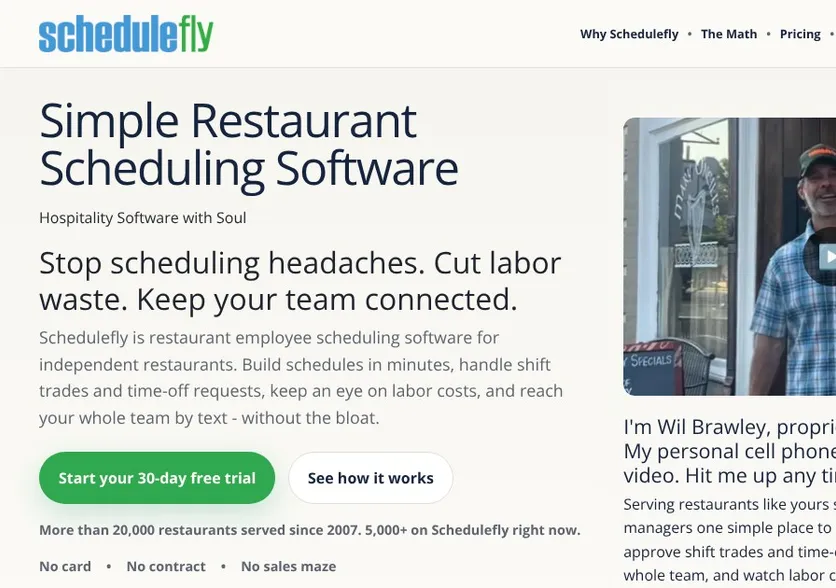
Schedulefly charges a flat thirty dollars a month for up to nineteen staff, with no per-user fees and no contracts, so a store manager knows the bill before the month starts. This Schedulefly plan covers scheduling and messaging for a small team, with a thirty-day free trial and no card needed. A shop that hates per-user pricing gets a simple flat bill, though the price steps up as the team grows past nineteen.
What we like
- Flat monthly price with no per-user fees
- Thirty-day trial with no card needed
- No contracts to sign
Watch out for
- Price steps up at twenty staff and again at forty
- No free plan beyond the trial
How to try it
- Open the Schedulefly site and start the thirty-day trial
- Add your team and build the first rota
- Keep the plan if the flat price fits your budget
Prices above were checked on each vendor’s own website on Nov 27, 2026 and can change — the vendor’s page is the final word. Vendor links are editorial: nobody paid to be listed or ranked here. Vendors who want a featured listing can see how it works on our Get listed page.
What workforce software costs in 2026
Workforce software costs from one dollar and seventy cents a user a month on Sling to thirty-nine dollars and ninety-nine cents a location a month on 7shifts, with Homebase Essentials at twenty-four dollars a location. Per-user pricing suits a store with a small team, while flat pricing suits a store with many part-timers, because thirty dollars flat beats five dollars a user once the team passes six. Free plans are generous here, with four tools offering one for a small shop.
Count your team and count your locations before you pay, because the cheapest plan for a five-person shop is not the cheapest for a thirty-person store. Run one rota on the free plan or trial and ask the staff whether the app is easy to read on a phone. Pick the tool your manager will open every morning, because a rota that nobody checks is worse than a paper one.
Before you buy
- Count your team first, because Sling charges one dollar and seventy cents a user while Deputy charges five.
- Check the free plan before paying, because Homebase, 7shifts, Connecteam and Sling all offer one.
- Compare flat versus per-user pricing, because Schedulefly charges thirty dollars flat while Deputy charges per person.
- Confirm the team-size limit, because 7shifts prices rise with the team-size selector.
- Use the trial before you buy, because Deputy, When I Work and Schedulefly all offer a free trial.
Official websites
Official websites of the products reviewed above. Features and prices were checked against these sites when this guide was written, and they can change, so confirm on the vendor site before you buy.
Frequently asked questions
Which workforce management software is best for retail in 2026?
Homebase is the best overall pick for a retail store that wants scheduling, time tracking and hiring in one place, at twenty-four dollars a location a month billed annually. Sling is the cheapest per-user option at one dollar and seventy cents a user a month, and 7shifts is the best pick for hourly teams. Choose Homebase for the full package, Sling for the lowest price and 7shifts for hourly rotas.
Is there free workforce management software?
Yes, because Homebase, 7shifts, Connecteam and Sling all offer free plans for small teams. Homebase Basic is free for one location and up to ten employees, while Sling free covers up to thirty users. A tiny shop can run its rota free and upgrade only when the team grows past the free limit.
How much does workforce management software cost?
Paid plans in this list run from one dollar and seventy cents a user a month on Sling to thirty-nine dollars and ninety-nine cents a location a month on 7shifts. Homebase Essentials costs twenty-four dollars a location a month billed annually, while Schedulefly charges a flat thirty dollars a month for up to nineteen staff. Free plans cover small teams, so a tiny shop may pay nothing at all.
What is the cheapest way to schedule retail staff?
Sling is the cheapest per-user option at one dollar and seventy cents a user a month billed annually, with a free plan for up to thirty users. When I Work Essentials costs two dollars and fifty cents a user a month, while Homebase Basic is free for one location and up to ten employees. A shop with under ten employees should start on the Homebase free plan and compare it with Sling.
Do these tools handle time tracking too?
Yes, because Homebase, 7shifts, Deputy, When I Work, Connecteam and Sling all include time tracking alongside scheduling. When I Work now includes time and attendance in every plan, while Homebase and 7shifts track time on their paid plans. Schedulefly focuses on scheduling and messaging, so check the time tracking feature before you choose it.
Need everyday business help too? Try Toolsvine's free business tools right in your browser.
Browse Business Tools tools


