On this page
Research writing is a team sport, and the right tool keeps drafts, citations and comments in one place instead of scattered across email threads. The seven tools below run from about three dollars a month to a one-time payment of two hundred and fifty dollars, and every price was checked on the vendor site on November 26, 2026. Most offer a free plan, so a research group can start collaborating before spending anything. Overleaf is our first pick — the standard for collaborative academic writing with built-in LaTeX.
How we researched this
We started with the research writing tools academic and professional teams actually use, then read each price on the vendor pricing page on November 26, 2026 and noted the free plan each one carries. We judged them for a team that writes, cites and reviews together, and we kept only tools with a published price. We dropped Mendeley because it publishes no paid price and Authorea because it is quote-only, and we cover Google Docs through Google Workspace rather than listing it twice.
Compare the tools
| Name | Best for | Starting price | Free plan | |
|---|---|---|---|---|
 Overleaf | Academic teams writing papers together in LaTeX | $199/year | Free plan with limited collaborators | Visit |
 Notion | Research teams that want notes, docs and databases in one workspace | $10/member/month | Free plan for individuals and small teams | Visit |
 Confluence | Teams that need a shared wiki next to their research drafts | $7.15/user/month | Free plan for up to 10 users | Visit |
 Google Workspace | Teams that write in Docs and want mail, storage and meetings bundled | $7/user/month | No free plan; 14-day free trial | Visit |
 Zotero | Researchers who need a free reference manager with paid cloud storage | $20/year | Free app with 300 MB storage | Visit |
| EndNote | Researchers who want a one-time purchase reference manager | $249.95 one-time | No free plan; trial available | Visit |
 Paperpile | Google Docs writers who want clean reference management | $2.99/month | No free plan; 30-day free trial | Visit |
The collaborative research writing tools software, compared
1. Overleaf
Best for: Academic teams writing papers together in LaTeX
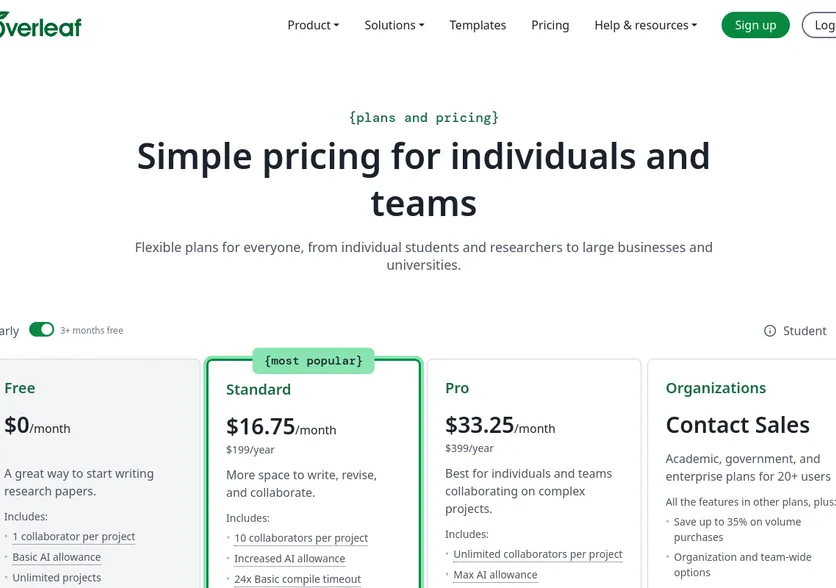
Paid tool Starting price: $199/year · Standard plan, $199 a year or $25 a month billed monthly; Student $98 a year and Pro $399 a year
Free plan: Free plan with limited collaborators
Overleaf is the shared LaTeX editor that research groups use to write papers, theses and grants without emailing files back and forth. This Overleaf Standard plan costs a hundred and ninety-nine dollars a year and adds tracked changes, full document history and more collaborators. A research team that typesets in LaTeX will find no faster way to co-author a paper.
What we like
- Real-time collaborative LaTeX editing
- Journal templates ready to submit
- Full history and tracked changes
Watch out for
- LaTeX learning curve for new writers
- Free plan limits collaborators per project
How to try it
- Open the Overleaf plans page and create a free account
- Start a project from a journal template
- Invite a collaborator and edit the same document live
2. Notion
Best for: Research teams that want notes, docs and databases in one workspace
Paid tool Starting price: $10/member/month · Plus plan, $10 per member a month billed annually; Business is $20 per member a month
Free plan: Free plan for individuals and small teams
Notion turns research notes, drafts and reference databases into one shared workspace that the whole team can search. This Notion Plus plan costs ten dollars per member a month on annual billing and lifts the limits that hold small teams back. A group that mixes writing with task tracking and a shared knowledge base will get more from Notion than from a plain editor.

What we like
- Docs, notes and databases in one workspace
- Flexible templates for research workflows
- Generous free plan for small teams
Watch out for
- Not a dedicated citation manager
- Offline access is limited on the free plan
How to try it
- Open the Notion pricing page and start the free plan
- Create a shared page for your research project
- Invite teammates and build a database for your sources
3. Confluence
Best for: Teams that need a shared wiki next to their research drafts
Paid tool Starting price: $7.15/user/month · Standard plan, per user a month; Free plan covers up to 10 users
Free plan: Free plan for up to 10 users
Confluence is the team wiki where research drafts, meeting notes and decisions live alongside the work itself. This Confluence Standard plan costs seven dollars and fifteen cents per user a month and adds the permissions and admin controls a growing team needs. A group that wants its research documented and searchable, not just written, will use Confluence daily.

What we like
- Strong wiki structure for research knowledge
- Integrates with Jira for tracked work
- Free for teams up to ten users
Watch out for
- Page editor is simpler than a word processor
- Costs add up per user on larger teams
How to try it
- Open the Confluence pricing page and claim the free plan
- Create a space for your research project
- Draft a page together and link it to related notes
4. Google Workspace
Best for: Teams that write in Docs and want mail, storage and meetings bundled
Paid tool Starting price: $7/user/month · Business Starter plan, $7 per user a month billed annually or $8.40 on flexible billing; includes Docs, Drive and Meet
Free plan: No free plan; 14-day free trial
Google Workspace puts Docs, Drive, Gmail and Meet under one subscription, so a research team can write, store and discuss without extra tools. This Google Workspace Business Starter plan costs seven dollars per user a month on annual billing and covers the whole collaboration loop. A team that already lives in Google Docs will find the upgrade to a business plan an easy step.

What we like
- Docs collaboration is the smoothest available
- Mail, storage and meetings in one bill
- Familiar tools with almost no learning curve
Watch out for
- Citation tools need add-ons or a reference manager
- Storage limits apply on the Starter plan
How to try it
- Open the Google Workspace pricing page and start the trial
- Create a shared Drive folder for the project
- Write the draft in Docs with comments and suggestions on
5. Zotero
Best for: Researchers who need a free reference manager with paid cloud storage
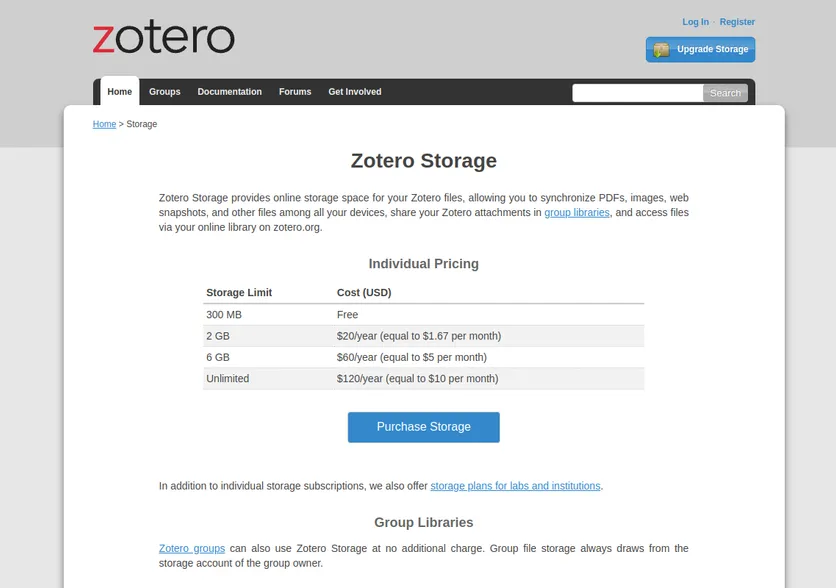
Paid tool Starting price: $20/year · Storage plan, $20 a year for 2 GB; 6 GB is $60 a year and unlimited is $120 a year; the app itself is free
Free plan: Free app with 300 MB storage
Zotero is the free reference manager that collects sources, builds bibliographies and plugs into Word and Google Docs. This Zotero storage plan costs twenty dollars a year for two gigabytes of synced files, while the app itself stays free. A researcher with a growing library of PDFs will find the small storage fee the cheapest way to keep everything in sync.
What we like
- Free app with strong citation support
- Works with Word and Google Docs
- Cheap storage for synced PDFs
Watch out for
- Free storage is only 300 MB
- Interface looks dated next to newer tools
How to try it
- Download Zotero and install the browser connector
- Save a few sources and check the bibliography output
- Buy the storage plan if your library outgrows the free 300 MB
6. EndNote
Best for: Researchers who want a one-time purchase reference manager
Paid tool Starting price: $249.95 one-time · Perpetual individual license, one-time; student pricing is around $150 and subscriptions run about $155 a year
Free plan: No free plan; trial available
EndNote is the long-running reference manager that serious researchers use to organize thousands of sources and format citations in any journal style. This EndNote individual license costs two hundred and forty-nine dollars and ninety-five cents as a one-time purchase, with no monthly bill. A researcher who prefers to own software outright rather than rent it will appreciate paying once and keeping it.
What we like
- One-time purchase with no subscription
- Huge library of journal citation styles
- Handles very large reference libraries
Watch out for
- Upfront cost is the highest here
- Interface feels old compared with newer rivals
How to try it
- Open the EndNote pricing page and buy the individual license
- Import your existing reference library
- Install the Word plugin and insert your first citation
7. Paperpile
Best for: Google Docs writers who want clean reference management
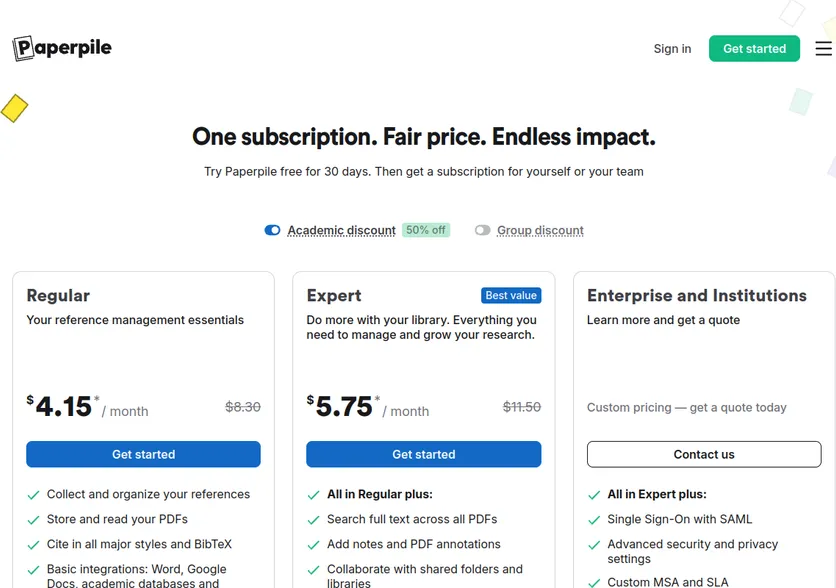
Paid tool Starting price: $2.99/month · Academic plan, billed annually; Business is $9.99 a month
Free plan: No free plan; 30-day free trial
Paperpile is the reference manager built for Google Docs, adding citations and a shared library without leaving the document. This Paperpile Academic plan costs two dollars and ninety-nine cents a month on annual billing, which makes it the cheapest paid tool here. A student or researcher who writes in Google Docs will find citations finally feel effortless.
What we like
- Best Google Docs citation experience
- Clean library that syncs everywhere
- Cheapest paid plan in this list
Watch out for
- Academic plan needs a university email
- Word support is weaker than Google Docs
How to try it
- Open the Paperpile pricing page and start the trial
- Install the browser extension and the Docs add-on
- Add sources to your library and cite them in a document
Prices above were checked on each vendor’s own website on Nov 26, 2026 and can change — the vendor’s page is the final word. Vendor links are editorial: nobody paid to be listed or ranked here. Vendors who want a featured listing can see how it works on our Get listed page.
What collaborative research writing costs in 2026
Research writing tools split into two kinds of spending, and this list shows both. Editors like Overleaf, Notion and Confluence charge per user or per year, while reference managers like Zotero and Paperpile cost almost nothing and EndNote asks for one upfront payment. The headline plan each vendor shows on its own pricing page is the number in the table above, checked on November 26, 2026.
Start with the free plan on two tools and write one real section together, citations included. Compare how smoothly co-editing works, how the bibliography builds, and whether the tool fits your journal or publisher template. Pick the editor your whole team will open every day, because a research tool only works when everyone uses it.
Before you buy
- Check the citation support first, because a writing tool without a reference manager means extra work.
- Count the collaborators, because free plans often cap how many people can edit at once.
- Test the journal template, because reformatting a finished paper wastes days.
- Confirm offline access, because fieldwork and travel do not always have Wi-Fi.
- Compare per-user and flat pricing, because a per-user editor costs more as the team grows.
Official websites
Official websites of the products reviewed above. Features and prices were checked against these sites when this guide was written, and they can change, so confirm on the vendor site before you buy.
Frequently asked questions
Which collaborative research writing tool is best in 2026?
Overleaf, at a hundred and ninety-nine dollars a year for Standard, is the safest default for academic teams because it combines real-time LaTeX editing with journal templates. Notion is better when the team also needs notes, tasks and a shared knowledge base in one workspace. Paperpile wins for Google Docs writers at under three dollars a month with the cleanest citation flow.
How much does collaborative research writing software cost?
Most tools here cost between three and ten dollars per user a month, with Overleaf at a hundred and ninety-nine dollars a year and EndNote as a one-time payment of about two hundred and fifty dollars. Zotero is free to use with twenty-dollar-a-year storage, and Paperpile costs under three dollars a month. A small research group can usually start free and pay only for the editor it uses daily.
Do I need a reference manager as well as a writing tool?
Yes, the writing tool holds the draft while the reference manager holds the sources and builds the bibliography. Zotero and Paperpile plug into Word and Google Docs, and Overleaf pairs well with either for LaTeX papers. Pick the pair that matches your editor, because a mismatched pair means manual citation work.
Can I write a research paper for free?
Yes, Overleaf, Notion, Confluence and Zotero all offer free plans that cover small teams and basic collaboration. The free tiers cap collaborators, storage or history, so a large group or a long project will eventually need a paid plan. Start free, and upgrade only when a limit actually blocks your work.
Is Overleaf better than Google Docs for research papers?
Overleaf wins for papers that need LaTeX, equations and journal templates, because it typesets as you write and handles references cleanly. Google Docs wins for plain text collaboration, comments and teams that never touch LaTeX. Many research groups use both, drafting in Docs and typesetting the final version in Overleaf.
Need everyday writing help too? Try Toolsvine's free text tools for writers right in your browser.
Browse Text Tools tools