On this page
Litigation firms live inside contracts: the clause that wins a case is often buried in a document signed years ago. When the library is a pile of folders, finding it takes hours a good lawyer does not have. Contract analytics software reads those agreements and makes every term searchable, so case prep starts with answers instead of a hunt. This comparison covers eight paid tools with prices checked on the vendor site on November 27, 2026. For most firms, ContractSafe is the best starting point.
How we researched this
We compared paid contract tools that publish US dollar prices and fit how litigation firms work: fast search, matter-linked storage, and court-ready audit trails. Each tool was scored on extraction quality, security, pricing transparency, and how well it handles a firm's daily case work. Quote-only platforms and tools with no public price were left out.
Compare the tools
| Name | Best for | Starting price | Free plan | |
|---|---|---|---|---|
 ContractSafe | Litigation firms that need to search a case's contracts in seconds | $450/month | No free plan; free trial available | Visit |
 ContractWorks | Litigation firms that want contracts, AI search, and signatures in one secure place | $425/month | No free plan; 14-day free trial | Visit |
 Concord | Litigation firms that manage the full contract process around each case | $499/month | No free plan; demo available | Visit |
 Zoho Contracts | Small litigation firms that need contract tracking without enterprise cost | $25/user/month | Free plan for 3 users and 10 contracts | Visit |
 DocuSign IAM | Litigation firms that want AI to summarize agreements and surface key terms | $45/user/month | No free plan; free trial available | Visit |
 PandaDoc | Litigation firms that send engagement letters and settlement documents for signature | $19/user/month | Free plan (5 documents a month) | Visit |
 DocuSign eSignature | Litigation firms that need court-ready signatures with a full audit trail | $25/user/month | 30-day free trial | Visit |
 Signeasy | Small litigation firms that need affordable e-signatures with an audit trail | $10/seat/month | No free plan; 14-day free trial | Visit |
The contract analytics software for litigation firms, compared
1. ContractSafe
Best for: Litigation firms that need to search a case's contracts in seconds
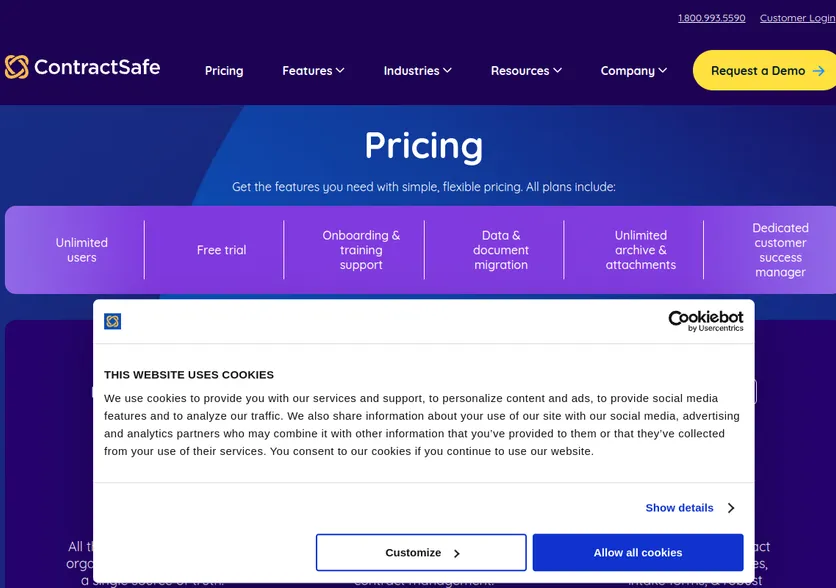
Paid tool Starting price: $450/month · Four hundred fifty dollars a month to start, priced by active contract volume with unlimited users; Finalize and Maximize add e-signature, approvals and AI review.
Free plan: No free plan; free trial available
In litigation, the clause you need is always in the document you cannot find. ContractSafe indexes every agreement so a firm can search by party, clause, or date and get an answer in seconds. Pricing starts at four hundred fifty dollars a month, based on active contract volume, with unlimited users so the whole firm can search. That speed matters when a deadline is hours away.
What we like
- Instant search across the whole library
- Unlimited users for the whole firm
- Fast setup with no long project
Watch out for
- Entry price is high for small firms
- AI features need the higher plans
How to try it
- Upload the contracts tied to each matter.
- Tag key dates and clauses for quick retrieval.
- Search the library during case prep instead of opening files one by one.
2. ContractWorks
Best for: Litigation firms that want contracts, AI search, and signatures in one secure place
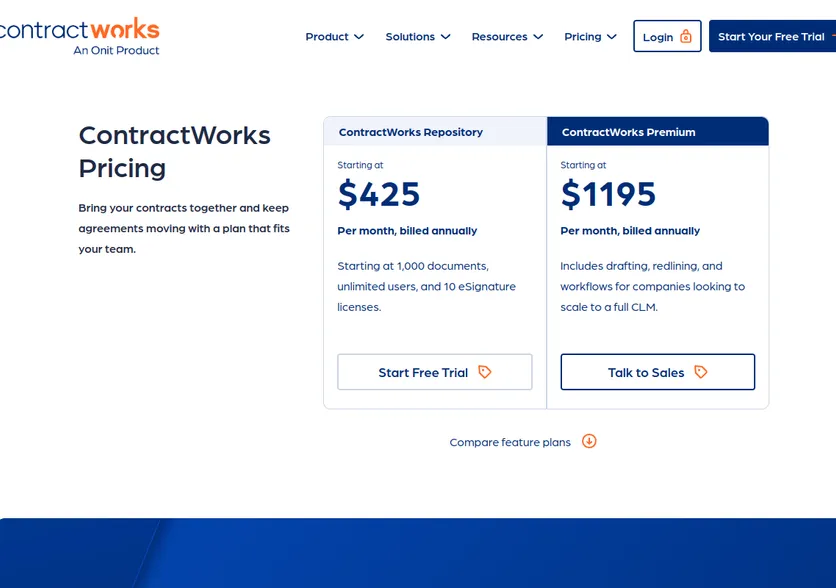
Paid tool Starting price: $425/month · Four hundred twenty-five dollars a month for Repository billed annually, with up to one thousand documents and unlimited users; Premium is custom priced.
Free plan: No free plan; 14-day free trial
ContractWorks gives a litigation firm a secure home for its agreements, with AI search that pulls clauses and dates without opening each file. Repository costs four hundred twenty-five dollars a month billed annually, covering up to one thousand documents and unlimited users. Built-in e-signature means settlement documents can go out without a second tool.
What we like
- Secure repository with AI search
- E-signature built in
- Flat price with unlimited users
Watch out for
- Premium plan is custom priced
- Repository caps at 1,000 documents
How to try it
- Move matter contracts into the secure repository.
- Use AI search to find clauses during discovery and prep.
- Send settlement and engagement documents for e-signature.
3. Concord
Best for: Litigation firms that manage the full contract process around each case
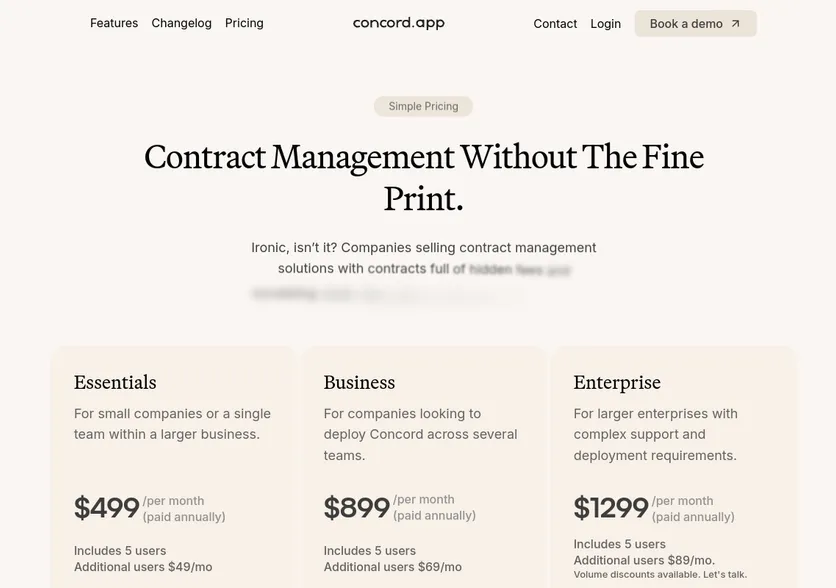
Paid tool Starting price: $499/month · Four hundred ninety-nine dollars a month for Essentials paid annually, including five users; extra users cost forty-nine dollars a month and Business costs eight hundred ninety-nine dollars a month.
Free plan: No free plan; demo available
Concord runs contracts from first draft to renewal in one workspace, with approvals and version history that show exactly who changed what and when. Essentials costs four hundred ninety-nine dollars a month paid annually, including five users. For firms that draft, negotiate, and sign as part of case work, that audit trail is as valuable as the storage.
What we like
- Complete lifecycle with version history
- Approvals built into the workflow
- Clear per-plan pricing
Watch out for
- Highest entry price in this comparison
- No free plan, only a demo
How to try it
- Draft or import the contracts tied to a matter.
- Route agreements through approvals with full version tracking.
- Set renewal alerts so client agreements never lapse unnoticed.
4. Zoho Contracts
Best for: Small litigation firms that need contract tracking without enterprise cost
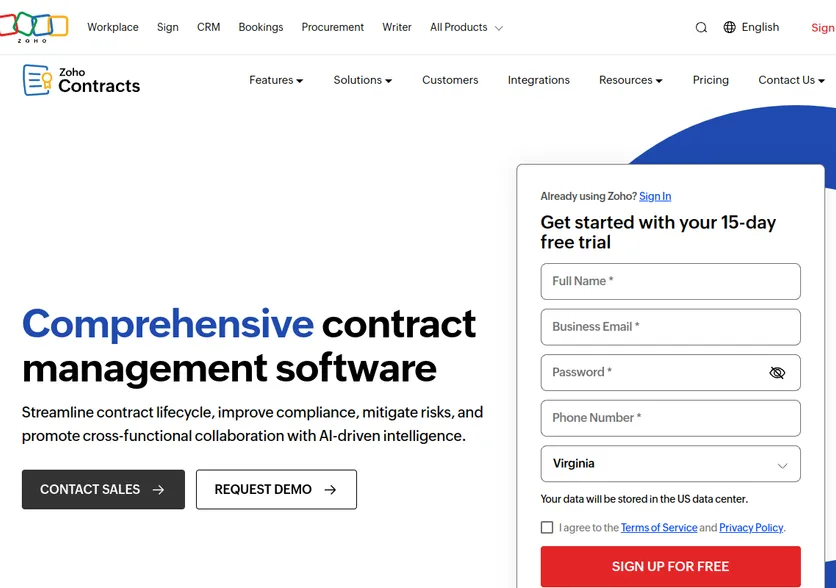
Paid tool Starting price: $25/user/month · Twenty-five dollars per user a month for the Standard plan billed annually, or thirty dollars billed monthly; Professional costs forty dollars and Premium costs fifty dollars per user a month.
Free plan: Free plan for 3 users and 10 contracts
Zoho Contracts gives a small firm real contract analytics at a small-firm price: obligations, milestones, and renewals tracked in one dashboard, with AI help on drafting. Standard costs twenty-five dollars per user a month billed annually, and the free plan covers three users and ten contracts. It is the sensible pick for firms that want structure without a four-figure monthly bill.
What we like
- Lowest price in this comparison
- Free plan for tiny teams
- Obligation tracking per matter
Watch out for
- Fewer enterprise integrations than rivals
- AI features need higher plans
How to try it
- Import the firm's contracts and set renewal alerts.
- Use the AI assistant to review clauses before filing.
- Track obligations per matter in the dashboard.
5. DocuSign IAM
Best for: Litigation firms that want AI to summarize agreements and surface key terms
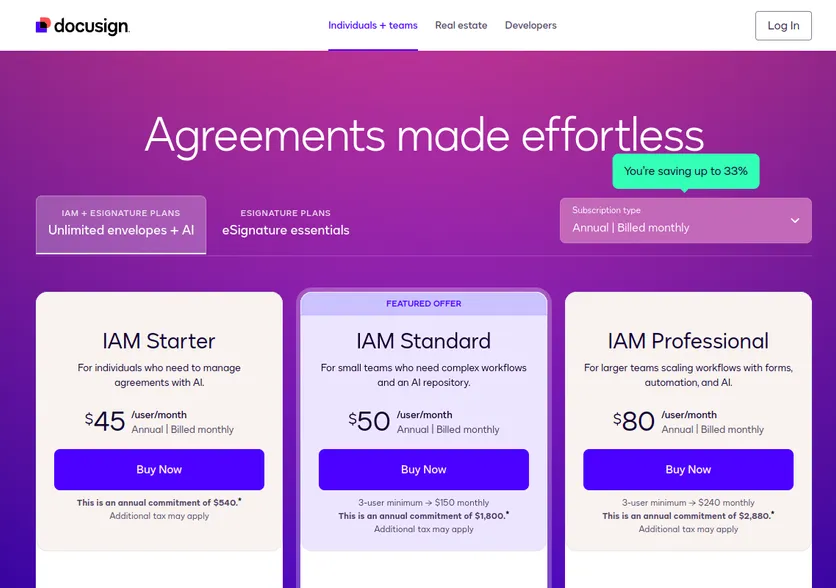
Paid tool Starting price: $45/user/month · Forty-five dollars per user a month for IAM Starter on an annual plan billed monthly; Standard costs fifty dollars and Professional costs eighty dollars per user a month.
Free plan: No free plan; free trial available
DocuSign IAM turns the signature platform into an analytics tool: AI reads each agreement, summarizes it, and extracts the terms a litigator needs to see. IAM Starter costs forty-five dollars per user a month on an annual plan billed monthly. Firms already using DocuSign get the analytics layer on a platform they trust.
What we like
- AI summaries save review time
- Trusted DocuSign platform
- Searchable repository included
Watch out for
- No free plan
- Standard and Professional need 3-user minimums
How to try it
- Bring your DocuSign agreements into the IAM repository.
- Read the AI summary before opening the full document.
- Search by clause or party when building a case timeline.
6. PandaDoc
Best for: Litigation firms that send engagement letters and settlement documents for signature
Paid tool Starting price: $19/user/month · Nineteen dollars per user a month for the Starter plan billed annually, or thirty-five dollars billed monthly; Business costs forty-nine dollars per user a month billed annually.
Free plan: Free plan (5 documents a month)
PandaDoc is the workhorse for the documents a firm sends again and again: engagement letters, fee agreements, and settlement papers, all tracked from open to signature. Starter costs nineteen dollars per user a month billed annually, and the free plan covers five documents a month. The tracking shows which clients have seen a document and which are stalling.

What we like
- Templates for repeat documents
- Tracks opens and signatures
- Low Starter price
Watch out for
- Analytics are basic compared to CLM tools
- Advanced features need Business
How to try it
- Create templates for engagement letters and fee agreements.
- Send documents and watch open and signature tracking.
- Follow up with clients who have viewed but not signed.
7. DocuSign eSignature
Best for: Litigation firms that need court-ready signatures with a full audit trail
Paid tool Starting price: $25/user/month · Standard plan, $25 a user a month billed annually upfront ($300 a year); $30 a month on an annual commitment billed monthly; $45 month to month. Personal $10 a month billed annually upfront ($11 billed monthly); Business Pro $40 a month billed annually upfront ($45 billed monthly); Enterprise is quoted. Standard includes 100 envelopes per user a year.
Free plan: 30-day free trial
DocuSign eSignature is the signature standard most courts and counterparties already accept, with an audit trail that records every step. Standard costs twenty-five dollars per user a month billed annually upfront, and clients sign without creating an account. For litigation firms, that familiarity removes friction from every signature.

What we like
- Accepted by courts and counterparties
- Complete audit trail
- Clients sign without an account
Watch out for
- No contract repository on Standard
- No free plan, only a trial
How to try it
- Upload the document and place signature fields.
- Send the envelope and monitor its status.
- File the completed document with its audit trail.
8. Signeasy
Best for: Small litigation firms that need affordable e-signatures with an audit trail
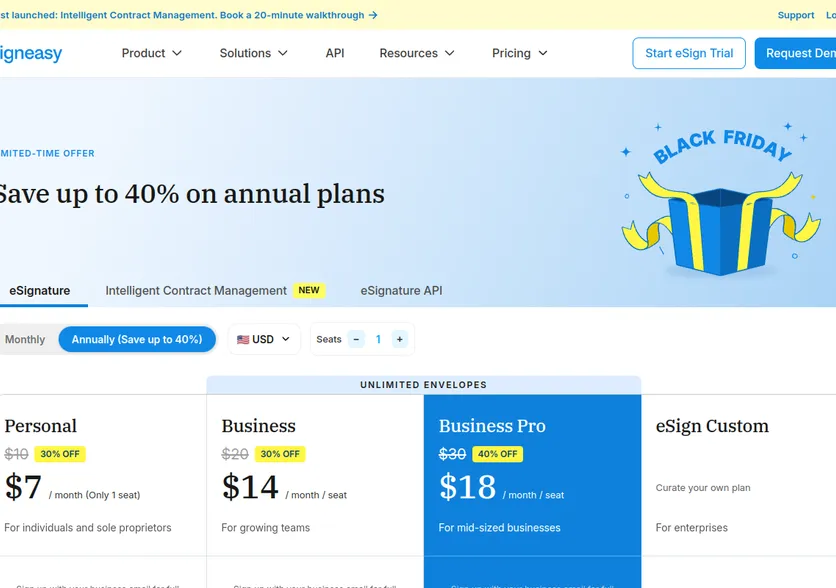
Paid tool Starting price: $10/seat/month · Ten dollars per seat a month is the Personal list price, currently seven dollars with a limited-time thirty percent discount; Business lists at twenty dollars per seat a month.
Free plan: No free plan; 14-day free trial
Signeasy gives a small firm reliable e-signatures without enterprise pricing: unlimited envelopes, a tamper-proof trust seal, and AI summaries on higher plans. Personal lists at ten dollars per seat a month, with Business at twenty dollars per seat. It is a solid low-cost signature option alongside a repository tool.
What we like
- Low list price for individuals
- Unlimited envelopes on paid plans
- AI summaries on Business plans
Watch out for
- No screenshot available for this entry
- No contract analytics of its own
How to try it
- Upload a document and add signature fields.
- Send it and track who has signed.
- Download the completed agreement with its trust seal.
Prices above were checked on each vendor’s own website on Nov 27, 2026 and can change — the vendor’s page is the final word. Vendor links are editorial: nobody paid to be listed or ranked here. Vendors who want a featured listing can see how it works on our Get listed page.
How litigation firms should use contract analytics
Begin with the matters you are working now: import their contracts, tag the key dates, and let the team search instead of digging through files. Build a habit of searching the library before drafting any new agreement, so the firm stops reinventing clauses it already owns. Then set renewal and deadline alerts for every active matter, because a missed date costs far more than any subscription. The tool earns its keep the first time it finds a clause in seconds that would have taken an afternoon.
Before you buy
- Confirm the tool extracts the dates and clauses that matter in litigation, such as limitations and indemnity.
- Check whether the repository meets your firm's security and confidentiality requirements.
- Make sure matter tagging works, so contracts link to the cases they belong to.
- Verify the audit trail is complete enough for court use.
- Ask about migration: moving a firm's contract archive is the hardest part of switching.
Official websites
Official websites of the products reviewed above. Features and prices were checked against these sites when this guide was written, and they can change, so confirm on the vendor site before you buy.
Frequently asked questions
What is the best contract analytics software for litigation firms?
ContractSafe leads for pure search speed, while ContractWorks is the best all-rounder with its repository, AI search, and built-in signature. Zoho Contracts is the best budget pick for small firms. The right choice depends on whether your firm's biggest pain is finding clauses, storing agreements, or tracking renewals.
How much does contract analytics software cost for a litigation firm?
Entry prices here run from ten dollars per seat a month for Signeasy to four hundred ninety-nine dollars a month for Concord Essentials. Full analytics platforms cost four hundred to five hundred dollars a month, while signature-only tools stay under fifty dollars per user.
What does contract analytics do for a litigation firm?
It reads your agreements and makes them searchable: renewal dates, obligations, indemnity, and termination clauses are extracted so lawyers can answer questions in seconds. For litigation, that means faster case prep and fewer missed deadlines buried in the paperwork. The result is a library that works as hard as the lawyers who use it.
Is there free contract analytics software for litigation firms?
Yes, for small volumes. Zoho Contracts offers a free plan for three users and ten contracts, and PandaDoc covers five documents a month free. A firm with hundreds of contracts will need a paid repository with proper search, alerts, and security.
What should a litigation firm look for in contract software?
Look for three things: a searchable repository, an audit trail that holds up in court, and renewal alerts. If a tool lacks any of those, it will not survive real case work, no matter how cheap or polished it looks.
Need more business tools? Try Toolsvine's free business calculators right in your browser.
Browse Business Tools tools