On this page
A startup portfolio has to look hired, so the eight tools below cover the full range from dedicated portfolio builders to website builders with a store. Every price was checked on the vendor site on November 27, 2026, and the list runs from five dollars and forty cents a month to nineteen dollars a month. Format is our first pick — the portfolio builder made for photographers and designers.
How we researched this
We started with the portfolio tools startups actually buy, then read each price on the vendor pricing page on November 27, 2026 and noted the trial each plan carries. We judged them for a startup that needs a polished portfolio live fast and wants client galleries or a store beside it. We dropped Crevado, Krop and Dunked because their prices are in euros or not published in dollars, and we left out quote-only enterprise tools.
Compare the tools
| Name | Best for | Starting price | Free plan | |
|---|---|---|---|---|
| Format | Startups that need a polished portfolio fast | $10/month | No free plan; 14-day free trial | Visit |
 Pixpa | Startups that need a portfolio and a store at the lowest price | $5.40/month | No free plan; 15-day free trial | Visit |
| Cargo | Startups that want an art-directed portfolio | $14/month | Free for students | Visit |
 Squarespace | Startups that need a portfolio beside a store | $19/month | No free plan; 14-day free trial | Visit |
 Wix | Startups that want a portfolio live today | $17/month | Free plan with Wix branding | Visit |
| Behance | Startups that want their work seen by hirers | $9.99/month | Free plan; 7-day free trial on Pro | Visit |
| Adobe Portfolio | Startups already inside Adobe Creative Cloud | $9.99/month | No free plan; 7-day free trial on Behance Pro | Visit |
 Pixieset | Startups that shoot client work | $12/month | Free plan available | Visit |
The creative portfolio management software for startups, compared
1. Format
Best for: Startups that need a polished portfolio fast
Paid tool Starting price: $10/month · Ten dollars a month billed annually for the Basic plan, or fourteen dollars a month billed monthly; Pro costs seventeen dollars a month and Pro Plus costs twenty-six dollars a month billed annually, before any first-year promotion
Free plan: No free plan; 14-day free trial
Format is the portfolio builder made for photographers and designers, pairing gallery templates with client proofing and a store in one login. This Format Basic plan costs ten dollars a month billed annually and includes a fourteen-day free trial. A startup that needs a polished portfolio fast gets a site built for visual work without touching code.
What we like
- Templates built only for visual portfolios
- Client proofing and store in one login
- Fast setup with no code needed
Watch out for
- First-year promo prices hide the real renewal rate
- Fewer store features than the big website builders
How to try it
- Open the Format site and start the fourteen-day free trial
- Pick a gallery template and upload your work
- Publish the portfolio and share the link
2. Pixpa
Best for: Startups that need a portfolio and a store at the lowest price
Paid tool Starting price: $5.40/month · Five dollars and forty cents a month billed annually for the Basic plan; Creator costs nine dollars, Professional costs twelve dollars and Advanced costs fifteen dollars a month billed annually; a fifteen-day free trial is available with no card
Free plan: No free plan; 15-day free trial
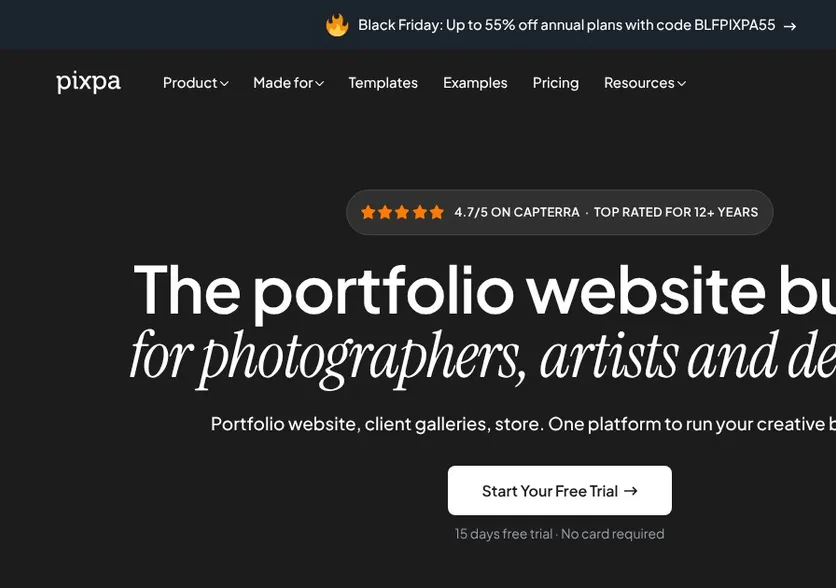
Pixpa is the portfolio builder for photographers, artists and designers that pairs gallery sites with client galleries and a store in one login. This Pixpa Basic plan costs five dollars and forty cents a month billed annually and includes a fifteen-day free trial. A startup that needs a portfolio and a store gets both for the lowest price here.
What we like
- Lowest price in this comparison
- Client galleries and store in one login
- Fifteen-day free trial with no card
Watch out for
- Renewal may cost more than the first-year price
- Black Friday promo prices vary through the year
How to try it
- Open the Pixpa site and start the fifteen-day free trial
- Pick a template and upload your portfolio
- Publish the site and add the store
3. Cargo
Best for: Startups that want an art-directed portfolio
Paid tool Starting price: $14/month · Fourteen dollars a month billed yearly, or nineteen dollars a month billed monthly; the Commerce add-on costs nineteen dollars and fifty cents a month billed yearly; free for students
Free plan: Free for students
Cargo is the portfolio platform for designers who want art-directed layouts, with grid tools that break the template mould. This Cargo plan costs fourteen dollars a month billed yearly and is free for students. A startup that wants a portfolio that looks designed, not templated, gets a canvas built for visual experiments.
What we like
- Art-directed layouts no template can match
- Free for students
- Simple pricing with one plan
Watch out for
- Fewer templates than the big builders
- Commerce costs extra on top of the plan
How to try it
- Open the Cargo site and start a site
- Pick a grid layout and add your work
- Publish the portfolio and share the link
4. Squarespace
Best for: Startups that need a portfolio beside a store
Paid tool Starting price: $19/month · Nineteen dollars a month billed annually for the Basic plan, or twenty-five dollars a month billed monthly; Core costs twenty-nine dollars, Plus costs forty-nine dollars and Advanced costs ninety-nine dollars a month billed annually; a fourteen-day free trial is available
Free plan: No free plan; 14-day free trial
Squarespace is the website builder that pairs portfolio templates with a store, blog and scheduling in one subscription. This Squarespace Basic plan costs nineteen dollars a month billed annually and includes a fourteen-day free trial. A startup that needs a portfolio beside a store gets both in one login without plugins.

What we like
- Portfolio, store, blog and scheduling in one login
- Polished templates that need no code
- Strong mobile layouts out of the box
Watch out for
- Basic plan is the most expensive entry here
- Store features need higher plans
How to try it
- Open the Squarespace site and start the fourteen-day free trial
- Pick a portfolio template and add your work
- Publish the site and connect the store
5. Wix
Best for: Startups that want a portfolio live today
Paid tool Starting price: $17/month · Seventeen dollars a month billed yearly for the Light plan; a free plan is available with Wix branding
Free plan: Free plan with Wix branding
Wix is the website builder that pairs portfolio templates with drag-and-drop editing and a free plan to start with. This Wix Light plan costs seventeen dollars a month billed yearly and includes a free plan with Wix branding. A startup that wants a portfolio live today gets a builder that needs no code at all.
What we like
- Free plan to start with
- Drag-and-drop builder with no code
- Huge template library for every niche
Watch out for
- Free plan carries Wix branding
- Templates cannot be switched after launch
How to try it
- Open the Wix site and start with the free plan
- Pick a portfolio template and add your work
- Publish the site and upgrade to remove branding
6. Behance
Best for: Startups that want their work seen by hirers
Paid tool Starting price: $9.99/month · Nine dollars and ninety-nine cents a month for Behance Pro with an annual commitment; prices vary by region, and a seven-day free trial is available
Free plan: Free plan; 7-day free trial on Pro
Behance is the creative network where designers publish portfolios and get hired, with discovery built into the platform itself. This Behance Pro plan costs nine dollars and ninety-nine cents a month with an annual commitment and a seven-day free trial. A startup that wants its work seen gets a portfolio inside the largest creative community.
What we like
- Largest creative community for discovery
- Zero platform fees on Pro
- Adobe Portfolio included with Pro
Watch out for
- Pro needs an annual commitment
- Free accounts pay platform fees on sales
How to try it
- Open the Behance site and create a free profile
- Upload your first project with images
- Upgrade to Pro for analytics and zero platform fees
7. Adobe Portfolio
Best for: Startups already inside Adobe Creative Cloud
Paid tool Starting price: $9.99/month · Nine dollars and ninety-nine cents a month for Behance Pro, the cheapest plan that includes Adobe Portfolio, with an annual commitment; the Lightroom plan costs eleven dollars and ninety-nine cents a month and also includes Portfolio
Free plan: No free plan; 7-day free trial on Behance Pro
Adobe Portfolio is the portfolio builder included with Creative Cloud, pairing simple templates with Lightroom and Behance sync. This Adobe Portfolio plan costs nine dollars and ninety-nine cents a month through Behance Pro, the cheapest route in. A startup already inside Adobe gets a portfolio for no extra cost beyond the plan it holds.
What we like
- Included with Creative Cloud at no extra cost
- Lightroom and Behance sync built in
- Up to five portfolio sites per account
Watch out for
- No standalone price, so the cost hides in the plan
- No store, blog or client galleries
How to try it
- Open the Adobe Portfolio site and sign in
- Pick a theme and sync work from Lightroom
- Publish up to five portfolio sites
8. Pixieset
Best for: Startups that shoot client work
Paid tool Starting price: $12/month · Twelve dollars a month for the Plus plan; a free plan is available
Free plan: Free plan available
Pixieset is the portfolio and client gallery platform built for photographers, pairing gallery sites with proofing and a store. This Pixieset Plus plan costs twelve dollars a month and includes a free plan to start with. A startup that shoots client work gets galleries and proofing beside the portfolio itself.
What we like
- Client galleries and proofing built in
- Free plan to start with
- Built for photographers, not generic sites
Watch out for
- Narrower than the general website builders
- Store features need higher plans
How to try it
- Open the Pixieset site and start with the free plan
- Build a gallery site and add client galleries
- Publish the site and turn on the store
Prices above were checked on each vendor’s own website on Nov 27, 2026 and can change — the vendor’s page is the final word. Vendor links are editorial: nobody paid to be listed or ranked here. Vendors who want a featured listing can see how it works on our Get listed page.
What a startup portfolio costs in 2026
A startup pays for a portfolio in two ways, the subscription and the sales it loses to a weak site. A five-dollar builder looks cheap until a clumsy gallery costs a client, so weigh templates and mobile layouts against the sticker price. Dedicated portfolio builders cost more because they fit visual work, while website builders stay cheap by doing many jobs at once.
Start with a trial on two tools and publish real work through each one. Check that the gallery looks right on a phone, that the store checkout works, and that the site loads fast on a slow connection. Pick the tool whose portfolio you would show a client today, because a polished site that you hide is worse than a plain one you share.
Before you buy
- Check the renewal price, because a first-year promo hides the real cost.
- Match the tool to your work, because photographers need galleries and designers need grids.
- Confirm the store fees, because platform fees can eat a sale.
- Test the trial with real work, because a demo will not show mobile layouts.
- Ask about the domain, because a custom domain costs extra on some plans.
Official websites
Official websites of the products reviewed above. Features and prices were checked against these sites when this guide was written, and they can change, so confirm on the vendor site before you buy.
Frequently asked questions
Which creative portfolio management software is best for startups in 2026?
Format is the best overall pick at ten dollars a month, with gallery templates built only for visual portfolios. Pixpa is the best budget pick at five dollars and forty cents a month for startups that need a portfolio and a store. Squarespace is the best all-rounder at nineteen dollars a month for startups that need a portfolio beside a store.
How much does portfolio management software cost for startups?
Prices in this list run from five dollars and forty cents a month for Pixpa Basic to nineteen dollars a month for Squarespace Basic, with most portfolio tools landing between ten and seventeen dollars a month. First-year promos can cut the price, so check the renewal rate before you compare totals. Behance Pro and Adobe Portfolio both start at nine dollars and ninety-nine cents a month.
Do startups need a dedicated portfolio tool or a website builder?
Yes, when the startup sells visual work, because a dedicated portfolio builder fits galleries, proofing and client work in one login. A website builder suits startups that need a portfolio beside a store and a blog. A creative network suits startups that want discovery and hiring built into the platform itself.
Is there a free portfolio tool for startups?
Yes, Wix and Pixieset both carry free plans, and Behance lets any designer publish a portfolio for free. Free plans limit storage, carry branding or charge platform fees on sales, so check the caps before you rely on them. Most startups move to a paid plan once the portfolio fills and the store matters.
What is the cheapest portfolio option for startups?
Pixpa is the cheapest paid option here at five dollars and forty cents a month billed annually for the Basic plan, with a fifteen-day free trial and no card. Format follows at ten dollars a month, and Pixieset costs twelve dollars a month with a free plan to start. The cheapest plan is not always the cheapest deal if the renewal rate is higher or the store fees eat a sale.
Designing something too? Try Toolsvine's free image tools right in your browser.
Browse Image Tools tools