On this page
A small firm loses more time to lost documents than to almost anything else: the contract is in email, the signed version is on someone's desktop, and nobody knows which draft is final. The tools below fix that by filing every document to its matter with version history and an audit trail. Box leads the list because it offers unlimited storage from fifteen dollars a user a month, and the other eight tools are ranked on the same practical test: how fast anyone in the firm can find the right version.
How we researched this
We checked every price on the vendor pricing page on November 27, 2026, and only included tools with a published US dollar list price and a free trial or free plan. NetDocuments and iManage are not in this list because they publish no prices. Prices change, so confirm the current figure before you buy.
Compare the tools
| Name | Best for | Starting price | Free plan | |
|---|---|---|---|---|
 Box | Small firms that want unlimited storage at a low price | $15/user/month | Free plan with 10 GB storage | Visit |
 Dropbox Business | Small firms that already live in Dropbox | $15/user/month | Free plan with 2 GB storage | Visit |
 Egnyte | Small firms that want governance controls on their storage | $22/user/month | Free trial | Visit |
| LexWorkplace | Small firms that want a document system built only for law | $395/month | Free 7-day trial | Visit |
 Clio | Small firms that want documents inside the practice platform | $49/user/month | Free 7-day trial | Visit |
 MyCase | Small firms that want documents and client portal in one tool | $50/user/month | Free trial | Visit |
 PracticePanther | Small firms that want documents with automation built in | $49/user/month | Free trial | Visit |
 CosmoLex | Small firms that want documents and accounting in one database | $49/user/month | Free trial | Visit |
 Lawcus | Small firms that want the cheapest practice tool with document management | $39/user/month | Free trial | Visit |
The document management software for small firms, compared
1. Box
Best for: Small firms that want unlimited storage at a low price
Paid tool Starting price: $15/user/month · Fifteen dollars per user a month billed annually on the Business plan, or twenty dollars on monthly billing, with unlimited storage, five-gigabyte uploads and a three-user minimum; Business Starter is five dollars a user a month billed annually and Business Plus is twenty-five dollars. One directory lists Business at twenty dollars billed annually, so confirm the current price before buying
Free plan: Free plan with 10 GB storage
Fifteen dollars per user a month billed annually buys Box Business, with unlimited storage, five-gigabyte uploads and a three-user minimum. Box is cloud storage with serious business controls: version history, permissions, audit logs and integrations with the tools a firm already uses. It is not built for law, so matter organization and legal workflows need your own folder structure, but at this price a small firm gets unlimited storage with room to grow.

What we like
- Unlimited storage on the Business plan
- Five-gigabyte uploads with version history included
- Strong permissions and audit logs for client files
Watch out for
- Not built for law, so matter organization is manual
- One directory lists a different annual price, so confirm the figure
How to try it
- Set up a folder structure that mirrors your matters and clients
- Set permissions so each matter is visible only to the right people
- Use version history to recover an earlier draft when a document changes
2. Dropbox Business
Best for: Small firms that already live in Dropbox
Paid tool Starting price: $15/user/month · Fifteen dollars per user a month billed annually on the Standard plan, or eighteen dollars on monthly billing, with a three-user minimum and pooled team storage; Advanced is twenty-four dollars a user a month billed annually and Enterprise is priced on request
Free plan: Free plan with 2 GB storage
Fifteen dollars per user a month billed annually buys Dropbox Business Standard, with a three-user minimum and pooled team storage. Dropbox is the storage most firms already know, and Business adds admin controls, file recovery and team folders on top of the familiar sync. Advanced at twenty-four dollars a user a month billed annually adds more controls and larger transfer limits, while Enterprise is priced on request.
What we like
- The storage tool most firms already know how to use
- Pooled team storage with file recovery included
- Secure sharing links replace email attachments
Watch out for
- Not built for law, so matter organization is manual
- Storage amounts vary across sources, so confirm the pooled figure
How to try it
- Set up team folders for each client and matter
- Turn on file recovery so a deleted document can be restored
- Share files with clients through secure links instead of email attachments
3. Egnyte
Best for: Small firms that want governance controls on their storage
Paid tool Starting price: $22/user/month · Twenty-two dollars per user a month billed annually on the Business plan for ten to one hundred users; Enterprise Lite is thirty-nine dollars and Elite is forty-eight dollars. Egnyte's Team plan, listed at ten dollars a user a month for one to ten users, appears to have been removed from Egnyte's pricing page in November 2026, so confirm the current price before buying
Free plan: Free trial
Twenty-two dollars per user a month billed annually buys Egnyte Business, for ten to one hundred users. Egnyte is cloud storage with governance built in: permissions, audit trails, data classification and ransomware protection sit on top of the file store. Enterprise Lite at thirty-nine dollars and Elite at forty-eight dollars add deeper controls.

What we like
- Governance, audit trails and permissions built into storage
- Ransomware protection on business files
- Strong fit for firms with compliance obligations
Watch out for
- Business needs ten users minimum, so tiny firms may not qualify
- The Team plan appears to have been removed in November 2026
How to try it
- Set up governed folders for each client and matter
- Turn on audit trails so every file access is logged
- Use data classification to flag sensitive client files
4. LexWorkplace
Best for: Small firms that want a document system built only for law
Paid tool Starting price: $395/month · Three hundred and ninety-five dollars a month for the Core plan with three users and one thousand gigabytes of storage included; Advanced is five hundred and ninety-five dollars a month with three users, two thousand gigabytes, integrated OCR and Litera Compare. Extra users are fifty dollars a month on Core, onboarding is a one-time one thousand four hundred and ninety-five dollars for up to two hundred and fifty gigabytes, and billing is month to month
Free plan: Free 7-day trial
Three hundred and ninety-five dollars a month buys LexWorkplace Core, with three users and one thousand gigabytes of storage included. LexWorkplace is a document and email management system built only for law firms: documents, email, notes and tasks are organized by client and matter, with full-text search, version history and granular permissions. Advanced at five hundred and ninety-five dollars a month adds integrated OCR, Litera Compare and inline document compare. Billing is month to month, and onboarding is a one-time one thousand four hundred and ninety-five dollars for up to two hundred and fifty gigabytes.
What we like
- Built only for law firms, organized by client and matter
- Email filing from Outlook keeps everything in one place
- AI answers with citations to the source document
Watch out for
- Most expensive tool in this list at three hundred and ninety-five dollars a month
- Onboarding costs one thousand four hundred and ninety-five dollars extra
How to try it
- Migrate your existing files into LexWorkplace by matter
- File emails to matters from Outlook with the add-in
- Search the whole firm by document text, matter or client
5. Clio
Best for: Small firms that want documents inside the practice platform
Paid tool Starting price: $49/user/month · Forty-nine dollars per user a month billed annually on the EasyStart plan, or fifty-nine dollars on monthly billing; Essentials is eighty-nine dollars, Advanced is one hundred and nineteen dollars and Complete is one hundred and forty-nine dollars
Free plan: Free 7-day trial
Forty-nine dollars per user a month billed annually buys Clio EasyStart, and the document management comes free with the practice platform: unlimited document storage, matter-based filing, version tracking and a full audit trail sit beside intake, time tracking and billing. Clio Draft generates court forms from matter data, and the integration library connects the tools a firm already uses. Essentials at eighty-nine dollars adds more automation for firms that outgrow EasyStart.

What we like
- Unlimited document storage with matter-based filing
- Full audit trail on every document change
- Document management comes with the practice platform, not as an add-on
Watch out for
- Document features are part of a bigger platform, not a dedicated DMS
- EasyStart is the entry tier, so advanced features need higher plans
How to try it
- File every document to its matter as soon as it arrives
- Use Clio Draft to generate court forms from matter data
- Search the matter file for any document by name or content
6. MyCase
Best for: Small firms that want documents and client portal in one tool
Paid tool Starting price: $50/user/month · Fifty dollars per user a month billed annually on the Basic plan, or sixty dollars on monthly billing; Pro is one hundred dollars and Advanced is one hundred and thirty dollars
Free plan: Free trial
Fifty dollars per user a month billed annually buys MyCase Basic, where documents live beside matters, billing and the client portal. A client can upload a document to the portal, the firm files it to the matter, and the whole exchange stays in one auditable place. Pro at one hundred dollars adds intake, lead tracking and document automation, while Advanced at one hundred and thirty dollars adds Woodpecker automation for firms that draft at volume.

What we like
- Client portal keeps documents and messages in one auditable place
- Documents live beside matters and billing, not in a separate tool
- Clean interface the whole firm learns quickly
Watch out for
- Document automation needs Pro or Advanced, not Basic
- No dedicated DMS features like OCR or bulk compare
How to try it
- Invite clients to the portal to upload documents and messages
- File every document to its matter as soon as it arrives
- Generate documents from matter data on Pro or Advanced
7. PracticePanther
Best for: Small firms that want documents with automation built in
Paid tool Starting price: $49/user/month · Forty-nine dollars per user a month billed annually on the Solo plan, or fifty-nine dollars on monthly billing; Essential is sixty-nine dollars, Business is eighty-nine dollars and Business Pro is one hundred and fourteen dollars
Free plan: Free trial
Forty-nine dollars per user a month billed annually buys PracticePanther Solo, where document templates, intake forms and e-signature run on workflows the firm sets up once. A document generated from an intake form files itself to the matter, and reminders chase the signature until it is done. Essential at sixty-nine dollars, Business at eighty-nine dollars and Business Pro at one hundred and fourteen dollars add capacity and reporting as the firm grows.

What we like
- Document templates and e-signature run on set-and-forget workflows
- Documents generate from intake forms without retyping
- Same price as Clio EasyStart with more automation included
Watch out for
- Solo is the entry tier, so deeper features need higher plans
- No dedicated DMS features like OCR or bulk compare
How to try it
- Build document templates for your most-used agreements
- Connect templates to intake forms so documents generate themselves
- Let e-signature and reminders close the loop on every document
8. CosmoLex
Best for: Small firms that want documents and accounting in one database
Paid tool Starting price: $49/user/month · Forty-nine dollars per user a month billed annually on the Launch plan, or fifty-nine dollars on monthly billing; Core is ninety-nine dollars and Pro is one hundred and twenty-nine dollars
Free plan: Free trial
Forty-nine dollars per user a month billed annually buys CosmoLex Launch, where document management shares a database with accounting, billing and matters. A document filed to a matter sits beside the trust ledger and the invoice for the same client, so the file, the money and the work are never in different systems. Core at ninety-nine dollars and Pro at one hundred and twenty-nine dollars add more reporting and capacity for growing firms.

What we like
- Documents, accounting and matters share one database
- Trust accounting with three-way reconciliation is built in
- One system for the file, the money and the work
Watch out for
- Launch is the entry tier, so advanced reporting needs Core or Pro
- Fewer third-party integrations than Clio
How to try it
- File documents to matters so they sit beside billing and accounting
- Use the built-in trust accounting to track client funds per matter
- Run compliance reports from the same database as the documents
9. Lawcus
Best for: Small firms that want the cheapest practice tool with document management
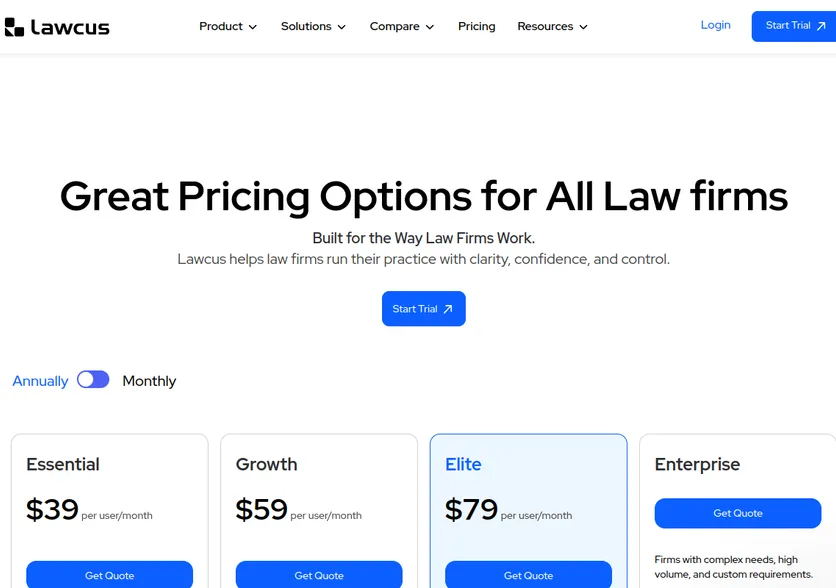
Paid tool Starting price: $39/user/month · Thirty-nine dollars per user a month billed annually on the Essential plan, or forty-nine dollars on monthly billing; Growth is fifty-nine dollars and Elite is seventy-nine dollars
Free plan: Free trial
Thirty-nine dollars per user a month billed annually buys Lawcus Essential, the cheapest practice platform in this list. Documents, matters, time tracking and trust accounting share one system, so a small firm can file documents to matters, track the work and bill for it without a separate storage subscription. Growth at fifty-nine dollars and Elite at seventy-nine dollars add document automation and CRM depth as the firm grows.
What we like
- Cheapest practice tool here at thirty-nine dollars a month
- Documents, matters and billing share one system
- Trust accounting is included from the entry plan
Watch out for
- Document features are simpler than a dedicated DMS like LexWorkplace
- Smaller vendor with fewer integrations than Clio
How to try it
- File documents to matters as soon as they arrive
- Use document automation to generate standard agreements from matter data
- Track time and bill from the same matter record
Prices above were checked on each vendor’s own website on Nov 28, 2026 and can change — the vendor’s page is the final word. Vendor links are editorial: nobody paid to be listed or ranked here. Vendors who want a featured listing can see how it works on our Get listed page.
How a small firm should organize its documents
Start with the matter, not the folder. Every document belongs to a client and a matter, and the file structure should say so, because a folder named after a person tells nobody which case it belongs to. File documents the day they arrive, not at the end of the week, because a filing backlog is how versions get lost. Turn on version history everywhere and never overwrite a signed document with a new draft. Finally, give every person in the firm the same filing rules and check them monthly, because a system only half the firm follows is worse than no system at all.
Before you buy
- Check that documents are organized by matter, not just by folder name
- Confirm whether version history and audit trails are included on the plan you buy
- Ask how much storage is included and what extra storage costs
- Make sure the tool works with your email and case systems without manual filing
- Run a trial by filing a real matter from intake to closing before you commit
Official websites
Official websites of the products reviewed above. Features and prices were checked against these sites when this guide was written, and they can change, so confirm on the vendor site before you buy.
Frequently asked questions
What is legal document management software for small firms?
It is software that stores, organizes and controls a firm's documents by client and matter, with version history, permissions and an audit trail. Small firms choose between a dedicated legal DMS like LexWorkplace, a practice platform like Clio that includes document management, or plain cloud storage like Box and Dropbox.
Do small firms need a legal DMS or is cloud storage enough?
It depends on what your clients demand. Cloud storage is enough when the firm only needs to store and share files with version history. A legal DMS becomes necessary when the firm needs documents organized by matter, email filed to matters, OCR search or audit trails for compliance.
How much does Box Business cost?
Box Business costs fifteen dollars per user a month billed annually, or twenty dollars on monthly billing, with unlimited storage, five-gigabyte uploads and a three-user minimum. Business Starter is five dollars a user a month billed annually and Business Plus is twenty-five dollars.
Which tool is best for a small law firm that wants everything in one place?
Clio EasyStart at forty-nine dollars per user a month is the strongest all-in-one pick: unlimited document storage with matter-based filing, intake, time tracking and billing in one system. MyCase Basic at fifty dollars adds a client portal, and PracticePanther Solo at forty-nine dollars adds more automation.
What is the cheapest document management tool for a small firm?
Box Business and Dropbox Business Standard tie at fifteen dollars per user a month billed annually, and both offer free plans to start. Box is the better pick for storage because it includes unlimited storage on Business, while Dropbox is the better pick for a firm that already uses Dropbox everywhere.
Compare the nine tools above, then start with a free trial on the tool that matches how your firm already files documents before you pay for a full year.
Browse Business Tools tools