On this page
A medical startup needs scheduling software that works on day one, costs almost nothing while the team is small, and still fits when headcount doubles. The seven tools below cover that job for new clinics of different shapes, from a founder running one rota to a deskless team spread across sites. Sling leads the list because its free plan covers thirty users and its paid plan costs one dollar and seventy cents a user a month, and the other six are judged on the same practical test: how much of the startup staffing job they cover for the price.
How we researched this
We checked every price on the vendor pricing page on November 28, 2026, and only included tools with a published US dollar list price. QGenda, ShiftWizard and AMN Healthcare publish no prices, so they are not in this list despite leading the Toolnimba guide. Prices change, so confirm the current figure on the vendor site before you buy.
Compare the tools
| Name | Best for | Starting price | Free plan | |
|---|---|---|---|---|
 Sling | Medical startups that want a free rota now and the cheapest paid plan later | $1.70/user/month | Free plan (up to 30 users) | Visit |
 When I Work | Startups that want the simplest paid scheduler with messaging built in | $2.50/user/month | 14-day free trial | Visit |
 Deputy | Startups that are hiring fast and need scheduling with compliance built in | $5/user/month | 30-day free trial | Visit |
 Homebase | Startup clinics that expect fast headcount growth at one location | $24/location/month | Free Basic plan (1 location, up to 10 employees) | Visit |
 ZoomShift | Startups with changing rosters that want to pay only for active members | $2/active user/month | Free plan (up to 20 users, 1 location) | Visit |
 7shifts | Startups that want labor forecasting from the first paid plan | $39.99/location/month | Free Comp plan (1 location, up to 15 employees) | Visit |
 Connecteam | Deskless medical startups that want scheduling and operations in one mobile app | $29/month | Free plan (up to 10 users) | Visit |
The medical staff scheduling software for startups, compared
1. Sling
Best for: Medical startups that want a free rota now and the cheapest paid plan later
Paid tool Starting price: $1.70/user/month · One dollar and seventy cents per user per month billed annually on the Premium plan, or $2 month to month; Business is $3.40 billed annually ($4 monthly). The free plan covers up to thirty users with basic scheduling and time tracking. Sling is now Sling by Toast.
Free plan: Free plan (up to 30 users)
This Sling plan costs one dollar and seventy cents per user a month billed annually, and it is the cheapest way for a medical startup to put a real rota in place without spending anything at first. The free plan covers thirty users with shift scheduling, swaps, availability and messaging, which is enough for most early-stage clinics to run their whole schedule at no cost. When the team needs a mobile time clock, labor cost budgeting and advanced reporting, Premium adds them for under two dollars a head. The trade-off is depth: there is no clinical coverage logic, so a startup with complex rostering rules will need a heavier tool later.

What we like
- Free plan covers thirty users with real scheduling tools
- Cheapest paid plan in this list at under two dollars a user
- No setup project — publish a schedule the same day
Watch out for
- No healthcare-specific scheduling or credential features
- Reporting and integrations are lighter than on bigger platforms
How to try it
- Sign up free and invite the whole team
- Publish your first rota and let staff swap shifts
- Move to Premium when you need time clocking and labor reports
2. When I Work
Best for: Startups that want the simplest paid scheduler with messaging built in
Paid tool Starting price: $2.50/user/month · Two dollars and fifty cents per user per month for a single location or schedule; multiple locations or schedules cost $5 per user per month. Seats are billed in bundles of five or ten, so a six-person team pays for ten seats. A separate vendor layout lists Essentials at $2.50, Pro at $5 and Premium at $8 — confirm the plan names at checkout.
Free plan: 14-day free trial
This When I Work plan costs two dollars and fifty cents per user a month, and it is the easiest paid scheduler for a startup team to adopt without training. Scheduling, time tracking and team messaging live in one app, so a founder can publish shifts, staff can swap from their phones, and payroll gets clean timesheets without a second tool. Auto-scheduling and labor forecasting are included on the entry plan, which is unusual at this price and saves hours every week. The limits are familiar ones: seats are billed in bundles, and there is no clinical rostering depth for complex coverage rules.

What we like
- Scheduling, time tracking and messaging in one app
- Auto-scheduling and forecasting on the entry plan
- Staff swap shifts and check rosters from their phones
Watch out for
- Seats are billed in bundles, so small teams may overpay
- No healthcare-specific coverage rules or credential tracking
How to try it
- Add staff and set roles and availability for each person
- Publish the schedule and open shift swaps to the team
- Review timesheets and message staff from the same app
3. Deputy
Best for: Startups that are hiring fast and need scheduling with compliance built in
Paid tool Starting price: $5/user/month · Five dollars per user per month on the Lite plan billed annually, or $5.50 month to month; Core is $6.50 billed annually ($7.25 monthly) and Pro is $9 billed annually ($10 monthly). There is a $30 monthly minimum spend per invoice. HR, messaging and analytics add-ons cost extra on Lite and Core.
Free plan: 30-day free trial
This Deputy plan costs five dollars per user a month billed annually, and it is the scheduler to grow into when a medical startup outgrows a basic rota. Lite handles scheduling, timesheets, time clocking and leave, while Core adds auto-scheduling, demand forecasting, wage budgets and labor optimization for teams that plan around patient volume. The compliance tools matter for a startup hiring fast: labor-law rules, biometric clocking and audit trails are built in rather than added later. A thirty-day free trial gives a new team a full month to test it with real shifts.

What we like
- Auto-scheduling and demand forecasting on Core and above
- Labor-law compliance and audit trails built in
- Thirty-day free trial to test with real shifts
Watch out for
- Five-dollar Lite plan has a thirty-dollar monthly minimum spend
- HR, messaging and analytics are paid add-ons on lower plans
How to try it
- Create locations and add staff with roles and availability
- Build rosters with auto-scheduling or drag-and-drop shifts
- Approve timesheets and export hours to payroll
4. Homebase
Best for: Startup clinics that expect fast headcount growth at one location
Paid tool Starting price: $24/location/month · Twenty-four dollars per location per month billed annually on the Essentials plan, or $30 month to month, with unlimited employees; Plus is $56 billed annually ($70 monthly) and All-in-One is $96 billed annually ($120 monthly). The free Basic plan covers one location and up to ten employees. Payroll costs $49 a month plus $6 per employee on top of any plan.
Free plan: Free Basic plan (1 location, up to 10 employees)
This Homebase plan costs twenty-four dollars per location a month billed annually, and it is the best deal in this list for a startup clinic whose headcount will grow fast. The flat per-location price covers unlimited employees, so hiring ten more front-desk staff costs nothing extra on the scheduling bill, which per-user tools cannot match. Essentials adds GPS-verified clock-ins, advanced scheduling and labor reports, while hiring and payroll live in the same app for later. The free Basic plan covers one location and ten employees, so a brand-new clinic can start without paying at all.

What we like
- Flat per-location price with unlimited employees on paid plans
- Free Basic plan covers one location and ten employees
- Hiring and payroll in the same app when you need them
Watch out for
- Built for small hourly teams, not hospital-scale rostering
- Payroll is a separate add-on at forty-nine dollars plus per-employee fees
How to try it
- Create your location and invite the first ten team members free
- Publish schedules and set up GPS-verified clock-ins
- Move to Essentials when the team passes ten people
5. ZoomShift
Best for: Startups with changing rosters that want to pay only for active members
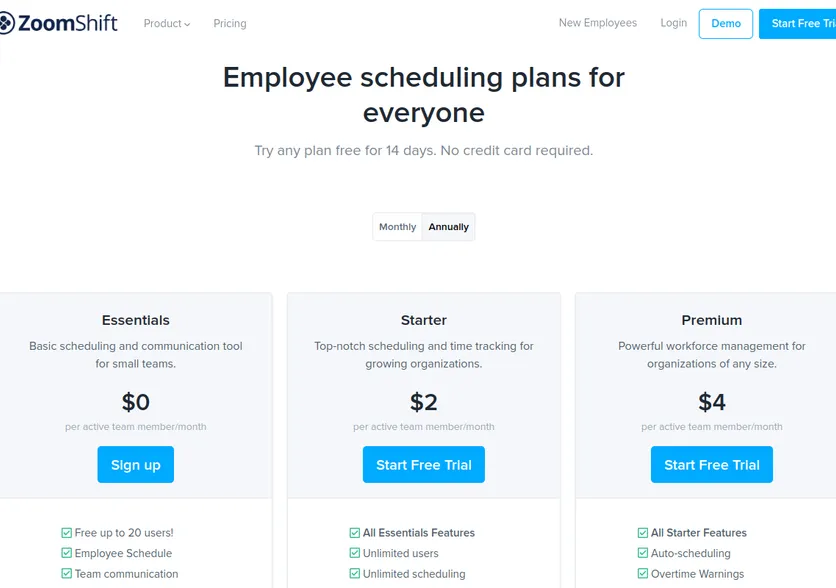
Paid tool Starting price: $2/active user/month · Two dollars per active team member per month billed annually on the Starter plan, or $2.50 month to month; Premium is $4 billed annually ($5 monthly). The free Essentials plan covers up to twenty users at one location with scheduling up to two weeks ahead. Only active team members are billed.
Free plan: Free plan (up to 20 users, 1 location)
This ZoomShift plan costs two dollars per active team member a month billed annually, and it fits a startup whose roster changes every week. Billing per active member means a clinician who takes no shifts in a month costs nothing, which keeps the bill honest while the team is still forming. Starter removes the free plan caps on users, locations and advance scheduling, and adds shift swaps, cover requests, timesheets and a time clock. The product is deliberately plain, so a founder can set it up in an afternoon, though reporting stays basic compared with Deputy or Connecteam.
What we like
- Only active team members are billed each month
- Free plan covers twenty users at one location
- Shift swaps, cover requests and timesheets on Starter
Watch out for
- Reporting is basic compared with Deputy or Connecteam
- Free plan caps scheduling at two weeks ahead
How to try it
- Sign up free and add up to twenty team members
- Publish the rota and let staff request swaps
- Move to Starter for unlimited locations and timesheets
6. 7shifts
Best for: Startups that want labor forecasting from the first paid plan
Paid tool Starting price: $39.99/location/month · Thirty-nine dollars and ninety-nine cents per location per month billed annually on the Essentials plan, or $44.99 month to month, for up to thirty employees; Pro is $79.99 billed annually ($89.99 monthly) for up to sixty employees and Premium is $134.99 billed annually ($149.99 monthly) with unlimited employees. The free Comp plan covers one location and up to fifteen employees.
Free plan: Free Comp plan (1 location, up to 15 employees)
This 7shifts plan costs thirty-nine dollars and ninety-nine cents per location a month billed annually, and it suits a startup that plans staffing around demand rather than copying last week rota. Essentials adds labor targets against projected demand, scheduling templates, team messaging and basic time clocking for up to thirty employees at one location. Pro brings overtime alerts, break tracking and labor compliance tools, which a growing team needs before shifts get messy. The free Comp plan covers one location and fifteen employees, so a new clinic can test the labor-forecasting approach before paying.

What we like
- Labor targets against projected demand on Essentials
- Free Comp plan covers one location and fifteen employees
- Overtime alerts and break tracking on the Pro plan
Watch out for
- Each plan caps headcount, so growth forces an upgrade
- Built for restaurants, so clinical features need workarounds
How to try it
- Create your location and set labor targets for each shift
- Build schedule templates for your regular patterns
- Turn on overtime alerts before rosters get busy
7. Connecteam
Best for: Deskless medical startups that want scheduling and operations in one mobile app
Paid tool Starting price: $29/month · Twenty-nine dollars per month billed annually on the Operations Hub Basic plan for the first thirty users, or $35 month to month, then $0.80 per extra user; Advanced is $49 billed annually and Expert is $99. The free Small Business plan covers up to ten users with all hubs. Scheduling sits in the Operations Hub — other hubs are billed separately.
Free plan: Free plan (up to 10 users)
This Connecteam plan costs twenty-nine dollars a month billed annually, and it is the best fit in this list for a startup whose staff never sit at a desk. The Operations Hub puts the scheduler, a GPS time clock, forms and tasks into one mobile app, so field nurses and care workers can check shifts, complete checklists and clock in from their phones. The flat price covers the first thirty users, which beats per-user billing once the team passes about twelve people, and the free plan covers ten users with every hub. The hub model is the catch: messaging, HR and training each carry their own price.

What we like
- Flat monthly price covers the first thirty users
- Scheduling, time clock, forms and tasks in one mobile app
- Free plan includes all hubs for up to ten users
Watch out for
- Other hubs are billed separately, so the full app costs more
- Auto-scheduling needs the Expert tier at ninety-nine dollars
How to try it
- Sign up free and add your team to the Operations Hub
- Build schedules and attach checklists to each shift
- Turn on the GPS time clock for field staff
Prices above were checked on each vendor’s own website on Nov 28, 2026 and can change — the vendor’s page is the final word. Vendor links are editorial: nobody paid to be listed or ranked here. Vendors who want a featured listing can see how it works on our Get listed page.
How to pick scheduling software your startup will not outgrow in a year
Start with the free tier, not the sales page. A startup with eight staff can run for months on a free plan, so check the headcount caps before paying for anything. Count the real monthly cost at your next hiring milestone, because per-user billing doubles when the team doubles while flat per-location pricing stays put. Confirm the tool handles shift swaps and cover requests from a phone, since a founder cannot approve swaps from a desk all day. Finally, check that time tracking and payroll connect cleanly, because retyping hours is the first process that breaks as you scale. Finally, export the schedule to the tool your team already checks every day.
Before you buy
- Check the free plan headcount cap before paying for anything
- Model the monthly cost at your next hiring milestone, not today
- Confirm shift swaps and cover requests work from a phone
- Verify time tracking and payroll connect without manual retyping
- Ask whether healthcare coverage rules or credential tracking are supported
Official websites
Official websites of the products reviewed above. Features and prices were checked against these sites when this guide was written, and they can change, so confirm on the vendor site before you buy.
Frequently asked questions
What is the best medical staff scheduling software for startups?
Sling is the best start, because its free plan covers thirty users and its paid Premium plan costs one dollar seventy per user a month billed annually. When I Work is the simplest paid step up at two dollars fifty per user a month, while Deputy is the tool to grow into when you need auto-scheduling, forecasting and compliance.
Can a medical startup schedule staff for free?
Yes, Sling is free for up to thirty users, Homebase is free for one location with up to ten employees, and ZoomShift is free for up to twenty users at one location. 7shifts is free for one location with up to fifteen employees, and Connecteam is free for up to ten users with all hubs. Most startups can run for months without paying.
How much does When I Work cost for a startup?
When I Work costs two dollars fifty per user per month for a single location or schedule, and five dollars per user per month for multiple locations or schedules. Seats are billed in bundles of five or ten, so a six-person team pays for ten seats. A fourteen-day free trial lets you test scheduling and messaging first.
Which tool is best when a startup starts hiring fast?
Homebase is the best deal for fast hiring at one location, because its Essentials plan costs twenty-four dollars a month billed annually with unlimited employees. Deputy is the better pick when you also need labor-law compliance, auto-scheduling and demand forecasting as the roster grows more complex.
Do healthcare-specific schedulers publish prices for startups?
No, the healthcare-specific platforms in the Toolnimba guide — QGenda, ShiftWizard and AMN Healthcare — all sell by quote with no published prices. Startups usually start on a general scheduler such as Sling or When I Work, then move to a healthcare platform once the team and budget justify a sales conversation.
Compare the seven tools above, then start with the free plan or free trial on the tool that matches your team size before you pay for a full year.
Browse Health & Fitness Calculators tools