On this page
A software release lives or dies by its milestones, and a spreadsheet that only one person updates is not a plan. The eight tools below keep the schedule, the dependencies and the milestones in one place that the whole team can read. Jira leads the list because it is the standard for agile planning with roadmaps and release milestones for nine dollars seventy cents a user a month, and the other seven tools are ranked on the same practical test: how clearly they show the release plan for the price.
How we researched this
We checked every price on the vendor pricing page on November 28, 2026, and only included tools with a published US dollar list price. Procore, Buildertrend, Autodesk Construction Cloud and Oracle Primavera P6 publish no prices for their plans, so they are not in this list. Prices change, so confirm the current figure on the vendor site before you buy.
Compare the tools
| Name | Best for | Starting price | Free plan | |
|---|---|---|---|---|
 Jira | Software teams that want agile planning with milestones and releases | $9.70/user/month | Free plan | Visit |
 ClickUp | Software teams that want one tool for tasks, docs and milestones | $9/member/month | Free plan | Visit |
 Asana | Software teams that want a clean timeline with workload views | $10.99/user/month | Free Personal plan | Visit |
 monday.com | Software teams that want a visual board with a timeline for releases | $9/seat/month | Free plan | Visit |
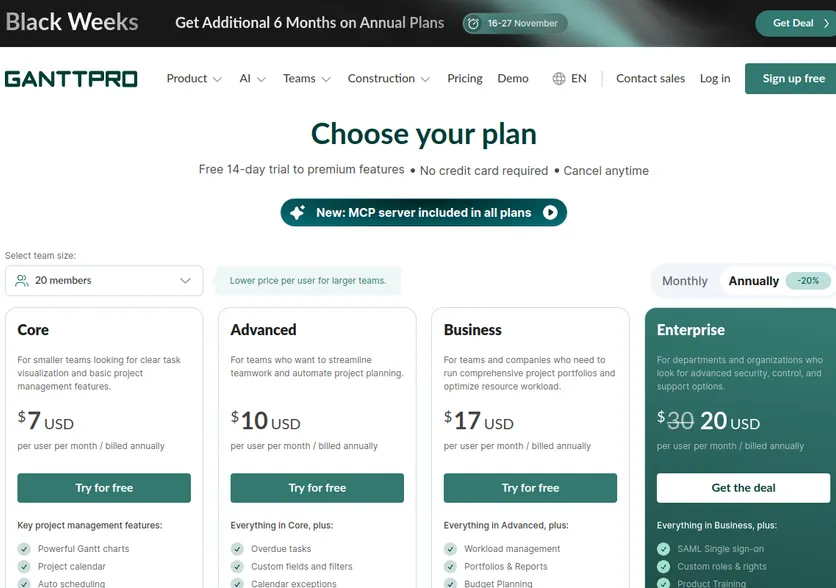
 GanttPRO | Software teams that want a Gantt-first tool at the lowest price here | $7/user/month | Free plan | Visit |
 Smartsheet | Software teams that want a spreadsheet they already know, with timelines | $9/member/month | 30-day free trial | Visit |
 Wrike | Software teams that want a simple team plan with a free tier | $10/user/month | Free plan | Visit |
 Airtable | Software teams that want a database they can shape around their own workflow | $20/seat/month | Free plan | Visit |
The milestone tracking software for software teams, compared
1. Jira
Best for: Software teams that want agile planning with milestones and releases
Paid tool Starting price: $9.70/user/month · Nine dollars seventy cents per user per month on the Standard plan at the monthly list price; Premium is $19.60 per user per month, with annual tiers at $950 per year for up to 10 users and $9,700 per year for up to 100 users, and a free plan for up to 10 users
Free plan: Free plan
For a team that plans in sprints but needs milestones for releases, this Jira plan costs nine dollars seventy cents a user a month. It covers boards, backlogs and roadmaps, with milestones that mark each release and dependency. The price is the monthly list for the Standard plan, which suits a team that wants the industry standard for agile planning without paying for the Premium tier.

What we like
- The industry standard for agile software planning
- Roadmaps with milestones and release tracking
- A free plan for up to ten users
Watch out for
- The interface takes time to learn for a new team
- The Premium tier costs twice the Standard price
How to try it
- Create the project and set up the backlog with epics
- Plan sprints and mark milestones for each release
- Track progress on the roadmap and adjust dates weekly
2. ClickUp
Best for: Software teams that want one tool for tasks, docs and milestones
Paid tool Starting price: $9/member/month · Nine dollars per member per month billed annually on the Core plan; Business is $17 per member per month billed annually, with a free plan
Free plan: Free plan
For a team that wants tasks, docs and goals in one place, this ClickUp plan costs nine dollars a member a month billed annually. It covers boards, timelines and Gantt charts, with milestones that mark each release and goal. The price is the annual rate for the Core plan, which suits a team that wants to replace several tools with one subscription.

What we like
- Tasks, docs, timelines and goals in one place
- A Gantt view with milestones and dependencies
- A generous free plan for small teams
Watch out for
- The interface has a lot of features, so setup takes time
- The Gantt view is strongest on the higher Business tier
How to try it
- Create the project space and add the task list
- Switch to the Gantt view and mark the release milestones
- Set goals for each sprint and track progress weekly
3. Asana
Best for: Software teams that want a clean timeline with workload views
Paid tool Starting price: $10.99/user/month · Ten dollars ninety-nine cents per user per month billed annually on the Starter plan, or $13.49 month to month; Advanced is $24.99 per user per month billed annually, with a free Personal plan for up to 2 users
Free plan: Free Personal plan
For a team that wants a clean timeline and a clear view of who is doing what, this Asana plan costs ten dollars ninety-nine cents a user a month billed annually. It covers tasks, timelines and milestones, with a workload view that shows when a developer is overloaded. The price is the annual rate for the Starter plan, which suits a team that wants a polished interface and strong reporting.

What we like
- A clean timeline view that is easy to read
- Workload views that show who is overloaded
- Strong reporting for stakeholders and managers
Watch out for
- The Starter plan is the cheapest paid tier but still costs more than ClickUp
- Portfolios and advanced reporting need the higher tier
How to try it
- Create the project and add tasks with due dates
- Switch to the timeline view and mark the release milestones
- Check the workload view to balance the sprint
4. monday.com
Best for: Software teams that want a visual board with a timeline for releases
Paid tool Starting price: $9/seat/month · Nine dollars per seat per month billed annually on the Basic plan, or twelve dollars month to month; Standard is $12 billed annually and Pro is $19, with a 3-seat minimum; the Basic plan has no timeline or Gantt view, so Standard at $12 is the realistic floor for milestone tracking
Free plan: Free plan
For a team that plans on boards but needs a timeline for releases, this monday.com plan costs nine dollars a seat a month billed annually. It covers boards, timelines and dashboards, with automations that move a task forward when the previous one finishes. The price is the annual rate for the Basic plan, which suits a small team that wants one board for the whole release.

What we like
- A visual board that the whole team can read
- Timelines and dashboards in the same subscription
- Automations that cut down on manual status updates
Watch out for
- The Basic plan has no timeline or Gantt view, so milestone tracking needs Standard
- Seats are sold in buckets, so the bill can jump when the team grows
How to try it
- Create a board for the release and add the task list
- Switch to the timeline view and mark the milestones
- Set automations to move tasks when dependencies complete
5. GanttPRO
Best for: Software teams that want a Gantt-first tool at the lowest price here
Paid tool Starting price: $7/user/month · Seven dollars per user per month billed annually for teams of 20 or more users on the Core plan, or $8 for 1 to 15 users; Advanced is $10 or $12 and Business is $17 or $19 per user per month, with a monthly-billed rate of $9 and a free plan
Free plan: Free plan
For a team that wants a Gantt chart first and everything else second, this GanttPRO plan costs seven dollars a user a month billed annually. It puts the project timeline front and centre, with milestones, dependencies and a view the whole team can read at a glance. The price is the annual rate for teams of twenty or more users, with a slightly higher rate for smaller teams.
What we like
- A Gantt chart that is the whole product, not an add-on
- Milestones and dependencies that are easy to set up
- The lowest price in this list for a dedicated Gantt tool
Watch out for
- Smaller teams pay a higher per-user rate
- Reporting is simpler than on the larger platforms
How to try it
- Create the project and add tasks with start and end dates
- Mark milestones and link the tasks that depend on them
- Share the timeline with the team and track progress weekly
6. Smartsheet
Best for: Software teams that want a spreadsheet they already know, with timelines
Paid tool Starting price: $9/member/month · Nine dollars per member per month billed annually on the Pro plan, or twelve dollars month to month; Business is $19 per member per month billed annually, with Pro capped at 10 members and 250 automations per month and a 30-day free trial; the free plan was discontinued in 2025
Free plan: 30-day free trial
A software team that lives in spreadsheets can keep planning there with this Smartsheet plan, which costs nine dollars a member a month billed annually. It turns a grid of tasks into a Gantt chart with dependencies, and it automates reminders when a milestone slips. The price is the annual rate for the Pro plan, which covers up to ten members and is enough for a small software team.

What we like
- A familiar spreadsheet view with real Gantt charts
- Dependencies and automations that flag slipping milestones
- Templates built for software project schedules
Watch out for
- The Pro plan caps at ten members, so larger teams pay more
- The monthly-billed rate is a third higher than the annual rate
How to try it
- List the project phases and add task dates in the grid
- Switch to the Gantt view and link dependent tasks
- Set reminders so the team knows when a milestone slips
7. Wrike
Best for: Software teams that want a simple team plan with a free tier
Paid tool Starting price: $10/user/month · Ten dollars per user per month billed annually on the Team plan for 2 to 15 users; Business is $25 per user per month billed annually, with a free plan capped at 200 active tasks; the plan structure was reworked in January 2026, with Professional renamed to Team
Free plan: Free plan
A small software team that wants a straightforward plan will find it in this Wrike plan, which costs ten dollars a user a month billed annually. It covers tasks, Gantt charts and dashboards, with a free plan capped at two hundred active tasks. The price is the annual rate for the Team plan, which covers two to fifteen users and suits a small software team.

What we like
- A simple Team plan for small teams
- Gantt charts and dashboards in the same subscription
- A free plan for up to two hundred active tasks
Watch out for
- The Team plan caps at fifteen users
- The Business tier costs two and a half times the Team price
How to try it
- Create the project and add tasks with dates
- Switch to the Gantt view and mark the milestones
- Share dashboards with the team and track progress
8. Airtable
Best for: Software teams that want a database they can shape around their own workflow
Paid tool Starting price: $20/seat/month · Twenty dollars per seat per month billed annually on the Team plan, or $24 month to month; Business is $45 per seat per month billed annually, with a free plan; Bending Spoons acquired Airtable in September 2026 for $1.285 billion
Free plan: Free plan
For a team that wants to build its own tracker rather than fit a template, this Airtable plan costs twenty dollars a seat a month billed annually. It turns a spreadsheet into a database with views, automations and a timeline for milestones, and it connects to the tools the team already uses. The price is the annual rate for the Team plan, which suits a team that wants flexibility more than a fixed project template.

What we like
- A database the team can shape to its own workflow
- Timeline, calendar and kanban views in one base
- Automations and integrations with the tools teams already use
Watch out for
- The price is the highest in this list for the entry tier
- A database needs setup before it works as a project tracker
How to try it
- Create a base for the project and add the task table
- Switch to the timeline view and mark the milestones
- Connect the tools the team already uses with automations
Prices above were checked on each vendor’s own website on Nov 28, 2026 and can change — the vendor’s page is the final word. Vendor links are editorial: nobody paid to be listed or ranked here. Vendors who want a featured listing can see how it works on our Get listed page.
How to keep a software release on track
Put the release milestones on the roadmap first, before the tasks. A milestone is a date the whole team can see, while a task list is a detail only the developer reads. Link the work that depends on other work, because a slipped task only matters when it pushes a release. Update the plan every week with real progress, not estimates, since a roadmap that is a month old is a guess. Finally, share the timeline with stakeholders as well as the team, so everyone sees the same dates and the same delays.
Before you buy
- Confirm the price covers every developer, because most tools charge per user
- Check whether the Gantt chart and timeline are included or need a higher tier
- Ask if the tool connects to your code repository and issue tracker
- Make sure the tool handles sprints and releases, not just a list of dates
- Test the reporting, since a milestone plan needs to show progress to stakeholders
Official websites
Official websites of the products reviewed above. Features and prices were checked against these sites when this guide was written, and they can change, so confirm on the vendor site before you buy.
Frequently asked questions
What is milestone tracking software for software teams?
Milestone tracking software for software teams keeps the release plan in one place, with tasks, dates, dependencies and milestones on a timeline the whole team can read. It replaces a spreadsheet that only one person updates with a shared plan that flags when a release slips. The tools in this list differ mainly in price, in whether the Gantt chart is included on the entry plan, and in how they handle sprints and releases.
How much does Jira cost for a software team?
Jira Standard costs nine dollars seventy cents a user a month at the monthly list price, with Premium at nineteen dollars sixty cents a user a month. Annual tiers are nine hundred fifty dollars a year for up to ten users and nine thousand seven hundred dollars a year for up to one hundred users. A free plan covers up to ten users, which is enough for a small team to start without paying.
Can a software team track milestones for free?
Yes, with Jira, ClickUp, Asana, monday.com, GanttPRO and Wrike, which all have free plans. The free tiers cap the number of users, projects or tasks, so they suit a small team or a single project. For a larger team, the paid plans start at seven dollars a user a month with GanttPRO, which is the lowest paid price in this list.
Which tool is cheapest for a software team?
GanttPRO is the cheapest paid option at seven dollars a user a month billed annually for larger teams, with a free plan underneath. Smartsheet, monday.com, ClickUp and Jira all cost nine to ten dollars a user a month, so the difference between them is small. Airtable is the most expensive entry tier here at twenty dollars a seat a month billed annually.
How do I choose between these milestone tools?
Pick the tool that matches how the team already plans. If the team works in sprints, Jira is the standard. If the team wants a Gantt chart first, GanttPRO is built around it. If the budget is tight, Zoho Projects costs the least. If the team needs tasks, docs and goals in one place, ClickUp covers the most ground for nine dollars a month.
Compare the eight tools above, then start with a free trial on the tool that fits how your software team already works before you pay for a full year.
Browse Productivity Tools tools