
On this page
Plant design software turns a piping diagram into a 3D plant, and for a startup the tool has to be affordable as well as capable. The best systems cover 3D piping, equipment and structure design, then generate the isometrics and drawings a contractor can build from. The seven tools below run from $1.50 a day to quoted enterprise systems. Every price was checked on the vendor site on November 26, 2026, and every tool offers a free trial, a free demo or free training. PROCAD is our first pick — the cheapest plant design entry point, from $1.50 a day.
How we researched this
We started with the plant design systems startups actually buy, then read each vendor site on November 26, 2026 and noted the published price or quote path, free trial and design scope each tool offers. We judged them for a small engineering team that must deliver buildable plant designs without an enterprise budget. We kept the list to tools with a clear buying path, and we dropped any tool whose price we could not verify.
Compare the tools
| Name | Best for | Starting price | Free plan | |
|---|---|---|---|---|
 Autodesk Plant 3D | Startups whose engineers already work in AutoCAD and need plant design tools | $260/month | Free trial | Visit |
 AVEVA E3D Design | Startups that need to prove they can handle serious, complex plant projects | Custom pricing | Free demo | Visit |
 Bentley OpenPlant | Startups that need Bentley-grade data control on a small team | Custom pricing | Free demo | Visit |
 Hexagon CADWorx | Startups that want a full plant design suite without leaving AutoCAD | Custom pricing | Free demo | Visit |
 Siemens COMOS | Startups that sell plant lifecycle data management, not just drawings | Custom pricing | Free demo | Visit |
 CAD Schroer MPDS4 | Small teams that need 3D piping and equipment modeling at startup scale | Custom pricing | Free demo | Visit |
 PROCAD | Startups watching every dollar that want the cheapest plant design entry point | From $1.50/day | Free start-up training | Visit |
The plant design tools, compared
1. Autodesk Plant 3D
Best for: Startups whose engineers already work in AutoCAD and need plant design tools
Paid tool Starting price: $260/month · AutoCAD subscription, $260 a month or $2,095 a year billed annually; Plant 3D is a toolset included with AutoCAD, not sold separately
Free plan: Free trial
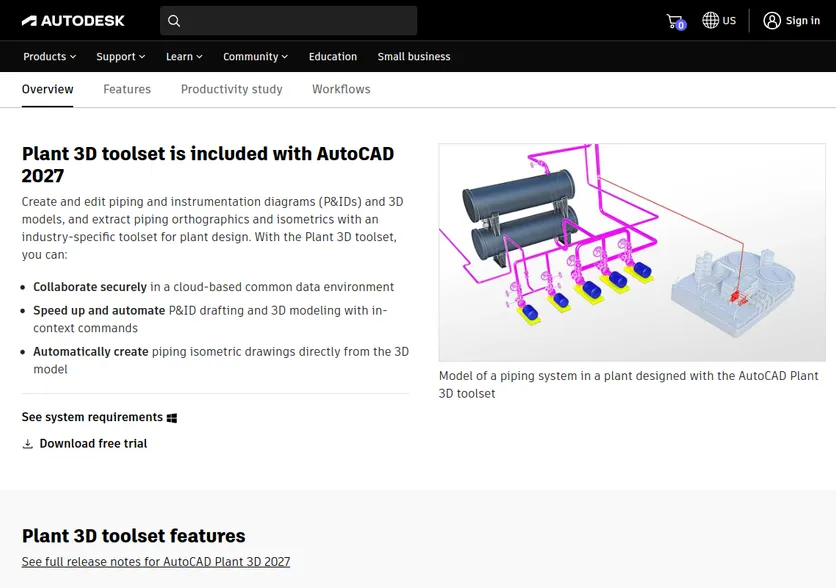
Autodesk Plant 3D is the plant design tool most engineers already know, because it runs as a toolset inside AutoCAD. This Autodesk Plant 3D product covers 3D piping, equipment and structure design with spec-driven modeling and isometrics. It is the safest pick for a startup whose engineers already work in AutoCAD.
What we like
- Runs inside AutoCAD, which engineers already know
- Spec-driven modeling and isometrics included
- Published price of $260 a month
Watch out for
- Plant 3D is not sold separately from AutoCAD
- $2,095 a year billed annually is a big startup outlay
How to try it
- Open the Autodesk Plant 3D page and start the 30-day AutoCAD trial
- Build a small piping model with spec-driven components
- Generate an isometric drawing from the model
2. AVEVA E3D Design
Best for: Startups that need to prove they can handle serious, complex plant projects
Paid tool Starting price: Custom pricing · Quote-only; no list price is published on the vendor site
Free plan: Free demo
AVEVA E3D Design is the 3D plant design platform behind some of the largest industrial projects in the world. This AVEVA E3D Design product covers multi-discipline 3D design, clash detection and data-driven engineering for complex plants. It fits a startup that needs to prove it can handle serious plant work from the first project.
What we like
- Proven on the largest industrial projects
- Multi-discipline 3D design with clash detection
- Data-driven engineering for complex plants
Watch out for
- Pricing is quote-only
- Enterprise heritage may be heavy for a small team
How to try it
- Open the AVEVA site and request a demo
- Describe your plant project scope and disciplines
- Review the 3D design and clash detection workflow
3. Bentley OpenPlant
Best for: Startups that need Bentley-grade data control on a small team
Paid tool Starting price: Custom pricing · Quote-only; no list price is published on the vendor site
Free plan: Free demo
Bentley OpenPlant is the plant design system for teams that model piping and equipment in a connected data environment. This Bentley OpenPlant product covers 3D modeling, isometric and orthographic drawings, and component data management. It is the pick when a startup needs Bentley-grade data control on a small team.

What we like
- Connected data environment for plant data
- Isometric and orthographic drawings included
- Component data management built in
Watch out for
- Pricing is quote-only
- Bentley starting prices for other products do not apply to OpenPlant
How to try it
- Open the Bentley site and request a demo
- Describe your piping and equipment modeling needs
- Review the connected data environment workflow
4. Hexagon CADWorx
Best for: Startups that want a full plant design suite without leaving AutoCAD
Paid tool Starting price: Custom pricing · Quote-only; no list price is published on the vendor site
Free plan: Free demo
Hexagon CADWorx is the AutoCAD-based plant design suite for piping, equipment and structural modeling. This Hexagon CADWorx product covers spec-driven piping design, isometrics and stress analysis integration. It suits a startup that wants a full plant design suite without leaving AutoCAD.
What we like
- Full plant design suite inside AutoCAD
- Spec-driven piping design
- Stress analysis integration
Watch out for
- Pricing is quote-only
- Suite breadth may be more than a startup needs
How to try it
- Open the Hexagon site and request a demo
- Describe your piping and structural modeling needs
- Review the spec-driven design and isometrics workflow
5. Siemens COMOS
Best for: Startups that sell plant lifecycle data management, not just drawings
Paid tool Starting price: Custom pricing · Quote-only; no list price is published on the vendor site
Free plan: Free demo
Siemens COMOS manages plant data across the whole lifecycle, from engineering design to operations and maintenance. This Siemens COMOS product covers object-oriented plant engineering, document management and data handover. It is the pick when a startup sells lifecycle data management, not just drawings.

What we like
- Manages plant data across the whole lifecycle
- Object-oriented engineering data model
- Document management and handover included
Watch out for
- Pricing is quote-only
- Lifecycle focus may be more than a design-only startup needs
How to try it
- Open the Siemens site and request a demo
- Describe your plant lifecycle data needs
- Review the engineering-to-operations data handover
6. CAD Schroer MPDS4
Best for: Small teams that need 3D piping and equipment modeling at startup scale
Paid tool Starting price: Custom pricing · Quote-only; the vendor now also brands the suite M4 PLANT
Free plan: Free demo
CAD Schroer MPDS4 is the plant design system for small teams that need 3D piping and equipment modeling at a startup scale. This CAD Schroer MPDS4 product covers 3D plant layout, piping design and isometrics, and the vendor now also brands the suite M4 PLANT. It fits a startup that wants real plant design tools without an enterprise price tag.
What we like
- Built for small teams at startup scale
- 3D plant layout, piping and isometrics
- Also sold as the M4 PLANT suite
Watch out for
- Pricing is quote-only
- Smaller brand may need explaining to clients
How to try it
- Open the CAD Schroer site and request a demo
- Build a 3D plant layout with piping and equipment
- Generate isometrics from the model
7. PROCAD
Best for: Startups watching every dollar that want the cheapest plant design entry point
Paid tool Starting price: From $1.50/day · PROCAD applications as an AutoCAD add-on, starting at $1.50 per day; monthly subscriptions or yearly licensing with savings up to 45 percent
Free plan: Free start-up training
PROCAD is the budget way into plant design, with AutoCAD add-ons that start at $1.50 a day. This PROCAD product covers piping, equipment and P and ID design as AutoCAD add-ons, with monthly subscriptions or yearly licensing that saves up to 45 percent. It is the cheapest published entry point here and the right choice for a startup watching every dollar.
What we like
- From $1.50 a day, the cheapest entry here
- Monthly subscriptions or yearly licensing with savings up to 45 percent
- Free start-up training for your team
Watch out for
- Runs as an AutoCAD add-on, so AutoCAD is needed
- No free trial is stated on the site
How to try it
- Open the PROCAD site and pick an application
- Start a monthly subscription or yearly license
- Use the free start-up training to get the team going
Prices above were checked on each vendor’s own website on Nov 26, 2026 and can change — the vendor’s page is the final word. Vendor links are editorial: nobody paid to be listed or ranked here. Vendors who want a featured listing can see how it works on our Get listed page.
What plant design software costs a startup in 2026
Price is the first filter for a startup, and the range on this list runs from $1.50 a day to fully quoted enterprise systems. The two published prices are PROCAD from $1.50 a day as an AutoCAD add-on, and Autodesk Plant 3D at $260 a month, or $2,095 a year billed annually, as part of an AutoCAD subscription. AVEVA E3D Design, Bentley OpenPlant, Hexagon CADWorx, Siemens COMOS and CAD Schroer MPDS4 are all quote-only, so their cost comes from a demo and a quote. Every price below was checked on the vendor site on November 26, 2026.
Before you buy
- Check whether AutoCAD is included: Plant 3D needs an AutoCAD subscription at $260 a month, and PROCAD runs as an AutoCAD add-on.
- Ask for a quote early on the five quote-only tools, because AVEVA, Bentley, Hexagon, Siemens and CAD Schroer publish no list price.
- Test isometric output before you buy, because the drawings are what a contractor actually builds from.
- Start with the free trial or training: Autodesk offers a 30-day trial and PROCAD offers free start-up training.
- Match the tool to your discipline: Siemens COMOS manages lifecycle data, while CAD Schroer MPDS4 focuses on 3D piping and equipment.
Official websites
Official websites of the products reviewed above. Features and prices were checked against these sites when this guide was written, and they can change, so confirm on the vendor site before you buy.
Frequently asked questions
Which plant design software is best for a startup in 2026?
PROCAD, from $1.50 a day, is the best default for a cash-conscious startup because it is the cheapest published price and it covers piping, equipment and P and ID design as AutoCAD add-ons. Autodesk Plant 3D is better when your engineers already work in AutoCAD and you want the best-known tool. CAD Schroer MPDS4 wins when a small team wants 3D piping and equipment modeling at startup scale.
How much does plant design software cost?
PROCAD starts at $1.50 a day, and Autodesk Plant 3D costs $260 a month, or $2,095 a year billed annually, as part of an AutoCAD subscription. AVEVA E3D Design, Bentley OpenPlant, Hexagon CADWorx, Siemens COMOS and CAD Schroer MPDS4 are all quote-only, so the price depends on seats and scope. Expect an enterprise-style sales conversation for the quote-only tools.
Can I try plant design software before paying?
Yes, most tools here offer a free trial or a free demo. Autodesk offers a 30-day AutoCAD trial, and PROCAD offers free start-up training for your team. AVEVA, Bentley, Hexagon, Siemens and CAD Schroer all offer free demos. Start the trial with a real piping model, not a sample file, to see the isometric output your contractors will build from.
Do I need AutoCAD to use plant design software?
It depends on the tool. Autodesk Plant 3D is a toolset inside AutoCAD, and PROCAD and Hexagon CADWorx run as AutoCAD add-ons, so those three need AutoCAD. AVEVA E3D Design, Bentley OpenPlant, Siemens COMOS and CAD Schroer MPDS4 are standalone systems. Check what your engineers already use before you buy, because the AutoCAD subscription is a separate cost.
What is the difference between P and ID design and 3D plant design?
P and ID design is the 2D schematic showing pipes, instruments and flow, while 3D plant design is the physical model showing where every pipe and piece of equipment actually sits. PROCAD covers both, and Autodesk Plant 3D, AVEVA E3D and CAD Schroer MPDS4 all generate 3D models plus the isometrics and drawings a contractor builds from.
Need everyday engineering jobs too? Convert units and run science calculations free on Toolsvine right in your browser.
Browse Science & Engineering tools


