On this page
A nonprofit buys with other people's money, so every purchase needs a paper trail the board and the grantor can follow. The eight tools below turn a casual ask into a requisition with a budget code, an approver and a receipt, and they start at three dollars a user a month. Precoro leads because its approval chains and budget controls match how nonprofits actually spend, and the cheaper tools cover the small teams that only buy now and then.
How we researched this
We checked every price on the vendor pricing page on November 28, 2026, and only included tools with a published US dollar list price. NetSuite, Blackbaud Financial Edge NXT, Procurify and GEP SMART publish no prices, so they are not in this list. Prices change, so confirm the current figure on the vendor site before you buy.
Compare the tools
| Name | Best for | Starting price | Free plan | |
|---|---|---|---|---|
 Precoro | Nonprofits and distributors that need requisitions with approval chains | $499/month | No free plan; demo available | Visit |
 Zoho Expense | Small nonprofits already using Zoho apps | $3/user/month | Free plan (up to 3 users) | Visit |
 Spendwise | Tiny teams that want simple spend approval | $9/user/month | Free trial; no free plan | Visit |
 Tradogram | Small teams that want simple purchase orders | $99/month | Free plan (1 user) | Visit |
 ProcurementExpress.com | Nonprofits that approve spending by budget, not by seat | $415/month | 14-day free trial; no free plan | Visit |
 ApprovalMax | Teams that approve bills and purchase orders in Xero or QuickBooks | $49.50/organisation/month | 14-day free trial; no free plan | Visit |
 Expensify | Nonprofits that want expense reports without a finance team | $5/member/month | Free plan (Submit, for individuals) | Visit |
| SAP Concur | Nonprofits that already run SAP or file few expense reports | $7/report | No free plan; demo available | Visit |
The purchase requisition software for nonprofits, compared
1. Precoro
Best for: Nonprofits and distributors that need requisitions with approval chains
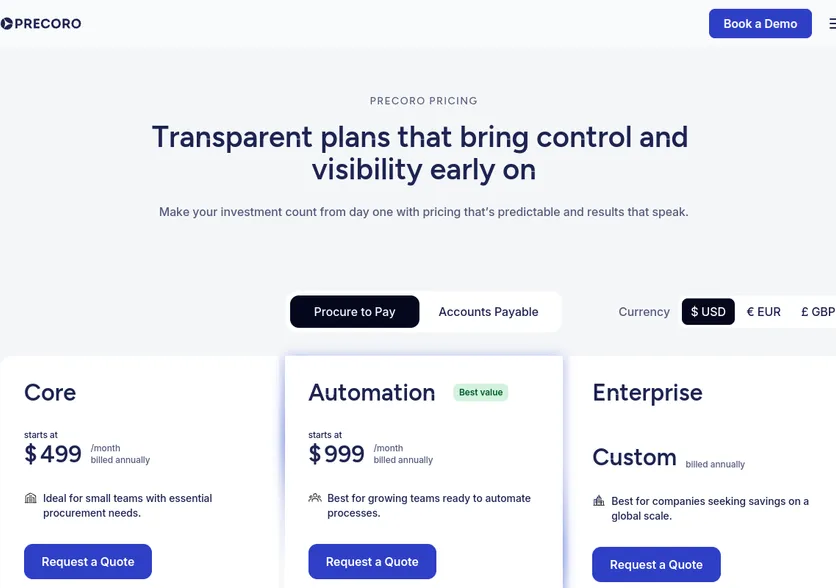
Paid tool Starting price: $499/month · Four hundred and ninety-nine dollars a month on Core billed annually; Automation is nine hundred and ninety-nine dollars a month; Enterprise is quoted; a standalone accounts payable module also starts at four hundred and ninety-nine dollars a month
Free plan: No free plan; demo available
For a nonprofit that answers to a board and a grantor, this Precoro plan costs four hundred and ninety-nine dollars a month billed annually, and it turns every purchase into a requisition with a clear approval trail. Budget owners see what is left in each fund before they sign, and the purchase order, receipt and invoice stay attached to the same request. It is the most complete control in this list for a nonprofit that cannot afford a surprise spend.
What we like
- Approval workflows mirror real purchase requisitions
- Budgets, purchase orders and receipts stay in one place
- Integrates with QuickBooks, Xero and NetSuite
Watch out for
- Entry price is high for a small nonprofit
- Advanced automation needs the dearer Automation tier
How to try it
- Create a requisition and attach the supplier quote
- Send it through the approval chain for sign-off
- Convert the approved request into a purchase order
2. Zoho Expense
Best for: Small nonprofits already using Zoho apps
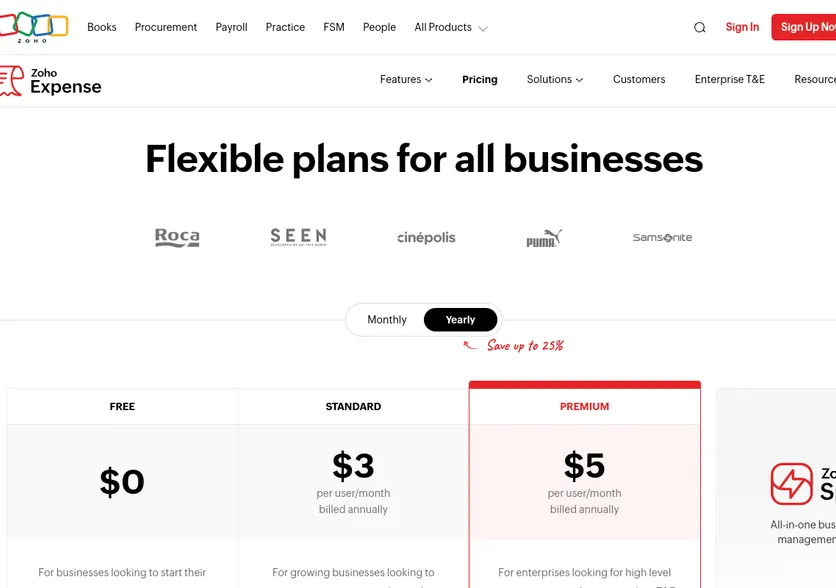
Paid tool Starting price: $3/user/month · Three dollars per user a month on Standard billed annually, four dollars month to month; Premium is five dollars a month billed annually; Enterprise is quoted; paid plans need at least three users
Free plan: Free plan (up to 3 users)
Small nonprofits that already live in Zoho will find the cheapest honest start here, because this Zoho Expense plan costs three dollars per user a month billed annually, and the free plan covers a three-person finance team. Receipts scan in seconds, expenses sort themselves by project or grant code, and approvals happen on a phone. It is the best value in this list for a nonprofit that wants expense control without a finance department.
What we like
- Free plan covers a three-person finance team
- Receipt scanning and auto-categorisation work well
- Per diem and mileage tracking included
Watch out for
- Paid plans start at three users, so a solo bookkeeper pays for seats
- Advanced controls sit on the Premium tier
How to try it
- Connect a card or bank feed to pull expenses in
- Scan receipts and let the app categorise them
- Approve the report and export it to the accounts
3. Spendwise
Best for: Tiny teams that want simple spend approval
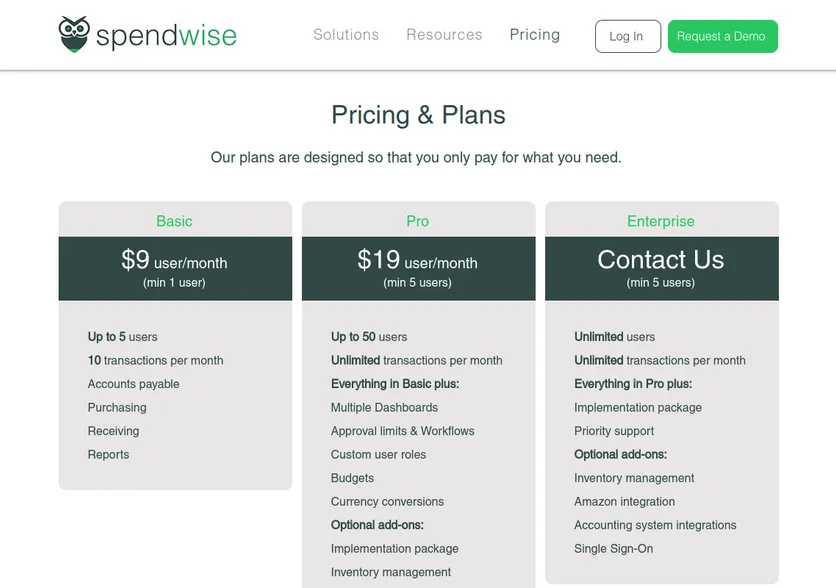
Paid tool Starting price: $9/user/month · Nine dollars per user a month on Basic for up to five users and ten transactions a month; Pro is nineteen dollars per user a month for five to fifty users with unlimited transactions; Enterprise is quoted
Free plan: Free trial; no free plan
When a nonprofit has five people and one shared budget, this Spendwise plan costs nine dollars per user a month on Basic, and it puts every purchase request in front of the right approver. The team sees live spend against each budget line, so nobody discovers an overrun at month end. It is the simplest tool here, and for a tiny nonprofit that simplicity is the point.
What we like
- Basic plan is genuinely cheap for a five-person team
- Purchase orders and approvals take minutes to set up
- Real-time spend tracking against budgets
Watch out for
- Basic caps at ten transactions a month
- No advanced inventory or receiving features
How to try it
- Set a budget and invite the team
- Raise a purchase request and route it for approval
- Track the spend against the budget in real time
4. Tradogram
Best for: Small teams that want simple purchase orders
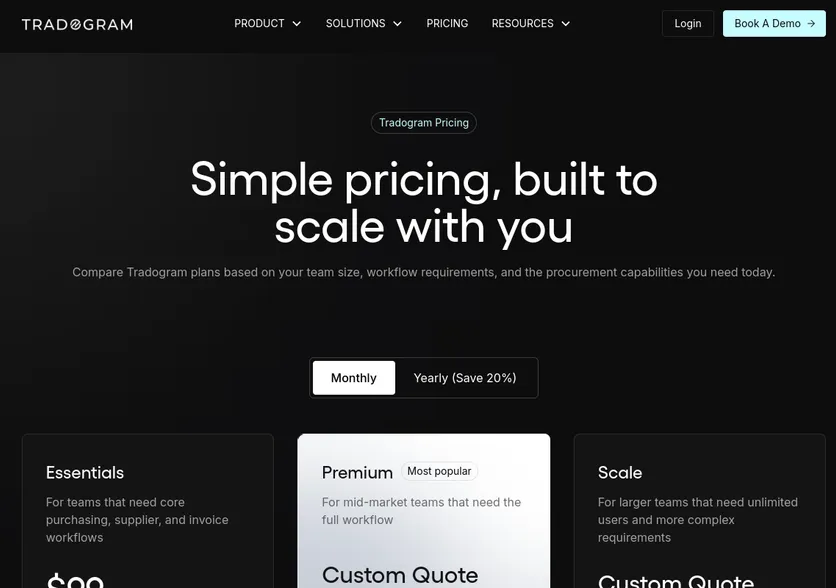
Paid tool Starting price: $99/month · Ninety-nine dollars a month on Essentials, about nine hundred and fifty dollars a year with the annual discount; Premium and Scale are quoted; requisitions need the Premium tier, not Essentials; a free plan exists for one user
Free plan: Free plan (1 user)
A nonprofit that orders from the same suppliers every month gets tidy purchase orders here, since this Tradogram plan costs ninety-nine dollars a month on Essentials, and the supplier portal keeps quotes and catalogues in one place. Budgets stay visible while orders are raised, and a free single-user plan lets the finance lead test it before the board commits. The catch is that requisitions need the quoted Premium tier, so check the plan before you buy.
What we like
- Clean purchase order workflow with a supplier portal
- Catalogues and budgets keep spending visible
- Free single-user plan for trying it out
Watch out for
- Requisitions are not in the entry Essentials plan
- Older listings show stale prices, so confirm at checkout
How to try it
- Add suppliers and build a product catalogue
- Create a purchase order from an approved request
- Send the order to the supplier through the portal
5. ProcurementExpress.com
Best for: Nonprofits that approve spending by budget, not by seat
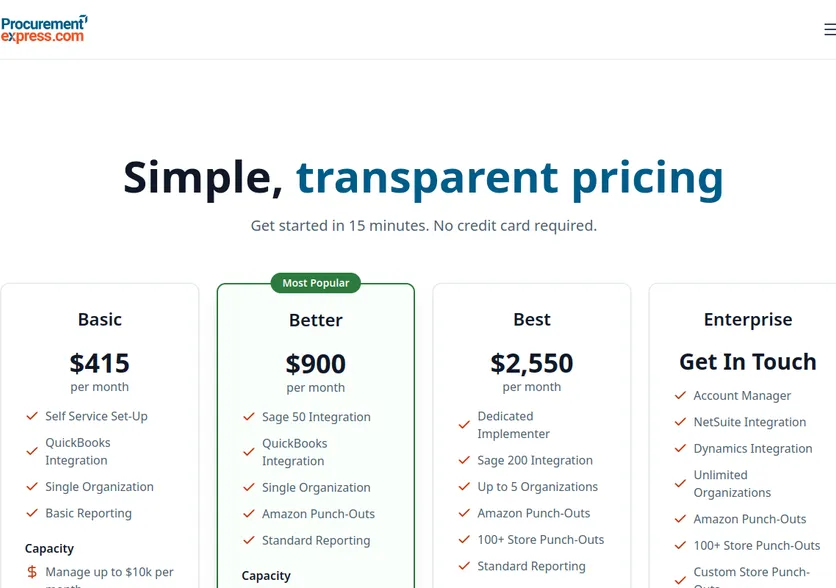
Paid tool Starting price: $415/month · Four hundred and fifteen dollars a month flat on Basic for up to ten thousand dollars of monthly spend and ten users; Better is nine hundred dollars a month; Best is two thousand five hundred and fifty dollars a month; Enterprise is quoted
Free plan: 14-day free trial; no free plan
Budget-first nonprofits should look closely at this ProcurementExpress.com plan, which costs four hundred and fifteen dollars a month flat and charges nothing per user. Each department or grant gets a budget cap, and any request that would break the cap is stopped before approval. It fits a nonprofit where the board cares more about staying inside the budget than about fancy procurement features.
What we like
- Flat pricing with no per-user fees
- Budget limits stop overspend before it happens
- Simple approval chains non-finance staff can use
Watch out for
- Entry plan caps monthly spend at ten thousand dollars
- No inventory or receiving module
How to try it
- Set budgets for each department or grant
- Raise a purchase request against the budget
- Approve or reject from email or the mobile app
6. ApprovalMax
Best for: Teams that approve bills and purchase orders in Xero or QuickBooks
Paid tool Starting price: $49.50/organisation/month · Forty-nine dollars and fifty cents per organisation a month on Standard billed annually, fifty-nine dollars and forty cents month to month; Advanced is seventy-nine dollars and twenty cents billed annually; Premium is one hundred and eleven dollars; NetSuite is quoted; some regions are moving to per-document pricing
Free plan: 14-day free trial; no free plan
Nonprofits that already run Xero or QuickBooks Online get the strongest approval control here, because this ApprovalMax plan costs forty-nine dollars and fifty cents per organisation a month billed annually. Multi-step approval matrices follow the real finance rules, and every decision leaves an audit trail the auditors can follow. It is the best pick in this list for a nonprofit whose books already live in Xero or QuickBooks.
What we like
- Multi-step approvals that match real finance rules
- Deep Xero and QuickBooks Online integration
- Audit trail on every approval decision
Watch out for
- Priced per organisation, so a second entity costs again
- Regional move to per-document pricing may change the bill
How to try it
- Connect ApprovalMax to Xero or QuickBooks Online
- Build an approval matrix by amount and department
- Approve bills and purchase orders from any device
7. Expensify
Best for: Nonprofits that want expense reports without a finance team
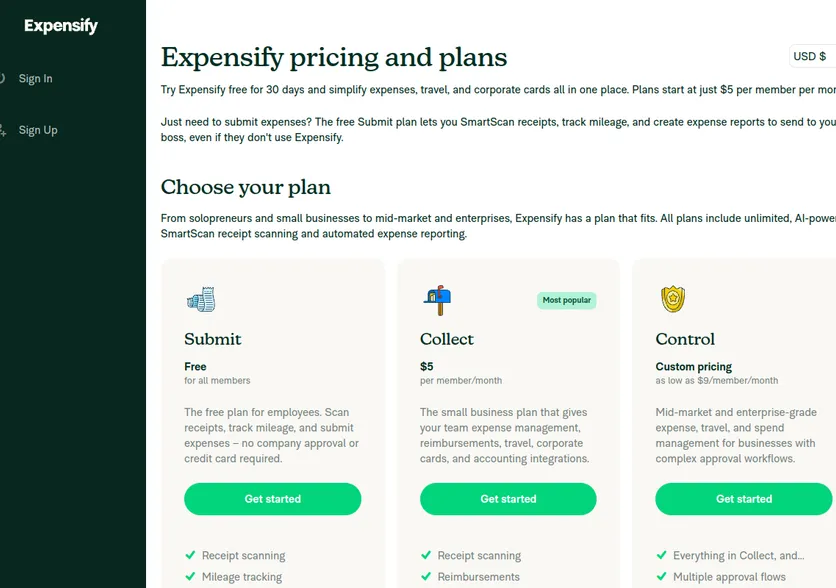
Paid tool Starting price: $5/member/month · Five dollars per unique member a month on Collect for new workspaces; Control is nine dollars per active member a month billed annually when at least half of settled US spend runs on the Expensify Card, otherwise eighteen dollars billed annually or thirty-six dollars pay per use; a free Submit plan covers individuals
Free plan: Free plan (Submit, for individuals)
Volunteers and part-time staff file expenses from their phones with this Expensify plan, which costs five dollars per unique member a month on Collect, and SmartScan reads each receipt in seconds. Reimbursements run straight from the app, and the free Submit plan covers a single person who only files now and then. It is the easiest expense tool here for a nonprofit with more volunteers than staff.
What we like
- SmartScan reads receipts in seconds
- One-click card reconciliation
- Free plan for a single submitter
Watch out for
- The nine-dollar Control rate depends on card spend
- Pay-per-use billing can surprise a busy month
How to try it
- Snap receipts with SmartScan
- Submit the expense report for approval
- Reimburse straight from the app
8. SAP Concur
Best for: Nonprofits that already run SAP or file few expense reports
Paid tool Starting price: $7/report · Seven dollars per report on the Base plan for expense reports; Plus is eleven dollars per report; Premium is quoted; Concur prices per report, not per user, so a team that files few reports pays less
Free plan: No free plan; demo available
A nonprofit that files expenses rarely gets a fair deal here, since this SAP Concur plan costs seven dollars per report on the Base plan, and teams pay only when they actually file. Receipts are captured by phone, policy checks run automatically, and approved reports flow into the SAP finance system the organisation already runs. It suits a nonprofit inside the SAP world far better than one buying expense software alone.
What we like
- Per-report pricing suits teams that file expenses rarely
- Receipt capture and policy checks are automatic
- Deep integration with SAP finance systems
Watch out for
- Per-report costs climb fast if the whole team files weekly
- Implementation and setup are heavier than a small-tool signup
How to try it
- Snap a photo of the receipt in the mobile app
- Match the expense to a project or grant code
- Submit the report and let the approver sign it off
Prices above were checked on each vendor’s own website on Nov 28, 2026 and can change — the vendor’s page is the final word. Vendor links are editorial: nobody paid to be listed or ranked here. Vendors who want a featured listing can see how it works on our Get listed page.
How to set up purchase approvals a nonprofit board will trust
Start with the budget, not the tool, because a requisition without a fund code is just a shopping list. Map each grant and department to its own budget line, then set an approval threshold so small buys flow fast and large buys reach the board. Test the flow on a real purchase before the whole team uses it, and check that the receipt, the purchase order and the invoice all attach to the same record. Train the people who raise requests, not just the finance team, because a system nobody uses is worse than a spreadsheet everybody understands. Review the audit trail each month, and fix the approval rule that slowed the most purchases.
Before you buy
- Confirm the tool tracks spending by grant or fund, not just by department
- Check whether approval chains can match the board's sign-off rules
- Ask if the free plan or trial covers a real purchase end to end
- Make sure receipts, orders and invoices attach to the same record
- Test the tool with the people who raise requests, not only finance
Official websites
Official websites of the products reviewed above. Features and prices were checked against these sites when this guide was written, and they can change, so confirm on the vendor site before you buy.
Frequently asked questions
What is purchase requisition software for nonprofits?
It is software that turns a purchase request into a formal requisition with a budget code, an approver and a paper trail before any money is spent. For a nonprofit it proves to the board and the grantor that spending followed the rules, and it links the request, the purchase order, the receipt and the invoice to one record. Without it, purchases happen on email and the audit trail is lost.
How much does Precoro cost for a nonprofit?
Precoro costs four hundred and ninety-nine dollars a month on Core billed annually, with Automation at nine hundred and ninety-nine dollars a month and Enterprise quoted. There is no free plan, only a demo, so a small nonprofit should weigh the price against the cost of an audit finding. Zoho Expense and Spendwise cost far less for a team that only needs basic approvals.
Can a nonprofit manage purchases for free?
Yes, with Zoho Expense, which offers a free plan for up to three users, and Tradogram, which offers a free plan for one user. Both cover the basics of expense and purchase order control, so a tiny nonprofit can run on them without paying. A larger nonprofit will outgrow either free plan and should compare the paid tiers above.
What is the cheapest purchase requisition tool for nonprofits?
Zoho Expense is the cheapest paid option at three dollars per user a month billed annually, with a free plan for three users. Spendwise follows at nine dollars per user a month on Basic. Both are far cheaper than Precoro, but neither offers the full approval chains and budget controls that a larger nonprofit needs.
Which tool is best for a small nonprofit?
Zoho Expense is the best pick for a small nonprofit, at three dollars per user a month with a free plan for three users and strong receipt scanning. Precoro is the better pick if the nonprofit needs strict approval chains and budget controls across grants. Spendwise suits a team of five that only needs simple spend approval.
Compare the eight tools above, then start with the free plan or trial on the tool that matches how the nonprofit already approves spending before paying for a full year.
Browse Business Tools tools